Amazon PPC is one of the fastest ways to buy visibility on high-intent searches and turn that attention into sales. This Amazon PPC guide focuses on practical, repeatable steps you can use to launch and optimize amazon ppc ads with confidence. We use Amazon.com (US) as the default example, but the principles also apply to other marketplaces such as the UK, DE, and JP, with minor adjustments.
In this guide, you will learn:
- How Amazon Advertising works for sellers, and why PPC impacts both paid and organic growth.
- The core ad types: Sponsored Products ads, Sponsored Brands, and Sponsored Display, and when to use each.
- A step-by-step launch process, including a simple account structure you can copy.
- How to read key metrics like ACoS, CTR, CPC, conversion rate, and how to optimize with negative keywords and bids.
- How to connect SellerSprite workflows (Keyword Mining, Reverse ASIN, Ads Insights, Keyword Tracker) to faster PPC decisions.
Key takeaways
- Start with one Auto campaign to discover converting search terms, then graduate winners into structured Manual campaigns.
- Measure performance weekly, not hourly. Use controlled changes: adjust bids in small steps and add negatives consistently.
- Track profitability with break-even ACoS and long-term health with TACoS, not ACoS alone.
- Use SellerSprite to build better keyword lists and validate intent across marketplaces before you spend more.
Table of contents
- What Is Amazon PPC and Why Does It Matters
- Main Types of Amazon Ads
- Step-by-Step: Launch Your First Amazon PPC Campaign
- Monitoring, Metrics, and Optimization
- Advanced Metrics: TACoS and Long-Term Profitability
- Pro Tips and Long-Term Strategy
- Notes for EU, UK, and JP Sellers
- Amazon PPC Checklist
- About the author
- References
What Is Amazon PPC and Why Does It Matter
Amazon PPC is the pay-per-click model inside Amazon Advertising that lets you bid for placements on shopper searches and product pages. You only pay when a shopper clicks. For most sellers, PPC is the fastest way to test demand, accelerate early sales velocity, and build relevance signals that can support organic ranking over time.
Why advertise on Amazon?
- Visibility boost: appear on high-intent searches even when organic rank is not ready.
- Launch support: accelerate learning on which keywords and audiences convert.
- Competitive defense: protect brand and category visibility when competitors push harder.
- Faster iteration: PPC data helps you refine your listing, pricing, and positioning with evidence.
Amazon Marketing Services (AMS) renamed
You may still see older guides mention Amazon Marketing Services, also called Amazon Marketing Services or AMS. Today, it is simply Amazon Advertising. The core idea is unchanged: you bid, win placements, and pay for clicks. What has expanded is targeting, placements, and reporting options.
Key takeaways from this section
- Amazon PPC buys learning speed and visibility while you build organic rank.
- AMS is the old name. The platform is now Amazon Advertising.
- Use PPC to validate keyword intent, not just to spend money for traffic.
Main Types of Amazon Ads
Most sellers start with Sponsored Products ads, then expand into Sponsored Brands and Sponsored Display as they gain data and confidence. Here is a quick comparison you can reference when deciding what to launch next.
Sponsored Products
Sponsored Products ads promote a single ASIN and are typically the highest impact starting point. They are straightforward to launch, easy to measure, and they create the best learning foundation for bidding and keyword control.
Sponsored Brands
Sponsored Brands ads let you highlight your logo and multiple products with a headline. They are powerful when your listing conversion is stable, and you want to win more top-of-search real estate or guide shoppers into a curated Store experience.
Sponsored Display
Sponsored Display can help you re-engage shoppers who viewed your product but did not purchase, or place ads on competitor listings through product targeting. If you want to extend beyond keyword-only demand, Sponsored Display adds an extra layer to your Amazon advertising for sellers strategy.
Key takeaways from this section
- Start with Sponsored Products for the cleanest learning loop.
- Add Sponsored Brands for brand visibility once core campaigns are stable.
- Use Sponsored Display for remarketing and targeted expansion when ready.
Step-by-Step: Launch Your First Amazon PPC Campaign
The biggest reason sellers waste budget is a messy launch. Use this simple structure: start focused, collect clean data, then scale deliberately. For the workflows below, you can switch marketplaces inside SellerSprite (US, UK, DE, JP, and more) to align keyword and competitive analysis with your target region.
Step 1: Choose the right product to promote
- Margin room: ads need space to collect data without breaking your economics.
- Conversion-ready listing: strong images, clear title, persuasive bullets, and competitive pricing.
- Inventory confidence: do not scale ads if you will stock out in 7 days.
Use SellerSprite to validate before you spend:
- Product Research to confirm price band, demand, and competitor density.
- Competitor Research to see how crowded the niche is and where leaders win.
Step 2: Automatic vs. manual targeting
Automatic targeting
Auto campaigns let Amazon match your ads to searches and placements. Use Auto for discovery: collect search terms, find unexpected winners, and identify obvious negatives.
Manual targeting
Manual campaigns give you control. You choose keywords, match types, and product targets. This is where you scale profitably once you know what converts.
Pro Tip
Keep your first structure simple. One Auto campaign plus two Manual campaigns (Brand and Category) is enough to learn fast without drowning in complexity.
Step 3: Keyword research for ads using SellerSprite
Keyword choice is where performance is won or lost. The goal is not "more keywords." The goal is "more relevant, higher-intent keywords" that your listing can convert.
- Start from competitors: use Reverse ASIN to see which queries drive traffic to top ASINs in your niche.
- Expand intelligently: use Keyword Mining to generate buyer-intent and long-tail variants at scale.
Filter for intent: prioritize keywords that match your product type, size, material, use case, and buyer expectations.
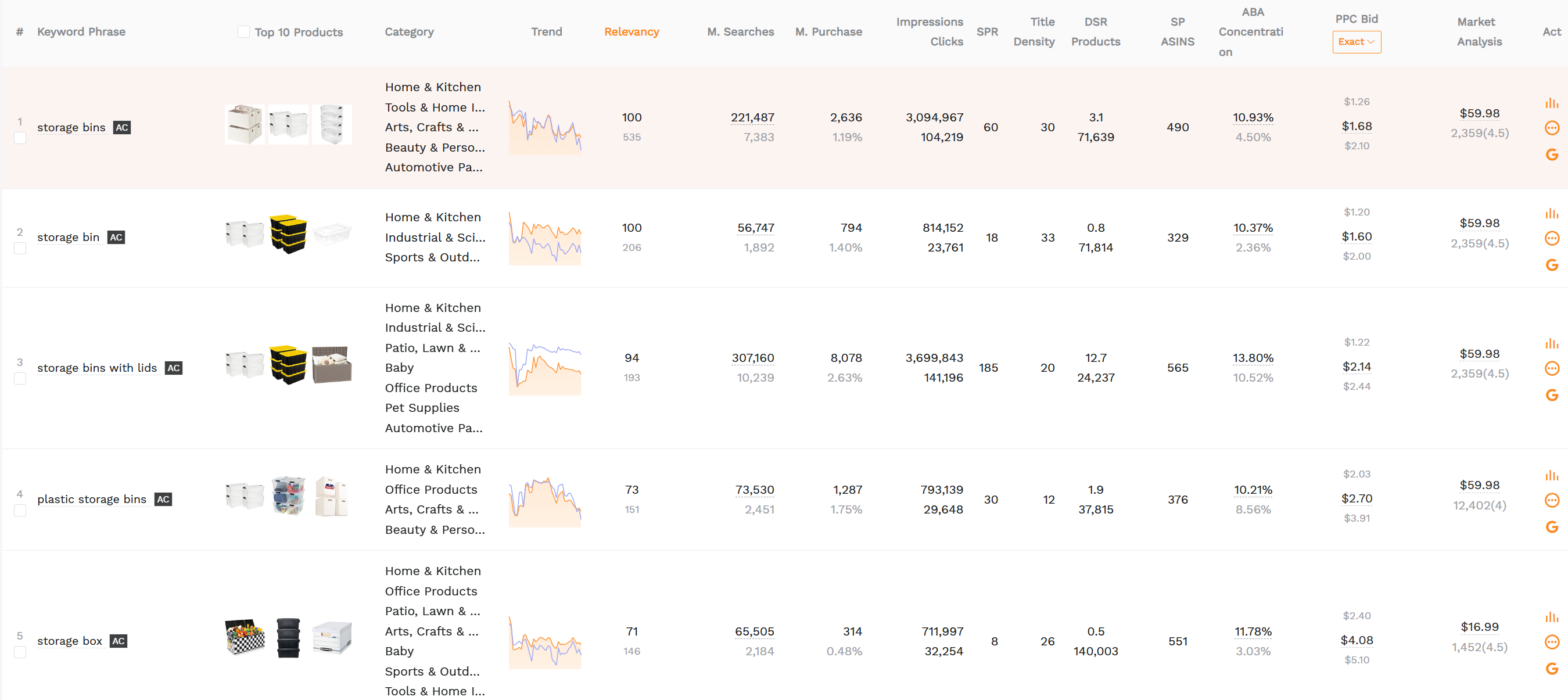
Figure 1. Keyword Mining helps you build a cleaner keyword set before you bid, so your manual campaigns start with higher intent.
Step 4: Set bids and budget
How much budget should you start with on Amazon PPC?
Start with a daily budget that can collect meaningful clicks without forcing panic decisions. As a practical baseline, aim for enough budget to get steady data (clicks and conversions) for at least 7 to 14 days, then optimize. The exact number depends on your category CPC and break-even ACoS.
- Use moderate bids: do not overpay for top placement before you know the conversion rate.
- Give the system time: let campaigns run long enough to collect signal, then adjust in small steps.
- Separate learning and scaling: keep Auto (learning) and Manual (scaling) budgets distinct.
Common mistake
Increasing budgets on campaigns with unclear intent. If search terms are messy, scale structure first: add negatives and move winners into manual match types.
Step 5: Write ad copy (for Sponsored Brands)
Sponsored Products ads rely on your listing content. Sponsored Brands adds a headline, so keep it clear and intent-matched. Write headlines that reflect what shoppers want, not what you want to say.
- Lead with the primary benefit or outcome.
- Use the same language shoppers use in your core keywords.
- Stay direct and readable. Avoid hype and vague claims.
Key takeaways from this section
- Launch simple: Auto for discovery, Manual for control and scaling.
- Use SellerSprite Keyword Mining and Reverse ASIN to build an intent-first keyword list.
- Budget should buy learning, not anxiety. Optimize after you collect the signal.
Monitoring, Metrics, and Optimization
PPC rewards consistency. The winning workflow is simple: measure, decide, adjust, repeat. Your job is to reduce waste and feed winners while protecting the conversion rate.
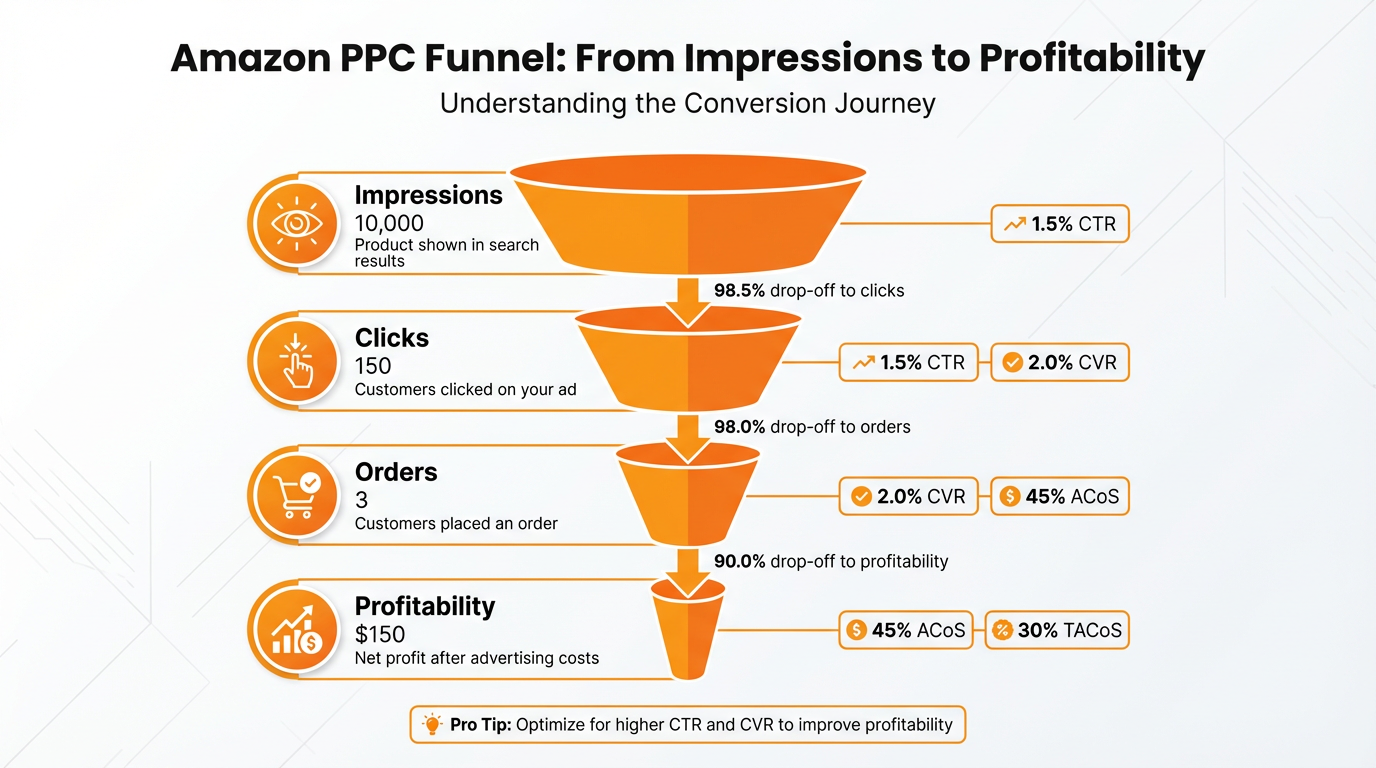
Figure 2. Think in funnel steps: impressions, clicks, conversions, then profitability.
Understanding key metrics
- ACoS: ad spend divided by ad sales. Use it to measure paid efficiency.
- CTR: clicks divided by impressions. Low CTR often means low relevance, weak pricing, or weak main image.
- CPC: cost per click. Influenced by competition and bid strategy.
- Conversion rate: orders divided by clicks. If conversion is low, fix the listing before you increase bids.
What is a good ACoS on Amazon PPC?
A "good" ACoS depends on your margins and goals. In launch mode, you might accept a higher ACoS to collect data and build relevance. In steady mode, aim below your break-even ACoS. When you are clearing inventory, you may choose an ACoS that protects cash flow even if profit per order is smaller.
Tuning your campaign
Add negative keywords to eliminate waste
- Search terms with multiple clicks and no sales.
- Terms describing a different product type, size, or feature.
- Low-intent browsing terms that do not match your buyer.
Adjust bids with controlled steps
- Increase bids for profitable keywords that are limited by low impressions.
- Reduce bids where ACoS is high and conversion is weak.
- Move winners into their own campaign or ad group so budgets do not get diluted.
Use SellerSprite to close the loop:
- Ads Insights to spot underperforming search terms and keyword targets faster.
- Keyword Tracker to see whether paid momentum is lifting organic ranking for key terms.
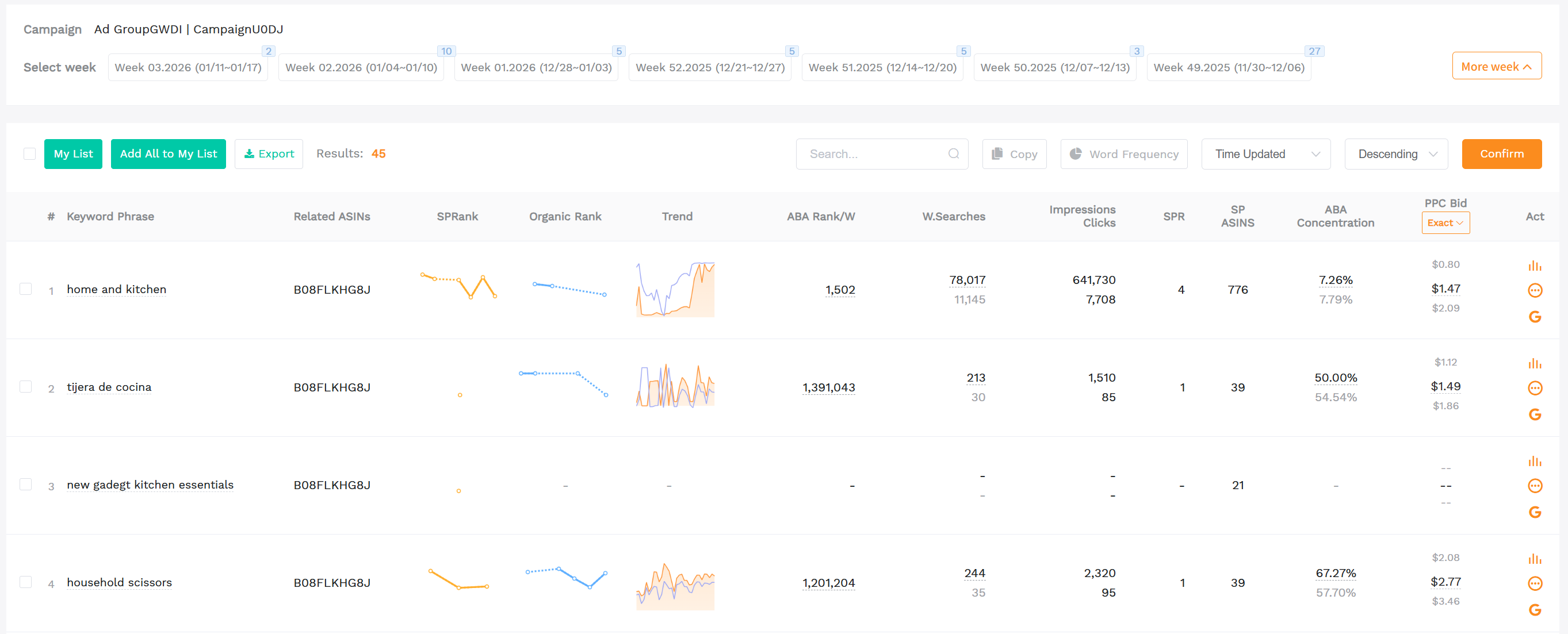
Figure 4. Ads Insights helps you turn raw ad data into a short, prioritized action list.
Mini case study: reduce ACoS while growing ad sales
Below is a representative example of what a structured optimization loop looks like. Numbers are illustrative and anonymized, and results vary by niche, listing quality, and seasonality.
Starting point (Day 0)
- ACoS: 45%
- CTR: 0.26%
- Avg CPC: $1.18
- Orders from ads: 92
- Ad sales: $5,300
Changes made (Days 1 to 30)
- Split one messy campaign into Auto (research) and Manual (brand, category) campaigns.
- Added negative keywords for high-click, no-sale search terms.
- Lowered bids on poor converters and increased bids only on proven winners.
- Used SellerSprite Keyword Tracker to prioritize keywords that improved organic rank after ad sales.
Result (Day 60)
- ACoS: 25%
- CTR: 0.34%
- Avg CPC: $0.96
- Orders from ads: 178
- Ad sales: $12,100
Key takeaways from this section
- Use funnel thinking: CTR and conversion rate often matter more than bid changes.
- Negatives are one of the fastest levers for improving efficiency.
- Connect ad performance to organic movement with SellerSprite Keyword Tracker.
Advanced Metrics: TACoS and Long-Term Profitability
ACoS is useful, but it only measures paid efficiency. As you scale, you also need to measure whether ads are improving the business, not just the campaign.
Break-even ACoS
Break-even ACoS is the point where ad cost equals your profit on the sale. A simple, practical shortcut is:
Break-even ACoS (%) ≈ Your profit margin (%)
If your margin is 30%, then an ACoS near 30% means you are roughly breaking even on ad-attributed sales. You can choose to run above or below that, depending on lifecycle goals.
TACoS: total advertising cost of sale
TACoS helps you evaluate overall health by comparing ad spend to total sales (ads plus organic):
TACoS = Ad spend / Total sales
- If TACoS is dropping while total sales grow, ads may be lifting organic performance.
- If TACoS rises and total sales stall, you may be paying more without building long-term momentum.
Lifecycle strategy: launch, steady, and clearance
Key takeaways from this section
- Use break-even ACoS to avoid scaling unprofitable traffic blindly.
- Track TACoS to understand whether ads improve total business performance.
- Adjust PPC strategy by lifecycle: launch, steady, clearance.
Pro Tips and Long-Term Strategy
Start small and focused
- Pick 1 to 3 ASINs to learn the system before you scale across the catalog.
- Separate discovery (Auto) from control (Manual) so results stay readable.
- Keep a weekly routine: check search terms, add negatives, adjust bids, and note listing changes.
Leverage Auto campaign data
Auto campaigns are your keyword discovery engine. Promote proven search terms into manual match types:
- Move top converters into Exact.
- Use a phrase for controlled expansion.
- Keep Broad limited and monitored if you use it at all.
A/B test Sponsored Brands (Brand Registry)
For Brand Registered sellers, Sponsored Brands can lift top-of-search visibility. Test systematically:
- Rotate two headlines for 2 to 4 weeks each and compare CTR and conversion rate.
- Feature a tight product set that supports cross-sell, not random variety.
- Match headline language to high-intent keywords you already convert on in Sponsored Products.
Mini case study: Sponsored Brands lift with better structure
Representative example (illustrative and anonymized). The key is not the exact numbers. The key is the repeatable testing loop.
Before (Weeks 1 to 2)
- Sponsored Brands CTR: 0.48%
- Conversion rate: 9.3%
- ACoS: 33%
Test actions
- Headline A emphasizes the primary benefit. Headline B emphasizes use case.
- Featured products reduced from 6 to 3 top converters to keep relevance tight.
- Search terms filtered using SellerSprite Keyword Mining to match shopper intent.
After (Weeks 3 to 6)
- Sponsored Brands CTR: 0.71%
- Conversion rate: 11.8%
- ACoS: 26%
Keep up with new features without chasing everything
Amazon Advertising changes constantly. The best habit is not chasing every update. It is maintaining a clean structure, tracking trends monthly, and using consistent rules for scaling.
Key takeaways from this section
- Run tests with a clear hypothesis, not random changes.
- Auto campaigns are for discovery, Manual campaigns are for control.
- Use SellerSprite to pre-qualify keywords and monitor ranking impact.
Notes for EU, UK, and JP Sellers
The PPC mechanics are similar across marketplaces, but performance baselines can differ by shopper behavior and category competition.
- CPC and conversion baselines: expect differences by marketplace and category maturity.
- Language and intent: keyword meaning and long-tail patterns differ. Localized keyword research matters.
- Marketplace alignment: switch marketplaces inside SellerSprite before you export keyword lists and competitive benchmarks.
Key takeaways from this section
- Do not copy US keyword lists into other marketplaces without localization.
- Use SellerSprite marketplace switching to keep PPC research region-accurate.
Amazon PPC Checklist
- Confirm listing quality: images, title, bullets, pricing, and inventory.
- Launch Sponsored Products Auto campaign for discovery.
- Build a Manual structure: Brand keywords, Category, long-tail keywords, and Product targeting.
- Run SellerSprite Reverse ASIN and Keyword Mining to expand and filter your keyword list.
- Review search term performance weekly, add negative keywords consistently.
- Adjust bids in small steps and separate winners into tighter ad groups.
- Track organic movement using SellerSprite Keyword Tracker to see if PPC is lifting core terms.
Key takeaways from this section
- Consistency beats complexity. Follow the checklist weekly.
- Measure and improve the full funnel: CTR, conversion rate, then ACoS and TACoS.
Conclusion and next steps
Amazon PPC is not just paying for traffic. It is building a repeatable growth system. When you combine a clean account structure with consistent optimization and SellerSprite data workflows, you spend less on guesswork and more on decisions you can defend.
- Start with structure, not ambition.
- Optimize weekly with negatives and controlled bid changes.
- Track long-term health with TACoS and organic lift on your core keywords.
Start Your First Optimized Amazon PPC Campaign With SellerSprite
Launch smarter amazon ppc ads with a clean workflow: build your keyword list, spot wasted spend, and track whether PPC is lifting organic rank.
- Build high-intent targets with Keyword Mining and Reverse ASIN.
- Find waste faster with Ads Insights and tighten negatives.
- Monitor paid and organic movement with Keyword Tracker.
Share Your Sourcing Journey With SellerSprite Community
Join the SellerSprite community on the Facebook Group to share your sourcing journey, ask questions, and get support from fellow Amazon sellers.
View The SellerSprite Course Directory
Ready for the next step? Open the SellerSprite Academy course directory to continue building your Amazon FBA skills chapter by chapter.
About the author
SellerSprite Team
PPC and data insights specialists focused on Amazon advertising for sellers. We translate ad reports into action steps and build repeatable workflows using SellerSprite tools across multiple Amazon marketplaces.
Related tools: Ads Insights, Keyword Mining, Reverse ASIN, Keyword Tracker


