A practical guide to earning authentic Amazon reviews, choosing the right Amazon review program, monitoring customer feedback, and turning review themes into product improvements, without incentives, review gating, or pressure to change negative reviews.
Amazon sellers should grow reviews through an accurate listing, a reliable product experience, Amazon's neutral Request a Review feature, eligible Amazon Vine enrollment, and compliant customer service. Do not buy reviews, offer benefits in exchange for reviews, request only positive feedback, selectively ask satisfied buyers, or ask customers to remove or change a negative review.
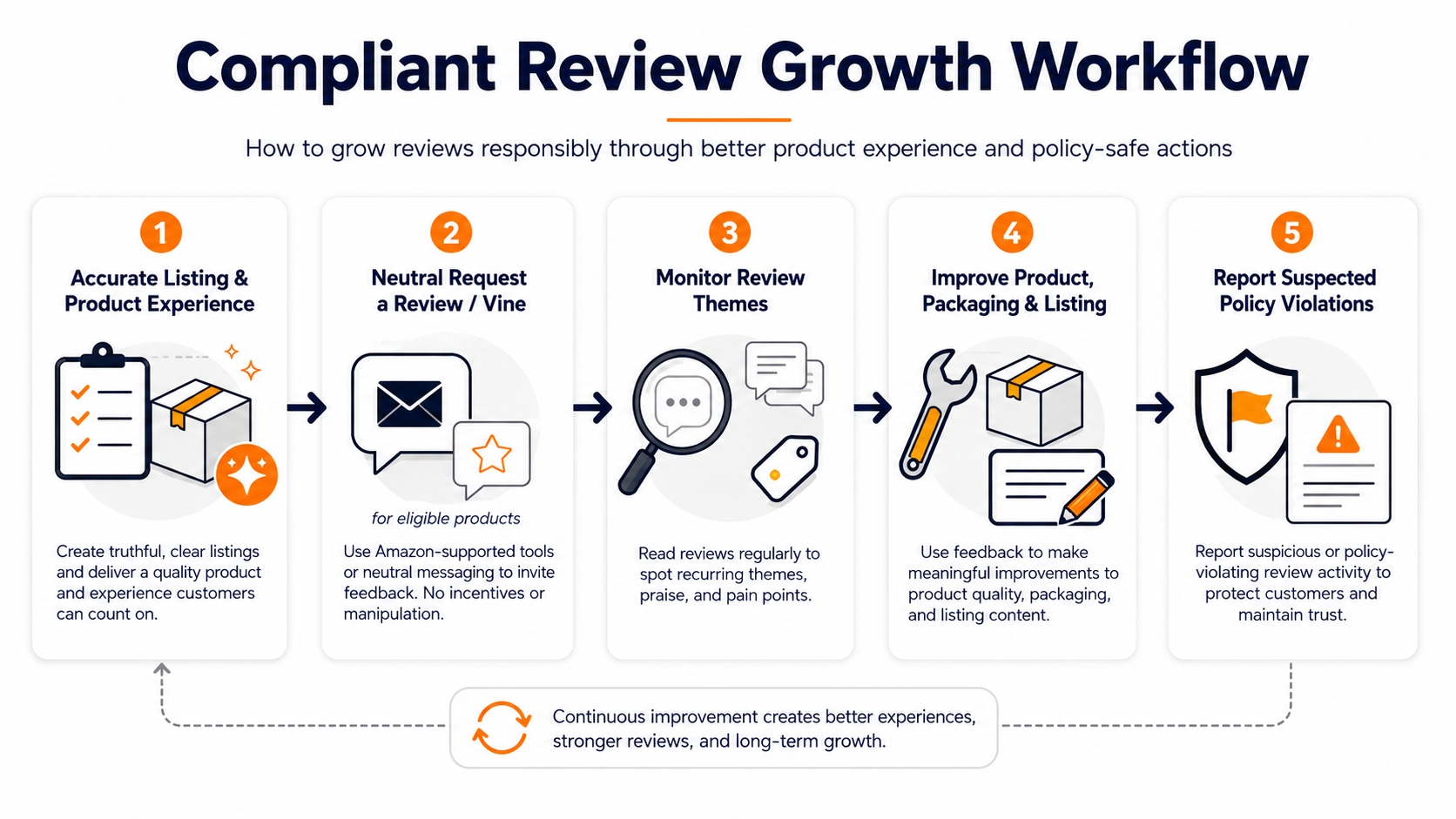
Key takeaways
- Keep every request neutral. The customer must remain free to leave a positive, neutral, or negative opinion.
- Separate acquisition from monitoring. Requesting reviews, analyzing themes, resolving customer concerns, and reporting abuse are different workflows.
- Treat reviews as product data. Look for repeated themes by ASIN, variation, rating, and time period before changing a listing or product.
- Verify time-sensitive terms. Vine eligibility, fees, supported marketplaces, and Seller Central options can change.
- Use review tools as decision support rather than proof. Pattern analysis can prioritize investigation, but it cannot conclusively establish that a reviewer or review is fake.
What is a compliant Amazon review strategy?
A compliant Amazon review strategy is neutral about sentiment and grounded in a real customer experience. It improves the conditions that produce useful feedback, uses Amazon-approved request paths, monitors recurring themes, resolves legitimate service issues independently of review activity, and reports suspected violations through Amazon's official channels.
Amazon's seller-facing review workflow includes the Request a Review feature, Amazon Vine, and the Customer Reviews tool. These tools serve different jobs; none gives a seller control over whether a customer reviews a product or what sentiment the customer expresses.
Ask: "Would this customer receive the same product support, refund consideration, discount, or other benefit if they never wrote a review, or if the review were negative?" If the answer is no, stop and review the workflow before using it.
Product reviews are not seller feedback
Product reviews describe the customer's experience with the item. Seller feedback focuses on the order and seller experience. Amazon's standardized Request a Review email can ask for both, but your internal analysis should keep the two datasets separate so a product defect is not mistaken for a fulfillment or service problem.
Amazon review programs and tools compared
The right Amazon review program depends on the job you are trying to complete. People often use "Amazon reviews program" as an umbrella term, but Request a Review, Vine, the Customer Reviews tool, and third-party analysis serve different purposes. Compare these Amazon review tools before adding a new request, platform, or standard operating procedure.
| Method | Best for | What the seller controls | What the seller cannot control | Main compliance risk |
|---|---|---|---|---|
| Request a Review | A neutral, standardized request for eligible completed orders | Whether to click Amazon's feature for an eligible order | Message wording, customer response, rating, or review content | Selective requests, repeated requests, or additional sentiment-influencing messages |
| Amazon Vine | Eligible products that need early, independent feedback | Which eligible product and unit tier to enroll | Whether a Vine Voice claims the product, publishes a review, or rates it favorably | Treating enrollment as a guaranteed review or guaranteed positive rating |
| Customer Reviews tool | Monitoring recent reviews and using Amazon-provided customer-contact options | Internal triage, ownership, product fixes, and approved support actions | Review edits, deletion, sentiment, or public outcome | Turning customer support into a request to revise or remove a review |
| Third-party review analysis | Finding themes across your products and competitor ASINs | Filters, theme taxonomy, scoring, comparison set, and internal decisions | Amazon enforcement decisions or a reviewer's identity and intent | Presenting a probability, pattern, or anomaly as definitive proof of fraud |
Availability and account permissions vary. Verify the current option inside Seller Central before updating your SOP.
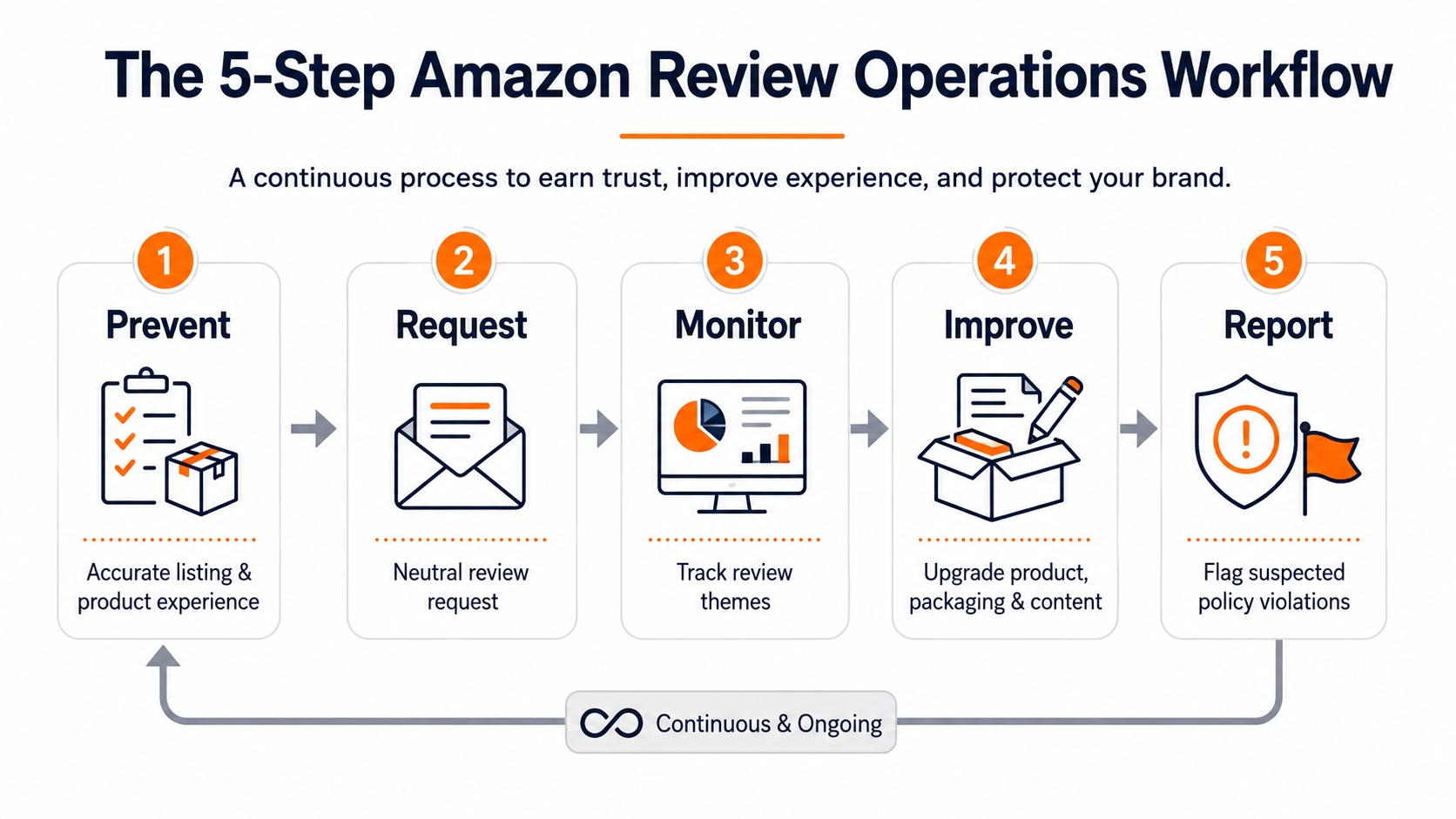
Build a five-stage Amazon review operating system
Sustainable review growth starts before a buyer places an order. The goal is not to "generate stars"; it is to create a product and information experience that makes authentic feedback more likely and more useful.
Stage 1: Prevent avoidable negative experiences
Compare every material listing claim with the product customers actually receive. Check dimensions, color, quantity, compatibility, included accessories, safety instructions, assembly steps, packaging, and variation labels. A precise listing may attract fewer poorly matched buyers, and that is often better than attracting more orders with expectations the product cannot meet.
Stage 2: Request feedback neutrally
Use Amazon's standardized workflow wherever possible. Do not segment buyers by predicted satisfaction, send a review request only after a positive customer-service interaction, or route unhappy buyers to private support while sending satisfied buyers to Amazon. This practice, which is often called review gating, creates a biased review pool.
Stage 3: Monitor themes, not isolated anecdotes
A single review may reveal a real issue, but it does not establish prevalence. Tag the theme, capture the affected ASIN or variation, and compare the signal with returns, buyer messages, support tickets, warranty claims, and quality-control data.
Stage 4: Improve the customer experience
Fix the highest-confidence cause first. For example, clarify dimensions when the item is technically correct but frequently misunderstood; improve packaging when damage clusters around a shipping route or batch; revise instructions when assembly confusion repeats across otherwise satisfied customers.
Stage 5: Report suspected violations carefully
Report a review only when you have a good-faith reason to believe it violates Amazon's guidelines. Preserve the review URL, ASIN, date, visible evidence, and the rule you believe applies. Avoid public accusations and do not attempt to identify or contact a reviewer outside the options Amazon provides.
How to use Amazon's Request a Review feature
Amazon's Request a Review feature sends an Amazon-generated message from the Order Details page. The message asks for a product review and seller feedback using standardized language and is automatically translated into the customer's preferred language.
An eligible order is complete and you want a neutral request through Amazon's standardized workflow.
A separate message asking for a "five-star review," explaining how ratings affect your business, or offering a reward.
Who owns the workflow, which orders are eligible, and the date the Amazon policy was last checked.
Request a Review checklist
- Use the feature consistently for eligible orders rather than selecting only customers likely to be satisfied.
- Do not send a repeated review request for the same order.
- Keep support messages focused on resolving the order or product issue.
- Do not mention changing, removing, or updating an existing product review.
- Recheck Amazon's communication guidelines whenever the SOP changes.
When Amazon Vine is the right review program
Amazon Vine connects enrolled products with invited Vine Voices, who receive products free of charge and publish honest, independent opinions. Vine is most useful when an eligible product needs early feedback and the listing, inventory, packaging, and customer experience are ready for scrutiny.
On Amazon's US public page reviewed August 6, 2026, participation requires a Professional selling account and an eligible brand role or eligible generic products, plus eligible FBA offers. Existing products generally need fewer than 30 reviews on the product detail page. Confirm the exact requirements inside Seller Central because account, product, category, and marketplace conditions can differ.
| Units per parent product | US public enrollment fee* | Use case |
|---|---|---|
| Up to 2 | $0 | Small initial test or limited inventory |
| 3–10 | $75 | Moderate early-review coverage |
| 11–30 | $200 | Broader launch feedback for a ready product |
*Public US terms reviewed August 6, 2026. Amazon states that charges depend on the enrollment tier and review timing. Verify current fees and billing conditions in Seller Central immediately before enrollment.
Do not enroll a product that still has unresolved quality, compatibility, instruction, or packaging issues. Vine Voices are expected to share honest opinions, and the seller cannot control the rating or wording.
For a deeper eligibility and enrollment workflow, check Amazon Vine Program official page.
Amazon review monitoring: turn feedback into decisions
Review monitoring is not the same as watching the average star rating. A useful system identifies repeatable signals, connects them with other evidence, assigns an owner, and tracks whether a change reduced the problem.
Create a monthly review ledger
At minimum, record the theme, frequency, severity, affected ASIN or variation, evidence source, first-seen date, owner, planned action, and validation date.
| Theme | Frequency | Severity | ASIN / variation | Corroborating evidence | Owner | Action | Review date |
|---|---|---|---|---|---|---|---|
| Example: assembly instructions unclear | Repeated | Medium | Record affected child ASINs | Support tickets + returns | Product content | Revise insert and listing image | 30 days after change |
Use a simple prioritization score
Score each theme from 1 to 5 for frequency, customer impact, confidence in the root cause, and fixability. Prioritize high-impact, high-confidence issues before cosmetic copy changes. Keep the score as an internal triage aid, not as a statistical claim.
Measure before-and-after windows
Record the exact date of each product, packaging, instruction, or listing change. Compare reviews published after customers had a reasonable chance to receive the new version. Do not mix old and new product batches when judging whether the action worked.
A reproducible SellerSprite review-analysis workflow
SellerSprite's Review Analysis workflow can help ecommerce teams organize large volumes of public review content by variation, rating, time period, and recurring themes. Use it to reduce manual reading and create a consistent research process, but not to make enforcement decisions on Amazon's behalf.
- Define the question. Examples: "Why do buyers return this variation?" or "Which competitor weakness is repeated across recent reviews?"
- Build the comparison set. Include your ASIN, the relevant child variations, and a small group of directly comparable competitor ASINs.
- Segment the evidence. Filter by rating, variation, and time period so old issues or unrelated variants do not distort the conclusion.
- Cluster customer language. Group phrases into practical themes such as fit, durability, usability, noise, packaging, missing parts, instructions, compatibility, and value.
- Validate outside reviews. Compare the theme with returns, support contacts, quality-control checks, and product-change dates.
- Assign an action and owner. Route confirmed issues to product, packaging, operations, listing content, or customer support.
- Recheck after the change. Use a clean post-change window and document limitations.
Review-analysis tools can surface anomalies, repeated language, rating patterns, and timing patterns. They cannot conclusively prove that a review is fake, establish a reviewer's identity or intent, or guarantee that Amazon will remove a reported review.
What Amazon sellers must not do
Amazon's customer review policies and communication guidelines prohibit several forms of review manipulation. In the United States, the FTC's Consumer Reviews and Testimonials Rule also addresses deceptive review practices, including fake reviews and incentives conditioned on a particular sentiment.
| Do not | Why it is risky | Safer operating approach |
|---|---|---|
| Buy reviews or pay for ratings | Creates manufactured social proof and can violate platform policy and law. | Improve the product experience and use approved neutral request paths. |
| Offer a refund, gift, rebate, discount, or future benefit for a review | Links compensation to review activity and may influence sentiment. | Handle legitimate remedies independently, with no review condition. |
| Ask only happy customers | Creates a selectively positive review pool. | Apply a neutral, consistent eligibility rule. |
| Ask for a positive or five-star review | Attempts to influence the customer's rating. | Use Amazon's standardized Request a Review message. |
| Ask a customer to remove, revise, or update a negative review | Interferes with independent customer feedback. | Resolve the issue without discussing review modification. |
| Use a package insert that diverts unhappy buyers away from Amazon | Functions as review gating when happy buyers are encouraged to review publicly. | Provide the same support path to every buyer and keep review requests neutral. |
| Create misleading variations to aggregate reviews | Misrepresents product relevance and can manipulate ratings. | Use variation relationships only when the products meet Amazon's requirements. |
How to respond to negative Amazon reviews
A negative review can be an early warning, a product-development input, or an isolated mismatch. Your first job is to classify the underlying issue instead of to persuade the customer to change the review.
- Capture the evidence. Record the ASIN, variation, review date, rating, theme, and relevant product batch.
- Check for recurrence. Search recent reviews, returns, support messages, and quality-control records.
- Use Amazon-provided support options. Where the Customer Reviews tool exposes an eligible contact option, keep the message focused on support or the remedy Amazon allows.
- Fix the root cause. Update the product, packaging, instructions, or listing only when the evidence supports the change.
- Report only genuine policy concerns. A critical opinion is not automatically a policy violation.
What to measure
Review count and average rating are lagging outcomes. A more defensible operating dashboard tracks the causes your team can influence.
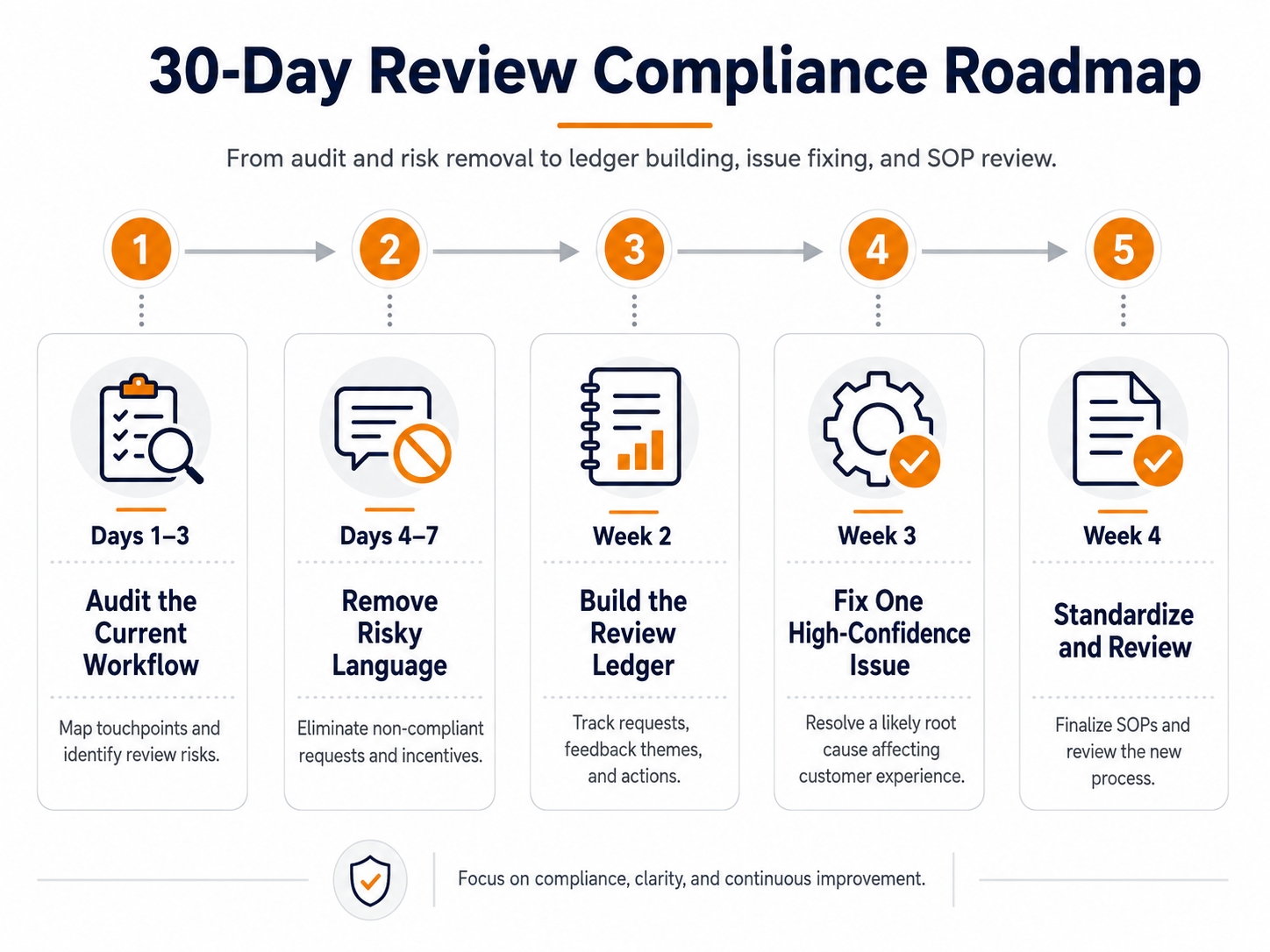
A 30-day compliant review action plan
Audit the current workflow
Inventory every email, package insert, automation, agency process, refund script, and customer-service template that mentions reviews or ratings.
Remove risky language
Eliminate positive-only requests, incentives, review gating, repeated requests, and any request to edit or remove an existing review.
Build the review ledger
Tag recent reviews by theme, variation, severity, and date; connect the highest-priority themes with returns and support evidence.
Fix one high-confidence issue
Choose a problem with clear evidence and an achievable remedy. Record the exact implementation date and affected inventory or listing version.
Standardize and review
Assign owners, add source-check dates to the SOP, confirm current Vine and Customer Reviews permissions, and schedule a monthly theme review.
Amazon reviews compliance checklist
- The listing accurately describes the shipped product and every variation.
- Review-request language is neutral and uses an approved Amazon workflow.
- Refunds, replacements, discounts, gifts, and support are never conditioned on review activity.
- No process selectively requests reviews from satisfied customers.
- No message asks a customer to change, update, or remove a review.
- Vine eligibility, fee terms, and marketplace availability were checked before enrollment.
- Review themes are validated against returns, support, and product-change dates.
- Suspected violations are reported through Amazon, without public accusations.
- Every policy-sensitive SOP records the official source and last-review date.
Frequently asked questions
Can Amazon sellers ask customers for reviews?
Yes. Sellers can use Amazon's approved Request a Review workflow and other permitted neutral communications. The request must not ask for a positive rating, target only satisfied customers, offer an incentive, or pressure a customer to change an existing review.
Can a seller offer a refund after a negative review?
A legitimate refund or support remedy must be handled independently of the review. Do not make the remedy conditional on writing, changing, or removing a review, and do not ask the customer to update the review after support is provided.
Does Amazon Vine guarantee reviews or positive ratings?
No. Vine Voices choose products and share honest, independent opinions. Enrollment does not guarantee that every unit will be claimed, that every participant will publish a review, or that the rating will be favorable.
What is the best Amazon review tool for sellers?
The best tool depends on the task. Use Request a Review for neutral post-order requests, Vine for eligible early-product feedback, Amazon's Customer Reviews tool for seller-side monitoring and approved support options, and review-analysis software for theme discovery and competitor research.
Can an Amazon review checker prove a review is fake?
No. A checker can flag patterns, anomalies, repeated language, or unusual timing for manual review, but it cannot conclusively determine identity, intent, or policy status. Use Amazon's reporting process for suspected violations.
How often should sellers monitor Amazon reviews?
High-volume or newly launched products may need weekly triage; established catalogs can use a monthly operating review. The cadence should be frequent enough to catch safety, quality, packaging, or listing problems before they become widespread.
Turn customer language into a better product decision
Use SellerSprite Review Analysis to organize recurring themes across products and variations, then validate those themes with your own operational data.
References
- Amazon: Customer Reviews tool
- Amazon: Amazon Vine
- Amazon Seller Central: Customer product reviews policies
- Amazon Seller Central: Request a review from a customer
- Amazon Seller Central: Communication guidelines
- FTC: The Consumer Reviews and Testimonials Rule Q&A
- SellerSprite: Review Analysis guide
Scope and limitations: Unless a source states otherwise, Amazon policy and program references in this article relate to US public pages reviewed on August 6, 2026. Marketplace, category, product, account, role, and program terms can differ. Third-party keyword volumes and tool outputs are estimates, not traffic forecasts or proof of customer intent. This article is educational and is not legal, tax, accounting, trademark, or financial advice.