TL;DR: Protect your revenue and brand integrity by enforcing Two-Step Verification, delegating access via User Permissions instead of sharing passwords, and conducting quarterly security audits to detect phishing and unauthorized access.
Key Takeaways
- Two-Step Verification (2FA) is mandatory for all accounts to prevent unauthorized login attempts.
- Never share master login credentials; always use the User Permissions tool to grant granular access to team members.
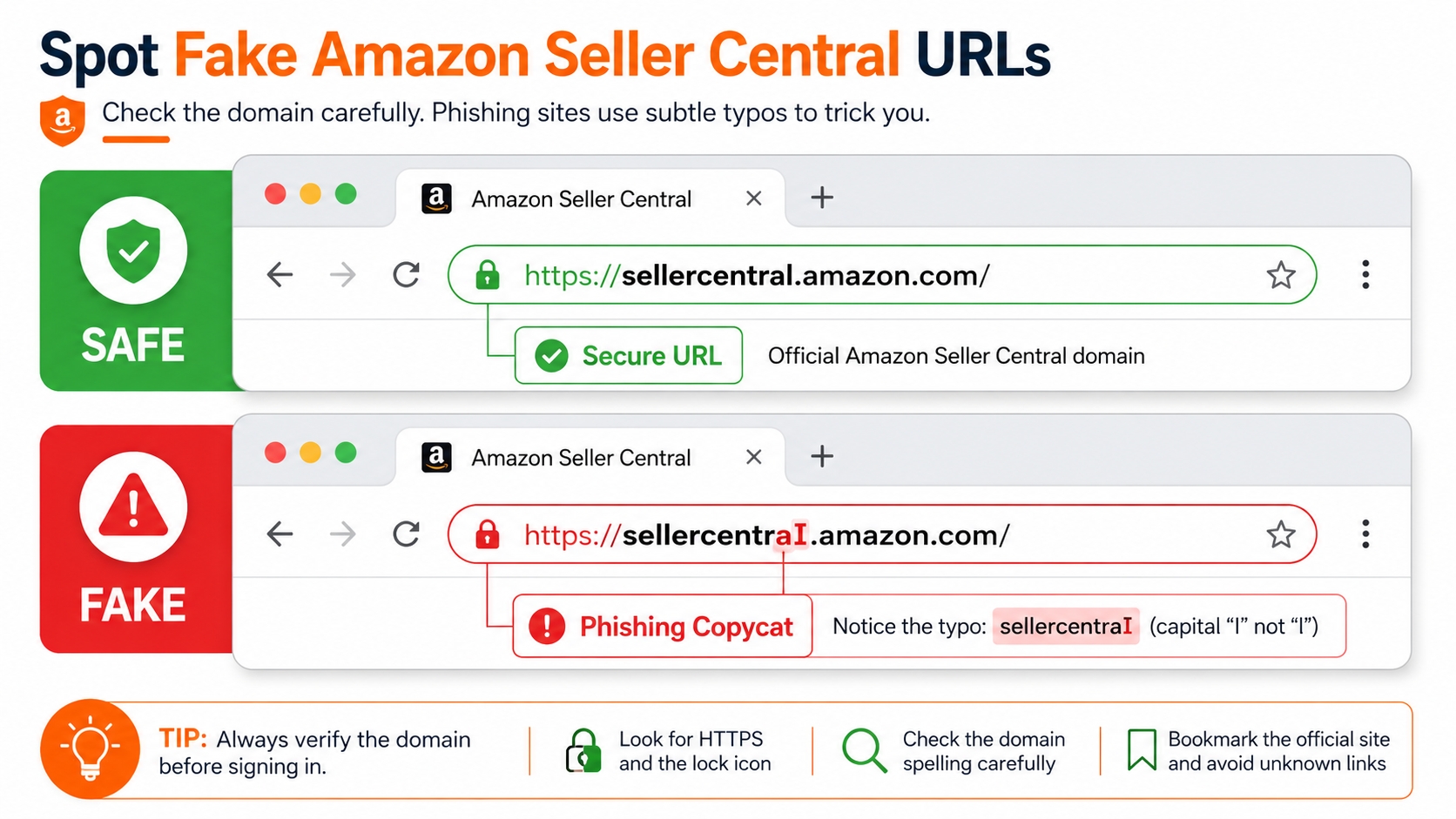
- Phishing attacks are the primary threat; always verify the URL starts with
https://sellercentral.amazon.combefore entering data. - Regular audits of API apps and active user sessions are essential to close security gaps left by former employees or outdated software.
Table of Contents
Note on marketplaces: This guide is specifically optimized for the US market.
Quick Answer
Account security is the foundation of a sustainable Amazon business. A single security breach can lead to inventory hijacking, fund theft, or permanent account suspension. While Amazon provides robust infrastructure, the weakest link is almost always human error, specifically how sellers manage their login credentials and user access. To secure your account immediately, you must move beyond simple passwords and adopt a defense-in-depth strategy that includes verification, access control, and continuous monitoring.
The minimum security setup every seller needs
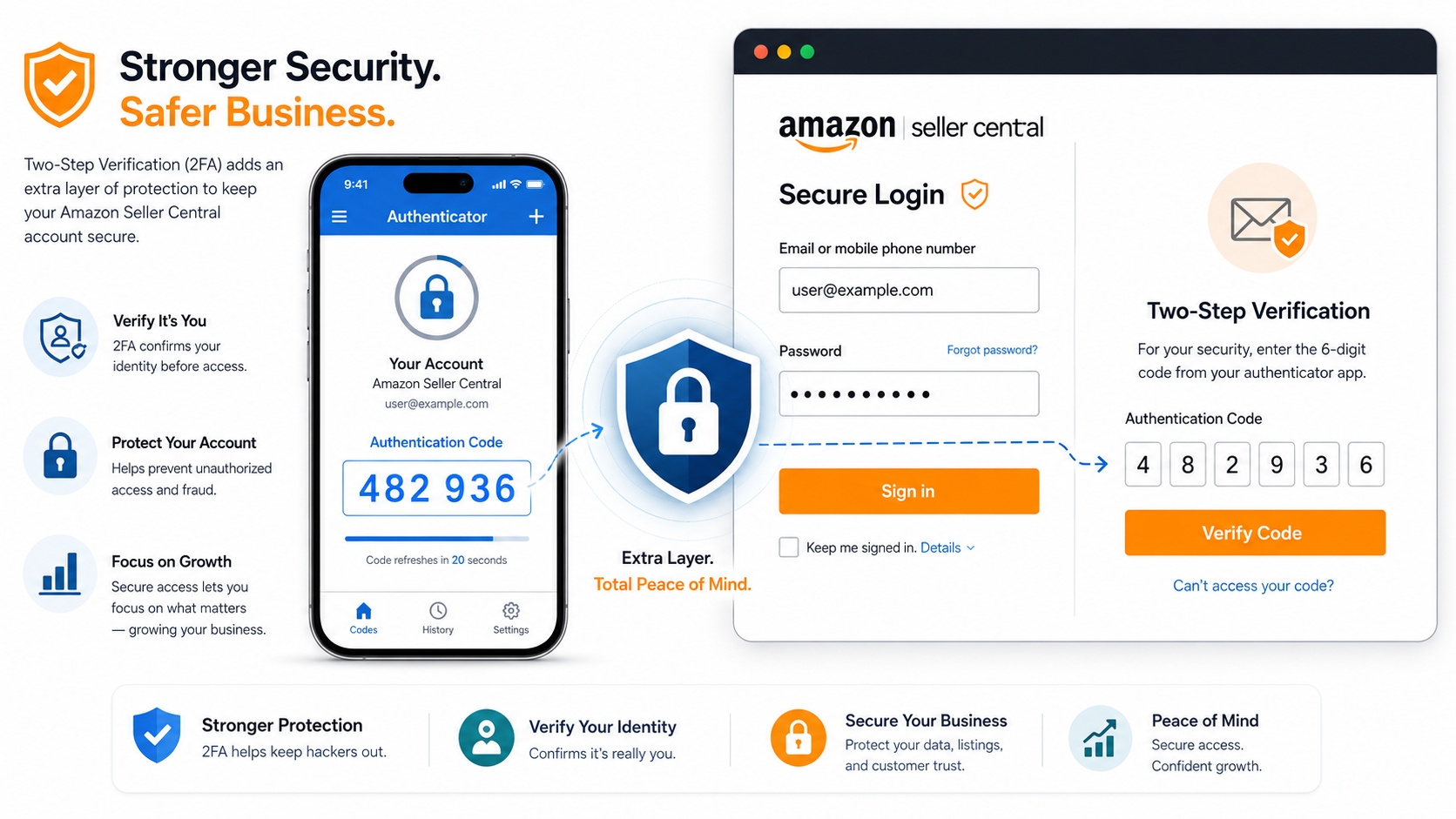
At a bare minimum, every Amazon seller must enable Two-Step Verification (2FA) on their root account. This ensures that even if a hacker obtains your password, they cannot access the dashboard without the unique code sent to your mobile device. Additionally, you should use a unique, complex password specifically for Amazon that is not reused on other e-commerce platforms or social media sites. For new sellers, establishing these two protocols before listing your first product is non-negotiable for data protection.
Seller Central Login Risk Map
Understanding the threat landscape is the first step toward effective defense. Most Amazon seller account compromises are not brute-force hacks but rather targeted exploits based on negligence or social engineering. By mapping out these risks, you can visualize where your account is most vulnerable and allocate your security resources accordingly. Below are the four most critical vectors for account intrusion.
Phishing pages
Phishing remains the number one threat to Amazon sellers. Attackers send sophisticated emails that mimic Amazon's branding, claiming urgent issues with your account health, listing suppression, or tax documents. These emails contain links to fake login pages designed to steal your credentials. Because these pages often look identical to the real interface, many sellers unknowingly hand over their account details. Recognizing the subtle URL discrepancies in these spoofed pages is a critical survival skill in the Amazon ecosystem.
Red flags before entering credentials
Before you type your username and password, pause and inspect the environment. Legitimate Amazon URLs will always direct you to a domain ending in amazon.com or the specific marketplace (e.g., amazon.co.uk). Be wary of URLs that use misspellings like arnazon.com or strange subdomains. Additionally, Amazon will never ask you to verify your account by clicking a link in an email and entering your password on a non-Amazon page. Always navigate to Seller Central manually via your browser bookmark to be safe.
Phishing vs. Legitimate Login: A Comparison
| Feature | Legitimate Amazon Page | Phishing / Suspicious Page |
|---|---|---|
| Domain Name | sellercentral.amazon.com | amazon-secure-login.net, signin-amazon.com |
| Connection | HTTPS with Lock Icon | Often HTTP, or Lock Icon triggers warning |
| Urgency | Informative, neutral tone | "Act now or account suspended!" |
Shared passwords
As businesses scale, the temptation to share the master login credentials with virtual assistants (VAs), agencies, or logistics partners grows. This is a catastrophic security risk. When you share a password, you lose control over who has access. If the VA's computer is infected with malware, your account is compromised. Furthermore, when employees leave, changing the password is often forgotten, leaving a permanent backdoor open for former staff or anyone who might have intercepted the credentials.
Unsafe browser extensions
Many sellers install third-party Chrome extensions to help with product research or revenue calculation. However, malicious extensions can read the data on the pages you visit, including your Amazon session cookies. By hijacking an active session, a bad actor can bypass the login screen entirely and access your account as if they were you. It is vital to only install extensions from reputable developers and to regularly audit the permissions granted to your browser tools.
Old employee access
Offboarding processes are frequently overlooked in fast-paced e-commerce environments. A former employee who still has active User Permissions can copy your customer list, download proprietary business reports, or maliciously change your pricing. This is often an inside job or a result of administrative laziness. Ensuring that access is revoked immediately upon the termination of a contract is a key component of managing your seller account hygiene.
Security Checklist
To systematically secure your business, follow this comprehensive checklist. This section moves beyond theory into actionable steps that you can implement immediately. From enabling advanced verification to managing how your team interacts with the platform, these measures form the firewall around your revenue streams. If you are unsure about navigating these settings, refer to our detailed Amazon Seller Central Setup Guide for step-by-step navigation assistance.
Two-step verification
Two-step verification (2FA), also referred to as Two-Factor Authentication, adds an extra layer of security. In addition to your password, you are required to enter a one-time passcode (OTP) sent to your registered mobile phone or generated by an authenticator app. Amazon requires this for all sellers, but ensuring it is set up correctly on the primary mobile device and not a shared VOIP number is vital. If you lose access to your 2FA device, Amazon's recovery process can be tedious, potentially locking you out of your account during critical sales periods.
Password manager
Human memory is unreliable for creating and storing complex passwords. A dedicated password manager (like 1Password, LastPass, or Bitwarden) allows you to generate a 20-character, random string of letters, numbers, and symbols for your Amazon Seller Central account. This thwarts dictionary attacks and ensures that you are not reusing passwords from other sites that may have been breached in the past. A password manager also facilitates secure sharing of credentials if absolutely necessary, without revealing the actual password in plain text.
Separate user permissions
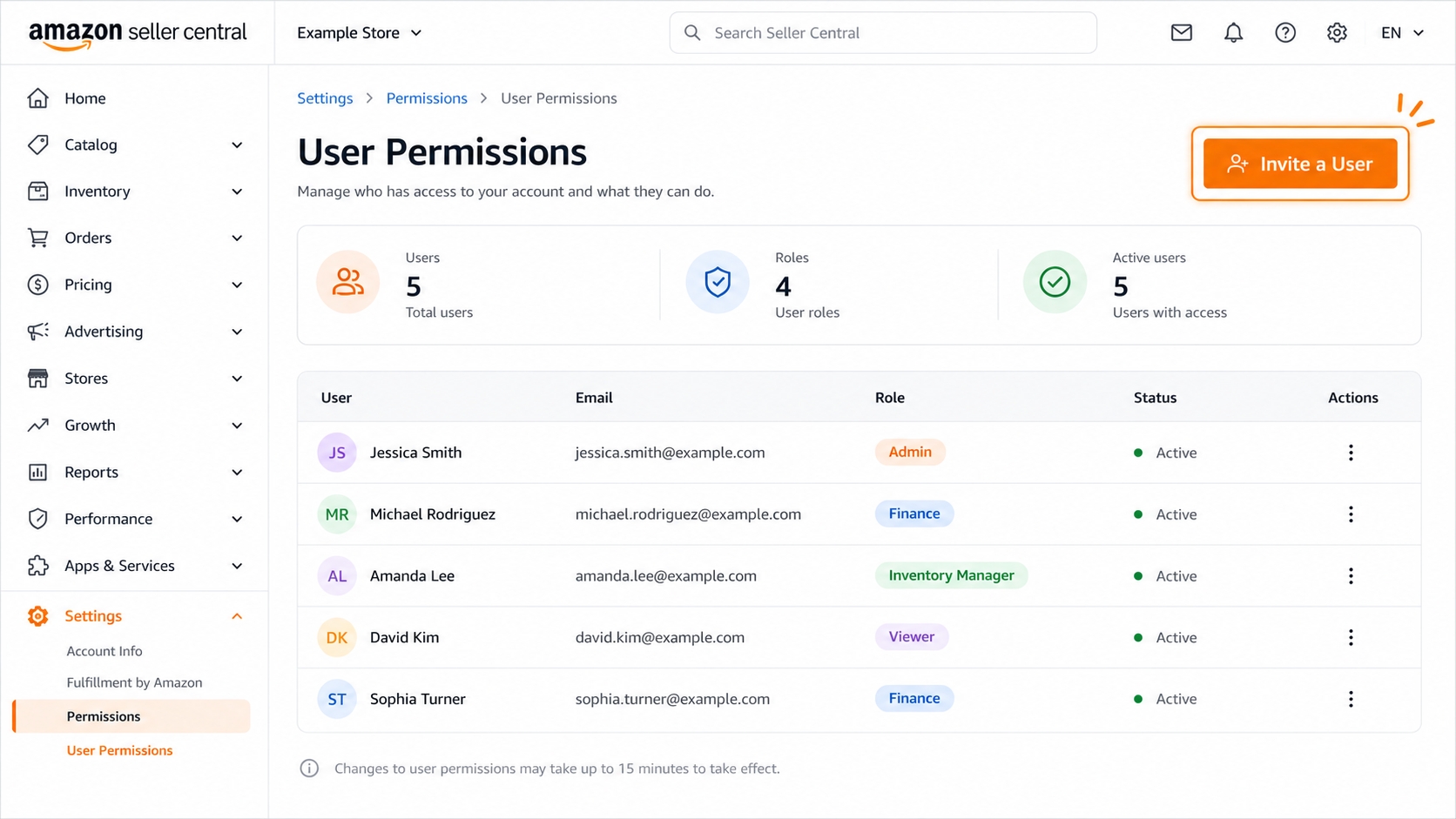
The User Permissions feature in Seller Central is designed specifically to solve the problem of shared logins. Instead of giving your VA your main username and password, you create a sub-user within the Settings menu. This allows you to grant specific rights. For example, you can give a customer support agent access to "Messages" but deny them access to "Payments" or “Inventory.”
Security Best Practice: The Principle of Least Privilege
Never grant a user permission that they do not absolutely need to perform their job. If a team member only needs to reply to customers, do not give them permission to edit listings or change payment settings. This minimizes the damage potential if an individual user's account is compromised.
App and API access review
Over time, sellers often authorize numerous third-party apps (for repricing, email marketing, or analytics) via the Amazon Marketplace Web Service (API). Each of these apps holds a key to your account data. An app that was safe two years ago might have been sold to a less reputable developer or abandoned, becoming a security vulnerability. Regularly reviewing your "Login with Amazon" settings and revoking access for apps you no longer use is a crucial cleanup task.
Login notification review
Amazon sends email notifications whenever a new device or browser is used to log into your account. These alerts are your early warning system. Ensure that the email address associated with your Seller Central account is one you check daily. If you reuse the same email for other Amazon accounts (buyer account, AWS, etc.), phishing emails can become confusing. It is best practice to use a dedicated, secure email address solely for your Seller Central business operations to avoid missing critical security alerts amidst spam.
Team offboarding SOP
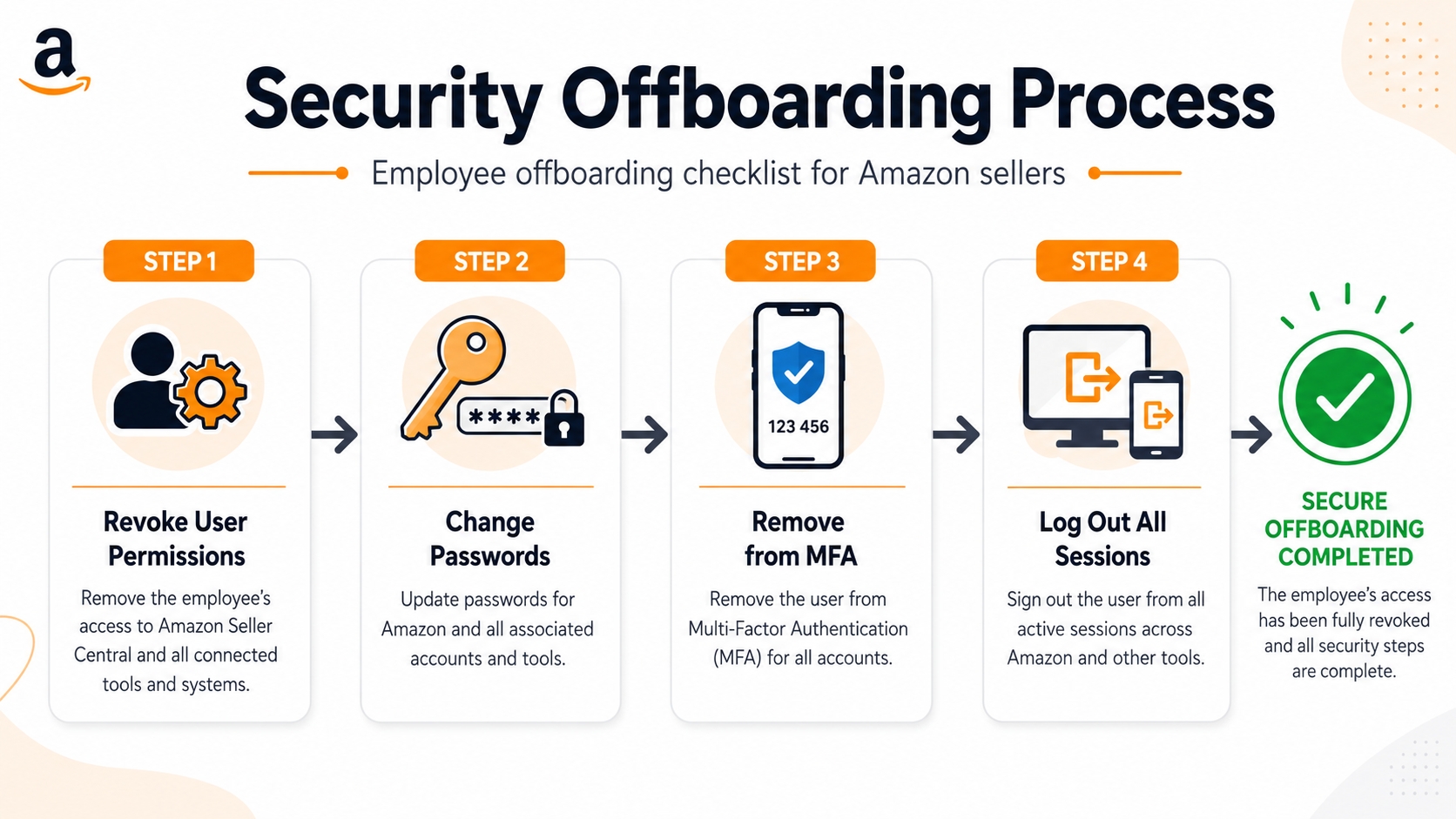
Creating a Standard Operating Procedure (SOP) for employee offboarding is just as important as hiring. The moment an employee or contractor's tenure ends, their User Permission should be revoked. Do not wait until the end of the billing cycle. If they had access to company emails that receive Amazon notifications, change the password for that email account or remove it from the Amazon notification settings. This ensures no lingering access remains that could be used for data theft or sabotage.
What to Do After Suspicious Activity
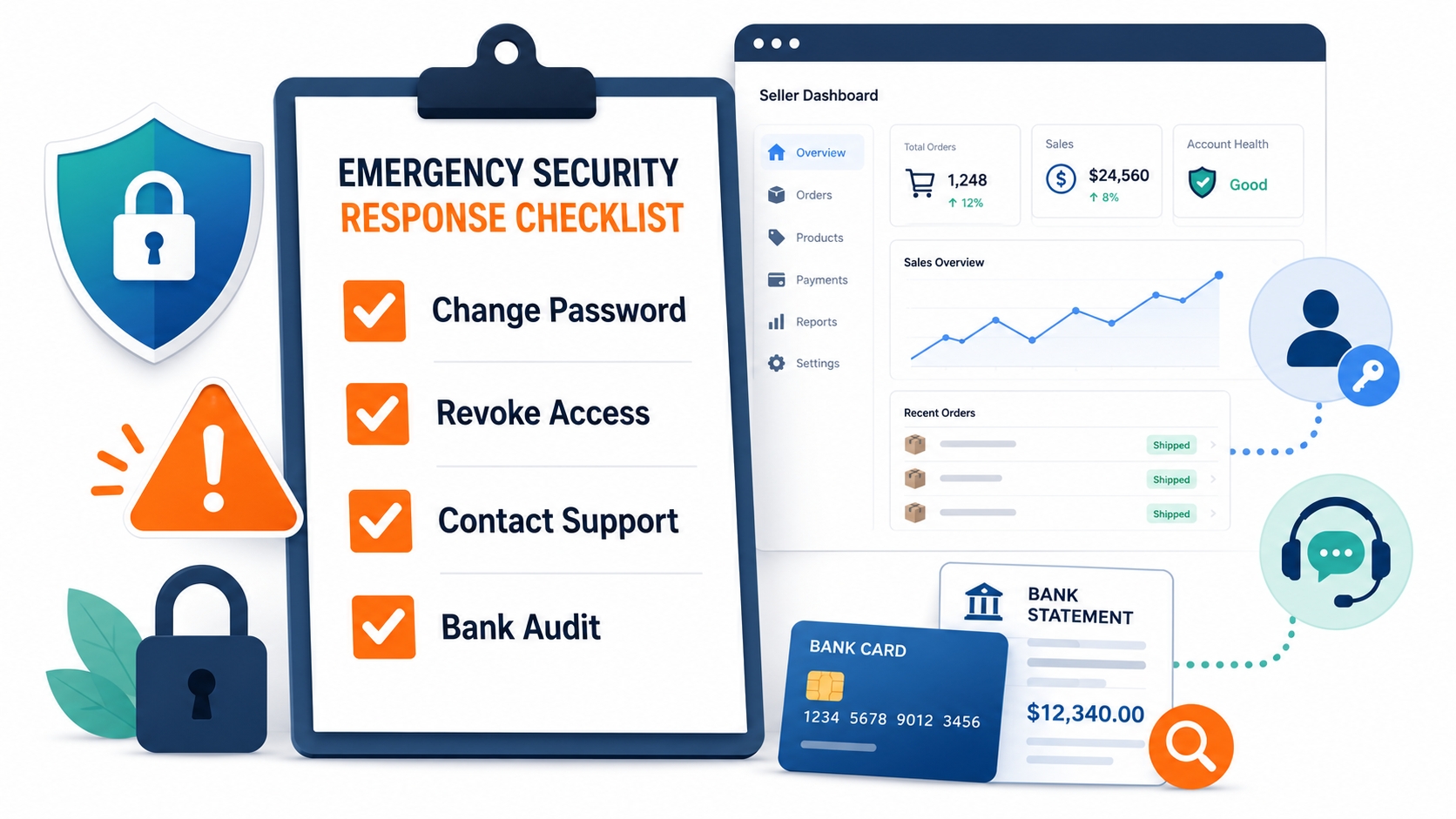
If you notice unfamiliar orders, changed banking information, or logins from foreign countries, time is of the essence. You must act immediately to contain the breach. The following steps are your emergency response plan designed to lock down your account and prevent further financial loss before Amazon support intervenes. If you have trouble logging in due to these changes, consult our guide on Amazon Seller Central login problems.
Change password
Your first action must be to change your password. Do this from a clean, known-secure computer or mobile device. Avoid using the device you suspect might be compromised, as it could be hosting a keylogger. Choose a completely new password that you have never used before. This immediately invalidates the stolen credentials held by the attacker, stopping them from logging back in after you kick them out of the current session.
Remove unknown users
Navigate to the User Permissions settings and inspect the list of active users. Delete any accounts that you do not recognize. Attackers often create a new user with administrative privileges to ensure they can regain access even after the root password is changed. Be ruthless in this deletion process; you can always recreate legitimate user accounts later if necessary.
Check bank and inventory changes
Once the login is secured, audit your financial settings. Verify that the deposit bank account has not been switched to an unknown account. Similarly, check your inventory settings to ensure thieves haven't listed zero-quantity items or destroyed your listing data. Look for any inactive listings that may have been tampered with. If funds have been withdrawn to a fraudulent account, contact your bank immediately, although recovery through Amazon is often difficult and slow.
Open a support case
Finally, open a case with Amazon Seller Support. Use the "Account Health" or "Other Account Issues" categories. Provide specific details about when the suspicious activity occurred and what actions you have taken so far. Request that Amazon flag the account for the security team to audit logs from their end. This creates a paper trail and may help if the attacker tries to appeal account suspensions caused by their own malicious activities.
Maintenance Routine
Security is not a "set it and forget it" task; it requires ongoing vigilance. Establishing a routine maintenance schedule ensures that small oversights do not spiral into major vulnerabilities. By incorporating these simple habits into your monthly and quarterly business reviews, you can maintain a high security posture without disrupting your daily operations.
Monthly access audit
Once a month, take five minutes to log into Seller Central and review the "View your current logins" section (if available) or simply scroll through your recent user list. Verify that you recognize all the names. Check your email for Amazon login alerts that might have slipped through the cracks over the last 30 days. This brief audit can catch ghost users created by malware or unauthorized API access early, before significant damage occurs.
Quarterly password and permission review
Every three months, perform a deeper clean. Update your root account password as a precaution. Re-evaluate the permissions of your current staff, for example, does that marketing intern still need access to the Advertising console? If their project is done, remove their access. Review all authorized third-party applications and revoke access to any tools you haven't used in the last 90 days. This quarterly reset keeps your digital footprint clean and minimizes your attack surface.
FAQ
How to keep my Amazon seller account secure?
Keeping your account secure requires a multi-layered approach. Always enable Two-Step Verification (2FA), use a unique complex password stored in a manager, and never share your main login credentials. Instead, use the User Permissions feature for team access. Additionally, regularly audit your user list and connected third-party apps to ensure no unauthorized access exists.
Should I share my Amazon Seller Central password with team members?
No, you should never share your master password. Sharing credentials compromises security by making it impossible to track individual actions and creates a risk if the team member's device is compromised. Instead, invite team members as sub-users via the Settings > User Permissions menu, granting them only the level of access they need to perform their specific job functions.
How do I spot a fake Amazon Seller Central login page?
Look closely at the URL in the browser address bar. A fake page will often have a misspelled domain (e.g., arnazon.com) or a strange subdomain (e.g., amazon.verify-login.com). Always ensure the address begins specifically with https://sellercentral.amazon.com or your specific marketplace domain. Also, be wary of urgent language in emails demanding you login immediately to avoid suspension.
What should I do if I suspect unauthorized access to Seller Central?
Immediately change your password from a secure device and revoke access for any unknown users in the User Permissions settings. Audit your bank deposit information and inventory settings for changes. Finally, contact Amazon Seller Support to report the breach and request an account review to secure your account health.
Are browser extensions safe to use with Amazon seller accounts?
Not always. While many legitimate tools exist, malicious extensions can steal cookies or session data, allowing hackers to bypass login screens. Only install extensions from highly reputable developers, and regularly review the permissions your extensions have. Avoid using extensions that promise "free" data or appear to be unverified clones of popular paid tools.
Next Steps
- Perform an immediate audit of your User Permissions and revoke access for anyone no longer working with you.
- Create your free SellerSprite account for deeper product and keyword research with AI-powered tools.
References
- Amazon Seller Central Help: About Two-Step Verification
- Federal Trade Commission (FTC) on Phishing: How to Recognize and Avoid Phishing Scams
By SellerSprite Success Team
SellerSprite Success Team consists of experienced Amazon e-commerce experts and data analysts dedicated to helping sellers navigate the complexities of the Amazon marketplace. With deep knowledge in account management, security protocols, and growth strategies, we provide actionable insights to help you protect and scale your business effectively.


