TL;DR: Automated Amazon competitor tracking is only worth building when every alert answers a specific business question. This guide shows how to turn Reverse ASIN discovery into a revenue-weighted watchlist, write alert rules that filter noise, and route each signal to an owner with a deadline.
Key Takeaways
- An alert is a filtered event, not a raw data change. Define the business question before you define the threshold.
- Build the watchlist from revenue exposure, then separate keywords into revenue-critical, growth, and discovery groups that deserve different response clocks.
- Capture organic and sponsored positions separately, and attach marketplace, ASIN, keyword, date, and data source to every observation.
- Require persistence plus a confidence check before a movement becomes an alert, and suppress duplicates until the event is resolved.
- Run a 30-day shadow test that measures false positives and actionable alerts before any alert is allowed to change bids or listings.
Table of Contents
- An Alert Is Only Useful When It Answers a Business Question
- Build a Competitor Watchlist Around Revenue Exposure, Not Keyword Volume
- Create a Baseline That Makes Future Alerts Trustworthy
- Set Up Continuous Tracking With SellerSprite
- Write Alert Rules That Detect Meaningful Changes
- Monitor Three Competitive Threats Without Treating Them as the Same Event
- Prevent False Alerts Before They Reach Your Team
- Route Alerts to the Right Owner and Response Window
- Build a Weekly Competitor Report That Leads to Decisions
- Build a Response Playbook for Each Competitive Alert
- Test Your Alert System Before Trusting It
- FAQ
- References
Note on marketplaces: This guide is specifically optimized for the US market. All examples assume Amazon.com listings, US search results, and US-centric seasonality such as Prime Day and Q4 holiday peaks. If you sell in other marketplaces, keep the same workflow but rebuild the baseline separately for each locale, because ranking positions do not transfer between Amazon storefronts.
An Alert Is Only Useful When It Answers a Business Question
Most Amazon competitor monitoring tools can surface a ranking change within hours. That is no longer the difficult part. The difficult part is deciding which of those changes deserves a human response, because a seller tracking 300 keywords across 20 ASINs can easily receive hundreds of notifications a week and act on none of them. This section sets the decision standard that everything else in this guide depends on, and it is the difference between a monitoring system that informs your team and one your team quietly mutes.
Competitor Movement Is Not the Same as a Competitive Threat
A competitor climbing from position 34 to 28 on a long-tail term you barely sell through is movement. A competitor moving from position 6 to position 2 on the keyword that supplies a large share of your organic orders is a threat. The difference is exposure: how much of your revenue depends on that keyword, how much traffic a position change can realistically shift, and whether the competing offer converts against yours on price, reviews, or delivery promise. Judge alerts by exposure and conversion risk, never by the size of the rank delta alone.
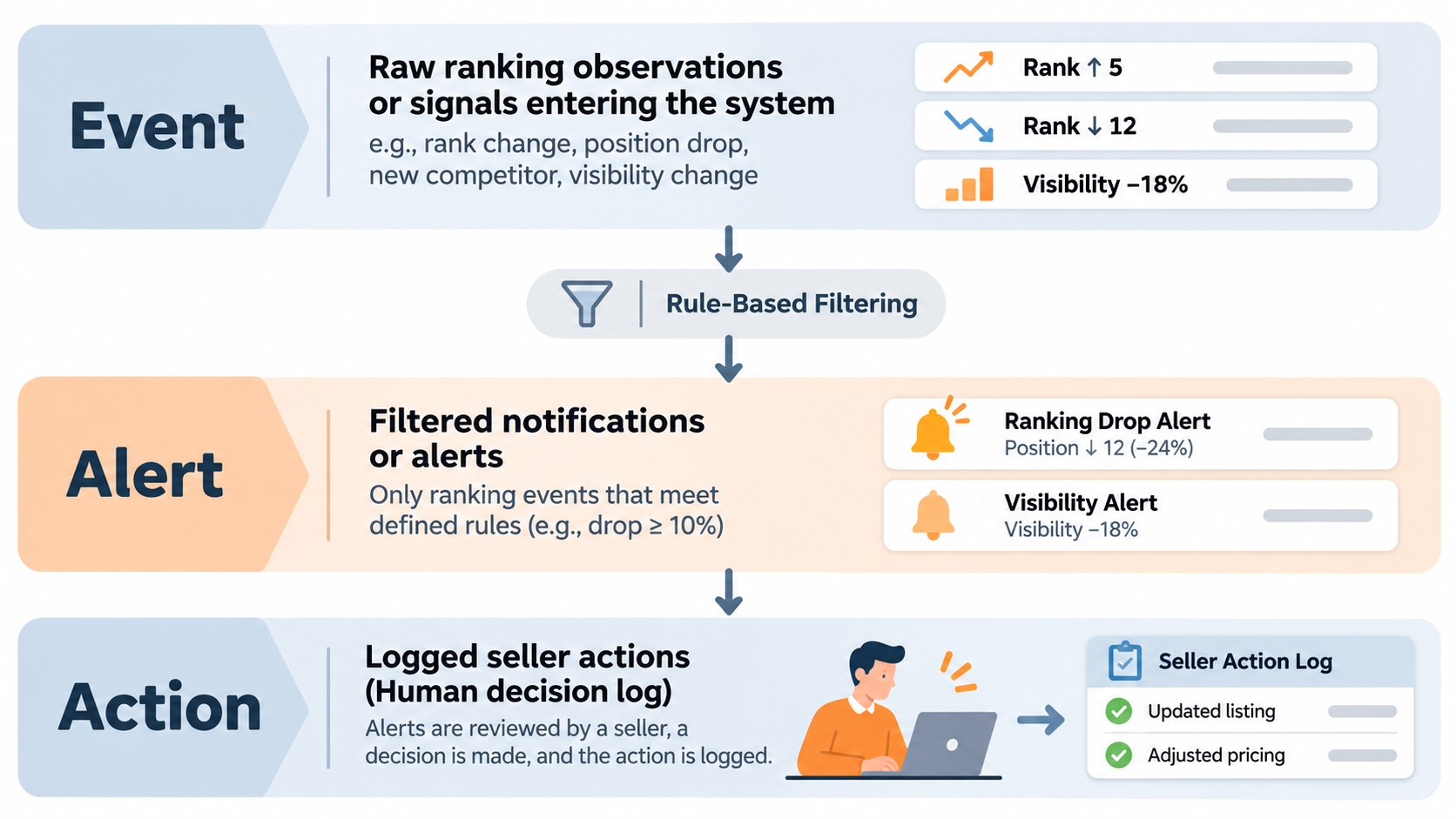
Separate Events, Alerts, and Actions Before You Automate Anything
Automation projects usually fail when teams blur three layers of the same workflow. An event is a raw observation, such as a competitor appearing in the top 10 for a tracked keyword on a given date. An alert is an event that passed your rules and is worth a human look. An action is a decision someone makes and records. Conflating them produces the classic failure mode where a dashboard change directly triggers a bid increase with no human judgment in between.
Working definitions: Event = an observed data change at a point in time. Alert = an event that satisfied your threshold, persistence, and relevance rules. Action = a logged human or playbook decision with an owner and a date. If a step in your workflow cannot be traced back to one of these three, it does not belong in your automation.
Decide Which Changes Deserve Immediate Attention and Which Can Wait
Not every alert needs the same clock. Sort candidate events by revenue exposure and by how reversible the consequence is. A competitor overtaking you inside the top 3 on a revenue-critical keyword deserves same-day attention, because every day of lost visibility compounds. A competitor entering page 3 for a discovery term can wait for the weekly review. The tiers below are a practical starting point for a US catalog, not a fixed rule.
| Exposure tier | Typical event | Response window | Primary owner |
|---|---|---|---|
| High | Top-3 change on a revenue-critical keyword | Same business day | Listing SEO and PPC |
| Medium | Page-1 boundary crossing on a growth keyword | 3 business days | Listing SEO |
| Low | Discovery keyword movement or competitor contraction | Weekly review | Market research |
Build a Competitor Watchlist Around Revenue Exposure, Not Keyword Volume
A watchlist is the input to everything downstream, and most teams build it backwards. They start with the competitors they admire or hear about at conferences, then track whatever keywords those ASINs happen to rank for. A more defensible approach starts from your own revenue: which keywords actually fund the business, and which ASINs are realistically positioned to intercept that demand in the US marketplace. Keyword volume is a proxy; revenue exposure is the real selection criterion.
Identify the Competitors That Can Actually Take Your Customers
Filter candidates through commercial reality rather than brand familiarity. A seller who is thousands of reviews ahead across the entire category is context, not a competitor you can displace this quarter. The ASINs worth monitoring are the ones sitting in the same search results, appealing to the same shopper, and changing their listing or advertising behavior often enough to matter.
Watchlist qualification checklist: same or adjacent category node; price within roughly 25% of yours; review count within one order of magnitude; shares at least five of your tracked keywords; comparable delivery promise for Prime shoppers; visible listing or advertising activity in the last 90 days. If an ASIN fails three or more checks, keep it on a passive list rather than an alerting list.
Divide Keywords Into Revenue-Critical, Growth, and Discovery Groups
Treating all keywords identically is the fastest way to drown a team. Split the portfolio into three groups and give each one its own check frequency and alert sensitivity. Revenue-critical keywords justify tighter thresholds and faster clocks; discovery keywords should almost never generate a same-day interruption.
| Keyword group | Definition | Check frequency | Alert sensitivity |
|---|---|---|---|
| Revenue-critical | Head and mid-tail terms that drive a meaningful share of organic orders | Daily | High, short persistence window |
| Growth | Terms you rank 8 to 30 for and want to push toward page 1 | Every 2 to 3 days | Medium, longer persistence window |
| Discovery | Long-tail, use-case, and new intent phrases | Weekly | Low, review only |
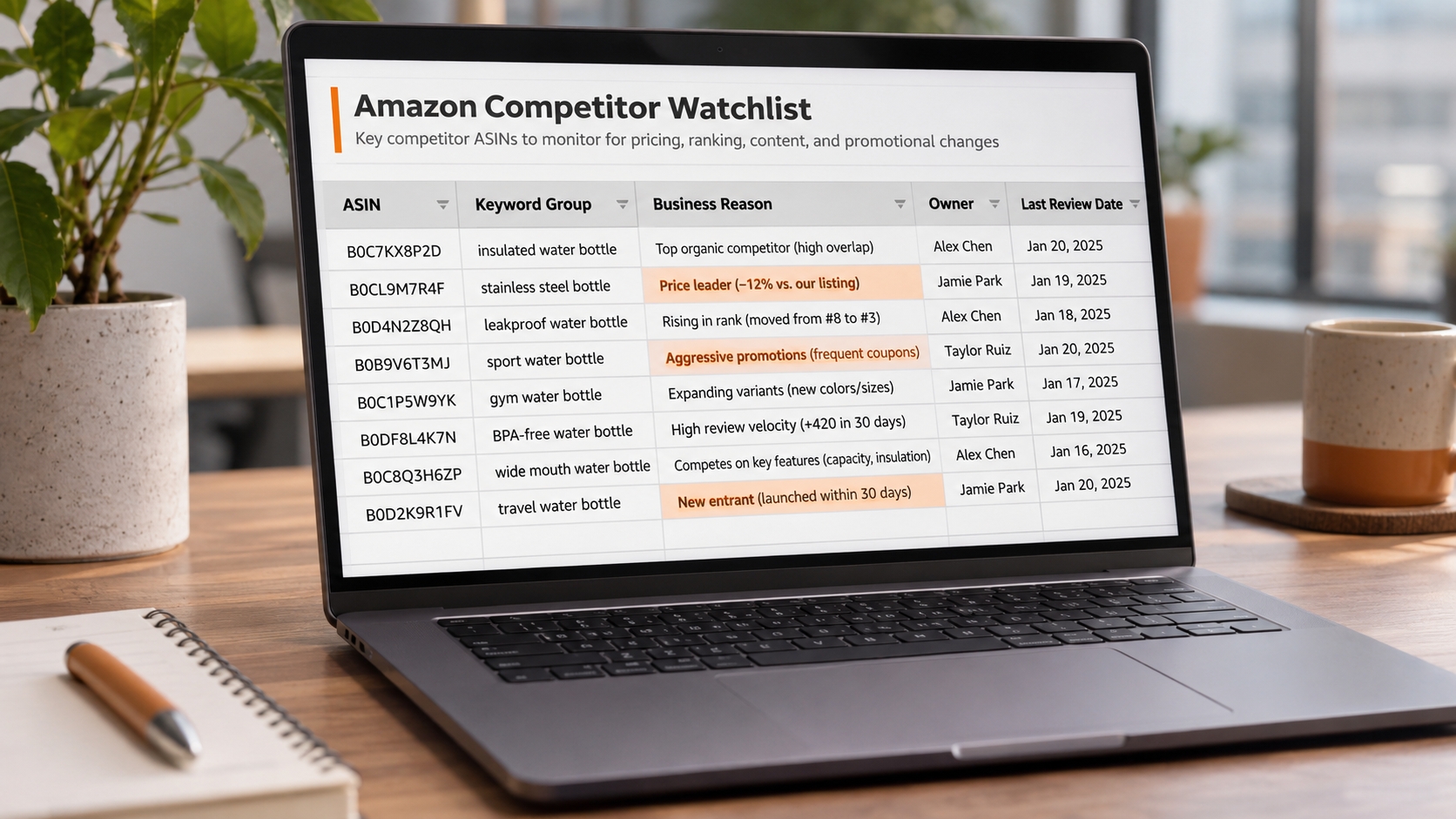
Assign Every Monitored Keyword a Business Reason and an Owner
Every row on the watchlist should carry a plain-language reason and a named owner. A useful reason reads like this: this keyword supplies a large share of organic orders, and the leading competitor gained two positions last month. A useless reason is a keyword sitting in the portfolio with no explanation. If nobody can write a sentence explaining why a keyword is monitored, it should be removed rather than tracked, because unowned keywords generate alerts that nobody is accountable for closing.
Create a Baseline That Makes Future Alerts Trustworthy
An alert is only meaningful relative to something. Without a recorded baseline, every notification invites the same question: was this position normal last month, or is this new? A baseline turns a raw rank number into a comparison, and comparisons are what allow a team to decide quickly. Build the baseline before you switch on any tracking, and version it so you can always reconstruct what the portfolio looked like when a rule was written.
Capture Organic and Sponsored Positions Separately
Organic rank and sponsored placement measure different business levers. Organic position reflects relevance, conversion history, and listing health; sponsored visibility reflects bidding, budget, and ad relevance. If you collapse them into one number, you cannot tell whether a competitor gained because their listing improved or because they simply spent more. Store them as two distinct fields on every observation so your playbook can choose the right response, SEO or PPC.
Record Marketplace, ASIN, Keyword, Date, and Data Source
A ranking observation without context is not evidence. The minimum field set below is enough to reproduce any alert later, which is what separates a professional monitoring log from a screenshot folder. Consistency matters more than sophistication, so lock the schema early and avoid free-text fields that drift between team members.
| Field | Why it is required |
|---|---|
| Marketplace | Rankings never transfer between storefronts, so US and non-US data must never mix |
| ASIN | Parent and child ASINs behave differently; record the exact ASIN observed |
| Keyword | Store the exact phrase, including singular or plural form and spelling variant |
| Date and time | Separates a genuine trend from a single unstable snapshot |
| Data source | Manual check, tracker export, or API pull, so confidence can be judged later |
Preserve the Initial Keyword Portfolio Before Monitoring Changes
Export and archive the full keyword portfolio on day one, then keep dated snapshots whenever the watchlist changes. This practice sounds administrative until the first disagreement about whether a keyword was ever tracked. Versioned snapshots also let you answer a subtle question later: did the competitor improve, or did we simply start measuring a keyword we previously ignored? That distinction protects the credibility of your reporting with leadership.
Keep Missing Data Separate From a Confirmed Ranking Loss
Treat an empty result as missing data, not as position 300. Tracking tools can miss a result because of throttling, geolocation differences, or a page that failed to return the expected element, and those gaps routinely get misread as catastrophic ranking losses. Use a distinct flag for no data, and require a second successful observation before recording a drop.
Rule of thumb: a single missing observation is a data gap; two or more consecutive missing observations across different sources is a genuine visibility problem. Never let a gap trigger the same alert as a measured decline.
Set Up Continuous Tracking With SellerSprite
SellerSprite supports this workflow in two stages: discovery, where you find the keywords worth monitoring, and continuous observation, where those keywords are checked on a schedule. The goal is not to track everything the tool can see, but to move a deliberately small set of ASIN and keyword pairs from discovery into ongoing measurement. You can explore the discovery interface in the Reverse ASIN tool before you commit to a watchlist.
Use Reverse ASIN to Discover the Keywords Worth Monitoring
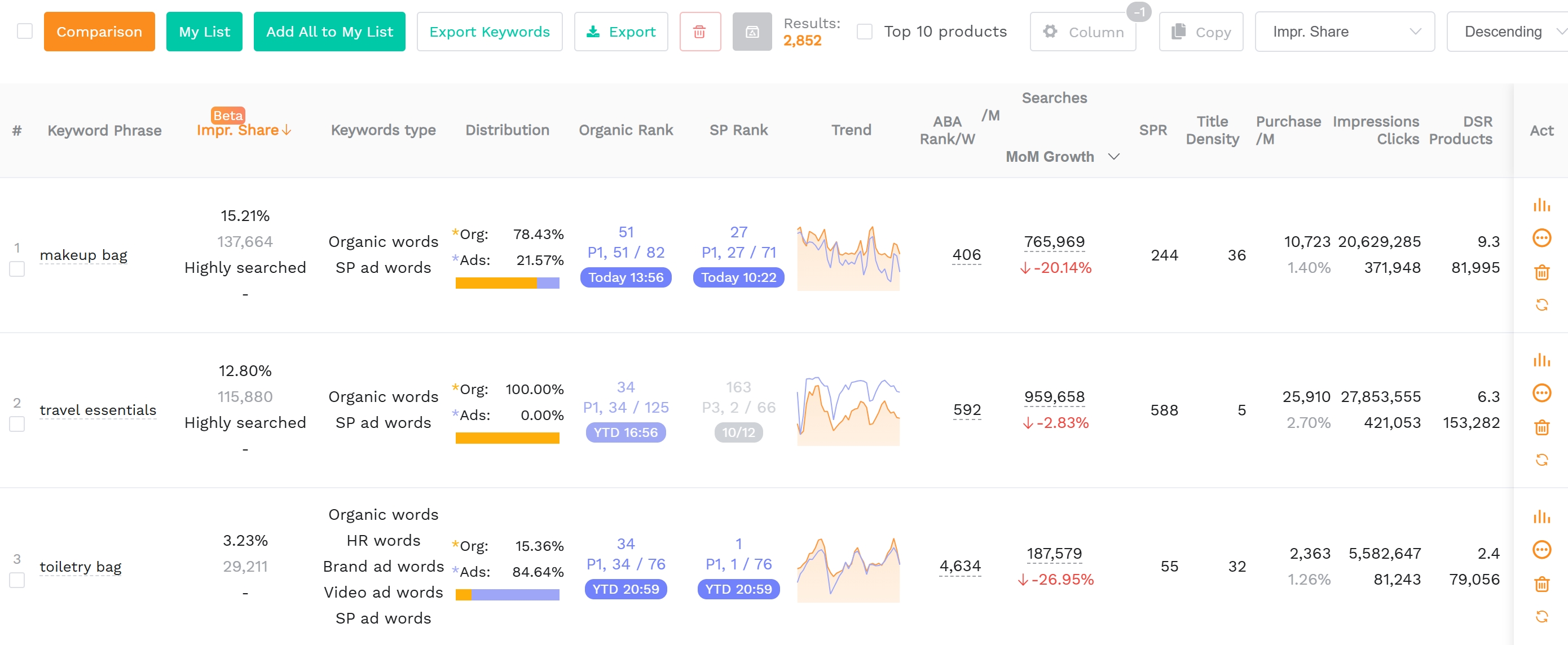
Reverse ASIN takes a competitor ASIN and returns the search terms it appears for, along with traffic and ranking context. Instead of guessing which keywords matter, you start from observed competitor visibility and then filter for terms that intersect with your own catalog. For a deeper explanation of query construction, result filtering, and interpretation, read the Reverse ASIN strategy guide before building your watchlist.
Add Competitor ASINs to SellerSprite Product Tracker
Once qualified competitors are identified, add their ASINs to the Product Tracker so price, rank, reviews, and listing changes accumulate as a time series. This layer answers a different question from keyword tracking: is the competitor changing their commercial posture? A sudden price cut or review surge often explains a keyword gain that would otherwise look mysterious in a ranking alert.
Add Selected ASIN–Keyword Pairs to Keyword Tracker
The ASIN and keyword pair is the atomic unit of competitor keyword tracking. Add only pairs that survived the revenue-exposure filter, then group them by the tiers described earlier. The Product Keyword Tracker guide explains the available settings, so confirm the current refresh cadence and notification options there rather than assuming behavior from an older tutorial.
Choose Between Tracker Reviews and External Alert Automation
Two operating models are realistic. The first is a scheduled human review of tracker data, which is slower but requires no engineering. The second exports or pulls tracker data into your own alerting layer, such as email rules, a shared spreadsheet with conditional logic, or a webhook into team chat. Choose based on how many keyword pairs you monitor and how fast your response window needs to be.
Write Alert Rules That Detect Meaningful Changes
An alert rule is a written hypothesis about what matters to your business. Good rules are specific enough to be tested and simple enough to explain to a new team member in one sentence. Before writing any rule, decide which threshold, persistence window, and confidence level would make you act, then encode exactly that. Rules written after the fact to justify alerts you already received are not rules, they are rationalizations.
Trigger Alerts When Competitors Cross Important Ranking Thresholds
Ranking thresholds matter more than rank deltas, because shopper attention is not distributed evenly across the page. Crossing into the top 3, into the top 10, or onto page 1 changes how many shoppers can realistically see an offer. Write rules around those boundaries rather than around arbitrary movement counts.
| Threshold event | Suggested rule |
|---|---|
| Competitor enters top 3 | Alert if confirmed on 2 consecutive checks on a revenue-critical keyword |
| Competitor crosses into top 10 | Alert if confirmed on 3 consecutive checks on a growth keyword |
| You lose page-1 position | Alert when your own position moves past 10 and persists for 3 checks |
Require Persistence Before Treating a Change as Significant
Amazon search results fluctuate constantly because of personalization, testing, inventory, and page composition. A single observation is a snapshot, not a trend. Require the change to hold across a defined number of consecutive checks, usually two to three for high-exposure keywords and three to five for lower-exposure ones. Persistence is the cheapest false-positive filter available and costs nothing to implement.
Combine Keyword Relevance, Competitive Impact, and Confidence
Weight three dimensions before an event becomes an alert: how relevant the keyword is to your catalog, how much competitive impact the movement implies, and how confident you are in the data. A weighted score keeps a high-volume but irrelevant keyword from outranking a smaller but decisive one.
Example scoring: rate relevance, impact, and confidence from 1 to 5, weight them 40%, 40%, and 20%, and alert only when the weighted total reaches 3.5 or more. A competitor reaching position 2 on a keyword that supplies a meaningful share of your organic orders with three consecutive confirmations scores high; the same movement on a loosely related discovery term does not. Treat these weights as a starting point and calibrate during your shadow test.
Set Different Rules for Organic Rankings and Sponsored Visibility
Sponsored placements change far more frequently than organic ones because bids, budgets, and ad scheduling shift throughout the day. Applying organic-style persistence to sponsored data will either bury real changes or flood your team. Use shorter persistence windows for sponsored alerts but demand larger changes, such as a competitor moving into the very first ad slot across several consecutive checks, or a cluster of new sponsored entrants on the same keyword.
Monitor Three Competitive Threats Without Treating Them as the Same Event
This framework covers three distinct threats plus a fourth signal that behaves differently. The threats are organic encroachment, sponsored pressure, and keyword expansion. The fourth, portfolio contraction, is not a threat at all but an opportunity signal that should be routed to a different owner. Mixing these categories into one inbox guarantees that your team responds to each type with the wrong playbook, or delays the urgent ones behind the interesting ones.
Organic Encroachment: When a Competitor Gains on Your Core Keywords
Organic encroachment is the clearest threat: a qualified competitor steadily improves position on a keyword that funds your business. The warning sign is usually gradual rather than sudden, with movement of two or three positions a week accompanied by review growth or listing refresh. Because organic rank responds to relevance and conversion, this signal belongs to the listing SEO owner first and to PPC only as a secondary hedge.
Sponsored Pressure: When Paid Visibility Expands or Changes
Sponsored pressure shows up as competitors occupying more paid placements, appearing in the top ad slot persistently, or suddenly bidding on your branded terms. The correct first response is almost never to raise bids across the board. Check your own campaign performance first: if impressions are stable but click share is dropping, the competitive intensity has changed, and a targeted defensive placement may be cheaper than a broad budget increase.
Keyword Expansion: When Competitors Enter New Search-Intent Clusters
Keyword expansion is early and strategic. A competitor begins ranking for a cluster of terms connected to a new use case, bundle, or audience segment. Because the terms are new, there is no baseline and no immediate revenue loss, which makes expansion easy to ignore and expensive to ignore for too long. Route these signals to market research and treat them as a scoping exercise for future listing and advertising tests.
Portfolio Contraction: When a Competitor Loses Relevant Visibility
When a competitor drops out of keywords they used to own, the event is a potential opening, not a threat. Common causes include stockouts, listing suppression, price increases, or a shift in strategy. Treat contraction as an opportunity signal: verify the cause, then decide whether a targeted bid increase or a listing relevance push can capture share before the competitor recovers. Log the decision, because these windows close quickly.
Prevent False Alerts Before They Reach Your Team
False alerts are not a minor annoyance; they are the mechanism by which monitoring systems lose credibility. Once a team learns that most notifications are noise, they stop reading them, and the one alert that mattered gets buried. Preventing false alerts is therefore a design requirement rather than a refinement, and it starts with comparing observations on equal terms.
Compare Observations at the Right Data Refresh Interval
Never compare an hourly snapshot with a daily one, or a manual check taken on mobile with a desktop tracker pull. Differences in timing, device, location, and page composition introduce variation that has nothing to do with competition. Standardize the comparison basis for each keyword group, document it, and reject any alert whose comparison mixes data refresh intervals.
Suppress Repeated Notifications for the Same Unresolved Event
Without deduplication, one competitor holding position 2 for two weeks generates fourteen identical alerts. Build a deduplication key from ASIN, keyword, and event type, then apply a cooldown that suppresses repeats until the event is resolved or materially changes. The alert log should show one open event with a history of observations, not a stream of separate messages.
Account for Seasonality, Variations, and Temporary Market Disruptions
US demand patterns around Prime Day, back-to-school, and Q4 routinely reshape rankings for weeks. Variation parent-child relationships can also shift, moving a child ASIN into or out of a merged listing. Before treating a movement as competitive, ask whether the calendar or the listing structure changed. Suppress or downweight alerts during declared peak windows, and re-baseline afterwards rather than comparing straight into the peak.
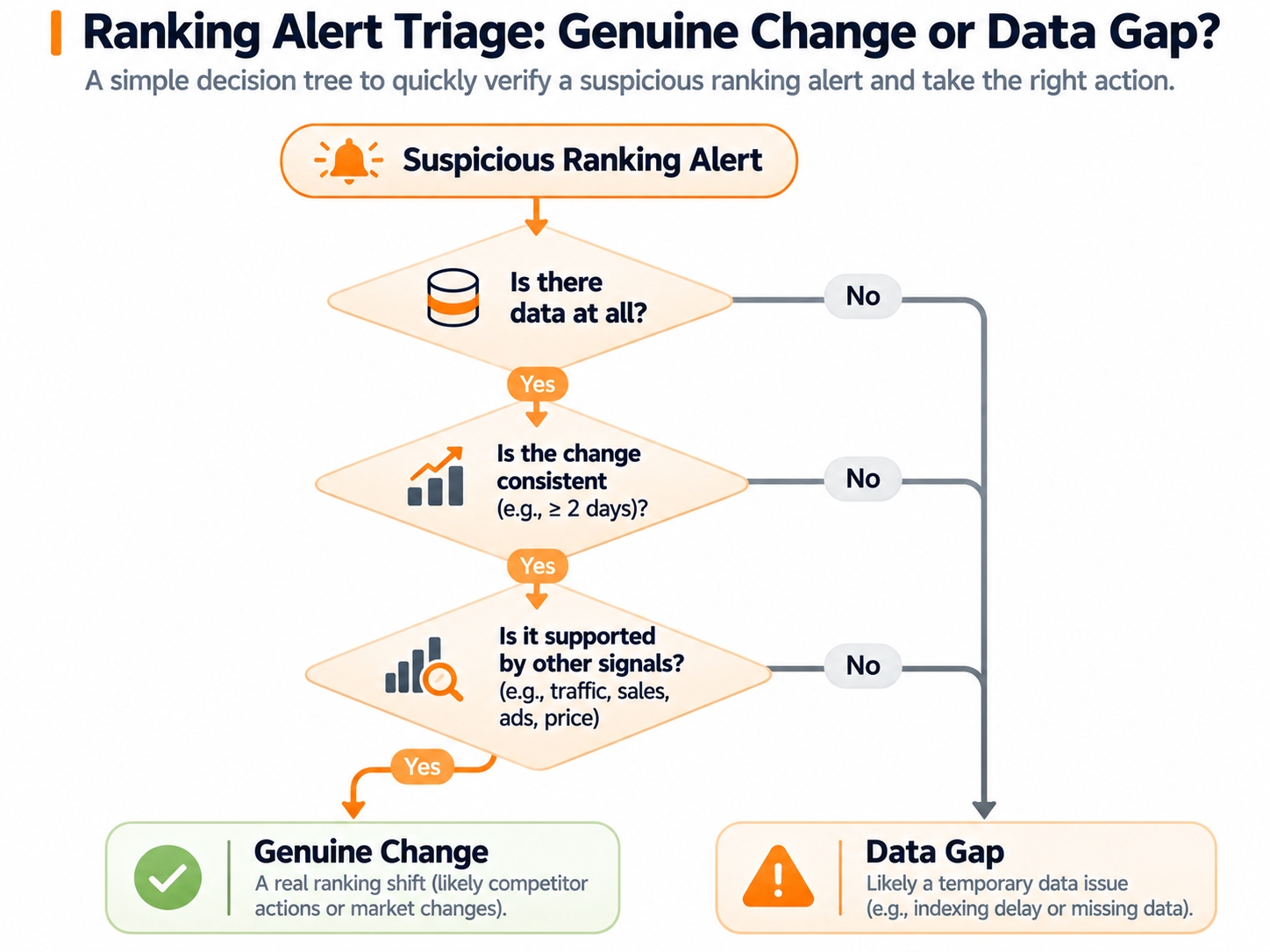
Distinguish a Data Gap From a Genuine Competitive Change
Run a short triage before escalating any suspicious alert. The checklist below takes under two minutes and eliminates most false positives.
Triage checklist: Did the observation return a result at all? Did the comparison use the same refresh interval and device type? Did the competitor's own listing stay live and in stock? Did the keyword spelling or variant change? Did a declared seasonal window overlap? If any answer is unclear, mark the event unresolved and re-check before escalating.
Route Alerts to the Right Owner and Response Window
An alert without an owner is a message, not a task. Routing decides whether your monitoring system produces action or discussion. In practice, most routing failures are not technical, they are organizational: three people receive everything, nobody knows who should respond, and the alert ages into irrelevance. Define the levels, assign the owners, and make the log the single source of truth for status.
Define Critical, Warning, and Informational Alert Levels
Three levels are usually enough. Assign each level a response window and an expectation about after-hours handling, then publish it so nobody has to guess.
| Level | Typical trigger | Response window |
|---|---|---|
| Critical | Competitor enters top 3 on a revenue-critical keyword and persists | Same business day |
| Warning | Page-boundary crossing or sustained sponsored slot gain | Within 3 business days |
| Informational | Discovery keyword movement or competitor contraction | Next weekly review |
Assign Each Alert to PPC, Listing SEO, or Market Research
Route by the lever that can actually change the outcome. Organic encroachment on a core keyword belongs to listing SEO, with PPC as a short-term hedge if revenue is at risk. Sponsored pressure belongs to PPC, because the levers are placement, bid, and budget. Keyword expansion and competitor contraction belong to market research, because the first job is to understand the opportunity before spending. A shared inbox with no routing rules guarantees decision delay.
Keep an Alert Log With Evidence, Ownership, and Resolution Status
The alert log is the memory of your monitoring system. Record the trigger, the supporting evidence, the assigned owner, the decision taken, and the resolution date. Two team practices separate a useful log from a compliance exercise: every alert must be closed as resolved, dismissed with a reason, or escalated, and every dismissal must cite a specific cause. Over a quarter, dismissal reasons become your best source of threshold improvements.
Build a Weekly Competitor Report That Leads to Decisions
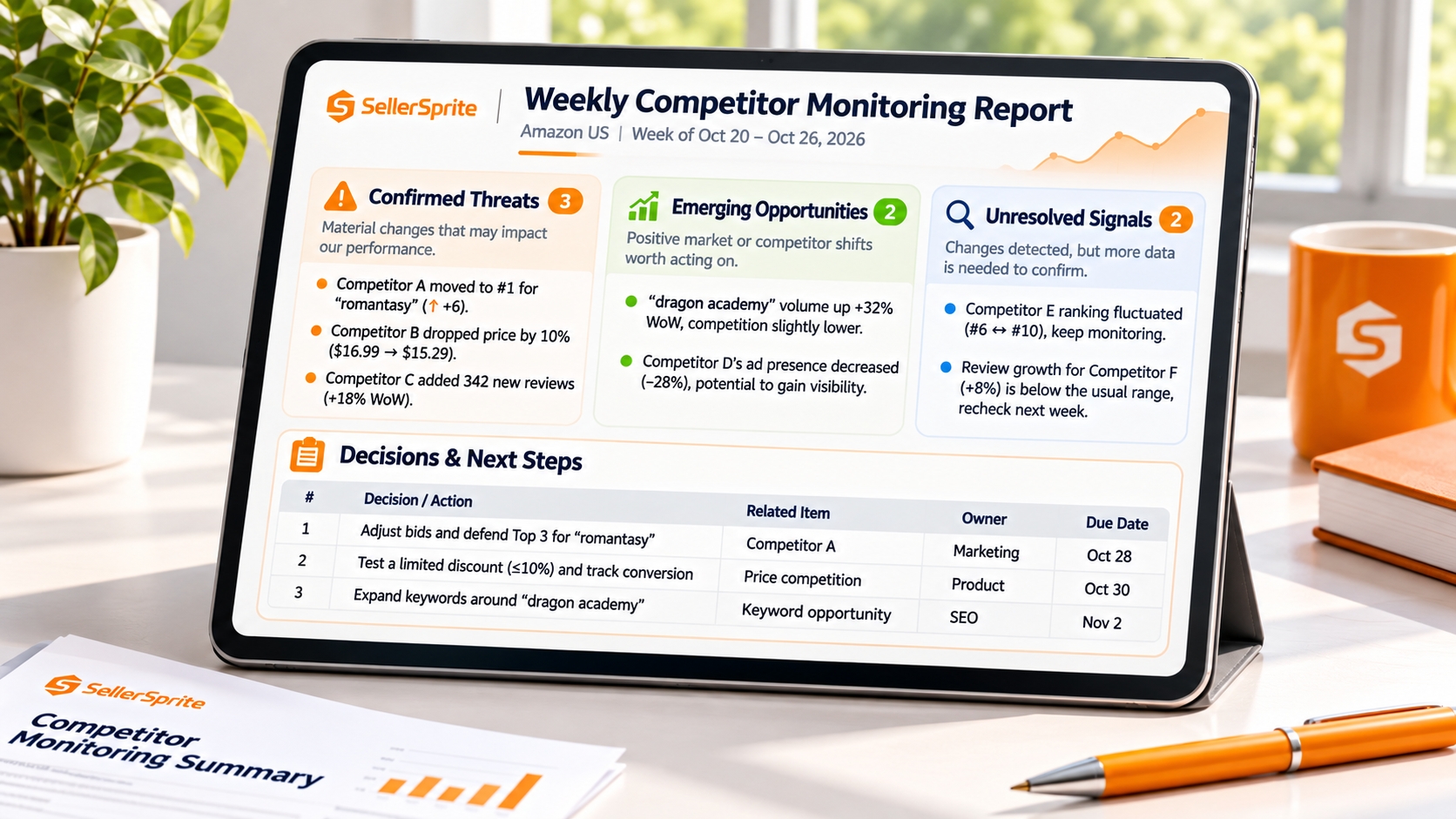
A weekly report is not a ranking dump. Its purpose is to compress a week of monitoring into the handful of changes that deserve management attention, with enough context to decide. If your report lists every movement, readers will skim and act on nothing. If it lists five changes with reasons and proposed responses, it will be read and used.
Summarize What Changed Instead of Listing Every Ranking Movement
Write the summary in sentences, not tables. State which competitors moved, on which keyword groups, and why it matters commercially. A useful opening line reads: the leading competitor gained top-3 visibility on two revenue-critical keywords and expanded into a bundle-intent cluster, while our own page-1 coverage held steady except for one term. That sentence contains more decision value than fifty rows of position data.
Separate Confirmed Threats, Emerging Opportunities, and Unresolved Signals
Three columns keep a report honest. Confirmed threats have passed your persistence and confidence rules and need a response. Emerging opportunities include competitor contraction and new intent clusters worth scoping. Unresolved signals are events still waiting for a second observation. Keeping unresolved signals visible but separate prevents the common distortion where a single unconfirmed snapshot gets escalated as a crisis.
Show Keyword Gains and Losses Alongside Relevant Business Context
A ranking change only matters in the context of business outcomes. Pair each keyword movement with the metrics that explain consequence: sessions, conversion rate, ad impressions, click share, and advertising cost of sale for the same period. This is where Amazon competitor keyword tracking becomes decision-grade rather than interesting. If a competitor gained two positions but your sessions and conversion held, the practical urgency is lower than the ranking chart suggests.
End Every Report With Decisions, Owners, and Follow-Up Dates
Close the report with a short decision table: what we will do, who owns it, and when we will review the result. Without this block, a weekly report becomes a newsletter. With it, the report becomes the operating rhythm of your competitor response, and the following week's report can begin by checking whether last week's decisions moved the numbers.
Build a Response Playbook for Each Competitive Alert
Detection without a response playbook simply documents decline. Each alert type should have a written, pre-approved sequence of checks and possible actions, so the owner does not improvise during a busy week. The playbooks below are deliberately conservative: confirm first, investigate the most likely cause second, act narrowly third, and measure afterwards.
Confirm the Signal Before Editing Listings or Increasing Bids
Confirm through a second source before touching anything. Re-pull the keyword with the same settings, check the competitor's listing manually, and verify that your own listing is live, correctly categorized, and in stock. This step costs minutes and prevents the most expensive automation mistake: editing a high-performing listing or inflating bids in response to a data artifact.
Investigate Organic Losses Through Relevance, Availability, and Conversion
When you lose organic visibility, work through three explanations in order. Relevance: did the title, bullets, or backend terms change, or did the keyword's intent shift? Availability: were there stockouts, suppressed variations, or buy box losses during the measurement window? Conversion: did price, reviews, or delivery promise deteriorate relative to the competitor now ranking above you? Fix the confirmed cause rather than the symptom.
Investigate Sponsored Pressure Through Your Own Campaign Performance
Competitor advertising is only actionable through its effect on your campaigns. Compare impressions, click-through rate, cost per click, and conversion over the same window. Rising impressions with falling click share suggests stronger competing creative or placement. Rising cost per click with stable conversion suggests auction pressure. Stable everything suggests the alert is observational noise rather than a business event.
Convert New Keyword Clusters Into Controlled SEO or PPC Tests
When a competitor enters a new intent cluster, resist the urge to rewrite the listing immediately. Define a small test: add the cluster to a defined ad group with a capped budget, or adjust one relevance element such as a bullet or backend term. Set the success metric and duration before launch, usually two to four weeks for organic effects and shorter for paid placement tests, then decide based on the measured result rather than on impressions alone.
Close the Loop by Measuring Results After Intervention
Every intervention should return to the alert log with an outcome. Use fixed review windows, such as seven days for paid placement changes and twenty-eight days for listing relevance changes, and record whether the metric improved, held, or deteriorated. Over time, this record tells you which playbooks actually work for your catalog, which is far more valuable than knowing that a competitor moved.
Test Your Alert System Before Trusting It
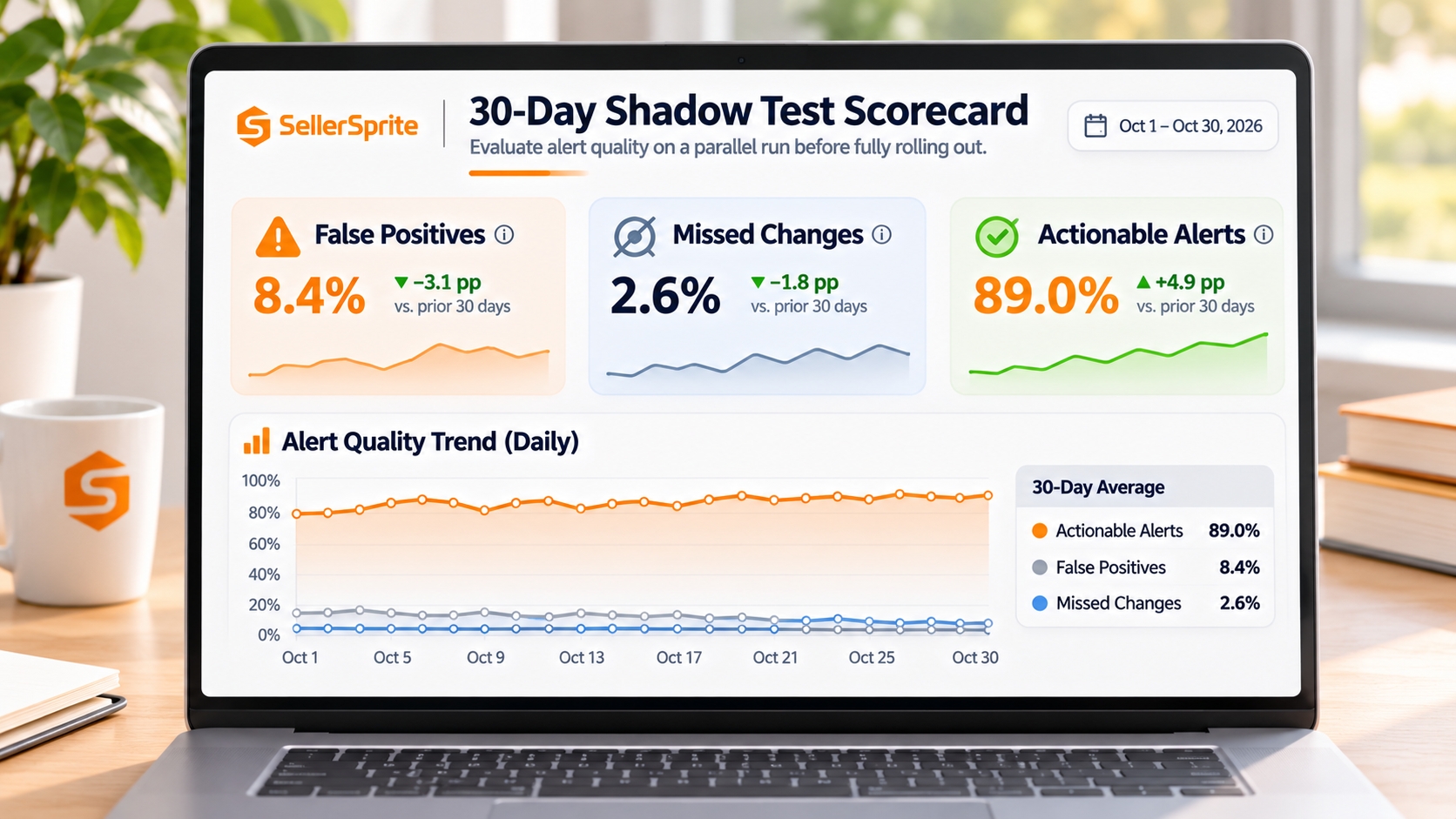
A monitoring system is a measurement instrument, and instruments need calibration. Running the rules silently for a month is the cheapest way to discover that your thresholds generate noise or miss the events you care about. During the shadow test, alerts are recorded but not acted upon automatically, which lets you evaluate the rules themselves rather than your reaction to them.
Run a 30-Day Shadow Test Without Automatic Interventions
For thirty days, log every alert your rules would have produced and take no automated action. Review the log weekly with the owners who would receive those alerts. Ask two questions of each entry: would you have acted on this, and if not, why not? The answers identify thresholds that are too tight, keywords that should not be monitored, and event types that are missing from your rules entirely.
Measure False Positives, Missed Changes, and Actionable Alerts
Track three rates during the shadow test and compare them to your own targets rather than to any external benchmark. The table shows how to structure the review; the target figures are illustrative goals, not published industry standards, so set your own based on team capacity.
| Metric | How to measure | Illustrative goal |
|---|---|---|
| False positive rate | Alerts dismissed after triage divided by total alerts | Keep it low enough that owners still read every alert |
| Missed changes | Manually found movements that no rule captured | Review weekly and add the missing rule |
| Actionable alerts | Alerts that produced a logged decision | Should rise as thresholds are calibrated |
Refine Alert Thresholds Based on Actual Decision Value
Adjust one parameter at a time and note the change in the alert log. If a threshold produces alerts nobody acts on, tighten persistence or raise the relevance weight rather than deleting the keyword. If a rule misses movements your team discovered manually, loosen the persistence window or add a threshold boundary. Small, documented adjustments beat a quarterly rewrite of the entire rule set.
Refresh the Reverse ASIN Watchlist Without Erasing Historical Context
Catalogs evolve, competitors change, and last quarter's watchlist gradually loses relevance. Refresh quarterly by re-running Reverse ASIN discovery on your qualified competitor set, then add newly relevant pairs and archive retired ones instead of deleting them. Archiving preserves the historical series, which is exactly what you need when someone asks whether a keyword was ever monitored and what happened after it was dropped.
FAQ
Can Reverse ASIN Automatically Alert Me When a Competitor Gains Keywords?
Reverse ASIN is primarily a discovery report: it returns the keywords a competitor ASIN appears for. It does not, by itself, watch those keywords over time. To get alerts, you move the relevant ASIN and keyword pairs into a tracker that records positions on a schedule, then apply your own rules to the changes. Treat discovery and alerting as two separate steps in one workflow.
Does SellerSprite Support Automated Competitor Ranking Tracking?
SellerSprite's Product Keyword Tracker records ranking positions for the ASIN and keyword pairs you add, so you can review changes over time instead of checking manually. Refresh cadence and notification options can change between plan tiers and product updates, so confirm the current behavior in the SellerSprite help center before you design a workflow that depends on a specific interval.
What Is the Difference Between Automated Tracking and Automatic Notifications?
Automated tracking means data is collected on a schedule without manual checks. Automatic notifications mean a system decides that a change is worth interrupting someone and sends a message. Tracking is a data capability; notification is a judgment layer you configure. Many teams have tracking but no notification logic, which is why their dashboards are full and their decisions are still slow.
How Often Should I Check Competitor Organic and Sponsored Rankings?
Daily checks are reasonable for revenue-critical keywords, every two to three days for growth keywords, and weekly for discovery terms. Sponsored placements shift faster than organic ones, so if you monitor ads, expect more short-term variation and rely on persistence rules rather than reacting to a single observation. Match frequency to your response capacity, not to what the tool can technically collect.
What Should Trigger an Amazon Keyword Ranking Alert?
Trigger an alert when a qualified competitor crosses a meaningful ranking boundary on a keyword tied to your revenue and the change persists across consecutive checks. Position thresholds such as top 3, top 10, and page 1 are more meaningful than raw movement counts. Add relevance and confidence scoring so that high-volume but unrelated keywords do not outrank smaller, decisive ones.
Can I Automatically Generate Weekly Competitor Monitoring Reports?
You can automate the data collection and the first draft, but the interpretive summary still benefits from human review. A practical pattern is to export weekly tracker data into a template that pre-fills confirmed threats, emerging opportunities, and unresolved signals, then have the owner add context, decisions, and follow-up dates. Automation handles assembly; judgment stays with the team.
How Do I Avoid False Alerts From Normal Amazon Ranking Fluctuations?
Require persistence across consecutive checks, compare observations taken at the same refresh interval and device type, suppress duplicate notifications for unresolved events, and account for seasonality and listing variations. Keep a separate flag for missing data so a gap never registers as a ranking loss. Running a 30-day shadow test before acting on alerts will reveal most of these issues cheaply.
Next Steps
- Run Reverse ASIN against your three closest qualified competitors and export the keyword list for filtering.
- Build the baseline sheet with the required fields, then split keywords into revenue-critical, growth, and discovery groups.
- Add the surviving ASIN and keyword pairs to Keyword Tracker and write your first three alert rules with persistence windows.
- Start a 30-day shadow test, log every would-be alert, and review the false positive rate weekly with the named owners.
- Once the rules are calibrated, put your watchlist into continuous operation.
References
- SellerSprite: Reverse ASIN Strategy Guide View
- SellerSprite Help Center: Product Keyword Tracker Guide View
- Amazon Ads: Sponsored Products View
- Amazon: Inventory Management for Small Businesses View
- Amazon Ads: How to Measure and Improve Your Amazon Ads Campaigns View
By SellerSprite Success Team
The SellerSprite Success Team combines deep Amazon marketplace expertise with data science to help sellers grow profitably. With years of experience in e-commerce analytics, we focus on ethical, sustainable strategies that align with Amazon's evolving algorithms and policies. Our insights are trusted by thousands of sellers worldwide.
Last updated: 2026-11-11