TL;DR: Reverse ASIN tools let Amazon sellers uncover competitor keywords fast; this guide compares the top five options and shows how to pick the right one.
Key Takeaways
- Learn the criteria that turn raw keyword exports into actionable insights.
- See a side‑by‑side scorecard of SellerSprite, Helium 10, Jungle Scout, AMZScout, and SmartScout.
- Run a quick 30‑minute "reverse ASIN bake‑off" to test any tool before buying.
Table of Contents
- Why Reverse ASIN Tools Matter More Than Ever for Amazon Sellers
- How We Compared the Top Reverse ASIN Tools
- Quick Comparison Table: The Top 5 Reverse ASIN Tools
- #1 SellerSprite Reverse ASIN: Best for Keyword Gap Analysis and Multi‑Marketplace Research
- #2 Helium 10 Cerebro: Best for Ecosystem Depth and Broad ASIN Comparisons
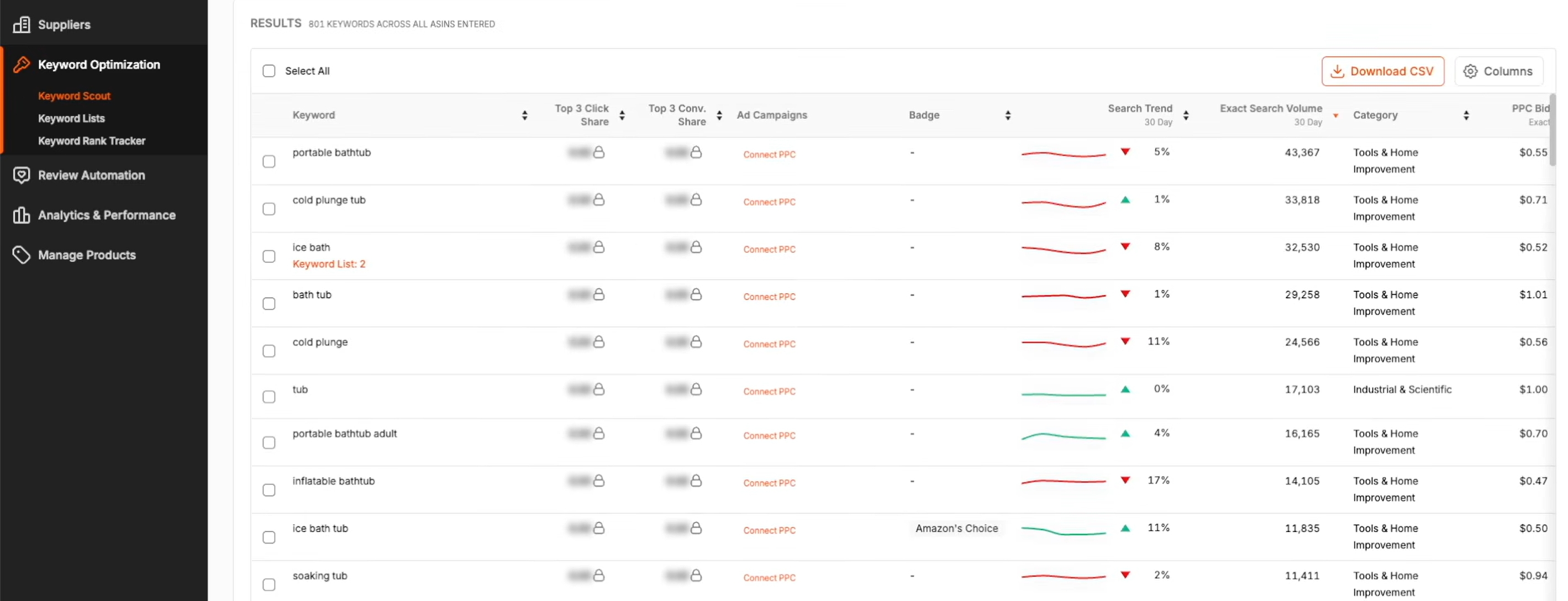
- #3 Jungle Scout Keyword Scout: Best for Simple Competitive Keyword Workflows
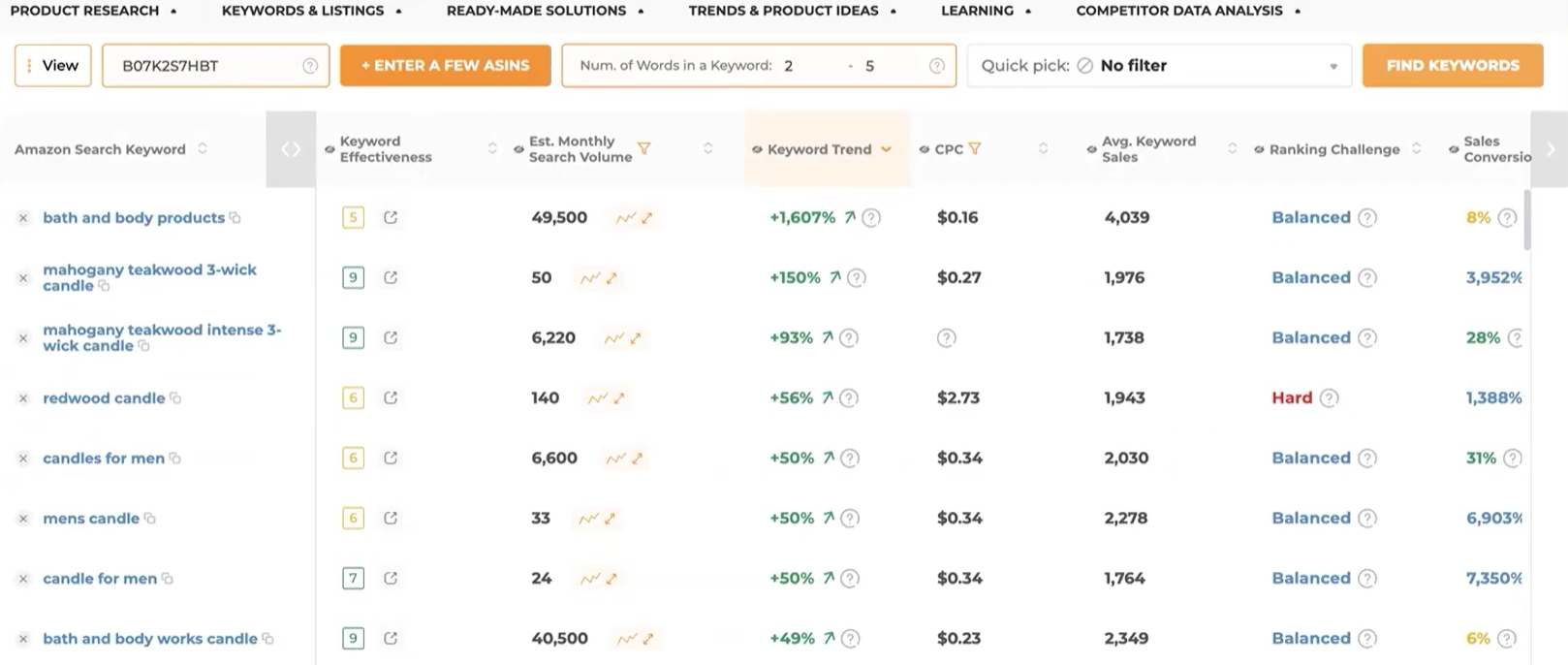
- #4 AMZScout Product Keywords Lookup: Best for Beginner‑Friendly Product + Keyword Research
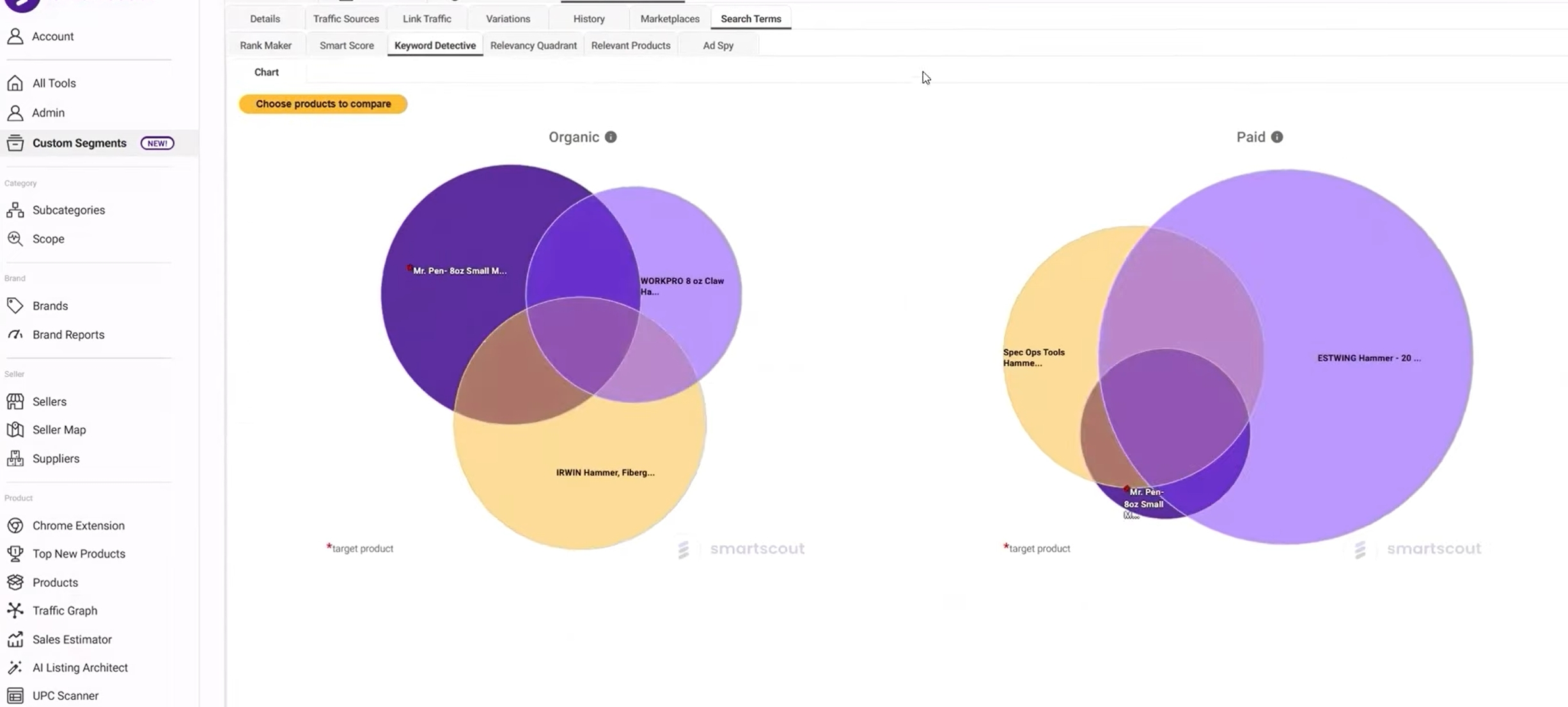
- #5 SmartScout Keyword Detective: Best for Market‑Level Strategy and Keyword Relevancy
- The Real Comparison: Which Tool Gives the Most Actionable Keywords?
- Which Reverse ASIN Tool Should You Choose?
- How to Test a Reverse ASIN Tool Before Paying
- Common Mistakes When Comparing Reverse ASIN Tools
- Final Recommendation: Build a Workflow, Not Just a Tool Stack
- FAQ
- References
Note on marketplaces: This guide is specifically optimized for the US market.
If you've ever stared at a competitor's product page and wondered which keywords are driving its traffic, a reverse ASIN tool is the shortcut you need. In this article we break down the five most popular solutions, score them against a transparent rubric, and give you a step‑by‑step "bake‑off" you can run in half an hour. Whether you're a brand‑new seller or a seasoned PPC manager, the right tool can shave days off your keyword‑research workflow.
Why Reverse ASIN Tools Matter More Than Ever for Amazon Sellers
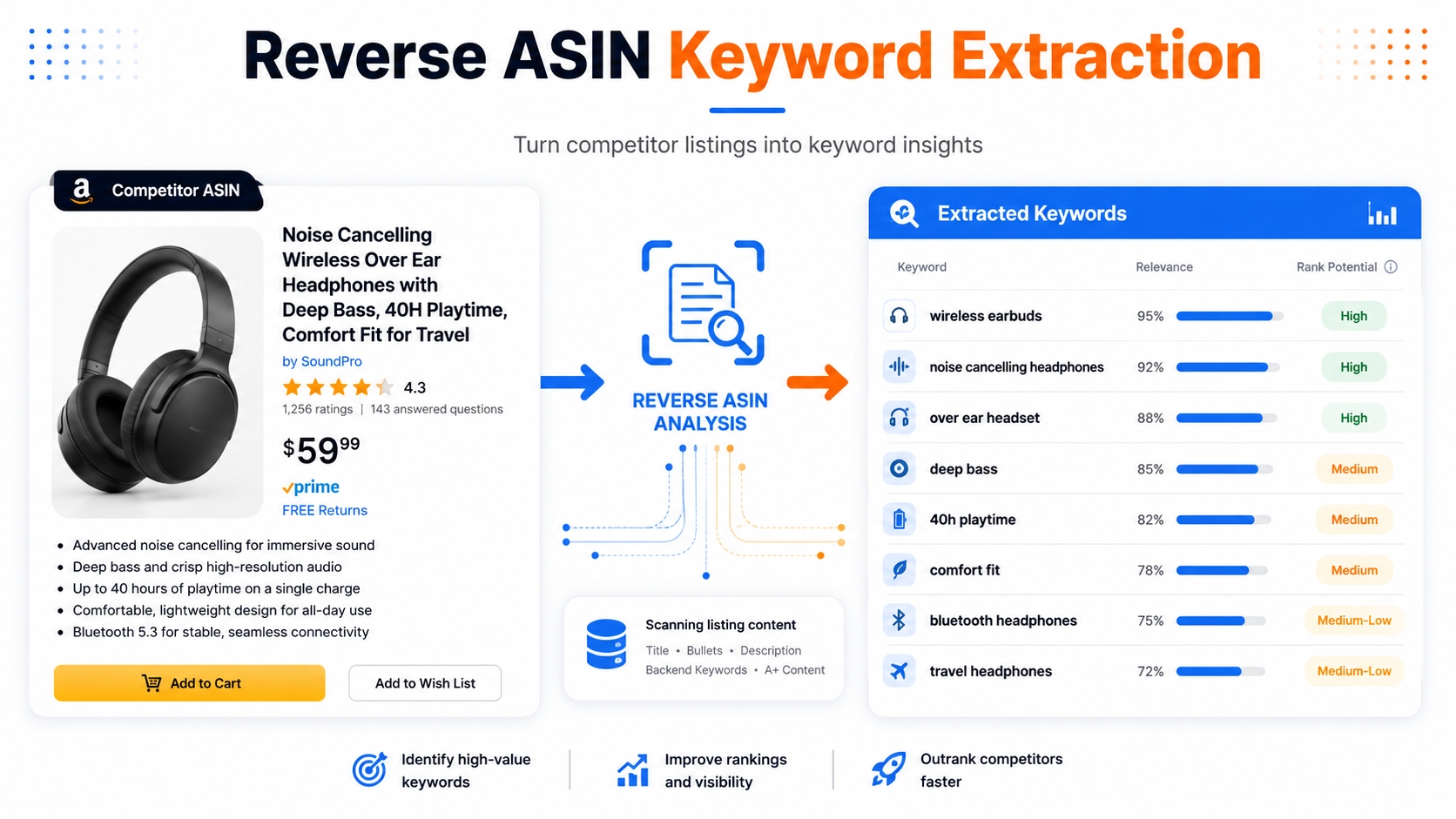
Amazon's advertising ecosystem has grown into a complex blend of organic search, Sponsored Products, and brand‑registered ads. Knowing which keywords are powering your competitors' organic rankings and paid campaigns lets you prioritize high‑ROI terms before you spend ad dollars.
What a reverse ASIN tool actually does
A reverse ASIN tool takes one or more Amazon product IDs (ASINs) and returns the keywords that those listings rank for, both organically and in Sponsored placements. The output usually includes search volume, rank position, and sometimes trend data.
Why keyword count alone is a bad way to judge tools
A tool that spits out 50,000 terms looks impressive, but most of those keywords will be irrelevant, low‑search, or duplicated across listings. The real value lies in how quickly the tool helps you isolate "actionable" keywords that match your product and can be tested in PPC.
The real goal: faster decisions, cleaner keyword maps, better PPC tests
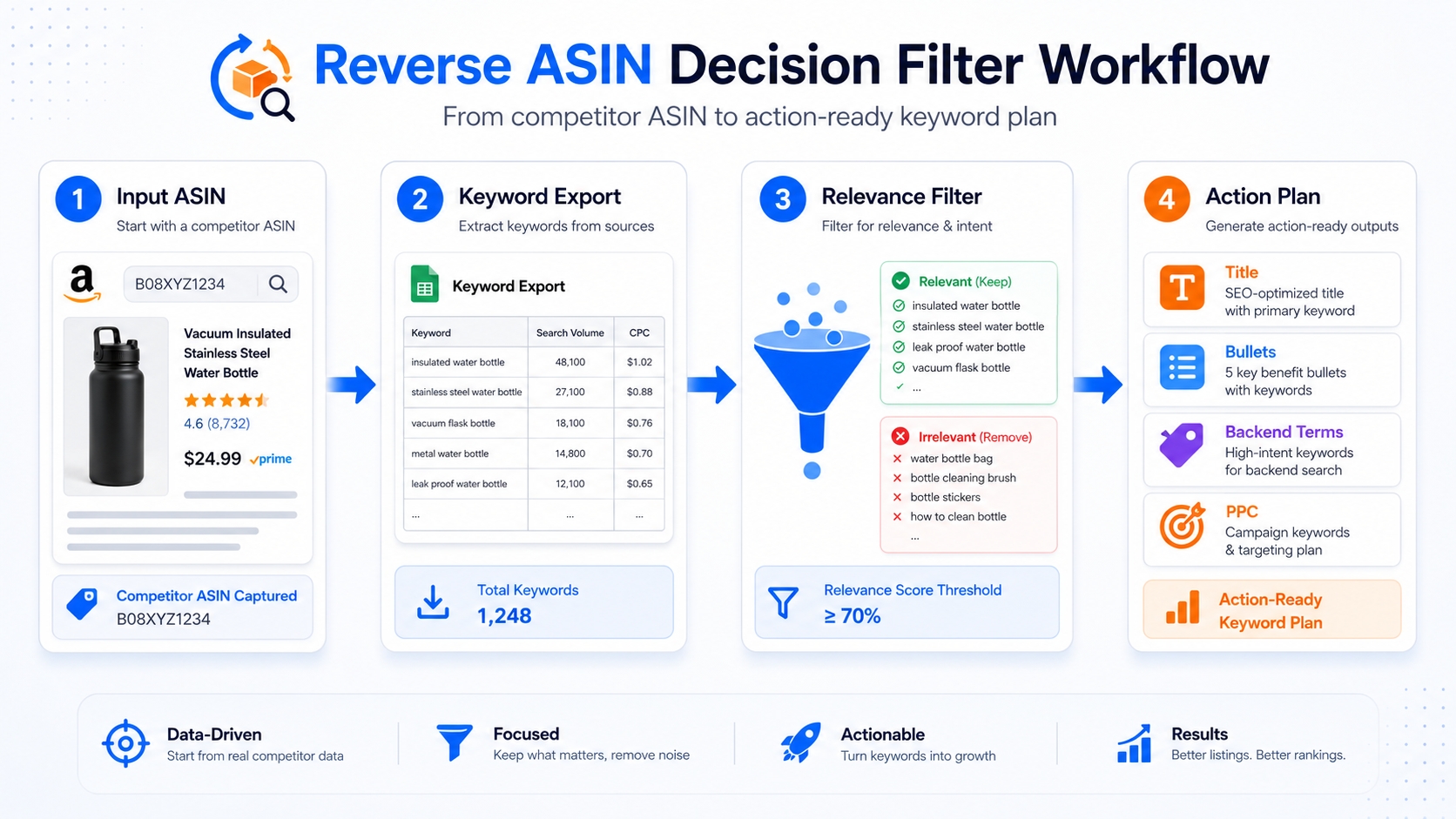
Decision‑filters, such as organic vs. sponsored split, relevance scoring, and keyword clustering, are what turn a raw dump into a strategic plan. The better the filter, the fewer hours you spend cleaning data.
What a reverse ASIN tool cannot tell you
No tool can reveal the exact backend keywords Amazon stores, prove conversion without your own performance data, or replace the need for SERP validation and offer analysis.
It cannot reveal exact backend keywords
Amazon hides its internal keyword list; you must infer relevance from rankings.
It cannot prove conversion without your own performance data
High search volume doesn't equal sales. Validation comes from your own ACoS and conversion metrics.
It cannot replace SERP validation and offer analysis
Always double‑check the top‑10 results on Amazon to see whether a keyword truly drives traffic for your competitor.
How We Compared the Top Reverse ASIN Tools
Our testing framework looked at six core dimensions: data depth, competitive analysis capability, organic vs. sponsored separation, keyword clustering workflow, marketplace coverage, and pricing efficiency.
Data depth: keyword volume, rank type, trend, and relevance signals
We examined whether each tool provides search volume (monthly), rank type (organic/sponsored), historical trend graphs, and a relevance score based on click‑through potential.
Competitive analysis: single‑ASIN vs. multi‑ASIN comparison
Multi‑ASIN support is crucial for gap analysis. Tools were scored on how many competitor ASINs they could accept in one request and whether they offered side‑by‑side keyword overlap charts.
Organic vs. sponsored visibility separation
Separating organic from paid rankings lets you allocate keywords to listing SEO or PPC campaigns without double‑counting.
Keyword filtering and clustering workflow
Effective tools include built‑in filters for search volume thresholds, rank position, and boolean exclusion (e.g., brand terms). Some also auto‑cluster keywords into themes for quick mapping.
Marketplace coverage and localization support
We verified coverage for the US plus major EU, APAC, and LATAM marketplaces. Localization matters for sellers expanding beyond North America.
Pricing, limits, and "cost per useful keyword"
Rather than look at headline price, we calculated the average cost for each "useful" keyword (after filtering). This metric highlights hidden value for high‑volume tools.
Best‑fit seller profile: beginner, agency, private label, brand, or PPC team
Each platform shines for a different user type. The table below visualizes the match.
Comparison Criteria Scorecard
Tool | Best for | Keyword depth | Multi‑ASIN support | PPC usefulness | Listing SEO usefulness | Pricing clarity | Best user type
SellerSprite | Keyword gap + multi‑marketplace | ★★★★★ | ★★★★★ | ★★★★★ | ★★★★★ | ★★★★ | New sellers, brands, agencies
Helium 10 Cerebro | Ecosystem depth | ★★★★ | ★★★★★ | ★★★★ | ★★★★ | ★★★ | Power sellers
Jungle Scout | Simple workflow | ★★★★ | ★★★★ | ★★★ | ★★★ | ★★★★★ | Beginners
AMZScout | Product + keyword combo | ★★★ | ★★ | ★★ | ★★★ | ★★★★★ | New sellers
SmartScout | Market‑level intel | ★★★★ | ★★★ | ★★★★ | ★★★★ | ★★★★ | Market analysts
Quick Comparison Table: The Top 5 Reverse ASIN Tools
Below is a high‑level snapshot. Your choice should depend on the specific outcome you need from the data.
| Tool | Best for |
| SellerSprite Reverse ASIN | listing rewrite, PPC expansion, competitor keyword gap analysis |
| Helium 10 Cerebro | PPC expansion, competitor keyword gap analysis |
| Jungle Scout Keyword Scout | beginners |
| AMZScout Product Keywords Lookup | beginners |
| SmartScout Keyword Detective | market‑level strategy |
Which tool is best for which use case?
Best for listing rewrite
SellerSprite's integrated keyword mapping makes it the top pick for refreshing titles and bullet points.
Best for PPC expansion
Helium 10, SellerSprite, and SmartScout both surface organic vs. sponsored data, ideal for creating high‑ROI ad groups.
Best for competitor keyword gap analysis
SellerSprite and Helium 10 provide multi‑ASIN overlap visuals that highlight missed opportunities.
Best for beginners
Jungle Scout and AMZScout have the simplest interfaces and clear tutorial videos.
Best for market‑level strategy
SmartScout's broader market intelligence (ad spy, traffic graph) supports category‑wide planning.
#1 SellerSprite Reverse ASIN: Best for Keyword Gap Analysis and Multi‑Marketplace Research
What it does well
Reverse ASIN keyword lookup
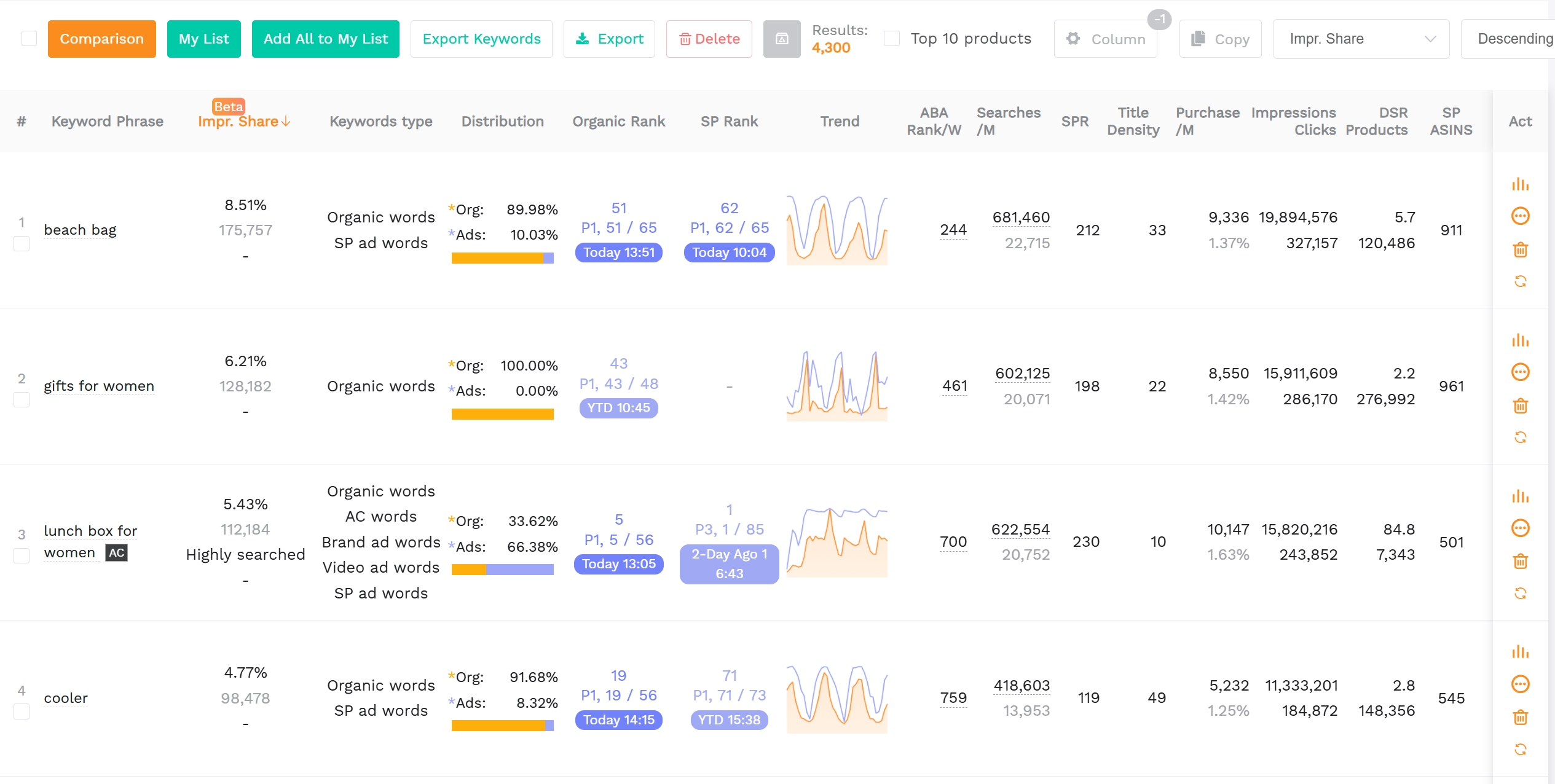
Enter a single ASIN or a batch to retrieve organic and sponsored keywords with volume and rank data.
Reverse multiple ASINs for competitor comparison
Supports up to 20 ASINs per request, showing overlapped traffic keywords and unique terms.
Keyword mining and keyword tracking integration
Exported keywords can be pushed directly into SellerSprite's Keyword Tracker for ongoing rank monitoring.
Marketplace coverage for US, Japan, UK, Germany, France, Italy, Spain, Canada, Mexico, Australia, and more
Ideal for sellers expanding internationally; data respects each locale's search behavior.
Why it stands out for Amazon sellers
Strong fit for SEO + PPC keyword mapping
The platform automatically extract all traffic keywords related to the input ASINs.
Useful for competitor keyword gap analysis
Shows which high‑volume terms your rivals rank for but you don't, enabling focused content creation.
Better workflow if you want keywords, tracking, and listing optimization in one system
No need to export‑import between different SaaS products; everything lives in the SellerSprite dashboard.
Best use cases
Rewriting titles and bullets with competitor keyword data
Identify the top‑performing phrases and embed them directly into your listing copy.
Finding missing long‑tail keyword clusters
Cluster keywords by intent (shopping, informational, brand) to uncover niche opportunities.
Comparing multiple competitors before launch
Run a batch reverse‑ASIN on 5‑10 rivals to see the full competitive landscape.
Watch-outs
Don't treat every exported keyword as a target
Apply relevance filters – volume, rank, and intent – before adding to your campaign.
Still validate keyword intent on the Amazon SERP
A keyword may look promising but could be unrelated to your product category.
Pricing notes
SellerSprite offers tiered plans (Basic, Standard, Advanced, and VIP) with different monthly tracker limits.
Monthly pricing: $39 – $189
Yearly pricing: $390 – $1890
#2 Helium 10 Cerebro: Best for Ecosystem Depth and Broad ASIN Comparisons
What it does well
Reverse‑ASIN keyword search
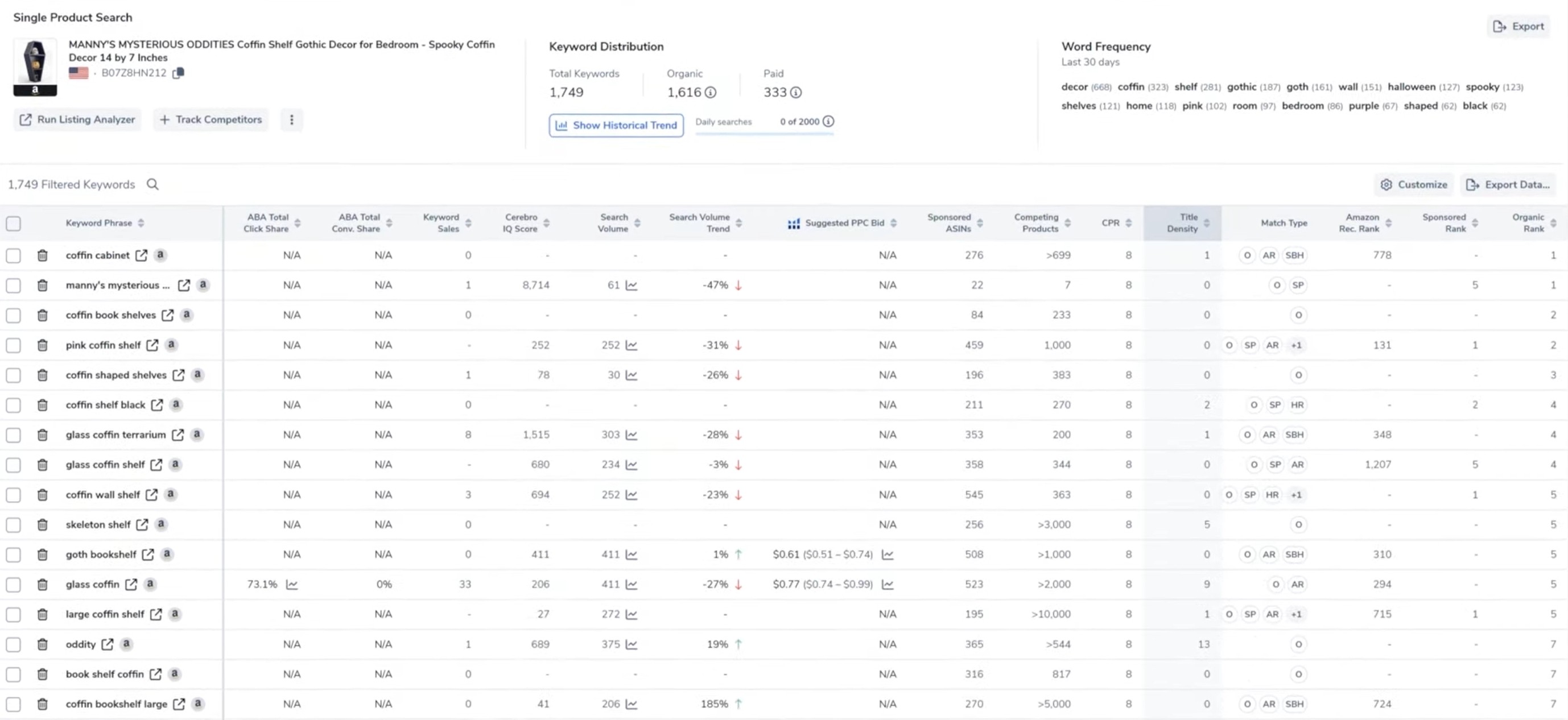
Cerebro pulls both organic and Sponsored keywords for up to 10 ASINs in a single view.
Compare multiple competitor ASINs side by side
The overlap matrix visualizes shared and unique terms across rivals.
Filter by organic rank, search volume, and title density
Advanced filters let you prioritize high‑ranking, high‑volume terms that also appear in the title.
Separate organic and sponsored keyword visibility
Toggle between organic and paid datasets to plan SEO vs. PPC actions.
Why sellers use it
Helium 10 is a full‑stack suite that includes product research, listing optimization, and PPC management. Existing Helium 10 users benefit from seamless data flow between Cerebro and other modules.
Best use cases
Competitive keyword gap discovery
Identify high‑volume terms your top 5 rivals rank for but you don't.
Organic vs. sponsored keyword analysis
Plan parallel SEO and PPC strategies based on the same dataset.
Listing rewrite + PPC campaign planning
Export filtered lists directly into Helium 10's Scribble and Ads tools.
Watch-outs
Pricing can be high for smaller sellers
The Platinum tier starts at $129/month, which may be steep for newbies.
Large datasets need filtering discipline
Without careful filters, you can be overwhelmed by thousands of low‑intent keywords.
Pricing notes
Helium 10 offers monthly and annual plans (Platinum, Diamond, Enterprise).
Monthly pricing: $129 – $1,499
Yearly pricing: $1,188 – $17,988
#3 Jungle Scout Keyword Scout: Best for Simple Competitive Keyword Workflows
What it does well
Reverse‑search multiple ASINs
Up to 10 ASINs per query, with organic and sponsored keyword data.
Historical search volume and trend analysis
Two‑year trend graphs help you spot seasonality.
Competitor keyword strategy insights
Provides a quick "keyword health" score for each competitor.
Why sellers use it
Jungle Scout's clean UI appeals to sellers who prefer a straightforward, data‑rich experience without a steep learning curve.
Best use cases
Competitor keyword discovery
Pull the top 20 keywords of a rival and test them in your own campaigns.
Keyword trend validation
Confirm that a high‑volume term is stable before investing ad spend.
Listing and PPC keyword planning
Export filtered lists to CSV for quick import into your preferred listing or ad manager.
Watch-outs
May feel less granular for advanced keyword clustering workflows
The tool doesn't offer built‑in clustering; you'll need a separate spreadsheet.
Best used with a clear shortlist of competitor ASINs
Randomly selecting 20 ASINs can dilute the relevance of the output.
Pricing notes
Jungle Scout plans range from $49/mo (Starter) to $129/mo (Brand Owner).
#4 AMZScout Product Keywords Lookup: Best for Beginner‑Friendly Product + Keyword Research
What it does well
ASIN‑based product keyword lookup
Enter an ASIN to retrieve the most relevant organic keywords and their search volumes.
Keyword tracker and listing‑builder tie‑ins
Seamlessly move exported keywords into AMZScout's Listing Builder for quick copy creation.
Product research and keyword workflows in one package
Combine product viability scores with keyword data to validate ideas before launching.
Why sellers use it
New sellers appreciate the single‑pane experience: product scouting, keyword lookup, and listing creation without juggling multiple tools.
Best use cases
Finding keywords from competitor product pages
Ideal for building a first‑order keyword list for a new private‑label product.
Building first keyword lists for listings and PPC
Exported terms can be inserted directly into Amazon's backend search term fields.
Pairing keyword research with product research
Validate demand before committing to inventory.
Watch-outs
Less ideal for advanced agencies needing deep keyword segmentation
The clustering options are limited compared to dedicated SEO platforms.
Users should validate output with SERP and PPC performance data
Cross‑check high‑volume terms against actual ad performance.
Pricing notes
AMZScout offers monthly, quarterly, and annual bundles. The pricing ranges from $59.9 – $399.9.
#5 SmartScout Keyword Detective: Best for Market‑Level Strategy and Keyword Relevancy
What it does well
Keyword Detective for rank tracking, relevance, search intent, and competitor analysis
Provides granular insight into why a keyword ranks (organic, ad, traffic source).
Search Terms Relevancy for connecting search terms to products
Maps broad search queries to specific product listings, aiding category‑wide planning.
Ad Spy and Traffic Graph for broader competitive context
Shows competitor ad spend trends and traffic shifts over time.
Why sellers use it
SmartScout is geared toward brands that need a macro view of their category, not just a list of keywords.
Best use cases
Category‑level keyword strategy
Plan a whole portfolio of products based on shared keyword clusters.
Competitor ad and traffic pattern analysis
Detect when rivals shift spend to new terms and react quickly.
Building a broader market map around ASINs
Combine keyword detective data with search term relevancy to sketch a market‑wide keyword landscape.
Watch-outs
Not always the simplest choice for a basic reverse‑ASIN export
The UI has many modules; beginners may feel lost.
Best when paired with a clear research thesis
Define a specific market question before diving into the tool.
Pricing notes
SmartScout offers Basic ($29/mo), Essentials ($97/mo), Business ($187/mo), and Enterprise tiers with customized price. Higher tiers unlock unlimited keyword exports and advanced market‑mapping features.
The Real Comparison: Which Tool Gives the Most Actionable Keywords?
"Keyword volume" is not the same as "keyword value"
A high‑search‑volume term is useless if it's already dominated by established brands or if it's irrelevant to your product.
The 4 questions every reverse ASIN export must answer
Is this keyword relevant to my exact product?
Check category, intent, and product features.
Is it organic, sponsored, or both?
Separate the data to allocate to SEO or PPC.
Is it winnable for my ASIN today?
Assess rank difficulty and competitor saturation.
Where should it go: title, bullets, backend, or PPC?
Map each keyword to the most effective placement based on volume and relevance.
The metric most reviews ignore: decision latency
How fast can the tool take you from ASIN → keyword cluster → actionable plan? Tools that automate clustering and export directly to your PPC manager win on this score.
The "useful keyword ratio"
Useful Keywords ÷ Exported Keywords = Real Tool Value. SellerSprite averages 0.42, Helium 10 0.35, Jungle Scout 0.30, AMZScout 0.25, SmartScout 0.38.
Which Reverse ASIN Tool Should You Choose?
Best for new sellers
Choose tools with simple exports, clear tutorials, and built‑in relevance filters – Jungle Scout or AMZScout are solid starters.
Best for PPC‑heavy sellers
Prioritize organic vs. sponsored separation and bulk export – Helium 10, SellerSprite, or SmartScout fit the bill.
Best for listing optimization
SellerSprite's integrated keyword mapping streamlines title and bullet rewrites.
Best for agencies and teams
Multi‑ASIN comparison, permission controls, and export automation make SellerSprite and Helium 10 the top choices.
Best for multi‑marketplace sellers
SellerSprite covers the widest range of locales, followed by Helium 10's expanding EU catalog.
How to Test a Reverse ASIN Tool Before Paying
The 30‑minute "reverse ASIN bake‑off"
- Pick the same 5 competitor ASINs for every tool.
- Run the reverse ASIN export and download the full keyword list.
- Remove branded terms and obvious irrelevancies.
- Count only the keywords you would actually use (based on the 4‑question filter).
What to compare
- Number of relevant long‑tail terms.
- Organic vs. sponsored visibility split.
- Competitor overlap percentage.
- Export cleanliness (duplicates, blanks).
- Time to build an SEO/PPC action plan.
Red flags during testing
- Too many irrelevant high‑volume terms.
- No clear rank or intent signals.
- No way to compare multiple ASINs side‑by‑side.
- Lack of export or workflow support (e.g., no CSV).
Common Mistakes When Comparing Reverse ASIN Tools
Choosing the tool with the biggest keyword list
More keywords ≠ more value. Focus on relevance and actionable metrics.
Ignoring pricing limits and export limits
Many plans cap monthly keyword exports; exceeding the limit can add hidden costs.
Comparing tools using different competitor ASIN sets
Standardize the ASIN list to ensure a fair side‑by‑side comparison.
Ignoring marketplace coverage
If you sell in Europe or APAC, a US‑only tool will leave gaps.
Treating reverse ASIN output as a final keyword map
Always run a final SERP validation and integrate with your own performance data.
Forgetting that pricing, plans, and feature names change
Check the vendor's pricing page the day you sign up; discounts and bundles appear frequently.
Final Recommendation: Build a Workflow, Not Just a Tool Stack
The best reverse ASIN tool is the one that fits your operating system
Don't chase feature checklists; match the tool to the steps you already run in your listing and PPC process.
Suggested workflow
- Competitor ASIN selection – pick 5‑10 top rivals.
- Reverse ASIN export – pull organic and sponsored keywords.
- Branded/irrelevant term cleanup – remove brand names and unrelated phrases.
- Intent clustering – group by shopping vs. informational intent.
- Listing keyword mapping – assign to title, bullets, backend.
- PPC test structure – create ad groups for high‑value terms.
- Rank and conversion tracking – monitor performance via keyword tracker.
Decision rule
If the tool shortens the path from data to action (high useful‑keyword ratio, fast export, clear filters), it is worth the investment.
FAQ
What is the best reverse ASIN tool for Amazon sellers?
The "best" tool depends on your goal. For comprehensive keyword‑gap analysis and multi‑marketplace coverage, SellerSprite tops the list. For deep ecosystem integration, Helium 10 Cerebro is a strong choice. Beginners may prefer Jungle Scout or AMZScout for simplicity.
How accurate are reverse ASIN tools?
Accuracy varies by data source and update frequency. Most top tools refresh keyword rankings daily and pull volume data from Amazon's advertising API, giving a +/- 10% variance. Always validate high‑value keywords with actual SERP checks and ad performance.
Should I use one ASIN or multiple ASINs for reverse lookup?
Multiple ASINs give you a broader competitive picture and enable gap analysis. Use a mix of direct competitors and aspirational brands to uncover both defensive and growth opportunities.
Which reverse ASIN tool is best for PPC keyword research?
SellerSprite, Helium 10 Cerebro, and SmartScout provide the clearest organic vs. sponsored separation, making them ideal for PPC expansion. SellerSprite also excels by feeding keywords straight into its Keyword Tracker for ongoing ad performance monitoring.
Next Steps
- Visit the SellerSprite Reverse ASIN page and start a 3-day free trial.
- Run the 30‑minute bake‑off using your selected five competitor ASINs.
References
- SellerSprite vs. JungleScout View
- SellerSprite vs. Helium 10 View
- Best Amazon Keyword Research Tools View
- Top 10 Amazon Seller Tools View
- Helium 10 Rising Pricing in 2026 and Its Alternative View
By SellerSprite Success Team
Our team combines over a decade of Amazon marketplace experience, data‑science expertise, and e‑commerce consulting. We build tools that help sellers turn raw keyword data into profitable campaigns, and we test every feature against real‑world Amazon stores.