If you have been selling FBA for more than a few months, chances are Amazon owes you money, and you may not even notice. Amazon FBA reimbursements exist to pay you back when inventory goes missing, gets damaged, returns are mishandled, or fees are charged incorrectly. This guide is built for experienced US and EU Amazon FBA sellers who want a repeatable system to get money back from Amazon with a clean workflow, plus an Amazon reimbursement tool approach using SellerSprite.
Reimbursement rules and timelines can vary slightly between marketplaces like the US, UK, and EU, but the core logic is the same. If you run audits consistently and document well, you can recover real cash flow and protect margins instead of leaving silent losses behind.
Key takeaways
- Most missed reimbursements live in the gaps between reports, not inside one report.
- Claim windows have tightened, so a monthly close beats an annual cleanup.
- A strong workflow is always: find the discrepancy, validate the report trail, then confirm the money in Payments.
- Fee overcharges often look legitimate until you compare dimensions and fee tiers.
- SellerSprite can help you run a more consistent reimbursement audit routine and track what is still unresolved.
- Never file weak or duplicate claims. Account health is worth more than one reimbursement win.
Table of contents
- What Are Amazon FBA Reimbursements?
- 8 Common FBA Reimbursement Types You Might Miss
- DIY Amazon FBA Reimbursement Step by Step in Seller Central
- When to Use FBA Reimbursement Tools Instead of DIY
- How SellerSprite Helps You Automate Amazon FBA Reimbursements
- Tips for Managing Reimbursements Proactively
- FAQ: Amazon FBA Reimbursements
- Conclusion: Do Not Leave Money on the Table
- About the author
- References
What Are Amazon FBA Reimbursements?
Understanding Inventory Errors and Refund Discrepancies
Amazon FBA reimbursements are payments Amazon issues when Amazon is responsible for a financial discrepancy. In practice, that usually falls into two buckets.
- Inventory issues: units lost, damaged, or mishandled while under Amazon control.
- Transaction issues: returns and refunds that never reconcile correctly, plus fee miscalculations.
Some events are reimbursed automatically, but many sellers still find unresolved gaps, especially when the evidence is spread across multiple reports. In short, if you do not audit, you do not know whether Amazon paid you fully, partially, or not at all.
Why Reimbursements Matter
Reimbursements are operational hygiene. On multi-SKU catalogs, high return categories, or high volume replenishment, missed reimbursements become a silent tax that drains cash flow and distorts true SKU profitability.
- Cleaner cash flow and reorder cycles
- More accurate contribution margin per SKU
- Better inventory accuracy for forecasting and restocking
- Less operational chaos as you scale
In short, reimbursements are not just about finding a one-time FBA refund. They are about building a system that keeps profit leakage under control.
8 Common FBA Reimbursement Types You Might Miss
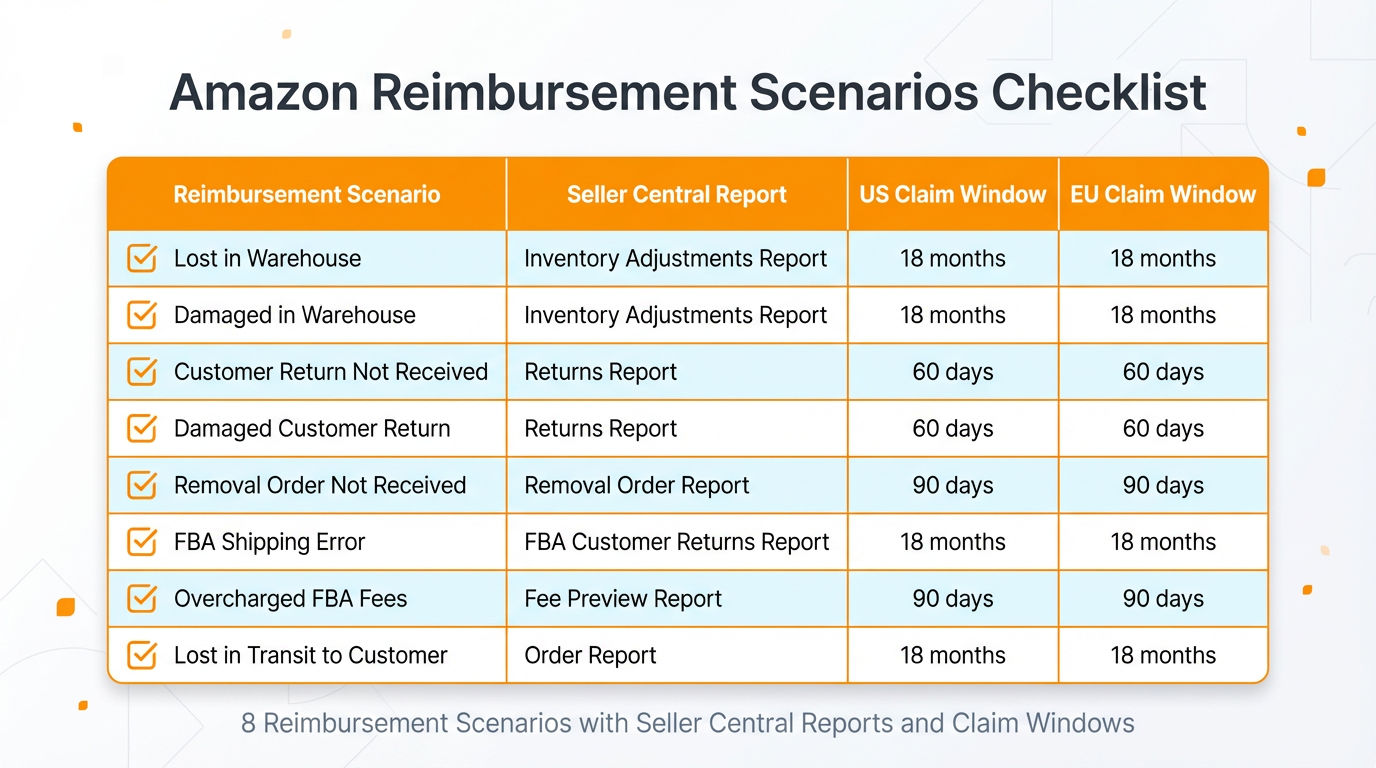
Use this checklist to scan for the most common places where Amazon owes you money. Timelines can differ by marketplace, so treat the windows below as practical guidance and always confirm the exact window inside your Seller Central policy pages.
Two anonymized seller examples
US home and kitchen seller with a 300+ SKU catalog ran a monthly audit routine and recovered $18,300 over 12 months. The biggest wins came from customer refunds not returned and inbound shipment discrepancies.
EU beauty seller noticed a sudden fulfillment fee jump after a remeasurement and found repeated overcharges. After documenting packaging dimensions and disputing the fee tier, they recovered about $4,120 in 90 days and prevented future overcharges on the same SKU.
DIY Amazon FBA Reimbursement Step by Step in Seller Central
Using Amazon's Reports
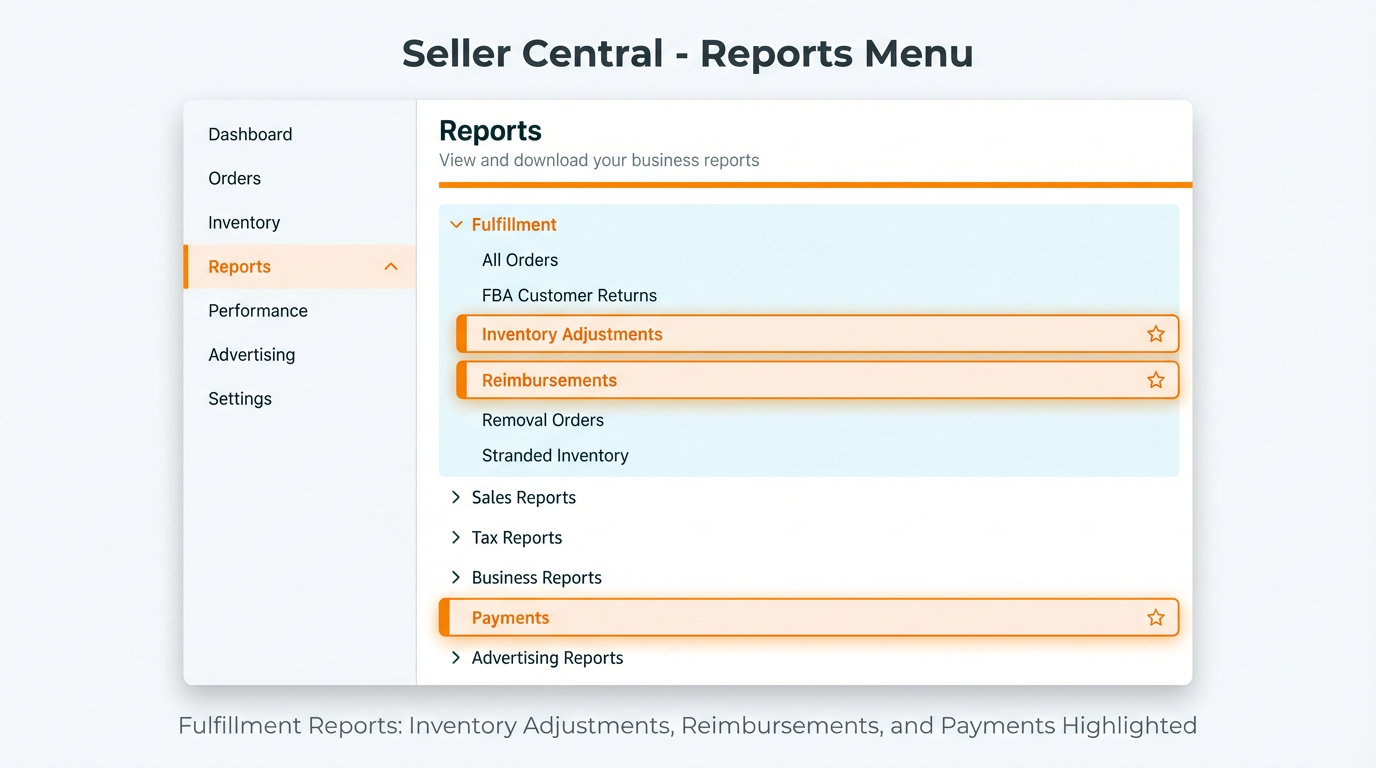
A manual audit works, but only if you stop thinking in single reports. Most missed reimbursements show up when you reconcile Inventory Adjustments, Reimbursements, and Payments together.
- Inventory Adjustments: find units removed as lost, damaged, disposed of, or other adjustments that reduce on-hand inventory.
- Reimbursements: confirm whether Amazon issued reimbursement events for those discrepancies.
- Payments: verify that the money actually hit your account, and the amount matches the expectation.
Advanced operator move: build a simple reconciliation habit. Every discrepancy should lead to an answer: reimbursed, partially reimbursed, denied, or still unresolved.
Filing a Claim Step by Step
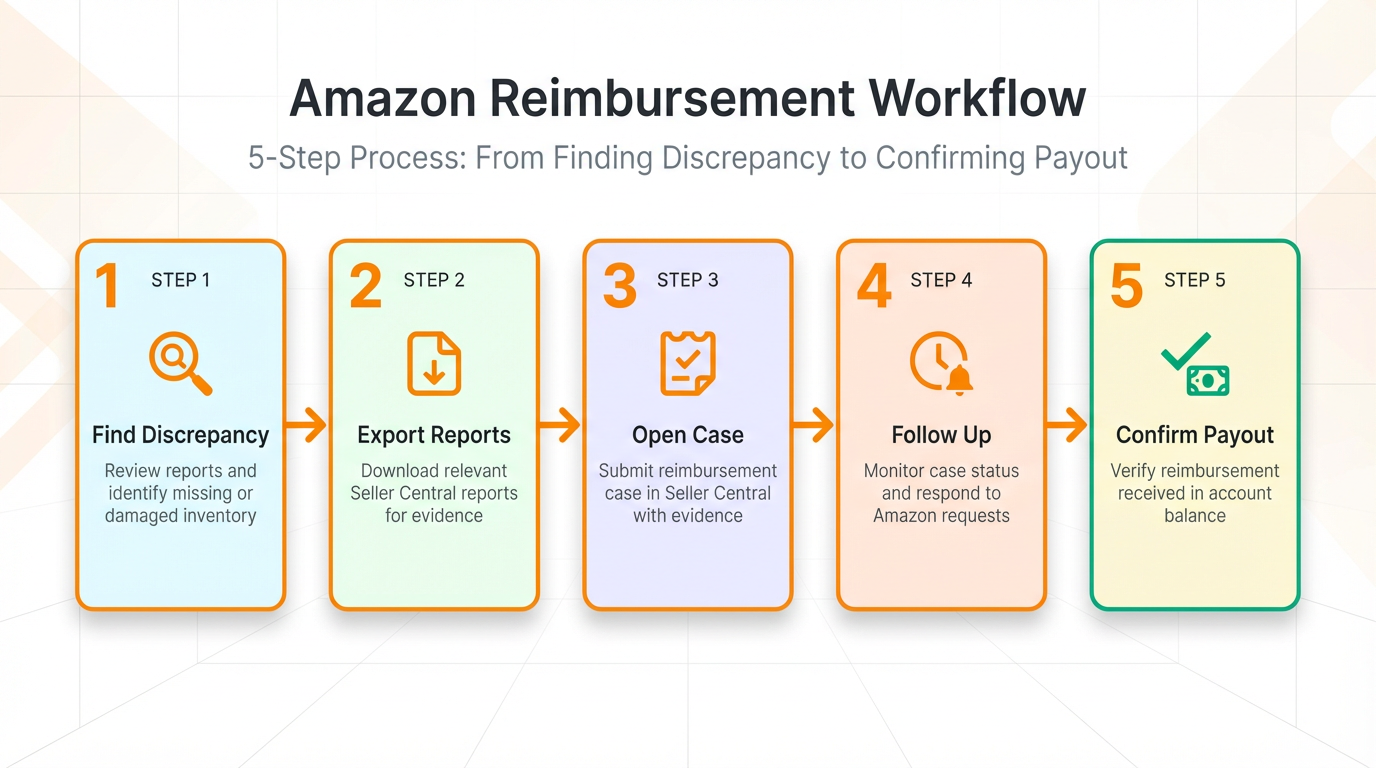
- Define the issue clearly. Note the SKU, ASIN, FNSKU if relevant, the event type (lost, damaged, return not resolved, fee dispute, inbound discrepancy), the dates, and units impacted.
- Export evidence from the right reports. Attach the exact lines from Inventory Adjustments and the matching date range from Reimbursements. For inbound issues, include shipment ID detail and proof of delivery when available.
- Open the case and request one specific resolution. Ask for the action you want: issue reimbursement, correct reimbursement amount, or review fee tier.
- Track the case outcome like a finance close. Record the case ID, result, and the final payout in Payments so you can measure recovery over time.
- Follow up professionally. If denied, respond directly to the reason with stronger documentation and clean timelines.
Pro tip
Keep your case message short. Amazon support processes faster when your claim reads like a structured audit note, not a long story.
Common mistake
Filing claims without reconciling Payments. You might win the case event but still miss that the payout amount was lower than expected.
Time Limits and Policy
Time limits are where most sellers lose money. Claim windows have tightened, and some reimbursement scenarios require action quickly. That is why reimbursements should run like a recurring operational close, not an occasional cleanup project.
In short, if you have been selling FBA at scale, you need a routine that catches issues before they expire.
When to Use FBA Reimbursement Tools Instead of DIY
How Automation Tools Work
A good FBA reimbursement tool does not magically invent reimbursements. It makes the workflow easier to execute consistently by scanning for patterns, organizing documentation, tracking open cases, and reminding you to stay inside claim windows.
Think of it as the difference between random spot checks and a real audit process. Consistency is where most recovery dollars come from.
Costs vs. Benefits
Reimbursements are a classic trade of time versus recovered money. Manually, you pay with attention and hours. With tooling, you pay for speed and consistency.
- Manual approach: lower direct cost, higher time cost, higher risk of missed windows at scale.
- Tool-supported approach: faster audits, better organization, more consistent recovery, easier tracking over time.
The simplest way to evaluate ROI is to treat reimbursements like a profit center. Track recovered dollars each month, compare against time spent, then decide how much you want to automate.
How SellerSprite Helps You Automate Amazon FBA Reimbursements
SellerSprite is built to support a repeatable reimbursement routine. Instead of digging only when cash feels tight, you can run structured audits and track what is still unresolved.
A simple 4-step workflow you can run every month
- Connect your workflow. Keep your reports organized by date range and claim type.
- Audit for discrepancies. Identify the mismatches worth reviewing before deadlines expire.
- Generate clean documentation. Build a case-ready evidence pack per issue type.
- Track outcomes. Log case IDs, results, and recovered amounts to measure ROI over time.
SellerSprite FBA Reimbursement Assistant
SellerSprite FBA Reimbursement Assistant is designed to support a consistent reimbursement review routine. It helps you identify common FBA discrepancies worth reviewing, organize documentation faster, and track your reimbursement workflow as a repeatable habit.
SellerSprite Business Dashboard
Reimbursements are easier to catch when you spot inventory anomalies early. The SellerSprite Business Dashboard helps you monitor key signals in one place, including SKU-level trends that can hint at inventory issues, unexpected stock drops, or operational inconsistencies that deserve a deeper look.
SellerSprite Product Tracker and Browser Extension
When a SKU suddenly behaves differently, the fastest operators investigate immediately. SellerSprite Product Tracker and the SellerSprite Browser Extension help you validate changes quickly, cross-check listing status, and keep an eye on product signals that can correlate with reimbursement-eligible events.
Share Your Sourcing Journey With SellerSprite Community
Join the SellerSprite community on the Facebook Group to share your sourcing journey, ask questions, and get support from fellow Amazon sellers.
Tips for Managing Reimbursements Proactively
Regularly Audit Your Account
Because claim windows can be short, the winning strategy is frequency. Set a schedule that matches your volume and stick to it.
- High volume catalogs: weekly quick checks, monthly deep dive.
- Mid volume catalogs: biweekly checks.
- Smaller catalogs: monthly checks.
The point is not perfection. The point is consistency.
Keep Good Records
Strong reimbursements are built on clear evidence. Keep shipment records, proof of delivery, carton labels, and report exports organized by date range and shipment ID.
In short, documentation is leverage. Better proof usually means faster outcomes.
Stay Within Amazon's Rules
Treat reimbursements like compliance, not combat. File only claims you can support. Avoid duplicate claims, do not inflate numbers, and do not submit cases without evidence. Protecting your account health is always more valuable than winning one dispute.
FAQ: Amazon FBA Reimbursements
Am I eligible for Amazon FBA reimbursements?
If you sell via FBA and have inventory movements, returns, or fee changes, you likely have eligible scenarios over time. Eligibility depends on the event type, your account standing, and whether the claim is filed within the allowed window.
How far back can I claim reimbursements?
Windows vary by claim type and marketplace. Some scenarios require action quickly, so assume the safest approach is to audit monthly and file promptly once an issue becomes eligible to submit.
Is it safe to connect reimbursement tools to Seller Central?
Always follow Amazon policies, use reputable tools, and limit permissions to what is required for reporting workflows. Internally, keep access managed like finance operations and review permissions regularly.
How much does SellerSprite charge for reimbursement recovery?
Pricing can depend on your plan and how you use the workflow. The practical way to decide is to compare your recovered dollars and time saved against the plan cost, then scale the process if the ROI is clear.
Conclusion: Do Not Leave Money on the Table
Every Dollar Counts in E-commerce
Mature sellers win on systems. If you already optimize listings and ads, reimbursements are the next layer of profit protection. Amazon FBA reimbursements are real money that can stabilize margins and fund growth initiatives you control.
Take Action
Pick one move today:
- Run a quick manual check in Seller Central using Inventory Adjustments, Reimbursements, and Payments.
- Start a monthly reimbursement close routine and track outcomes.
- Use SellerSprite to keep the workflow consistent and reduce missed opportunities.
Doing nothing has a cost. The sellers who build a routine are the ones who consistently get money back from Amazon, recover missed FBA refund dollars, and keep operations clean as they scale.
View The SellerSprite Course Directory
Ready for the next step? Open the SellerSprite Academy course directory to continue building your Amazon FBA skills chapter by chapter.
About the author
SellerSprite Team. SellerSprite is an Amazon seller platform used by 1.6M+ registered sellers worldwide, with 700K+ browser extension installs, refined over 8+ years of product and workflow iteration. We publish step-by-step playbooks to help sellers build repeatable operating systems, from research and listing optimization to reimbursement routines and profit protection.


