TL;DR: Understanding keyword match types—broad, phrase, and exact—is essential for optimizing Amazon PPC campaigns. Each match type controls how closely a customer's search must match your keyword, impacting traffic volume and ad relevance. Choosing the right mix helps reduce wasted spend and improve conversion rates.
Key Takeaways
- Broad match delivers the widest reach but can lead to irrelevant clicks and higher ad spend if not monitored.
- Phrase match strikes a balance between visibility and precision by targeting searches that include your keyword in sequence.
- Exact match offers the highest precision, ensuring your ads appear only when the search query closely matches your keyword.
- Using a strategic mix of all three match types allows you to gather data, refine targeting, and scale profitable campaigns efficiently.
- Regular optimization using tools like SellerSprite helps identify high-performing keywords and eliminate underperformers.
Table of Contents
Note on marketplaces: This guide is specifically optimized for the US market.
Introduction to Amazon PPC Keyword Match Types
Running successful Amazon PPC (Pay-Per-Click) campaigns isn’t just about setting a budget and launching ads. The real power lies in understanding how your keywords trigger ad placements. At the heart of this control are keyword match types—the rules that determine when and where your ads appear based on shopper search queries.
Amazon offers three primary match types: broad, phrase, and exact. Each one gives you a different level of control over who sees your ads, how much traffic you get, and how relevant those clicks are to your product. For new sellers, this can seem overwhelming. For growing brands and experienced marketers, mastering these match types is what separates profitable campaigns from money pits.
Whether you're just starting or looking to refine your strategy, knowing how to use each match type effectively will help you reduce wasted ad spend, improve conversion rates, and scale your business sustainably. In this comprehensive guide, we’ll break down each match type, compare their strengths and weaknesses, and show you how to build a smart, data-driven campaign structure using a blended approach.
This article is part of our broader Amazon PPC Optimization Hub, designed to help sellers at every stage—from beginners to enterprise-level teams—maximize ROI through smarter advertising.
The Three Keyword Match Types: Broad, Phrase, and Exact
Let’s dive into the mechanics of each match type. Understanding how they work will empower you to make informed decisions about where to allocate your budget and how to structure your campaigns.
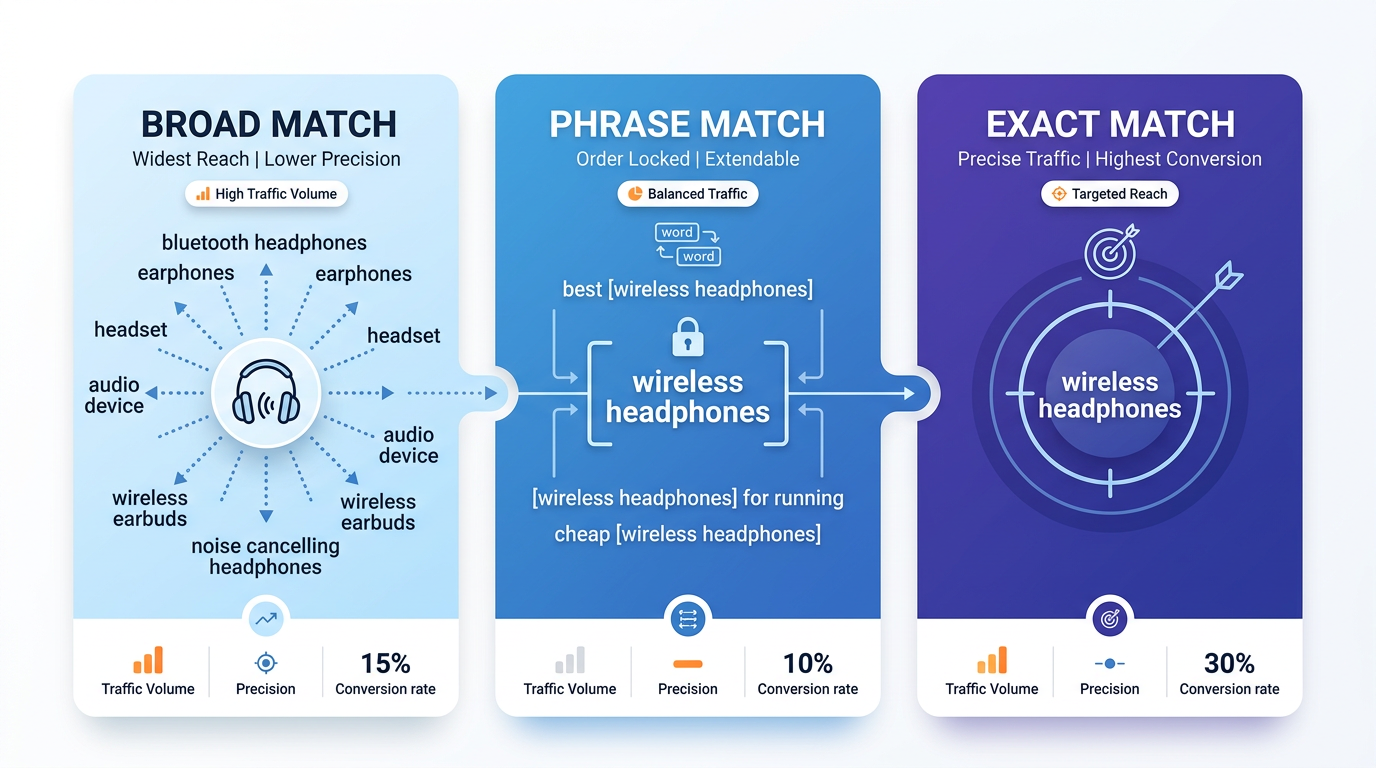
1. Broad Match: Maximum Reach, Minimum Control
Broad match is the most flexible—and often the most misunderstood—of the three match types. When you set a keyword to broad match, Amazon shows your ad for searches that include any word in your keyword, in any order, along with related terms, synonyms, and variations.
For example, if your broad match keyword is "noise-cancelling headphones", your ad might appear for searches like:
- "best headphones for flying."
- "over-ear earbuds."
- "Bluetooth headsets with mic."
- "kids' headphones with volume limit."
While this wide net increases visibility, it also opens the door to irrelevant traffic. You may end up paying for clicks from shoppers who aren’t interested in your specific product, leading to low conversion rates and poor ACoS (Advertising Cost of Sale).
However, broad match has a strategic role: discovery. It’s excellent for uncovering new keyword opportunities and understanding how real customers search for products like yours. Many top-performing exact match keywords start as insights pulled from broad match campaign reports.
2. Phrase Match: Balanced Visibility and Relevance
Phrase match offers a middle ground. Your ad will show when a shopper’s search includes your keyword in the same order, though other words can appear before or after it.
Using the same example—"noise cancelling headphones"—your ad could appear for:
- "best noise-cancelling headphones 2024."
- "wireless noise-cancelling headphones for travel."
- "affordable noise-cancelling headphones for the gym."
But it likely won’t show for:
- "headphones with noise cancellation" (words out of order)
- "noise-reducing earbuds" (different terminology)
Phrase match gives you better control than broad match while still capturing long-tail variations. It’s ideal for targeting shoppers who are further along in the buying journey and using more specific language.
3. Exact Match: Precision Targeting for High Intent
Exact match is the most restrictive—and often the most profitable—match type. Your ad appears only when a shopper’s search query closely matches your keyword, with minimal variation.
For the keyword "noise-cancelling headphones", your ad would typically show for:
- "noise-cancelling headphones."
- "noise cancelling headphones bluetooth."
- "noise cancelling headphones wireless."
But not for:
- "headphones with noise cancellation."
- "noise-cancelling earbuds."
Because exact match targets high-intent shoppers, it usually delivers the highest conversion rates and lowest ACoS. It’s perfect for promoting best-selling products or defending your brand terms against competitors.
However, because it’s so narrow, an exact match generates less traffic. That’s why it’s rarely used in isolation. Instead, it’s most effective when fed with high-performing keywords discovered through broader campaigns.
Traffic vs. Precision: Trade-offs by Match Type
Choosing the right match type isn’t about picking the “best” one—it’s about understanding the trade-off between traffic volume and targeting precision.
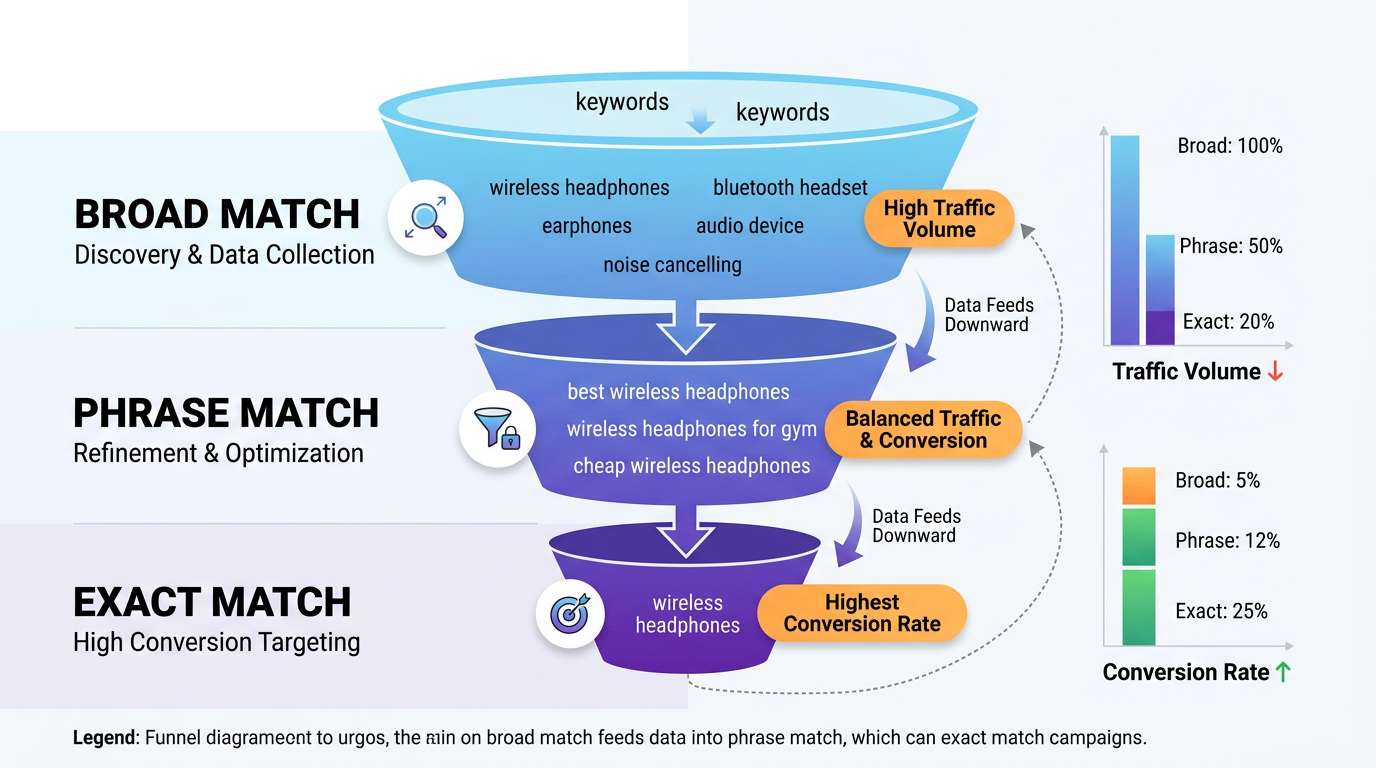
The Traffic-Precision Spectrum
Think of the three match types as points on a spectrum:
- Broad Match → High traffic, low precision
- Phrase Match → Medium traffic, medium precision
- Exact Match → Low traffic, high precision
Each has a role depending on your campaign goals:
- Use broad to explore and discover new keywords.
- Use a phrase to capture qualified traffic with moderate intent.
- Use exact to convert high-intent shoppers efficiently.
Why Precision Matters on Amazon
On Amazon, relevance is everything. The platform’s algorithm rewards ads that lead to conversions. If your ad gets many clicks but few sales, Amazon will lower your ad rank and increase your cost per click.
Exact match keywords are inherently more relevant because they align closely with what the shopper is searching for. This leads to higher CTR (Click-Through Rate), better conversion rates, and improved Quality Score—all of which reduce your overall advertising costs.
In contrast, broad match can generate a lot of impressions and clicks, but if those clicks don’t convert, your ACoS will rise, and your profitability will suffer. That’s why many experienced sellers use broad match primarily as a research tool, not a conversion engine.
Building a Winning Strategy with a Mixed Match Approach
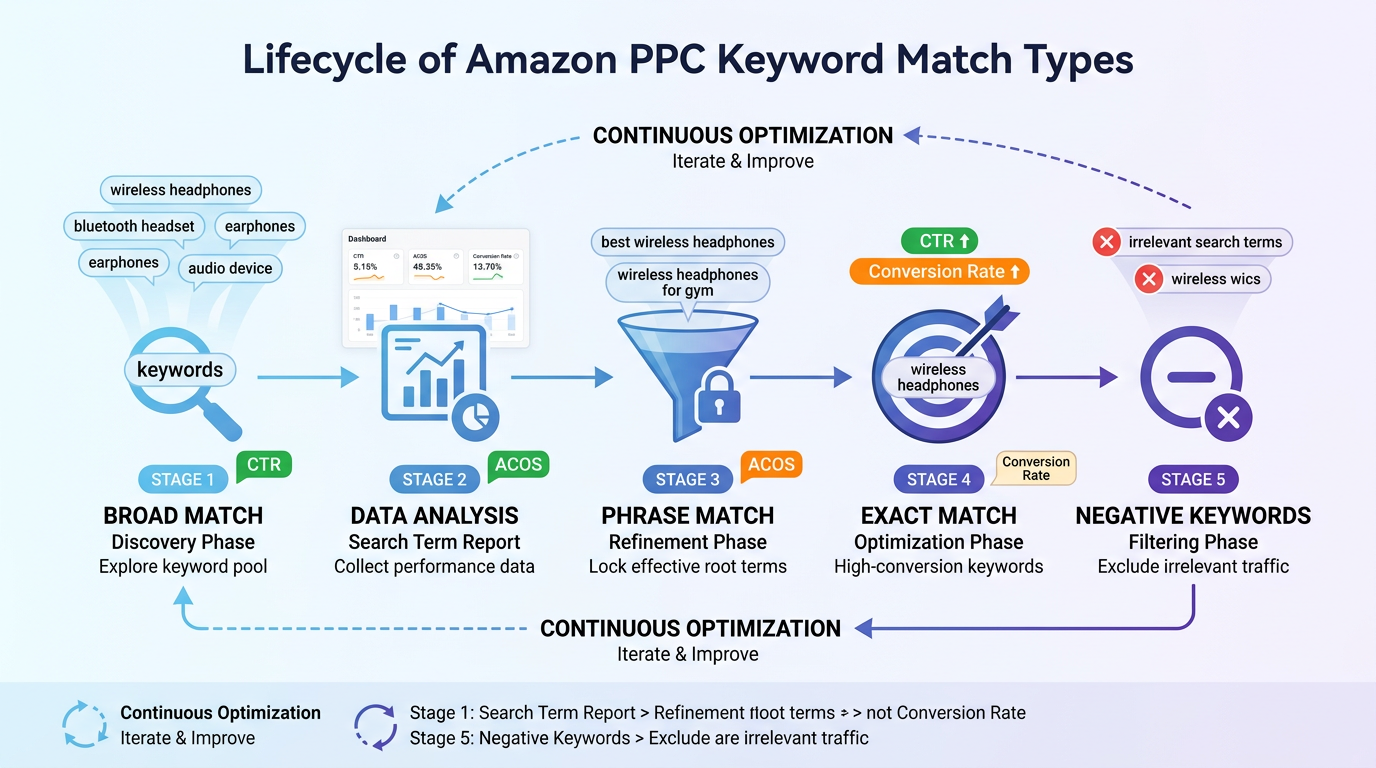
The most successful Amazon sellers don’t rely on a single match type. Instead, they use a layered strategy that leverages the strengths of each match type at different stages of the campaign lifecycle.
Step-by-Step: How to Structure a Mixed Match Campaign
Step 1: Start with Broad Match for Discovery
Launch a broad match campaign with a modest daily budget. Let it run for 2–4 weeks to collect search term data. Focus on keywords with high impressions, clicks, and conversions.
Step 2: Move Winners to Phrase Match
Identify top-performing search terms from your broad match report. Add these as phrase match keywords in a new campaign. This increases relevance while still allowing for some variation.
Step 3: Promote High-Intent Terms to Exact Match
From your phrase match data, pick keywords with the highest conversion rates and lowest ACoS. Create an exact match campaign to aggressively target these high-intent shoppers.
Step 4: Negate Poor Performers
Use negative keywords to block irrelevant traffic. For example, if you sell premium headphones, add "cheap" or "kids" as negative keywords in your broad match campaign to avoid unqualified clicks.
Real-World Example: Wireless Earbuds Seller
Let’s say you sell premium wireless earbuds. Here’s how a mixed strategy might look:
- Broad Match Campaign: Targets “wireless earbuds” and discovers that “sweatproof wireless earbuds for running” converts well.
- Phrase Match Campaign: Adds “sweatproof wireless earbuds” to capture fitness-focused shoppers.
- Exact Match Campaign: Bids aggressively on “sweatproof wireless earbuds” to dominate high-intent searches.
Over time, this approach builds a self-reinforcing system: broad match fuels discovery, phrase match refines targeting, and exact match drives conversions.
Pro Tips for Optimizing Amazon PPC Campaigns
Even with the right match types, success depends on ongoing optimization. Here are five expert-backed strategies to maximize your ROI:
1. Regularly Review Search Term Reports
Amazon’s Search Term Report (under Advertising > Reports) shows exactly what shoppers are typing when they click your ads. Use it weekly to find new keyword opportunities and identify irrelevant searches to add as negative keywords.
2. Use Bid Adjustments Strategically
Don’t use the same bid across all match types. Typically:
- Set lower bids for broad match (higher risk of irrelevant clicks)
- Use medium bids for phrase match
- Apply higher bids for exact match (higher conversion likelihood)
3. Leverage Automation Tools
Manual optimization is time-consuming. Tools like SellerSprite automate keyword harvesting, bid management, and performance tracking. For example, SellerSprite’s Keyword Engine identifies high-potential exact match keywords from your campaign data.
4. Segment Campaigns by Match Type
Keep broad, phrase, and exact match keywords in separate campaigns. This makes it easier to track performance, adjust budgets, and apply different bidding strategies.
5. Test and Iterate
PPC is not “set and forget.” Run A/B tests on keywords, bids, and match types. Monitor metrics like ACoS, TACoS (Total Advertising Cost of Sale), and ROAS (Return on Ad Spend) to refine your approach.
For a deeper dive into advanced tactics, check out our Amazon PPC Optimization Playbook and guide on ASIN and phrase/broad targeting.
FAQ
What are the differences between broad, phrase, and exact match types in Amazon PPC?
Broad match shows your ad for searches related to your keyword, including synonyms and variations, offering the widest reach. Phrase match requires the keyword to appear in sequence but allows additional words before or after, balancing reach and relevance. Exact match only triggers your ad when the search query closely matches your keyword, delivering the highest precision and typically the best conversion rates.
How do I choose the right keyword match type for my Amazon product listings?
Start with broad match to discover new keywords, then move high-performing terms to phrase and exact match for better control. Use exact match for high-intent, converting keywords, phrase match for moderate intent, and broad match for exploration. Always align your choice with campaign goals—discovery vs. conversion.
Why is an exact match more effective for reducing wasted ad spend on Amazon?
Exact match minimizes irrelevant clicks by only showing your ad to shoppers searching for terms very close to your keyword. This increases relevance, improves conversion rates, and reduces wasted spend on unqualified traffic—leading to lower ACoS and higher profitability.
Next Steps
- Review your current Amazon PPC campaigns and identify which match types you’re using.
- Download your Search Term Report and look for high-performing keywords to promote to exact match.
- Sign up for SellerSprite to automate keyword optimization and scale your campaigns efficiently.
References
- Amazon Advertising Help – Match Types View
- SellerSprite Blog: Amazon PPC Optimization Playbook View
- SellerSprite Blog: Exact Match Campaigns & Keyword Engine View
- SellerSprite Blog: Phrase & Broad ASIN Targeting Guide View
By SellerSprite Success Team
The SellerSprite Success Team combines decades of Amazon marketplace experience with cutting-edge AI-driven analytics. We specialize in helping sellers—from startups to enterprise brands—optimize their PPC strategies, reduce ad spend waste, and scale profitably. Our insights are backed by real campaign data and tested across thousands of SKUs in the US and global markets.


