- Use Amazon's official Seller Central flow to register and log in; SellerSprite is not an Amazon login page and does not replace Seller Central.
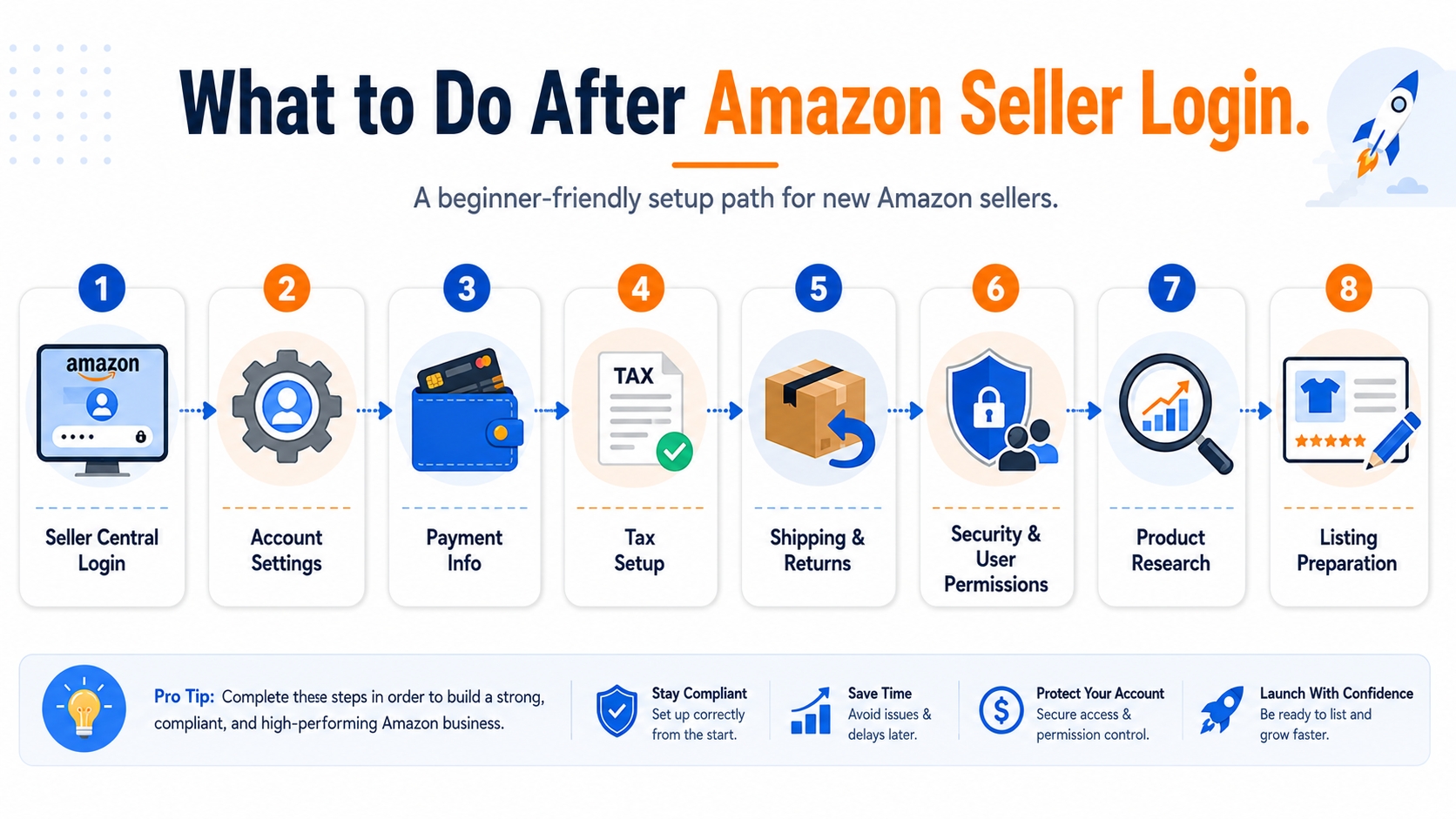
- After your first Amazon seller login, configure account settings, payment information, tax details, shipping and returns, login security, and user permissions before listing products.
- Before publishing your first listing, use SellerSprite to research product demand, keywords, competitors, market trends, and profit assumptions so you do not launch blindly.
- This page works as a practical after-login toolkit: registration checklist, first-dashboard setup, data research workflow, and links to deeper SellerSprite guides.
Quick Answer: What Should You Do After Amazon Seller Login?
After Amazon seller login, first confirm your Seller Central account settings, payment information, tax details, shipping and return rules, login security, and user permissions. Then validate your product idea, keywords, competitors, and profit assumptions before creating your first listing.
SellerSprite is designed for the second part of that workflow: research and decision-making. It helps sellers evaluate market demand, discover Amazon keywords, analyze competitors, estimate profit scenarios, and prepare a more informed launch plan.
Trust Note:
SellerSprite is an independent Amazon data analysis tool. It helps with product, keyword, competitor, and market research, but it does not ask for or replace your Amazon Seller Central login.
What This Amazon Seller Login Toolkit Is
The Amazon Seller Login Toolkit is a practical companion for sellers who have registered for an Amazon selling account or are preparing to log in to Seller Central for the first time. It does not try to redirect users away from Amazon's official login process. Instead, it explains what to check after login and how to use data tools before making product, keyword, pricing, and listing decisions.
Many new sellers treat login as the finish line. In practice, logging in is only the start of the operational setup. Seller Central gives you the account environment to manage listings, orders, payments, performance, and settings. SellerSprite gives you the research environment to evaluate whether a product idea, keyword strategy, competitor position, or profit model makes sense before you spend money on inventory or ads.
| What you need | Where it happens | Why it matters |
|---|---|---|
| Seller account registration and login | Amazon Seller Central | You need official account access before selling, listing, fulfilling, or managing orders. |
| Account settings and security setup | Amazon Seller Central | Your payment, tax, shipping, login, and user permission settings affect compliance and operations. |
| Product, keyword, competitor, and market research | SellerSprite | You need demand and competition data before choosing products, writing listings, and launching campaigns. |
| Profit and launch planning | SellerSprite calculator and research workflow | Revenue is not profit. Fees, fulfillment, product cost, ads, returns, and price changes should be modeled before launch. |
From Amazon Seller Registration to Seller Central Login
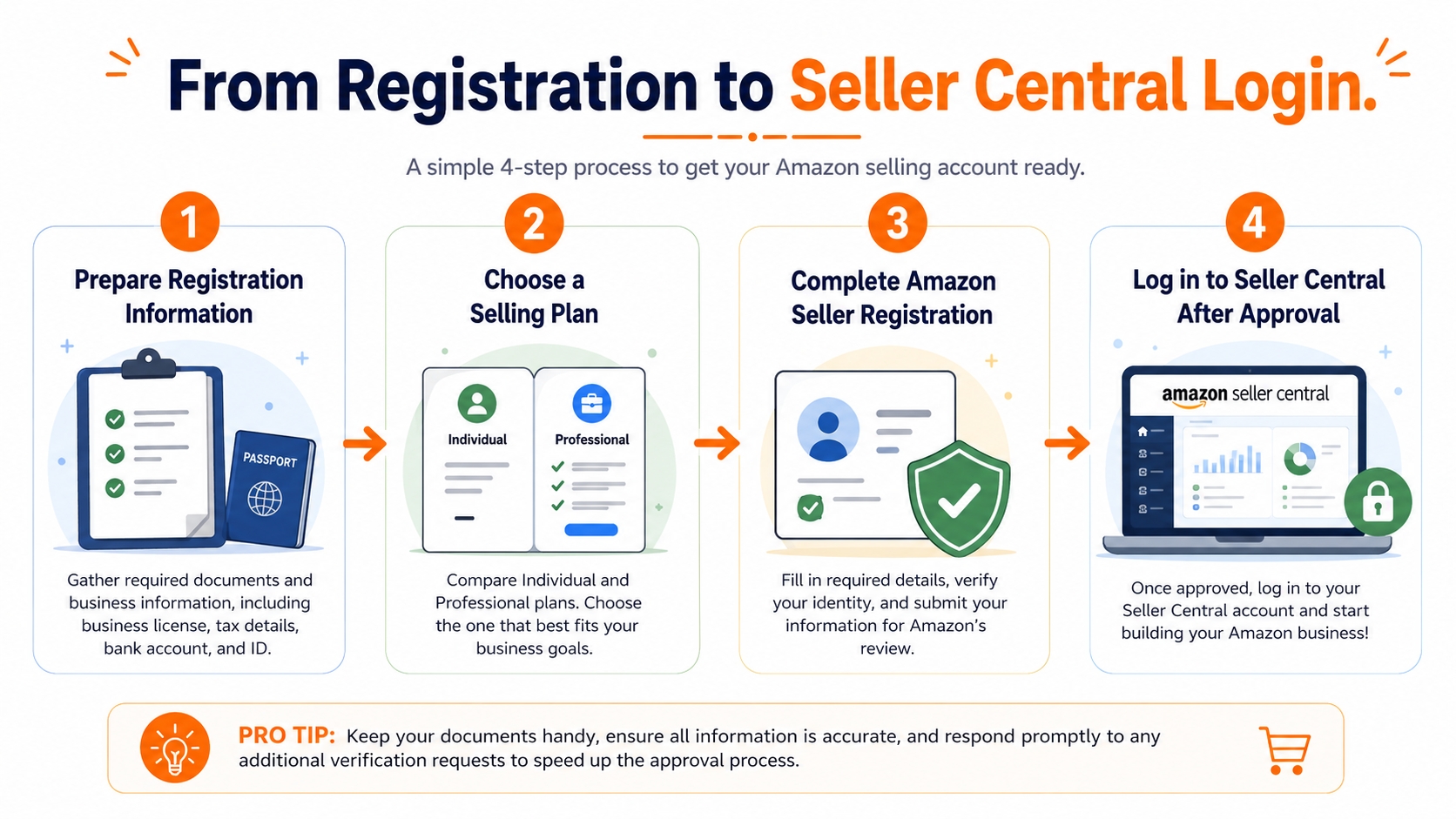
Before you can log in as a seller, you need an approved Amazon selling account. The exact experience can vary by marketplace, business type, and verification requirements, so sellers should always follow the official registration instructions for the marketplace they are entering.
Step 1: Prepare your registration information
Before registration, prepare your legal name or business information, contact details, government-issued identity information, bank account, charge method, tax information, and proof of address if required. Keep the name and address format consistent across documents to reduce verification friction.
Step 2: Choose a selling plan
Amazon sellers generally choose between an individual selling plan and a professional selling plan. Your choice depends on expected sales volume, feature needs, advertising plans, and business model. If you are still validating a product idea, use data first instead of choosing based only on optimism.
Step 3: Complete Amazon seller registration
Amazon's official registration guide walks sellers through business information, seller information, billing information, store and product information, and identity verification. Registration timing can vary, so do not plan a launch date that assumes instant approval.
Step 4: Log in to Seller Central after approval
Once your account is ready, log in through Amazon's official Seller Central environment. Bookmark the official page, enable strong authentication, and avoid entering Seller Central credentials into unknown pages, emails, or tools.
Official Source Note:
For account access, registration requirements, and Seller Central settings, refer to Amazon's official pages for seller registration and Seller Central.
First-Login Setup Checklist for Seller Central
Your first Amazon seller login should be treated like a business setup session, not a quick dashboard visit. The goal is to confirm the account foundation before listing products or sending inventory.
| Seller Central area | What to check | SellerSprite follow-up |
|---|---|---|
| Public seller profile | Confirm your display name, business identity, and customer-facing information. | Research your niche and competitor positioning before defining store positioning. |
| Payment and business information | Review deposit method, charge method, business address, and legal entity details. | Estimate product profitability before committing to sourcing or launch costs. |
| Shipping and returns | Set return settings and fulfillment assumptions based on your business model. | Compare FBA and FBM cost scenarios in your profit planning workflow. |
| Tax information | Confirm required tax settings for your marketplace and business structure. | Use SellerSprite for research, not tax advice; consult qualified professionals when needed. |
| Login settings | Enable strong login security and protect recovery methods. | Keep research tool access separate from Seller Central credentials. |
| User permissions | Give team members only the access they need. | Allow research teammates to work in SellerSprite without sharing Seller Central admin credentials. |
| Listing preparation | Do not publish incomplete listings just because the account is open. | Build keyword maps, competitor notes, and profit assumptions before listing. |
Why You Should Research Before Creating Your First Listing
Logging in to Seller Central gives you the ability to sell. It does not prove that your product idea has demand, your keywords match buyer intent, your price is competitive, or your margin can survive fulfillment fees and advertising costs.
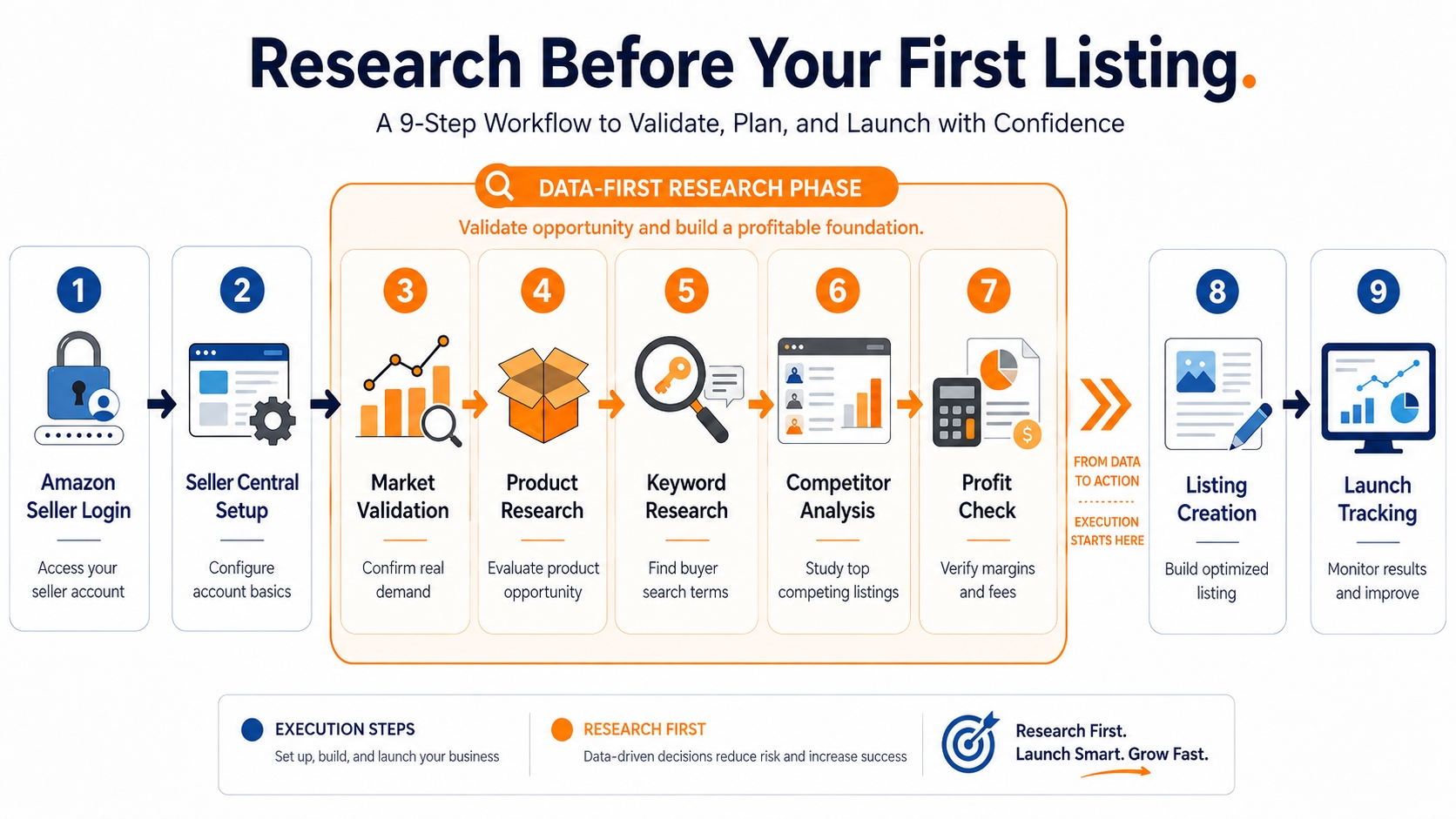
A data-first workflow helps new sellers avoid the most common early mistake: launching based on personal preference instead of market evidence. Before you create a listing, you should be able to answer four questions clearly.
- Demand: Are buyers already searching for this type of product?
- Competition: Are the top competitors too established, too cheap, or too review-heavy?
- Keyword fit: Which words should guide the title, bullets, description, backend terms, and launch PPC structure?
- Profitability: Can the product still make sense after product cost, fulfillment, Amazon fees, storage, ads, returns, and discounts?
Data-first launch path
Amazon seller login → Seller Central account setup → Market validation → Product research → Keyword research → Competitor analysis → Profit check → Listing creation → Launch tracking.
How SellerSprite Helps After Amazon Seller Login
SellerSprite helps sellers turn market signals into launch decisions. Use it after your account setup to reduce uncertainty before sourcing, listing, pricing, and advertising.
1. Product and market research
Use SellerSprite to explore product opportunities, category signals, demand patterns, price bands, review depth, and competition indicators. This helps you decide whether a niche is worth deeper validation before you source inventory.
2. Amazon keyword research
Use SellerSprite's keyword tools to collect seed terms, expand long-tail variants, compare search intent, and build a keyword map for your title, bullet points, product description, backend search terms, and PPC launch structure.
3. Competitor research and Reverse ASIN analysis
Before your first listing goes live, study which competitors rank, which keywords drive visibility, which price ranges dominate, and where your product can differentiate. A competitor research workflow is especially useful when several listings look similar on the surface.
4. Profit and revenue planning
Use profit calculation as a rejection tool. A product idea can look attractive in search results but fail when you include landed cost, fulfillment cost, Amazon fees, PPC, coupons, returns, and storage assumptions.
5. Product and keyword tracking after launch
After launch, continue monitoring products, keyword ranks, competitor changes, and pricing movement. Seller research is not a one-time task; it becomes part of your weekly operating rhythm.
| SellerSprite feature | How it helps after Amazon seller login |
|---|---|
| Product Research | Find and validate product opportunities before sourcing. |
| Category Insights | Understand market size, seasonality, competition, and entry difficulty. |
| Keyword Mining | Build a keyword list for listing SEO and PPC launch planning. |
| Reverse ASIN | Study competitor keywords and traffic opportunities. |
| Profitability Calculator | Estimate margin, ROI, and break-even assumptions. |
| Chrome Extension | Research products and keywords while browsing Amazon pages. |
SellerSprite Workflow for New Sellers After Login
This workflow is designed for sellers who have access to Seller Central but have not yet published a product listing. The goal is to move from an account-ready status to a research-backed launch plan.
Step 1: Validate market demand
Start with a category, product type, or seed keyword. Look for demand signals, search behavior, seasonality, price bands, and review distribution. Do not rely on a single metric.
Step 2: Shortlist product ideas
Create a shortlist of product ideas that have demand, realistic competition, manageable fulfillment requirements, and a price range that can support margin.
Step 3: Build a keyword map
Group keywords by primary intent, product attributes, audience, use case, long-tail variations, and PPC test groups. Your keyword map should guide listing copy instead of being added randomly after the listing is written.
Step 4: Analyze competitors
Choose the most relevant competitors, not only the largest brands. Compare titles, images, reviews, pricing, variations, badges, fulfillment method, and ranking keywords.
Step 5: Estimate profit and break-even limits
Model more than one scenario: normal price, launch discount, PPC-heavy launch, and price drop. Reject product ideas that only work under perfect assumptions.
Step 6: Prepare listing and tracking plan
Before publishing, prepare title structure, bullet point angles, backend terms, main image checklist, launch keywords, and post-launch ranking watchlist.
| Workflow step | Input | Output | Seller action |
|---|---|---|---|
| Market validation | Category or seed keyword | Demand, seasonality, competition signals | Decide whether the market deserves deeper research. |
| Product research | Product idea | Price range, review depth, estimated demand indicators | Shortlist or reject the idea. |
| Keyword research | Seed keyword | Keyword list and intent groups | Build listing and PPC keyword maps. |
| Competitor analysis | Relevant ASINs | Keyword gaps and positioning notes | Define differentiation strategy. |
| Profit check | Cost, price, size, fulfillment method | Margin, ROI, break-even assumptions | Confirm whether the product can survive real costs. |
| Tracking plan | Target ASIN and keywords | Rank and competitor watchlist | Monitor launch performance and adjust. |
Amazon Seller Login Safety and Account Protection
Account protection is part of seller operations. Login issues, shared passwords, and phishing pages can create serious disruption, especially for new sellers who are still learning the difference between official Amazon pages, third-party tools, and advertising emails.
- Use only official Amazon login pages for Seller Central access.
- Do not enter Seller Central credentials into unknown websites, forms, spreadsheets, or messages.
- Enable two-step verification and keep backup recovery methods current.
- Use user permissions instead of sharing one administrator password with a team.
- Review third-party access and team permissions regularly.
- Keep SellerSprite research access separate from Seller Central account administration.
Practical rule
If a page claims to be a shortcut for Amazon seller login but asks for credentials outside a trusted official Amazon context, stop and verify the source before entering anything.
Start your seller research before your first listing
Use SellerSprite to validate products, keywords, competitors, and profit assumptions after your Amazon seller account is ready.
Next steps
- Log in through Amazon's official Seller Central page and complete your first-account setup checklist.
- Use SellerSprite to validate one product idea with market, keyword, competitor, and profit data.
- Build your first listing plan only after your keyword map and margin assumptions are clear.
Quick recap
Amazon seller login gives you account access, but it does not guarantee a profitable product. Use Seller Central for official account operations and SellerSprite for data-backed product, keyword, competitor, and profit research before launch.
FAQs
Is SellerSprite the same as Amazon Seller Central?
No. Amazon Seller Central is Amazon's official seller account portal. SellerSprite is an independent Amazon seller research toolkit for product research, keyword research, competitor analysis, market intelligence, and profit planning.
Can I log in to Amazon Seller Central through SellerSprite?
No. You should log in through Amazon's official Seller Central environment. SellerSprite helps with research and planning after or before you access your seller account.
Does SellerSprite need my Amazon Seller Central password?
For the research workflows described on this page, no. Product, keyword, competitor, and market research can be performed in SellerSprite as a separate research workspace. Always review permissions carefully before connecting any third-party service to an Amazon account.
What should I do after my first Amazon seller login?
Review your seller profile, business information, payment method, tax settings, shipping and returns, login settings, user permissions, and optional FBA settings. Then research product demand, keywords, competitors, and profit before creating a listing.
Can SellerSprite help me choose my first Amazon product?
Yes. SellerSprite can help you evaluate market demand, identify product opportunities, compare competitors, research keywords, and estimate whether a product idea deserves deeper sourcing work.
Can I use SellerSprite before my Amazon seller account is approved?
Yes. You can use SellerSprite for market, product, keyword, and competitor research before your account approval is complete. This can help you prepare a better launch plan while you wait.
Is SellerSprite useful for Individual sellers?
Yes. Individual sellers can still benefit from product validation, keyword research, and competitor analysis. The right tool workflow depends on your sales volume, business model, and research needs.
Which SellerSprite tools should I use before creating my first listing?
Start with Category Insights or Product Research to validate demand, use keyword research tools to build a listing keyword map, use Competitor Research or Reverse ASIN to understand traffic gaps, and use a profit calculator to test margin scenarios.


