TL;DR: Before launching a product on Amazon, every seller must check for existing patents and trademarks to avoid legal risks like listing takedowns, account suspensions, or lawsuits. This guide walks you through a complete, step-by-step process using free tools like USPTO, WIPO, and Google Patents, tailored for Amazon sellers at every stage, from idea validation to global expansion.
Key Takeaways
- Always conduct a trademark and patent clearance search before launching a product on Amazon to avoid infringement claims.
- Use the USPTO Trademark Search for U.S. brand protection and WIPO's Global Brand Database for international coverage.
- Patents require checking both utility (function) and design (appearance), using USPTO Patent Public Search and Google Patents.
- Create a documented "IP evidence pack" including search strings, dates, and screenshots to defend your decisions if challenged.
- When in doubt, especially with close matches, consult an IP attorney; prevention is far cheaper than legal defense.
Table of Contents
- Why Amazon Sellers Must Check IP Before Launch
- Patents vs. Trademarks: What You're Actually Checking
- Set Your Scope (Product + Brand + Markets)
- Step 1: Run a Trademark Search the Right Way (Not Just Exact Match)
- Step 2: Check Patents: Utility + Design (The Part Sellers Skip)
- Step 3: Build a Clear Pass/Watchlist/Fail Decision
- Step 4: Document Your IP Checks (So You Can Defend Decisions Later)
- Step 5: What to Do If You Find a Conflict
- Amazon-Specific Notes: IP Complaints, Brand Registry, and Reporting
- Common Mistakes Amazon Sellers Make (And How to Avoid Them)
- FAQ
- References
Note on marketplaces: This guide is specifically optimized for the US market.
Why Amazon Sellers Must Check IP Before Launch
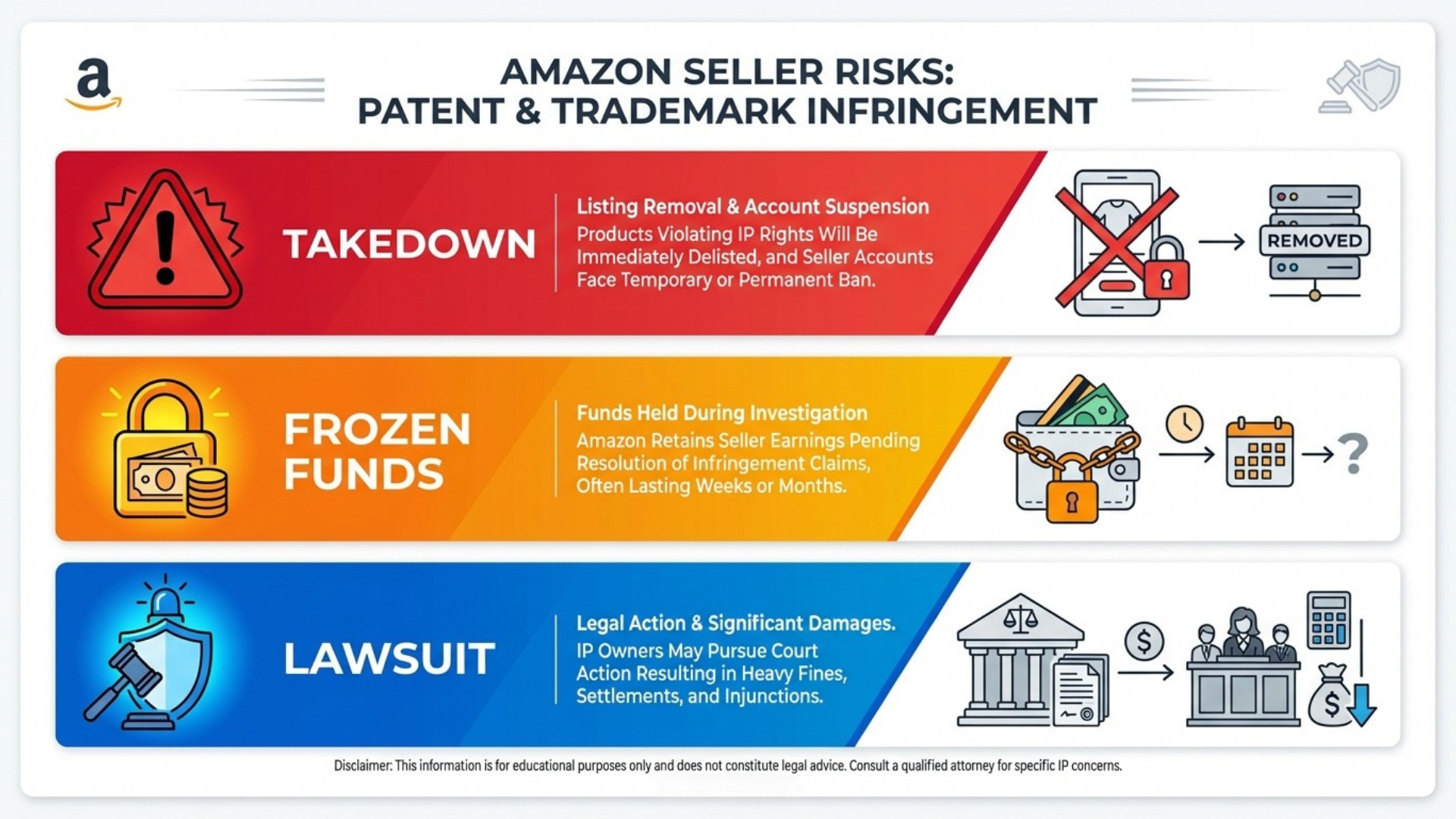
Launching a product without checking patents and trademarks is like building a house on someone else's land. On Amazon, intellectual property (IP) violations are among the top reasons for listing takedowns, account suspensions, and even legal action. With Amazon's complaint-driven enforcement model, it only takes one rights holder to file a report, and your entire inventory could be frozen overnight.
The real risks: listing takedowns, IP complaints, lost inventory, sunk ads
If you infringe on a registered trademark or active patent, the rights owner can file an IP complaint through Amazon's Brand Registry. Consequences include:
- Immediate removal of your product listing
- Withholding of seller funds
- Loss of advertising spend on now-deactivated ASINs
- Permanent account deactivation in severe cases
One seller reported losing over $40,000 in inventory and ad spend after launching a "me-too" product that unknowingly copied a design patent. Prevention is always cheaper than litigation.
"I found it on Amazon already" is not a safety test
Many new sellers assume that if a product is already being sold on Amazon, it must be safe to sell too. This is dangerously false. Just because a product exists doesn't mean it's legally compliant. In fact, Amazon often hosts multiple infringing listings until a rights holder files a complaint. By copying what's already there, you may be copying someone else's legal liability.
Quick disclaimer: this guide is educational, not legal advice
This article provides a practical framework for conducting preliminary IP checks. It does not replace legal counsel. For high-risk products or close matches, always consult a licensed intellectual property attorney.
Patents vs. Trademarks: What You're Actually Checking
Understanding the difference between patents and trademarks is critical. They protect different aspects of your business and require separate search strategies.
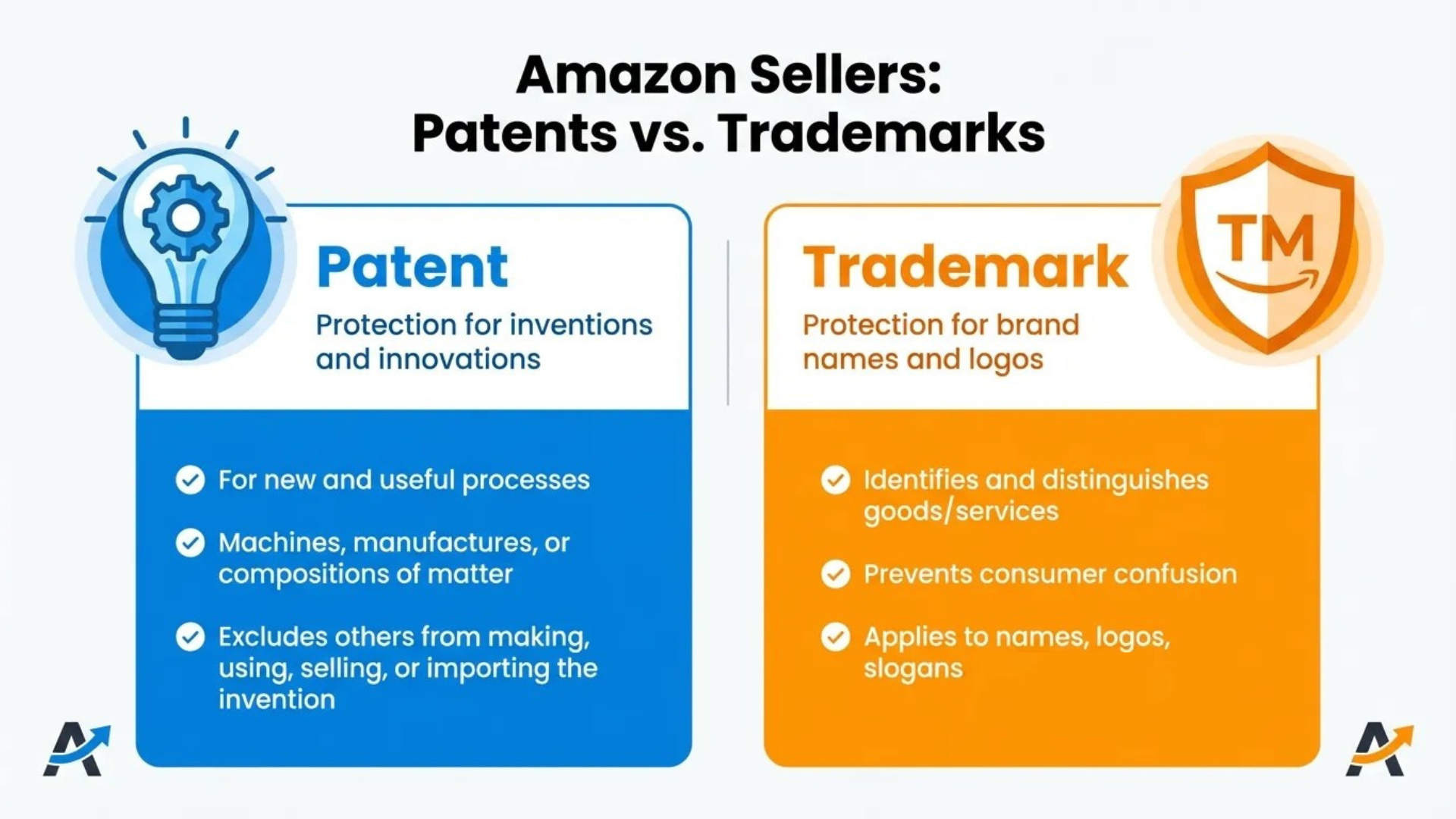
- Trademark: Protects brand identifiers like names, logos, slogans, and packaging (e.g., "Nike", swoosh logo).
- Patent: Protects inventions, either how something works (utility patent) or how it looks (design patent).
Trademarks protect brand identifiers (name, logo, packaging)
A trademark ensures customers can identify your brand and distinguish it from others. On Amazon, trademarks are essential for Brand Registry enrollment, which unlocks A+ Content, Sponsored Brands, and IP protection tools. If your brand name or logo is too similar to an existing registered mark in the same category, you risk rejection or takedown.
Patents protect inventions (utility) and appearance (design)
Utility patents cover functional aspects: how a product works or is used (e.g., a self-cleaning pet bowl mechanism). These typically last 20 years. Design patents protect ornamental appearance: shape, contours, surface patterns (e.g., the unique look of an ergonomic mouse). These last 15 years.
What Amazon sellers should prioritize at each stage (idea → sourcing → listing)
Your IP focus should evolve:
- Idea Stage: Trademark search for brand name + logo
- Sourcing Stage: Patent search on product function and design
- Listing Stage: Final clearance check + Brand Registry prep
Set Your Scope (Product + Brand + Markets)
Before diving into databases, define exactly what you need to clear. A structured approach prevents missed risks.
List what needs clearance: brand name, logo, product shape, key features
Create a checklist of all IP-sensitive elements:
- Brand name (exact and phonetic variants)
- Logo design (even if not yet registered)
- Product shape or unique packaging
- Key functional features (e.g., collapsible handle, magnetic base)
Choose countries/marketplaces you'll sell in (US first vs. global expansion)
Start with the U.S. if selling on Amazon.com. But if you plan to expand to Amazon.de, Amazon.co.uk, or Amazon.ca, include EUIPO (Europe), CIPO (Canada), or IP Australia in your search. IP rights are territorial, which means registration in one country doesn't protect you in another.
Build your "search term map" (synonyms, misspellings, competitor brand terms)
Expand your search beyond exact matches. Include:
- Common misspellings (e.g., "Therabody" vs. "TheraBody")
- Phonetic variations ("Lite" vs. "Light")
- Abbreviations ("AirPods Pro" vs. "AP Pro")
- Competitor brand names in your niche
| IP Clearance Checklist (Inputs) | Status |
|---|---|
| Brand name candidates | |
| Logo design concept | |
| Product shape / design elements | |
| Key functional features | |
| Target marketplaces (e.g., US, EU) | |
| Search term map (synonyms, variants) |
Step 1: Run a Trademark Search the Right Way (Not Just Exact Match)
Many sellers only search for exact matches and miss critical risks. A proper trademark search considers similarity in sound, appearance, and meaning, even if spelling differs.
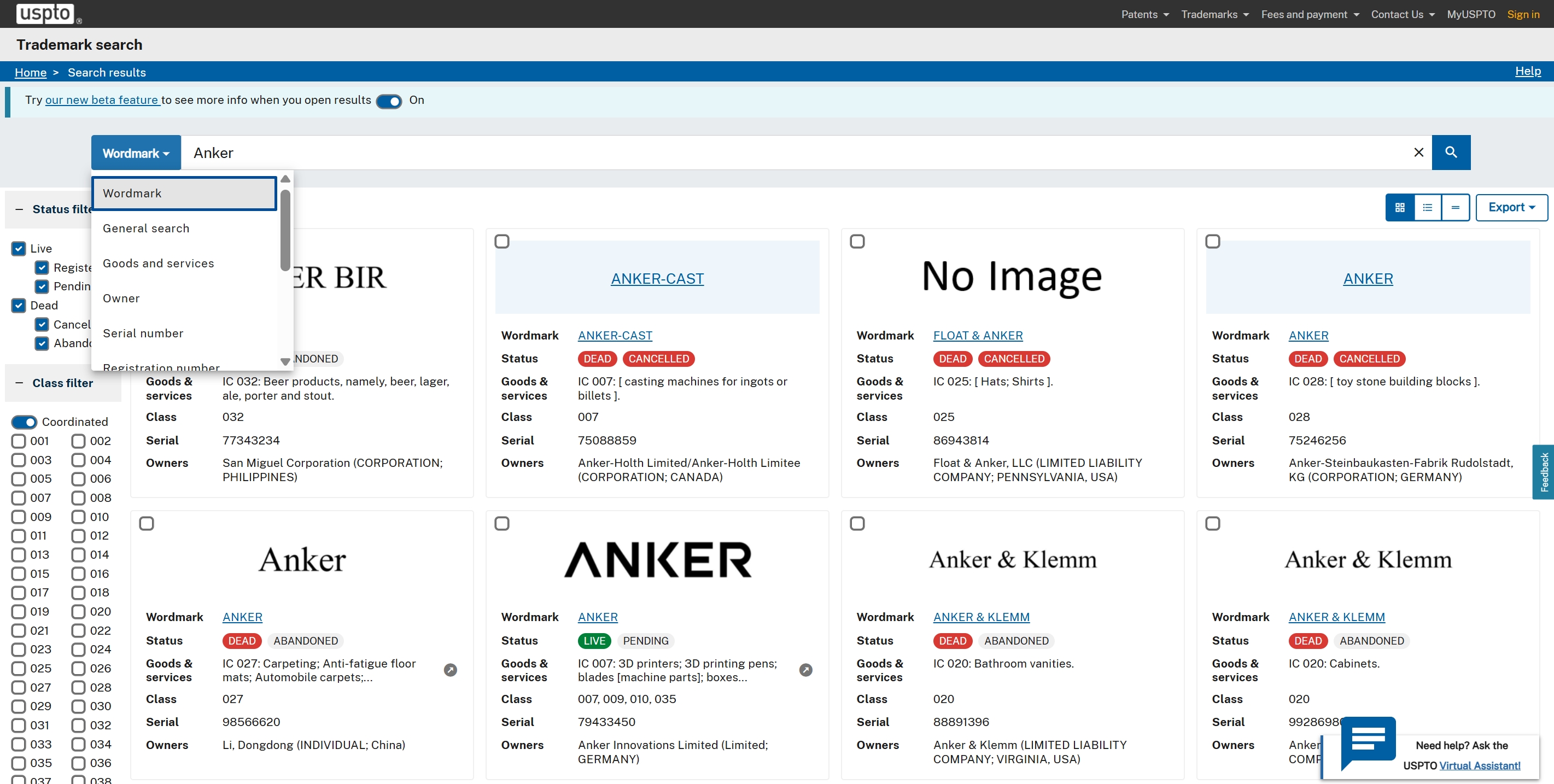
Start with the USPTO Trademark Search system (US)
Use the USPTO Trademark Electronic Search System (TESS) to check live and dead marks.
Practical search patterns: exact, contains, phonetic, spacing/hyphen variants
- Exact: "SmartGrip"
- Contains: "*Grip*" to find "EasyGrip", "PowerGrip"
- Phonetic: "Lite" → "Light"
- Spacing/hyphen: "Air Pods" vs. "AirPods"
What to capture: "live" marks, similar marks, goods/services scope
Focus on "Live" statuses. Check the International Class (IC) and Goods & Services description. A mark in Class 21 (housewares) may conflict with your kitchen gadget even if the name isn't identical.
Expand internationally with WIPO Global Brand Database
For global sellers, use the WIPO Global Brand Database to search trademarks across 70+ countries. It includes Madrid Protocol registrations, giving insight into brands going global.
If you sell in Europe: EUIPO search tools + TMview
Use EUIPO's eSearch for EU trademarks and TMview for cross-jurisdictional checks across 80+ offices.
How to interpret trademark results (seller-friendly decision rules)
"Likelihood of confusion" basics (similar name + same category = danger zone)
If a mark is similar in sound, look, or meaning AND used for related goods, there's a risk. Example: "SnoozeMat" vs. "SleepMat" for pet beds.
Don't ignore classes/goods descriptions (same class isn't required to be risky)
Even if a mark is in a different class, if consumers might confuse the source (e.g., a tech brand expanding into wearables), it could still pose a threat.
Trademark Search Checklist
- ✅ Search exact and variant spellings
- ✅ Check USPTO TESS and WIPO
- ✅ Review goods/services descriptions
- ✅ Flag "live" marks in related classes
- ✅ Document all searches
Step 2: Check Patents: Utility + Design (The Part Sellers Skip)
Most Amazon sellers skip patent searches, which is a big mistake. While trademarks are often visible, patents can lurk beneath seemingly generic products.
Use USPTO Patent Public Search for US patents/applications
Access USPTO Patent Public Search to find utility and design patents. Use basic search for starters, then advance to field-specific queries.
Basic vs. advanced searches + what fields matter (keywords, assignee, CPC)
- Keywords: Product function (e.g., "collapsible", "magnetic mount")
- Assignee: Competitor company names
- CPC (Cooperative Patent Classification): Narrow by category (e.g., A47G for kitchenware)
Use Google Patents for fast global scanning
Google Patents offers a user-friendly interface and machine translation for foreign patents. Great for quick scans.
Use WIPO PATENTSCOPE for international/PCT coverage
For PCT (Patent Cooperation Treaty) applications, use WIPO PATENTSCOPE to see filings before they publish in national databases.
How to interpret patent results (seller-friendly)
Utility patents: read the claims first (not the title)
The claims define the legal scope. If your product performs every step in Claim 1, you're likely infringing, even if your version looks different.
Design patents: compare drawings to your product's look
Focus on the ornamental design. If your product looks substantially similar in overall impression, it could be infringing, even with minor changes.
"Workarounds": feature changes that reduce risk (still consult counsel)
Sometimes removing or altering one key feature avoids infringement. But always get legal input before proceeding.
Patent Reading Mini-Guide
- Claims: Legal boundaries of protection
- Figures: Visuals of the invention
- Abstract: Summary of the innovation
- Assignee: Who owns the patent
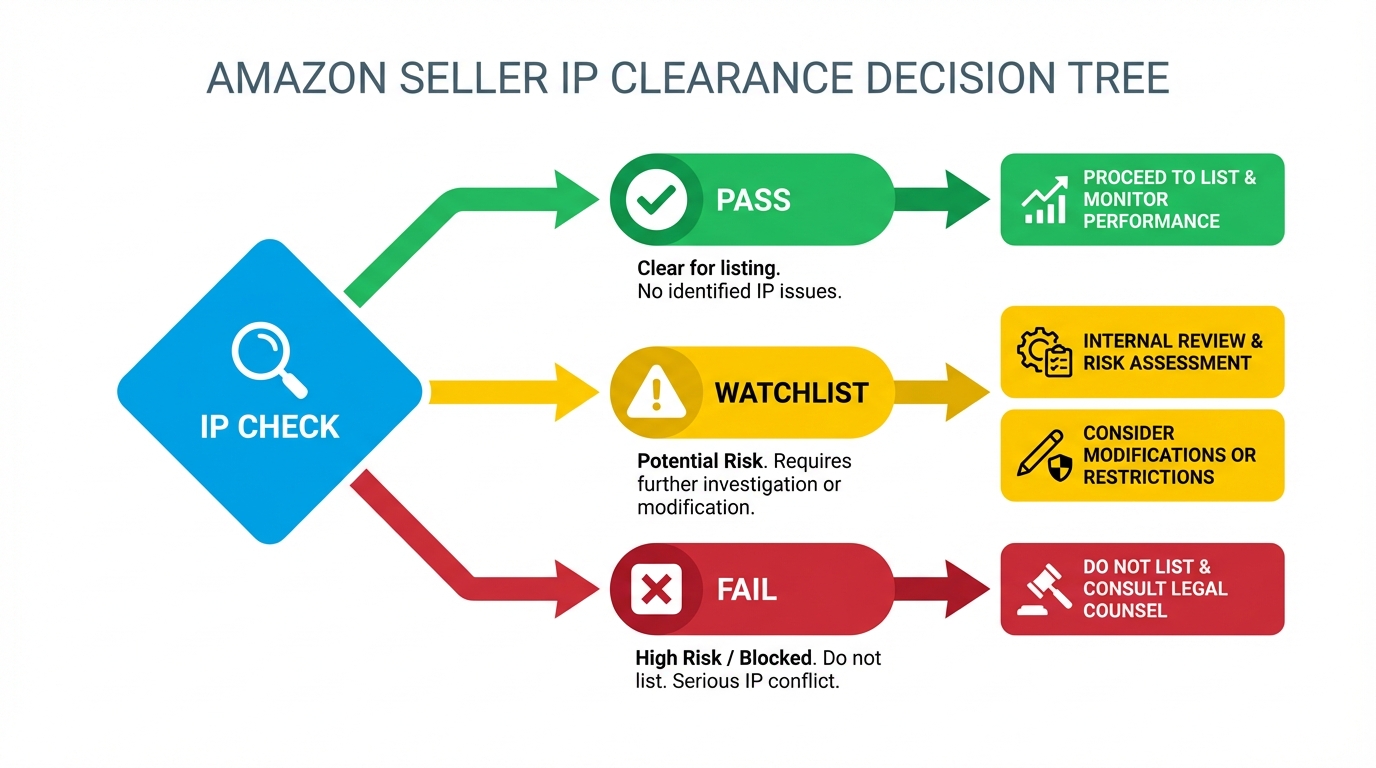
Step 3: Build a Clear Pass/Watchlist/Fail Decision
After gathering results, categorize your findings to guide next steps.
Pass: no close trademark conflicts + no active patents matching core features
You're clear to proceed. Still, document everything.
Watchlist: similar marks in adjacent categories; patents that might overlap
Not an immediate threat, but monitor. Consider slight branding changes or design tweaks.
Fail: near-identical trademark in your category; broad claims covering your core value
Do not launch. Rebrand or redesign. Example: a "FitBand" name for a fitness tracker when "Fitbit" exists.
When to escalate to an IP attorney (high-risk triggers)
- Close trademark match in same class
- Utility patent with broad independent claims
- Design patent with highly similar drawings
- Uncertainty about legal interpretation
Step 4: Document Your IP Checks (So You Can Defend Decisions Later)
If Amazon questions your listing or a competitor files a complaint, your documentation proves you acted in good faith.
Create an "IP evidence pack": screenshots, links, search strings, dates
Save:
- Search queries used
- Screenshots of results (with URLs and timestamps)
- PDFs of relevant patents/trademarks
- Internal decision memos
Track versions: brand name candidates + product design iterations
As your product evolves, update your records. This shows continuous due diligence.
Store it with your product launch SOP (repeatable process)
Make IP clearance a standard step in your launch checklist. Track your searches, decisions, and evidence in one place.
Step 5: What to Do If You Find a Conflict
Finding a conflict isn't the end; it's a pivot point.
Rename (brand/name strategy)
Choose a new brand name that's distinct in sound, spelling, and meaning. Use tools like SellerSprite BrandDB to screen candidates.
Redesign (feature-level changes)
Modify functional or visual elements to avoid patent claims. Example: change the latch mechanism or contour shape.
License/permission (when it's viable)
Reach out to the rights holder. Some brands offer licensing for a fee, turning a threat into a partnership.
Walk away (sometimes the best ROI decision)
If the risk is high and workarounds are costly, abandon the product. Protect your long-term business health.
Amazon-Specific Notes: IP Complaints, Brand Registry, and Reporting
Amazon's ecosystem adds unique dynamics to IP enforcement.
How Brand Registry's "Report a Violation" relates to trademarks/patents
Brand Registry allows rights holders to report violations of their trademarks and patents. Even unregistered design rights can be reported under Amazon's Project Zero.
Why preventative clearance beats reactive dispute handling
Defending a complaint is time-consuming and risky. Proactive clearance protects your account standing and ad ROI.
What to do if you receive an IP complaint (high-level, non-legal steps)
- Pause ads and new inventory shipments
- Review the complaint details
- Check your IP evidence pack
- Contact Amazon with your documentation
- Consult an attorney if needed
Common Mistakes Amazon Sellers Make (And How to Avoid Them)
Avoid these pitfalls that lead to preventable IP issues.
Searching only exact spellings (ignoring phonetics and spacing)
"GlowBrite" vs. “GloBrite”, similar sound, same category = risk.
Searching only one database (US-only mindset)
If selling globally, check WIPO, EUIPO, TMview, and other available database.
Skimming patents without reading claims
The title might seem irrelevant, but Claim 1 could cover your product exactly.
Confusing design vs. utility patents
One protects function, the other appearance. You need to check both.
Assuming "no one will notice" (Amazon is complaint-driven)
Someone will notice, especially if your product becomes successful.
FAQ
How can I check if a product is already patented before selling on Amazon?
Use USPTO Patent Public Search, Google Patents, and WIPO PATENTSCOPE to search for utility and design patents. Focus on keywords, competitor names, and product features. Always read the claims to understand the legal scope.
What is the best way to search for existing trademarks?
Start with USPTO's TESS for U.S. marks, then expand to WIPO Global Brand Database for international coverage. Search exact, phonetic, and variant spellings. Review goods/services descriptions and live statuses. Besides, SellerSprite also provides a powerful Global Brand Database tool for Amazon sellers.
Can I sell on Amazon if a similar product has a registered trademark?
Only if the trademark is in a different category or your brand is sufficiently distinct in name, logo, and packaging. Similar marks in the same class create a "likelihood of confusion" and risk takedowns.
Do I need a lawyer to check patents and trademarks?
You can conduct preliminary checks yourself using free tools. However, for high-risk products or close matches, consulting an IP attorney is strongly recommended to avoid costly mistakes.
What about pending trademark applications?
Pending applications ("Intent-to-Use") can mature into registered trademarks. If a similar mark is pending in your category, it poses a future risk. Monitor it or consider rebranding early.
Next Steps
- Run your first trademark search using USPTO TESS and WIPO BrandDB.
- Check patents via Google Patents for your top product idea.
- Explore Amazon Product Research Guide for more sourcing strategies.
- Try SellerSprite's Product Research Tool to validate demand and competition.
References
- USPTO Trademark Search View
- WIPO Global Brand Database View
- Google Patents View
- SellerSprite BrandDB View
- Amazon Brand Registry View
By SellerSprite Success Team
The SellerSprite Success Team combines deep expertise in Amazon marketplace dynamics, intellectual property compliance, and product research. With years of hands-on experience supporting thousands of sellers, from beginners to enterprise brands, we deliver actionable, up-to-date strategies that align with Amazon's evolving policies and global e-commerce trends. Our content is rooted in real-world testing, data analysis, and collaboration with legal and sourcing professionals to ensure accuracy and practical value.


