This Amazon PPC guide 2026 is a beginner-friendly, step-by-step course-style tutorial for sellers who want to understand what Amazon PPC is, how it works, and how to set up and optimize campaigns without wasting money on random clicks.
How to use this page
- If you are brand new to PPC, read in order from the top and follow the checklist and setup steps.
- If you already have campaigns running, jump to the Core metrics cheat sheet, Weekly optimization routine, and Mistakes and troubleshooting.
- All examples use US marketplace patterns and USD. The mechanics are the same in the UK and EU, but currency, naming, and compliance context can differ.
Key takeaways
- Amazon PPC is a pay-per-click auction. You pay when shoppers click, not when they see your ad.
- Two places matter most: search results (keyword intent) and product pages (ASIN targeting and cross-sell).
- Most beginners should start with Sponsored Products and expand into Sponsored Brands and Sponsored Display later.
- ACoS and ROAS are two sides of the same coin. Your real target is profitability and a controllable break-even point.
- Your fastest path to improvement is a consistent weekly loop: search term report, negatives, bid tuning, and campaign restructuring.
Start Learning Amazon PPC With SellerSprite Tools
Use SellerSprite keyword and competitor research tools to build a stronger PPC keyword list faster and make smarter bid decisions.
Table of contents
- Before you start: prerequisites and who this Amazon PPC course is for
- 1-minute quick note: the Amazon PPC fundamentals framework
- What is Amazon PPC in 2026, and how does it works
- Where Amazon PPC ads appear: search results and product pages
- Amazon PPC campaign types for beginners
- Core metrics cheat sheet: ACoS, TACoS, CTR, CPC, CVR, ROAS
- Keyword match types explained: exact, phrase, broad, negatives
- Step-by-step: how to set up your first Amazon PPC campaign
- Keyword research for Amazon PPC using SellerSprite tools
- Stage-based Amazon PPC strategy: launch, stabilize, scale
- Weekly optimization routine: search term report, bids, negatives
- Common mistakes and troubleshooting checklist
- FAQ
- References
- About the author
Before you start: prerequisites and who this Amazon PPC course is for
Amazon PPC is simple to understand and easy to mismanage. The difference between profitable PPC and expensive PPC is usually not a secret tactic. It is preparation, clear targets, and a repeatable process.
This guide is best for you if
- You sell on Amazon US (or you plan to). You can still apply the same workflow in the UK and the EU.
- You have at least one active listing (ASIN) that is in stock and ready to fulfill orders.
- You have access to Amazon Ads in Seller Central (most Professional accounts do).
- You want a practical Amazon PPC tutorial that explains not only what PPC is, but also how to decide what to do next.
Quick prerequisites checklist
- Inventory: you have enough stock to support ad-driven demand (do not scale ads into a stockout).
- Listing basics: clear main image, readable title, benefit-driven bullets, and a competitive price.
- Conversion readiness: your offer is not obviously weaker than the top listings for your main keyword.
- Restrictions: Some categories can be limited by Amazon advertising policies and approvals.
Warning
PPC can amplify both strengths and weaknesses. If your listing is not converting, increasing traffic often increases spend without increasing sales. Fix conversion first, then scale traffic.
Operational example: a 10-minute readiness check
- Search your main keyword on Amazon and open the top 5 competitors.
- Compare price, review count, and main image. Ask: Would you click yours?
- If your offer looks weaker, plan a conversion upgrade first (image, price, coupon, A plus content).
- Only then launch PPC, so your data is clean, and your learning is fast.
Key takeaways
- PPC is not a rescue plan for a weak listing. It is an amplifier for a strong offer.
- Your first goal is clean data, not maximum traffic.
- Start with what you can control: conversion, keyword relevance, and budgets you can afford.
1-minute quick note: the Amazon PPC fundamentals framework
Beginners often feel overwhelmed because PPC has many screens. The easiest way to stay calm is to treat PPC as a simple system: traffic in, conversion, profit out, then repeat.
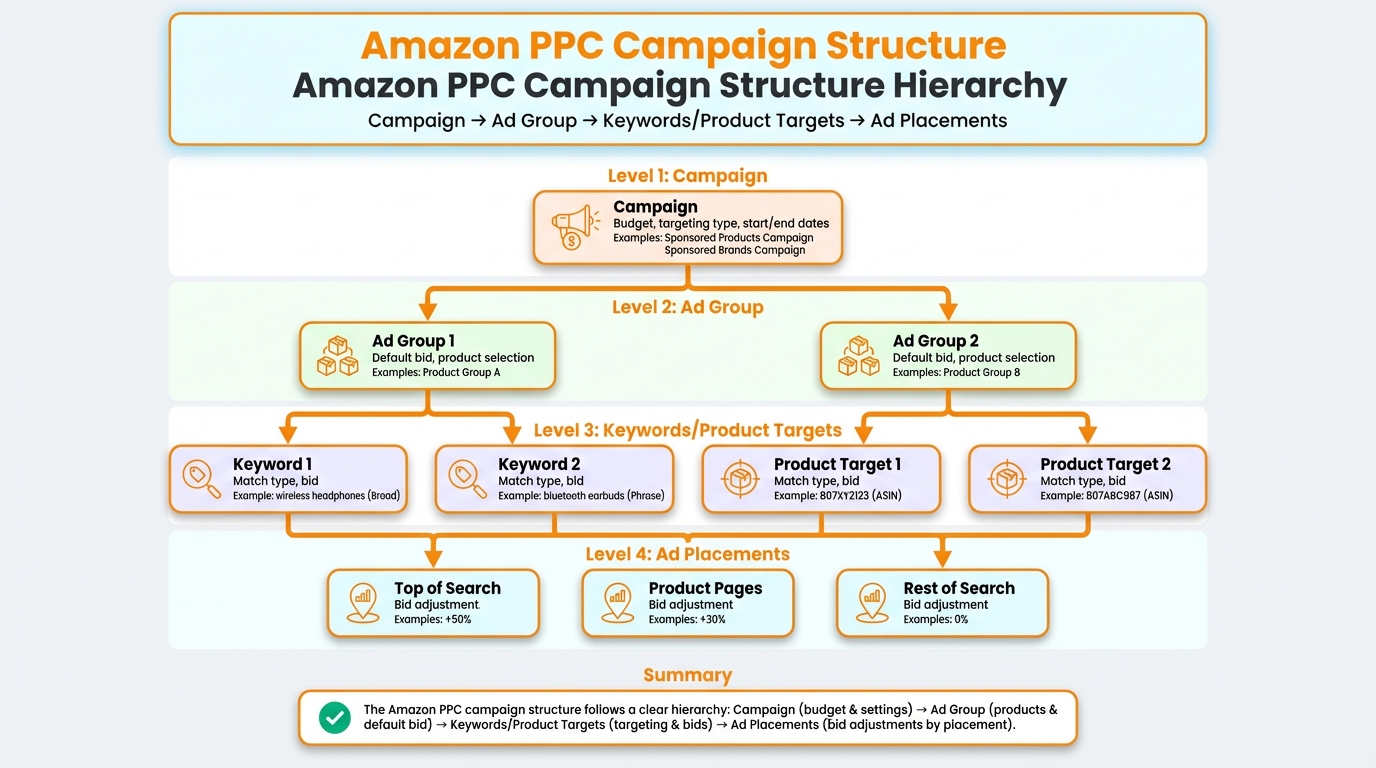
Image placeholder: Amazon PPC structure diagram showing Campaign, Ad group, Keyword or Product targeting, Ads, Placements.
Alt: Amazon PPC campaign structure hierarchy from campaign to ad group to keywords or product targets to ad placements.
The PPC loop in one list
- Choose a campaign type (usually Sponsored Products first).
- Choose targeting (keywords and product targets).
- Set bids and budgets (your maximum cost controls).
- Watch the funnel metrics (impressions, CTR, CPC, CVR, ACoS, TACoS).
- Optimize with one action at a time (negatives, bid changes, keyword migration, structure cleanup).
Pro tip
For the first 14 days, focus on learning and clean segmentation. A campaign structure that makes sense is worth more than any single trick.
Key takeaways
- PPC is a loop, not a one-time setup.
- Start simple, then add complexity only when the data tells you to.
- Your structure should make it easy to answer: what is working, what is wasting spend, and why.
What is Amazon PPC in 2026, and how does it works
Amazon PPC stands for Amazon pay-per-click advertising. As a seller, you choose which keywords (and which product pages) you want to show up for, you set a maximum bid, and Amazon shows your ads to shoppers when you are eligible.
The core idea is simple: you pay Amazon to increase visibility, and you aim to earn more profit from the extra sales than you spend on ads.
The most important rule: you pay for clicks
With Amazon PPC, you are charged when someone clicks your ad. You are not charged when someone only sees it. That is why impression volume is useful for diagnosing traffic, but click and conversion metrics are what determine profitability.
Reality check
Not every click becomes a sale. PPC is still worth it because it buys you data and opportunities. Your job is to tighten targeting and improve conversion, so fewer clicks are wasted.
Eligibility vs guaranteed placement
Targeting a keyword does not guarantee you show up for that keyword. It makes you eligible. Your bid, relevance, and competition influence whether and where your ad appears.
Operational example: sanity check your economics
Use this quick formula to understand what you can afford:
Cost per order from ads = CPC / CVR
Example: If your average CPC is $0.80 and your conversion rate is 10% (0.10), your cost per order is $0.80 / 0.10 = $8.00. If your profit per order after fees is $10, that can work. If your profit is $5, it cannot.
Key takeaways
- PPC is a cost-per-click auction that you control with bids, budgets, and targeting.
- Clicks are the cost driver. Conversion is the profit driver.
- Know what you can afford before you scale spend.
Where Amazon PPC ads appear: search results and product pages
Amazon PPC ads can appear in two high-impact contexts: in the search results for a keyword, and on product detail pages. Both can work, but they behave differently because the shopper's intent is different.
1) Search results placements
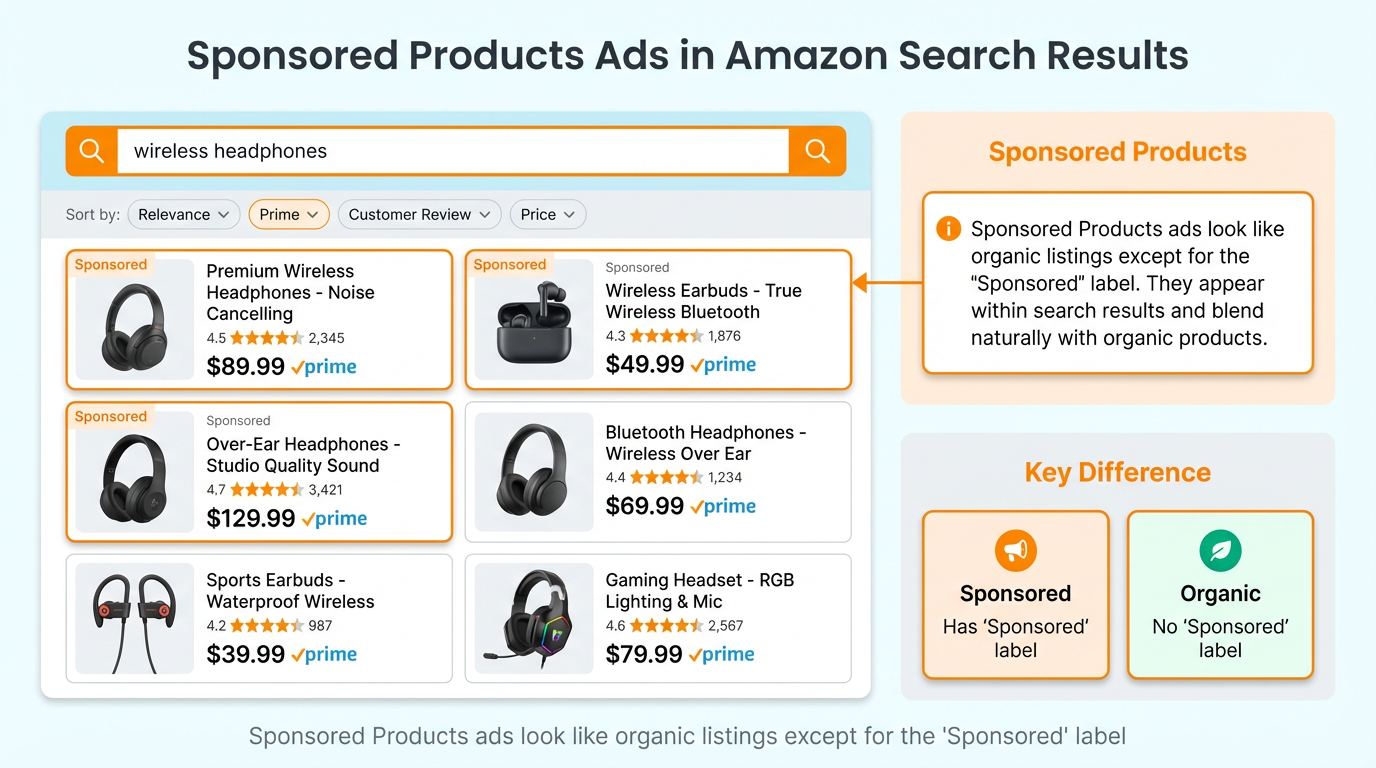
When shoppers type a keyword into Amazon, ads labeled Sponsored can appear at the top, within, or alongside the search results. This is where keyword intent is strongest, because the shopper is actively searching for a solution.
2) Product detail page placements
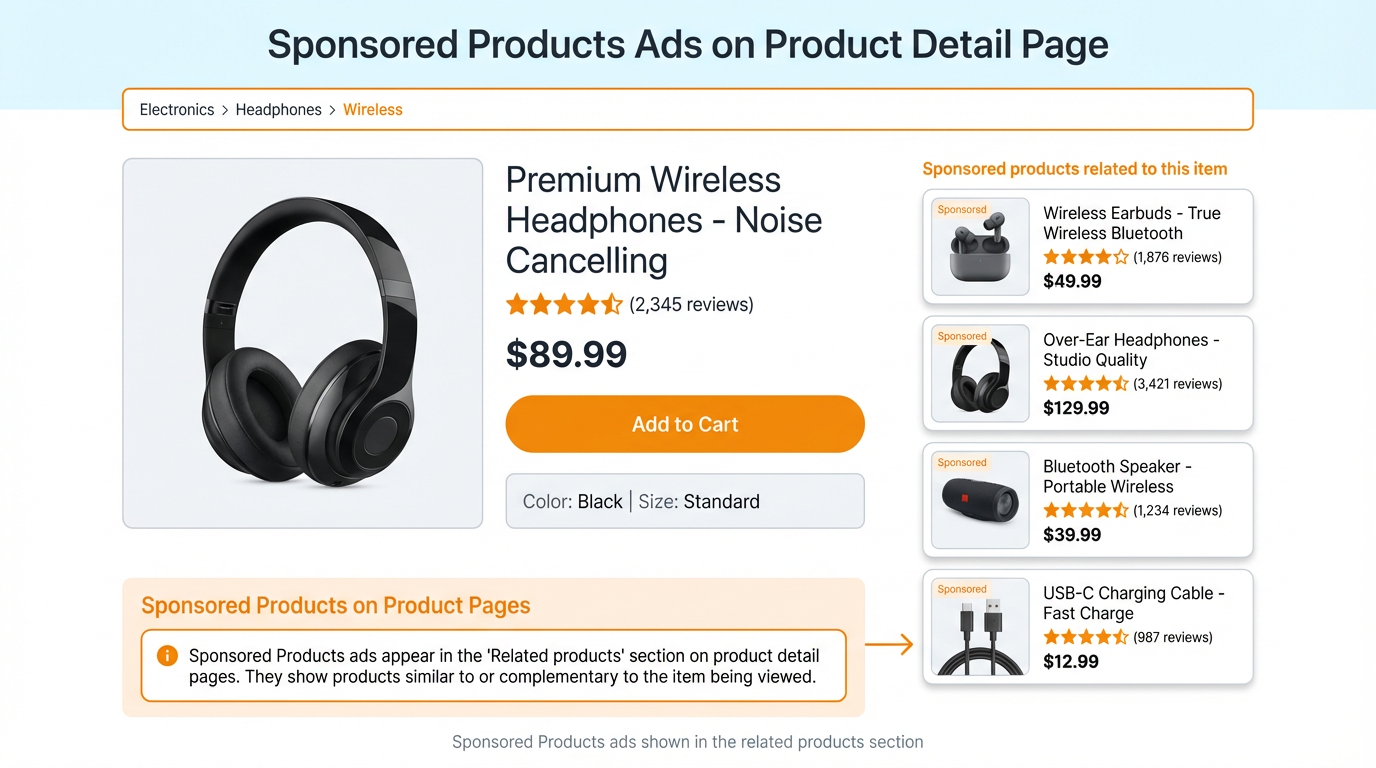
Ads can also appear on product pages, usually under sections like related products, sponsored recommendations, or similar item carousels. This is powerful for cross-selling, defending your listing, and targeting competitor ASINs.
Pro tip
Think of search ads as demand capture (shoppers searching keywords) and product page ads as demand interception (shoppers comparing options).
Operational example: when to use product targeting
- Conquest: target competitor ASINs that are close substitutes.
- Defense: target your own ASINs so competitors do not steal the shopper on your page.
- Cross-sell: target complementary products (example: taco holders and taco seasoning kits).
Key takeaways
- Search placements capture keyword intent and usually convert when relevance is high.
- Product page placements are strong for conquest, defense, and cross-sell.
- Always match the placement to the shopper's mindset.
Amazon PPC campaign types for beginners
In Amazon Ads, you will typically see three primary campaign types: Sponsored Products, Sponsored Brands, and Sponsored Display. Each type is useful, but beginners should prioritize in the right order.
| Campaign type | What it is | Best for | Beginner priority |
|---|---|---|---|
| Sponsored Products | Keyword and product targeting ads that look like listings and send shoppers to a product detail page. | Most day-to-day PPC sales volume and keyword ranking work. | Start here |
| Sponsored Brands | Brand-style ads (often with headline, logo, images, or video). Commonly requires Brand Registry access. | Brand discovery, top-of-search presence, and funnel building. | Add after SP basics |
| Sponsored Display | Audience and product targeting placements on and sometimes beyond Amazon. Often requires Brand Registry or specific eligibility. | Retargeting and competitor conquest on product pages. | Add when you have data. |
Pro tip
If you are not Brand Registered yet, do not stall. Sponsored Products can carry most of your early PPC performance, and you can build a strong keyword foundation first.
Operational example: a simple starter budget split
- If you are not Brand Registered: 100% Sponsored Products.
- If you are Brand Registered: start with 70% Sponsored Products, 20% Sponsored Brands, 10% Sponsored Display (adjust once you have conversion data).
Key takeaways
- Sponsored Products is the foundation for most beginners.
- Sponsored Brands and Sponsored Display are powerful, but only after you have a proven core offer and keyword data.
- Keep your structure simple enough to manage weekly.
Core metrics cheat sheet: ACoS, TACoS, CTR, CPC, CVR, ROAS
Metrics only matter because they tell you what to do next. The goal is not to memorize terms. The goal is to diagnose the funnel and choose the best next action.
| Metric | Meaning | Formula | Practical direction |
|---|---|---|---|
| Impressions | How many times has your ad been shown. | Views | Low impressions usually mean low bids, poor relevance, or limited eligibility. |
| CTR | Click-through rate. How often impressions turn into clicks. | Clicks / Impressions | If CTR is low, improve the main image, price, coupon, review proof, and keyword relevance. |
| CPC | Cost per click. The average cost you actually pay per click. | Spend / Clicks | If CPC is too high, refine targeting, lower bids, and move to longer-tail keywords. |
| CVR | Conversion rate. How often clicks turn into orders. | Orders / Clicks | If CVR is low, fix listing conversion, price, review confidence, and ensure search term relevance. |
| Bid | The maximum you are willing to pay per click for a keyword or target. | Max CPC | Bid controls eligibility and placement. Your CPC is usually below your max bid. |
| Budget | Maximum spend per day (or per period, depending on settings). | Max spend | Budget caps learning speed. If you run out early, you lose peak traffic. |
| ACoS | Advertising cost of sales. How much ad spend did it take to generate ad-attributed sales. | Spend / Ad sales | Use ACoS to judge efficiency. Compare to your break-even ACoS, not a random benchmark. |
| ROAS | Return on ad spend. Inverse of ACoS. | Ad sales / Spend | Same story as ACoS, just expressed as return instead of cost. |
| TACoS | Total advertising cost of sales. Measures ad spend against total revenue (ad plus organic). | Spend / Total sales | Use TACoS to monitor long-term brand health. Ideally, it trends down as organic grows. |
Break-even ACoS: the number beginners should actually care about
ACoS is only good or bad relative to your margin. If your profit margin after fees is 30%, a 30% ACoS is roughly break-even on ad-attributed orders. If your margin is 15%, a 30% ACoS is not sustainable unless PPC is driving profitable organic lift.
Use the SellerSprite Profitability Calculator to estimate your margin and break-even ACoS.
Tool: SellerSprite Profitability Calculator
- Enter selling price, cost of goods, and estimated Amazon fees.
- Calculate your net margin percent.
- Use that margin as your starting break-even ACoS target.
Operational example: a simple diagnosis map
If ACoS is high, check the funnel in this order:
- CTR low? Your ad is not attractive or not relevant. Fix the main image, price, and keyword relevance.
- CTR fine, but CVR low? You are getting clicks but not sales. Fix listing conversion and tighten search term relevance with negatives.
- CVR fine, but CPC too high? Your traffic is converting, but the cost is high. Shift budget to longer-tail and improve efficiency through structure and bid tuning.
Key takeaways
- ACoS and ROAS are inverse metrics. Use whichever you think in naturally.
- Do not compare your ACoS to someone else without comparing margins and goals.
- TACoS helps you see if PPC is building long-term organic strength or just buying short-term sales.
Keyword match types explained: exact, phrase, broad, negatives
Match types control how tightly your keyword target needs to match what shoppers type. Beginners often waste money because they do not understand that broad and phrase can trigger more search terms than expected.
| Match type | Triggers ads when | Best use | Beginner risk |
|---|---|---|---|
| Exact | The shopper search closely matches your keyword. | Control and efficiency for proven terms. | Low volume if your list is too small. |
| Phrase | The shopper search contains your phrase within a longer query. | Balanced discovery and control. | Can pull in medium relevance terms if you do not manage negatives. |
| Broad | The shopper search is loosely related to your keyword. | Discovery for new search terms and long-tail winners. | Most wasted spend if you do not filter search terms weekly. |
| Negative exact | Blocks a specific search term. | Stop spending on an exact irrelevant query. | If you block the wrong term, you can cut profitable traffic. |
| Negative phrase | Blocks any search term containing the phrase. | Stop an entire cluster of irrelevant traffic. | Over-blocking can reduce reach too aggressively. |
A beginner example with one product
If you sell a taco holder and your keyword is taco holder:
- Exact: best for the taco holder once it proves profitable.
- Phrase: can show for plastic taco holder, taco holder set, taco holder stainless steel.
- Broad: can show for taco stand, taco tray, tortilla holder, and other loose variations.
Warning
Broad match is not bad. It is just expensive if you do not run a weekly search term cleanup. Broad is a discovery tool, not a forever home for high spend.
Operational example: negative keywords to prevent irrelevant clicks and returns
If your shoes are not waterproof, you should not pay for searches containing waterproof. Add waterproof as a negative phrase to reduce wasted spend and prevent the wrong customers from buying and returning.
Screenshot placeholder: Seller Central Campaign Manager negative keywords panel showing Add negative keyword and match type selection.
Alt: Amazon Seller Central screen showing how to add a negative phrase keyword in the Sponsored Products campaign manager.
Key takeaways
- Exact is control, phrase is balance, broad is discovery.
- Negatives protect your budget and your customer experience.
- Search terms are what shoppers type. Keywords are what you bid on. Optimize using search term reports.
Step-by-step: how to set up your first Amazon PPC campaign
This section is written like an operational SOP. Your goal is to launch a clean structure that makes it easy to learn. You will create one simple Sponsored Products setup that can expand later.
Step 1: Open Campaign Manager
- Go to Seller Central.
- Open Advertising.
- Click Campaign Manager.
- Click Create campaign.
Screenshot placeholder: Campaign Manager dashboard showing the Create campaign button.
Alt: Amazon Seller Central Campaign Manager showing the Create campaign button for Amazon PPC setup.
Step 2: Choose Sponsored Products
Sponsored Products is the most direct and beginner-friendly campaign type. It drives shoppers to a product detail page and supports both keyword and product targeting.
Step 3: Set your budget and naming structure
Your daily budget is a maximum, not a guaranteed spend. Set a number you can afford for learning. For many new ASINs, a starting range like $20 to $30 per day is a practical learning budget, but the correct number depends on your category CPC and your margin.
Pro tip
Name campaigns so your future self can understand them at a glance: Product, targeting type, match type, and stage. Example: US TacoHolder SP Manual Exact Launch.
Step 4: Choose your first targeting approach
There are many valid structures. For beginners, the safest path is to start with one discovery campaign and one control campaign.
- Discovery: Sponsored Products automatic targeting or broad match manual keywords.
- Control: Sponsored Products manual targeting with exact match for your core terms.
Risk reminder
If you only run broad or auto without weekly cleanup, irrelevant clicks can consume your budget fast. Discovery campaigns require discipline.
Step 5: Set initial bids using a data-based reference
You can start with Amazon suggested bids inside Campaign Manager, then refine. To speed up planning, you can also use SellerSprite Realtime Bid Tracker to view suggested bid ranges and how they change over time.
Tool: SellerSprite Realtime Bid Tracker
- Use it to estimate competitiveness and expected CPC pressure.
- Remember, it shows suggested bids, not your actual CPCs.
Step 6: Launch, then wait long enough to learn.
Beginners often change bids too fast. A good rhythm is to allow enough clicks to learn. If you only have 5 clicks, you do not know much yet. If you have 30 to 50 clicks on a target with zero orders, you probably learned something.
Operational example: your first 7-day micro plan
- Days 1 to 2: confirm impressions and clicks are flowing. If not, raise bids or expand targeting.
- Days 3 to 4: begin adding obvious negatives from early search term data.
- Days 5 to 7: isolate early winners into exact matches and reduce spend on non-performers.
Key takeaways
- Start with one discovery path and one control path.
- Use suggested bid ranges to set reality-based bids.
- Do not optimize based on tiny sample sizes. Let the campaign collect enough data to be meaningful.
Keyword research for Amazon PPC using SellerSprite tools
PPC performance starts before you create a campaign. Your keyword list determines relevance, CTR, and conversion quality. The fastest way to build a strong keyword pool is to combine customer search behavior data with competitor intelligence.
A simple keyword pipeline you can reuse
- Seed terms: list 5 to 10 phrases your customer would type (product name, main use case, key feature).
- Expand: pull keyword ideas and long-tail variations.
- Validate: filter by relevance, search volume, and competitiveness.
- Cluster: group keywords into tight themes for ad groups.
- Assign match types: exact for core, phrase for expansion, broad for discovery.
Tool workflow with SellerSprite
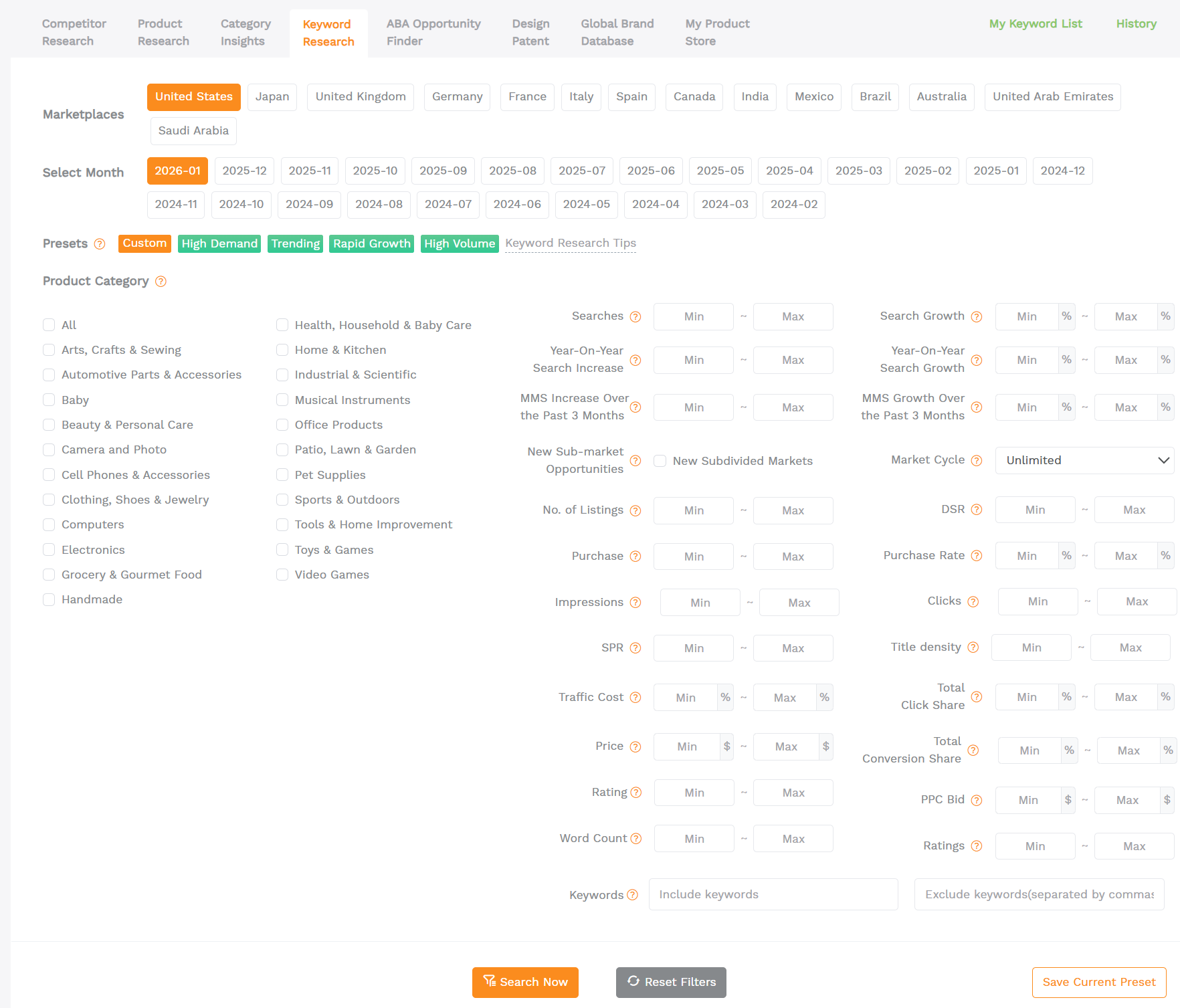
- Keyword Research: Start with your main keyword to get demand signals and keyword metrics.
Tool: SellerSprite Keyword Research - Reverse ASIN: pull keywords that bring impressions to your strongest competitors, then cherry-pick relevant terms for PPC and listing optimization.
Tool: SellerSprite Reverse ASIN - Keyword Mining: expand into long-tail, buyer-intent variations you might not think of manually.
Tool: SellerSprite Keyword Mining - Keyword Conversion Rate: Prioritize terms that tend to convert better in your market context.
Tool: SellerSprite Keyword Conversion Rate - Index Checker: verify your listing is indexed for your target keywords before you spend hard.
Tool: SellerSprite Keyword Index Checker
Competitive PPC intelligence: Ads Insights
If you want to understand how competitors structure Sponsored Products campaigns, SellerSprite Ads Insights can help you reverse the competitor listing ad group and search term patterns, so you can learn faster and avoid guesswork.
Tool: SellerSprite Ads Insights
Note: Ads Insights is currently designed for Sponsored Products structure analysis and may not support all ad types or targeting modes.
Operational example: build a launch keyword list in 30 minutes
- Use Keyword Research for your top 3 seed terms and export the top 50 relevant phrases.
- Reverse ASIN your top 3 competitors and export 50 to 100 overlapping relevant terms.
- Filter out obvious mismatches (wrong size, wrong material, wrong use case).
- Cluster into 5 groups: core, feature, use case, long-tail, competitor brand defense (if allowed).
- Assign match types and launch: exact for core, phrase for feature, broad for long-tail discovery.
Key takeaways
- Your keyword list is your targeting foundation. Better keywords mean better data and lower waste.
- Reverse ASIN helps you learn what already drives traffic in your niche.
- Index checking protects you from spending on keywords you are not even indexed for.
Stage-based Amazon PPC strategy: launch, stabilize, scale
Beginners often ask, what is the best Amazon PPC strategy. The honest answer is: the best strategy depends on what stage your product is in. A new ASIN needs data and relevance. A stable ASIN needs efficiency. A growing ASIN needs controlled expansion.
| Stage | Primary goal | Budget mindset | What to focus on |
|---|---|---|---|
| Launch (first 7 to 21 days) | Get data fast and prove relevance on core keywords. | Spend on learning and signal building. | Impressions, CTR, early conversions, search term discovery. |
| Stabilize (weeks 3 to 8) | Lower waste and approach profitable ACoS targets. | Shift budget to proven winners. | Negatives, bid tuning, exact match migration, and placement control. |
| Scale (after stable base) | Grow sales while protecting profitability and TACoS trends. | Increase spend where return is proven. | New keyword expansion, product targeting, brand formats, and automation. |
Launch stage: recommended starting ranges and triggers
Here are beginner-friendly launch ranges and what to do when early signals are weak. Use these as decision triggers, not rigid rules.
- Daily budget: start around $20 to $30 per ASIN in many categories. If your CPC is high, increase the budget only after you confirm conversion.
- If impressions are very low after 48 hours: raise bids on core targets, broaden match type slightly, or improve keyword relevance.
- If CTR is below about 0.3% after meaningful impressions: improve main image and offer appeal, or tighten keywords to better match buyer intent.
- If you get clicks but no orders after enough clicks: review listing conversion, price, review proof, and add negatives for misleading queries.
Warning
Aggressive bidding to force visibility can be useful during launch, but only if your conversion and margins can support it. Do not push bids up blindly. Always compare expected CPC and CVR to your break-even economics.
Practical case walkthrough: day 1 to day 30 PPC launch snapshot
Below is a realistic example timeline for a simple consumer product launch. Numbers are illustrative and will vary by category, but the decision pattern is what you should copy.
| Timeline | Setup and actions | Budget and bids | Expected outcome |
|---|---|---|---|
| Days 1 to 3 | Launch 1 auto discovery and 1 manual exact campaign with 10 to 20 core keywords. Add product targeting for 10 competitor ASINs. | $25 per day. Start bids near the suggested mid-range, then adjust if impressions are low. | Traffic begins. ACoS may be high early because you are buying data. |
| Days 4 to 7 | Pull early search terms. Add negatives for irrelevant clicks. Move any converting search term into a manual exact. | Keep the budget stable. Reduce bids on targets with spend but no add-to-cart signals. | CTR and CVR improve. Waste starts to drop. |
| Days 8 to 21 | Expand into a phrase for feature terms. Tighten the auto with negatives. Build an exact campaign for the top 5 to 10 winners. | Shift budget from discovery to winners. Increase bids only on proven terms that meet your ACoS goal. | ACoS trends down. Daily orders grow steadily. |
| Days 22 to 30 | Stabilize. Add a product targeting defense campaign. Consider Sponsored Brands if eligible, and you have a creative. | Scale budget only where ACoS is below break-even. Watch TACoS for organic lift signals. | A well-executed launch can reach consistent daily sales targets like 30 to 50 orders per day, depending on category demand and offer strength. |
Real-world proof: documented PPC scaling case study
If you want a deeper case study format, see our breakdown of scaling campaigns from low revenue to significant monthly sales by improving structure, search term mining, and bid management. You can read it here: Amazon PPC case study: $1,000 to $50,000 monthly sales.
Key takeaways
- Launch is about learning and proving relevance. Stabilize is about efficiency. Scale is about controlled expansion.
- Use trigger-based decisions: impressions, CTR, CVR, and ACoS guide your next move.
- Do not scale spend until you have proven winners that meet your break-even economics.
Weekly optimization routine: search term report, bids, negatives
This is the part that turns PPC from gambling into a process. If you do nothing else, run this weekly routine consistently. Most profitable accounts are not magical. They are maintained.
Daily checks (5 minutes)
- Are any campaigns out of budget early? If yes, you might be losing peak traffic.
- Are you suddenly spending without orders? Check price changes, stock, and buy box eligibility.
- Did your listing change, or did reviews shift? Conversion changes can show up as ACoS spikes.
Weekly checks (30 to 60 minutes)
- Pull search terms from your campaigns and sort by spend.
- Add negatives for irrelevant terms and high spend zero sales terms (based on your click threshold).
- Promote winners: move converting search terms into a manual exact campaign so you can control bids and budget.
- Tune bids: raise bids for targets with strong CVR and profitable ACoS, lower bids for weak targets.
- Review structure: Do you have too many keywords competing inside one ad group? Tighten.
A beginner-friendly decision rule for negatives
You can decide on a click threshold based on your expected conversion. If your product converts at 10%, you might expect 1 order per 10 clicks on relevant traffic. If a search term has 30 to 40 clicks with no orders, it is a strong candidate for negative, unless it is a high-consideration purchase.
Pro tip
When you add negatives, choose the right match type. Use negative exact when the exact query is bad. Use a negative phrase when the entire theme is irrelevant.
Operational example: promote winners and avoid bidding twice
- Find a converting search term in auto or broad.
- Add it to your manual exact campaign with a strong but controlled bid.
- Add the same term as a negative exact in the discovery campaign to prevent duplicate bidding.
Key takeaways
- Your weekly search term routine is where most profits are made.
- Negatives reduce waste. Exact campaigns increase control.
- Use rules that match your conversion reality, not feelings.
Common mistakes and troubleshooting checklist
If you are losing money on PPC, it is usually one of a few common causes. Use this list to diagnose faster and fix systematically.
The 5 most expensive beginner mistakes
- Running PPC with a weak listing: low conversion turns clicks into pure expense.
- Using broad match with no negatives: discovery becomes waste.
- Optimizing too quickly: changing bids daily without enough data creates noise.
- One campaign for everything: winners and losers mix, making decisions unclear.
- Chasing a random ACoS benchmark: your break-even ACoS is based on your margin and goal.
Troubleshooting by symptom
Symptom: low impressions
- Raise bids on core targets.
- Expand match types slightly (exact to phrase) for reach.
- Check listing indexing for the keyword using SellerSprite Index Checker.
- Confirm your offer is in stock and eligible.
Symptom: impressions but low CTR
- Improve the main image and make the value proposition obvious.
- Check price relative to top competitors.
- Tighten keyword relevance (remove vague or mismatched targets).
- Add a coupon if your category responds well to it.
Symptom: clicks but no orders
- Inspect search terms. Add negatives for misleading intent.
- Improve conversion drivers: images, bullets, reviews, comparison chart, A plus content.
- Ensure your product actually matches what the keyword implies (size, compatibility, material).
Symptom: orders but ACoS too high
- Lower bids slightly on borderline terms and keep bids on top converters.
- Move winners into exact match campaigns.
- Expand into longer-tail keywords with lower bid pressure.
- Track TACoS to see if PPC is building organic lift over time.
Common mistake
Cutting spending too early. If you pause everything the moment ACoS looks high in week 1, you often lose the chance to discover the real winners that would have stabilized your performance by week 3.
Operational example: a one-page weekly PPC checklist
- Export search terms, sort by spend.
- Add negatives for irrelevant and non-converting high spend terms.
- Move converting search terms into an exact match.
- Adjust bids using break-even ACoS as your reference.
- Check inventory and budget cap issues.
Key takeaways
- Most PPC problems are funnel problems: impressions, CTR, CVR, then cost.
- Fix conversion and relevance before you scale spend.
- Use a checklist so you do not rely on memory or emotion.
FAQ
These are common questions beginners ask when learning Amazon PPC fundamentals.
How much should I spend on Amazon PPC as a beginner?
Start with a budget you can afford for learning and data. Many sellers begin around $20 to $30 per day per ASIN in the US marketplace, then shift spend to proven winners. Your real limit should be based on margin and expected cost per order.
What is a good ACoS for new products?
ACoS depends on margin and objectives. During launch, a higher ACoS can be acceptable if you are collecting data and building keyword relevance. As you stabilize, aim to move toward or below your break-even ACoS.
Should I start with automatic or manual campaigns?
A practical beginner setup is one automatic or broad discovery campaign plus one manual exact control campaign. Discovery finds search terms. Manual exact lets you control bids for proven winners.
How long does it take for Amazon PPC to show results?
You can see impressions and clicks within hours, but meaningful performance decisions usually require enough clicks and at least several days. Many sellers use a 7-day learning window for early pattern recognition and a 14 to 30-day window for real stabilization.
Why do I get clicks but no sales?
The common causes are mismatched keywords, weak listing conversion, uncompetitive pricing, or low trust signals. Pull search terms, add negatives, tighten match types, and improve your product page.
Do I need Brand Registry to run Amazon PPC?
Most sellers can run Sponsored Products without Brand Registry. Sponsored Brands and Sponsored Display eligibility often depend on Brand Registry and account status.
Final CTA: start learning with SellerSprite
If you want to move faster, use SellerSprite tools to build better keyword lists, check indexing, analyze competitors, and understand bid pressure before you spend.
Run Your PPC Keyword Workflow With SellerSprite
Build a keyword map using Keyword Research and Reverse ASIN, validate indexing, then launch clean campaigns and optimize weekly with better data.
Share Your Sourcing Journey With SellerSprite Community
Join the SellerSprite community on the Facebook Group to share your sourcing journey, ask questions, and get support from fellow Amazon sellers.
View The SellerSprite Course Directory
Ready for the next step? Open the SellerSprite Academy course directory to continue building your Amazon FBA skills chapter by chapter.
References
- Amazon Ads: Sponsored Products overview and placements
- Amazon Ads: Keyword match types (exact, phrase, broad, negatives)
- Amazon Ads: Sponsored Products search term report
- Amazon Ads: ACoS, ROAS, and break-even ACoS guide
- SellerSprite: Amazon product launch formula and 30-day plan
- SellerSprite: Amazon PPC case study scaling from $1,000 to $50,000 monthly sales
About the author
SellerSprite Team. We help Amazon sellers plan and execute growth using marketplace data, keyword intelligence, competitor research, and rank tracking across major marketplaces. SellerSprite has served 1.6M+ users worldwide since 2017 and supports research and monitoring across multiple Amazon marketplaces. Our goal is to publish step-by-step playbooks that help sellers build better systems, avoid expensive mistakes, and turn learning into consistent execution.


