TL;DR: Amazon Sales Estimators provide modeled sales ranges, not exact figures. Use a 7-step verification process combining BSR, review velocity, and keyword demand to validate true product potential and avoid costly misjudgments.
Key Takeaways
- Amazon Sales Estimators use algorithms to model sales; they don't show real-time data from competitors.
- Accuracy depends on context: use estimates for go/no-go decisions, not precise forecasting.
- Triangulate sales using BSR trends, review velocity, and revenue logic to build confidence.
- Always validate demand with keyword breadth and share-of-voice, not just sales numbers.
- Post-launch, compare actual performance to initial estimates to refine future models.
Table of Contents
- What an Amazon Sales Estimator Really Does (And What It Can't Do)
- Why Sales Estimates Vary So Much (Tools, Categories, and Assumptions)
- Decide What "Accuracy" Means for Your Decision
- Step 1: Start With the Core Inputs (What You Should Collect First)
- Step 2: Build a "Benchmark Set" for Calibration (The Accuracy Unlock)
- Step 3: Triangulate Sales Using 3 Independent Methods (Don't Trust One Number)
- Step 4: Verify Demand Accuracy With Keyword Evidence (Demand ≠ Sales Model)
- Step 5: Accuracy Stress Tests (Catch the Most Common Estimator Errors)
- Step 6: Score Your Confidence (A Simple Accuracy Rating Sellers Can Use)
- Step 7: Ongoing Verification After Launch (Turn Estimates Into Truth)
- Common Mistakes When Using Amazon Sales Estimators
- FAQ
- References
Note on marketplaces: This guide is specifically optimized for the US market.
What an Amazon Sales Estimator Really Does (And What It Can't Do)
An Amazon Sales Estimator is not a window into Amazon's internal sales data. Instead, it's a predictive modeling tool that uses publicly available signals, like Best Seller Rank (BSR), price, and review velocity, to estimate how many units a product likely sells per month.
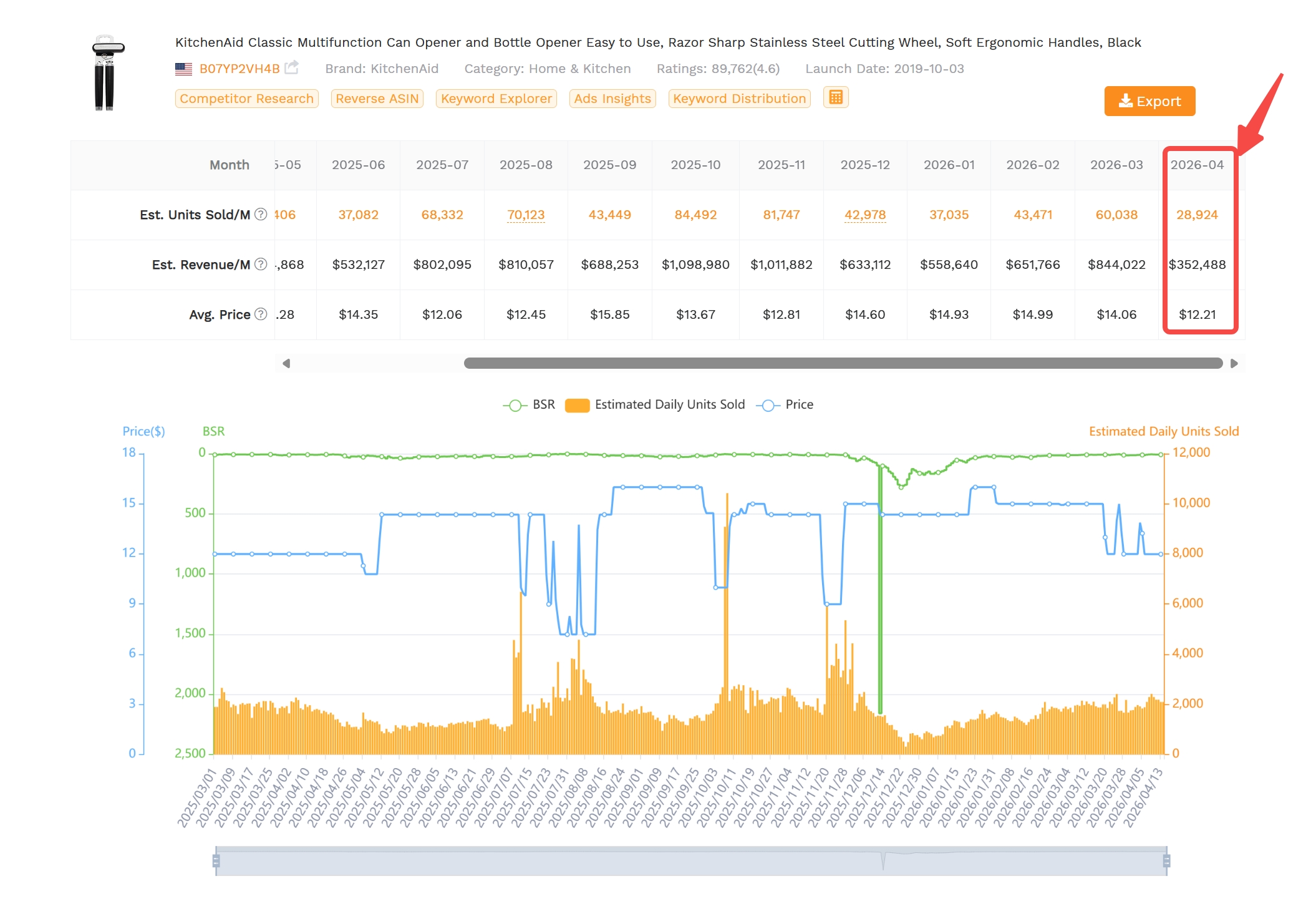
"Sales estimators" = modeled estimates, not Amazon's actual units
Sales estimators are algorithmic tools that infer sales volume based on proxy data. They do not access Amazon's internal order reports. The output is always a modeled estimate, not a confirmed number.
Why "exact sales" is usually not available (for competitors)
Amazon does not disclose competitor sales figures. Third-party tools must reverse-engineer performance using BSR fluctuations, review growth, and traffic patterns. Because these inputs are indirect, all estimates come with inherent uncertainty, especially for niche or volatile categories.
The right expectation: use estimators for ranges + direction, not precision
Instead of asking "How many units does this sell?", ask "Is this product selling consistently in the 500-2,000 units/month range?" Estimators are most valuable when used to assess relative demand and trend direction, not pinpoint accuracy. For example, if a product's BSR improves from #10,000 to #3,000 over 30 days, that's a strong signal of rising demand, even if the exact unit count is uncertain.
Why Sales Estimates Vary So Much (Tools, Categories, and Assumptions)
Not all Amazon sales calculators agree, and that's normal. Different tools use different data sources, assumptions, and modeling logic. Understanding these differences helps you interpret results more wisely.
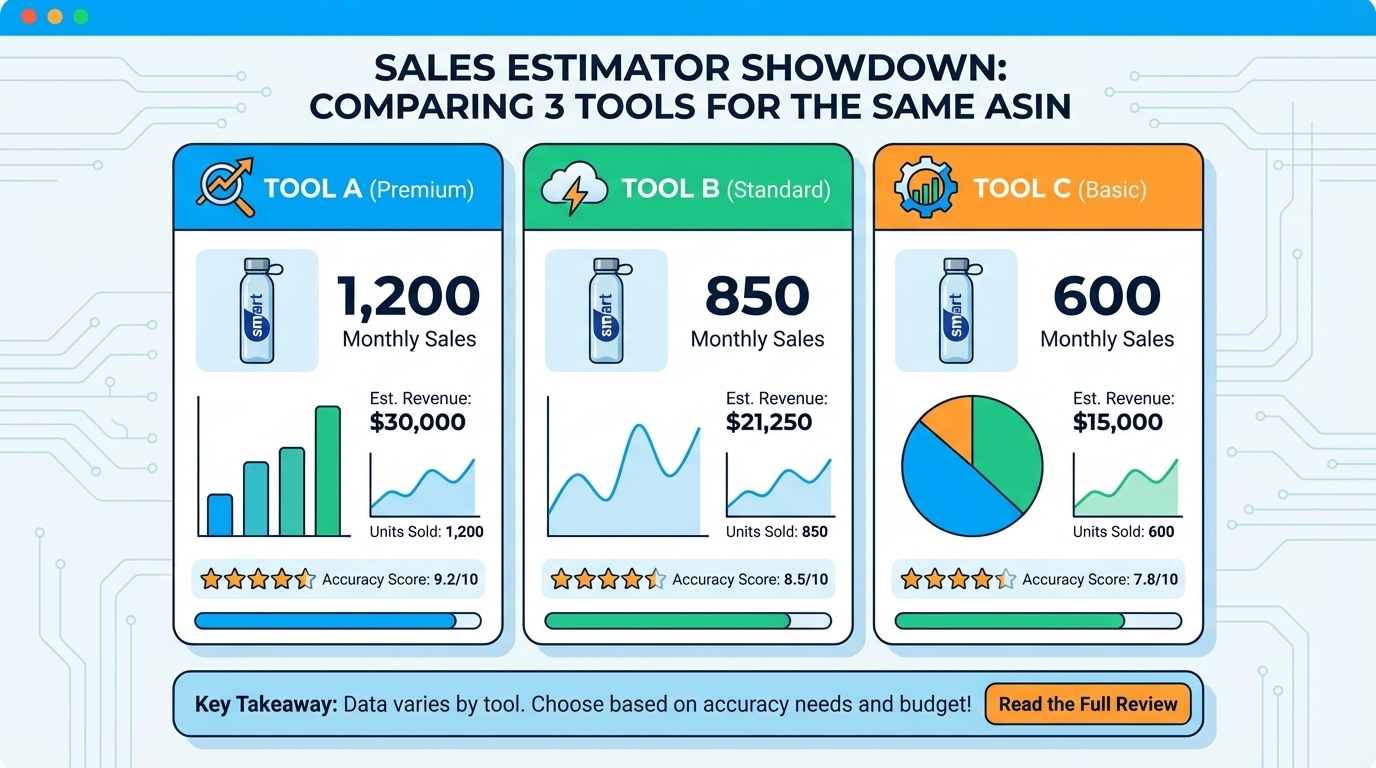
Different inputs: BSR, price, traffic proxies, panel data, click models
Some tools rely solely on BSR-to-sales conversion tables. Others incorporate panel data (user browsing behavior), ad spend estimates, or keyword traffic models. Tools like SellerSprite's Amazon Sales Estimator combine multiple signals for higher accuracy. The more diverse the inputs, the more robust the estimate, but also the more assumptions involved.
Category effect: the same BSR can imply different unit velocity
A BSR of #1,000 means very different things in Pet Supplies vs. Electronics. High-velocity categories (e.g., phone cases) sell thousands of units at that rank, while low-velocity ones (e.g., industrial tools) may only move hundreds. Always calibrate your expectations by category. Use historical data or benchmark sets to understand what BSR means in your niche.
Time window effect: daily vs. 30-day averages vs. seasonal spikes
A tool might show "1,200 units/month" as a 30-day average, but that could hide a spike from a Black Friday promo. Daily BSR tracking reveals volatility. A stable BSR suggests consistent demand; erratic swings suggest promotional dependency or inventory issues. Always check the time frame behind the estimate.
Listing reality: variations, stockouts, promos, coupons distort models
If a product is frequently out of stock, its BSR will be artificially high (worse), making it appear less popular. Conversely, a limited-time coupon can inflate short-term sales and distort long-term projections. Smart estimators adjust for these anomalies, or at least flag them for manual review.
Decide What "Accuracy" Means for Your Decision
"Accurate" depends on your goal. A ±30% error margin might be fine for a go/no-go decision but unacceptable for inventory planning. Define what level of confidence you need before acting.
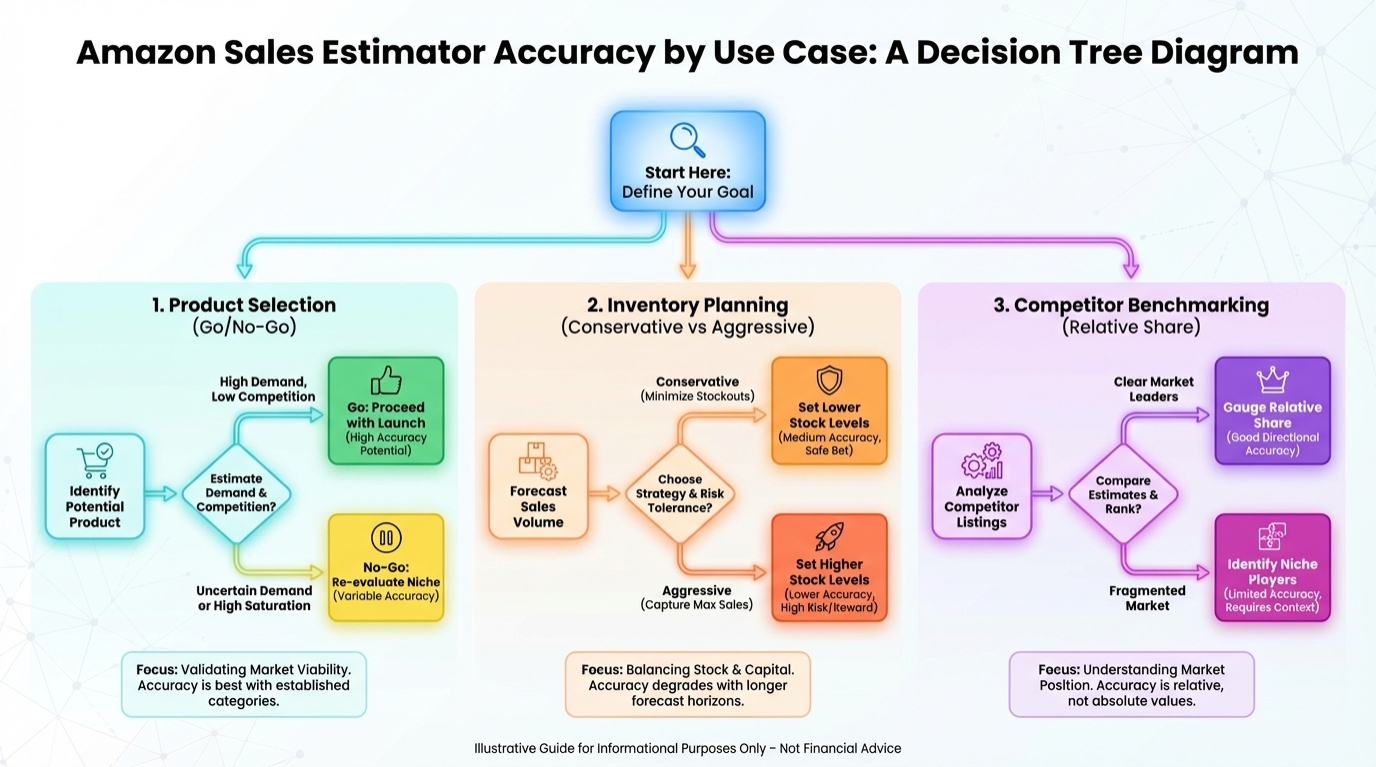
Use case A: product selection (go/no-go)
For new product research, you only need to know if demand is viable. Is the estimated monthly revenue above $3,000? Is competition manageable? If yes, proceed. You don't need exact numbers, just a reliable signal of opportunity.
Use case B: inventory planning (conservative vs. aggressive)
When ordering stock, use conservative estimates. If the tool says 1,500 units/month, plan for 1,000-1,200 unless you have historical data. Overstocking ties up capital; understocking risks stockouts. Use a range, not a point estimate.
Use case C: competitor benchmarking (relative share, not exact units)
To assess market share, compare BSR trends and review velocity across top sellers. If your competitor gains 100 reviews/month and you gain 20, they're likely outselling you 5:1, even if the exact units are unknown. Relative performance is often more actionable than absolute numbers.
Output format: "Low / Medium / High confidence" + sales range
Instead of reporting "1,247 units," report "High confidence: 1,000-1,500 units/month." This communicates uncertainty and sets better expectations.
✅ Accuracy Standard Checklist:
- Estimate based on 30-day average, not daily spike
- Calibrated to correct category and subcategory
- Adjusted for known promos or stockouts
- Validated against at least 5 similar ASINs
- Supported by keyword search volume data
Step 1: Start With the Core Inputs (What You Should Collect First)
Before running any estimate, gather the foundational data. These inputs form the backbone of any reliable sales projection.
BSR + category path (main + subcategory)
Always record both the BSR and the full category path (e.g., Home & Kitchen > Kitchen & Dining > Cookware > Pots & Pans). The same BSR in different subcategories can mean vastly different sales volumes. Use tools that auto-detect category context.
Price history + promotions (coupons/discounts)
A product priced at $29.99 today may have been $49.99 last month with a 40% coupon. Sales volume likely spiked during the promo. Use price tracking tools to identify these patterns and avoid overestimating baseline demand.
Review signals (rating, count, review velocity)
A listing with 500 reviews and a 4.8-star rating growing by 20 reviews/month suggests steady, high-volume sales. A sudden jump in reviews (e.g., +100 in one week) may indicate a review campaign or bundled giveaway, which distorts organic demand signals.
Traffic intent signals (keyword coverage, ad density, brand dominance)
Use keyword research tools to see how many high-intent terms the listing ranks for. High ad density on key search terms suggests strong demand. If one brand dominates page one, it may be hard to break in, even if sales estimates look attractive.
Optional: brand-owned data sources (if you have access)
If you're an existing seller, leverage your own sales data to calibrate models. For example, if you know your product with 1,000 reviews sells ~1,200 units/month, you can apply that ratio to similar products in the same category.
Step 2: Build a "Benchmark Set" for Calibration (The Accuracy Unlock)
One-off estimates are risky. To improve accuracy, create a benchmark set of 10-20 comparable ASINs in your niche. This allows you to spot outliers and validate modeling assumptions.
Pick 10-20 comparable ASINs (same use case + similar price band)
Focus on products that serve the same customer need and fall within ±20% of your target price. For example, if researching a $35 yoga mat, include other premium non-slip mats, not budget $15 versions.
Remove distortions (bundles vs. singles, brand giants, off-position variants)
Exclude products sold in multi-packs unless you're also selling bundles. Avoid including Amazon's Choice or dominant brands like Anker or Philips unless you're benchmarking against them specifically. Also, watch for "off-position" variants, e.g., a parent ASIN selling a 6-pack while child ASINs sell singles.
Why benchmarking beats one-off calculator outputs
A single estimate might be off due to data quirks. But if 15 similar products all show BSR #1,000 ≈ 800-1,200 units/month, you can trust the pattern. Benchmarking reduces noise and increases confidence.
✅ Benchmark ASIN Selection Rules:
- Same primary function (e.g., all portable blenders)
- Price within ±20% of target
- Same category and subcategory
- No bundles unless you're selling bundles
- Exclude Amazon's Choice or top 2 brands if the market is concentrated
Step 3: Triangulate Sales Using 3 Independent Methods (Don't Trust One Number)
Never rely on a single method. Cross-validate using three independent approaches to build a more accurate picture.
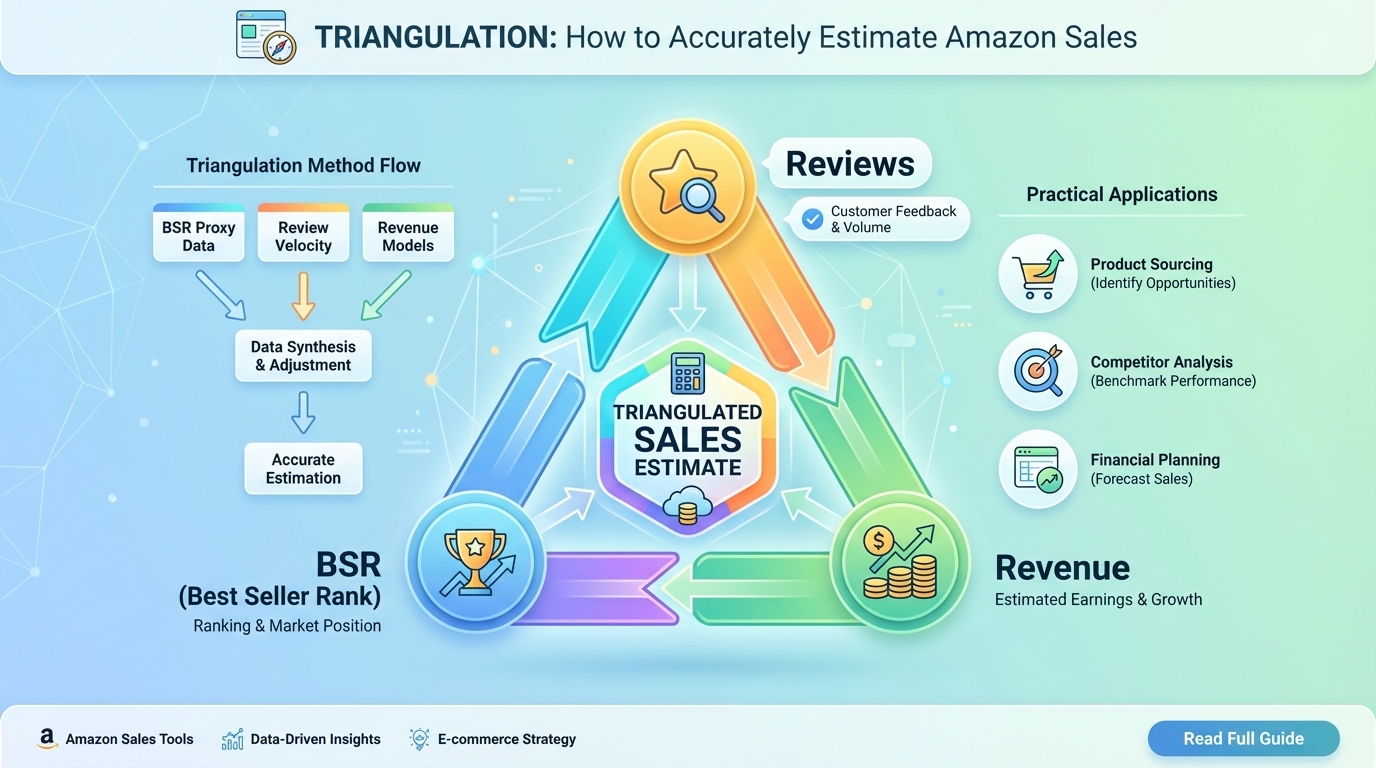
Method 1: BSR-to-sales range, not a point estimate
Use BSR trends over time to estimate a range. For example, a product with a stable BSR of #2,500 in "Pet Supplies > Dog > Food" might sell 600-900 units/month. A spiky BSR suggests promotional dependency, which means lower confidence.
Use BSR trends (stable vs. spiky) to set confidence bands
Stable BSR = high confidence. Frequent jumps = lower reliability.
Method 2: Review velocity as a sanity check
Assume a review rate: 10-30% of buyers leave a review. If a product gains 30 reviews/month, it likely sold 100-300 units. Adjust by category: electronics have higher review rates than consumables.
Estimate orders using review rate assumptions (category-dependent)
For example, in kitchen gadgets, assume 20% review rate. 50 new reviews = ~250 units sold. If your BSR model says 1,000 units, there's a mismatch, and you'd better investigate further.
Watch for review gating, seasonality, and review lag
Some brands use post-purchase emails to filter negative reviews ("review gating"), inflating ratings and distorting velocity. Also, holiday spikes may delay review timing by 2-4 weeks.
Method 3: Revenue logic (price × plausible conversion)
Estimate traffic from keyword volume and assume a conversion rate (CVR). For example, 10,000 monthly searches × 10% SERP click share × 10-15% CVR = 100-150 orders. If the seller's price is $50, that's $5,000-$7,500/month.
Use SERP competitiveness + offer quality to choose conservative CVR bands
In a crowded SERP with strong brands, use 5-8% CVR. For a unique product with great images and reviews, 12-15% may be plausible.
Flag "high traffic, low conversion" traps
If keyword volume is high but sales are low, the product may have poor conversion due to bad images, pricing, or reviews.
🔍 If methods disagree, what to check next:
| Discrepancy | Investigate |
|---|---|
| BSR high, reviews low | Stockouts or new listing |
| Reviews high, BSR low | Promo spike or review campaign |
| Revenue logic too high | Overestimated traffic or CVR |
Step 4: Verify Demand Accuracy With Keyword Evidence (Demand ≠ Sales Model)
High sales estimates mean nothing if there's no real buyer intent. Validate demand using keyword data.
Validate keyword breadth (cluster demand vs. one hero keyword)
A product relying on one high-volume keyword is riskier than one with broad demand across 10+ relevant terms. Use keyword clustering to assess market depth.
Compare "buyer intent" terms vs. browsing terms
"Buy portable blender" has higher intent than "best blender for smoothies." Prioritize products with strong commercial intent keywords.
Use share-of-voice logic: who owns page-one visibility for money keywords?
If 80% of page one is dominated by two brands, breaking in will be hard. High demand + low visibility = overestimated opportunity. Always cross-check sales estimates with actual SERP competition and visibility potential.
Step 5: Accuracy Stress Tests (Catch the Most Common Estimator Errors)
Run these quick checks to catch data distortions before making decisions.
Stockout test: is the listing frequently unavailable?
Use historical availability data. Frequent stockouts suppress sales and inflate BSR, making the product appear less popular than it is.
Variation test: are sales spread across child ASINs?
Check if sales are split among sizes, colors, or bundles. A parent ASIN may show low velocity, but child ASINs could be selling well.
Promo test: are estimates inflated by temporary coupons/deals?
Look for recent discount patterns. A 50% off coupon can double sales temporarily; don't mistake it for organic demand.
Brand dominance test: are most sales captured by 1-2 brands?
If the top 3 spots are all one brand, the market may be locked. High sales estimates for small players could be outliers.
⚠️ Red Flags Checklist:
- BSR improved suddenly after a coupon
- Review velocity spiked abnormally
- Only one keyword drives all traffic
- Top 3 results are all one brand
- Frequent "Currently unavailable" status
Step 6: Score Your Confidence (A Simple Accuracy Rating Sellers Can Use)
Assign a 1-5 score to each factor, then average for a final confidence rating.
Confidence Score inputs (1-5 each)
Data stability (BSR volatility)
Benchmark alignment (similar ASINs agree)
Keyword breadth (cluster depth)
Distortion risk (promos/stockouts/variations)
Average score ≥4 = High confidence. 2.5-3.9 = Medium (watchlist). ≤2.4 = Low (reject or validate further).
Decision rule: High confidence → proceed; Medium → watchlist; Low → reject or validate more
Step 7: Ongoing Verification After Launch (Turn Estimates Into Truth)
After launch, compare real performance to your estimates to refine future models.
Week 1-2: don't overreact to attribution/reporting lag
Sales may take 7-10 days to reflect in reports. PPC costs may seem high initially due to learning phase.
Week 3-8: compare estimator assumptions vs. real conversion and PPC cost
Did your actual CVR match your estimate? Was CPC higher than expected? Use this data to adjust future forecasts.
Update your model: refine CVR, CPC, and reorder timing
Build a feedback loop. Each launch improves your estimation accuracy for the next.
Common Mistakes When Using Amazon Sales Estimators
Treating one tool as "truth"
No single tool is perfect. Cross-check with multiple sources.
Comparing across categories without calibrating
A BSR of #1,000 means different things in different categories. Always calibrate.
Ignoring promotions and stockouts
These distort sales data. Always check for them.
Using sales estimates without checking keyword demand breadth
Sales models can be misleading. Always validate with keyword data.
FAQ
How accurate is the Amazon Sales Estimator for predicting monthly revenue?
Most Amazon Sales Estimators provide a range within ±30% of actual sales when used correctly. Accuracy improves with category calibration, benchmarking, and triangulation. For strategic decisions like product selection, this range is sufficient. For inventory planning, use conservative estimates.
What factors does the Amazon Sales Estimator consider when calculating potential sales?
Estimators use Best Seller Rank (BSR), price, review count and velocity, category, and sometimes traffic proxies or panel data. Advanced tools like SellerSprite also analyze keyword performance, ad density, and historical trends to improve accuracy.
Can I use the Amazon Sales Estimator to compare different product niches on Amazon?
Yes, but only after calibrating for category differences. A BSR of #1,000 in Electronics sells more units than in Office Products. Use benchmark sets within each niche to make fair comparisons.
Can I estimate competitor sales reliably from BSR alone?
Not reliably. BSR is a relative metric influenced by category, seasonality, and promotions. Use BSR as one input among many; combine it with review velocity and keyword data for better accuracy.
What's an acceptable accuracy range for product research?
For go/no-go decisions, a ±30% range is acceptable. If the estimated revenue is $5,000-$7,000/month and your minimum threshold is $3,000, the risk is manageable. For inventory or ad budget planning, aim for tighter validation using historical data.
Next Steps
- Try SellerSprite's Amazon Sales Estimator for free today.
- Join our free SellerSprite account to try out more advanced features.
References
By SellerSprite Success Team
The SellerSprite Success Team combines data science, e-commerce expertise, and real-world seller experience to deliver actionable insights. We've helped thousands of Amazon sellers validate product ideas, optimize listings, and scale profitably using AI-powered tools and proven frameworks.


