TL;DR: Reverse ASIN lets you harvest competitor keyword intent and rewrite your Amazon listing for higher rankings and conversion.
Key Takeaways
- Reverse ASIN is a research tool, not a shortcut for weak offers.
- Cluster buyer intent, then rewrite titles, bullets, and backend terms for readability and relevance.
- Validate indexing and performance before scaling any rewrite.
Table of Contents
Note on marketplaces: This guide is specifically optimized for the US market.
Introduction
If you've ever wondered why some Amazon listings seem to "just work," the secret often lies in the language they borrow from top‑ranking competitors. "Reverse ASIN" is a data‑driven approach that extracts the keywords and phrases winners already rank for, giving you a roadmap to rewrite your copy for better visibility and conversion. For the full strategic overview, visit our Reverse ASIN Strategy Guide.
Why Reverse ASIN Is a Copywriting Tool (Not Just "Keyword Theft")
Reverse ASIN = visibility keywords competitors already win
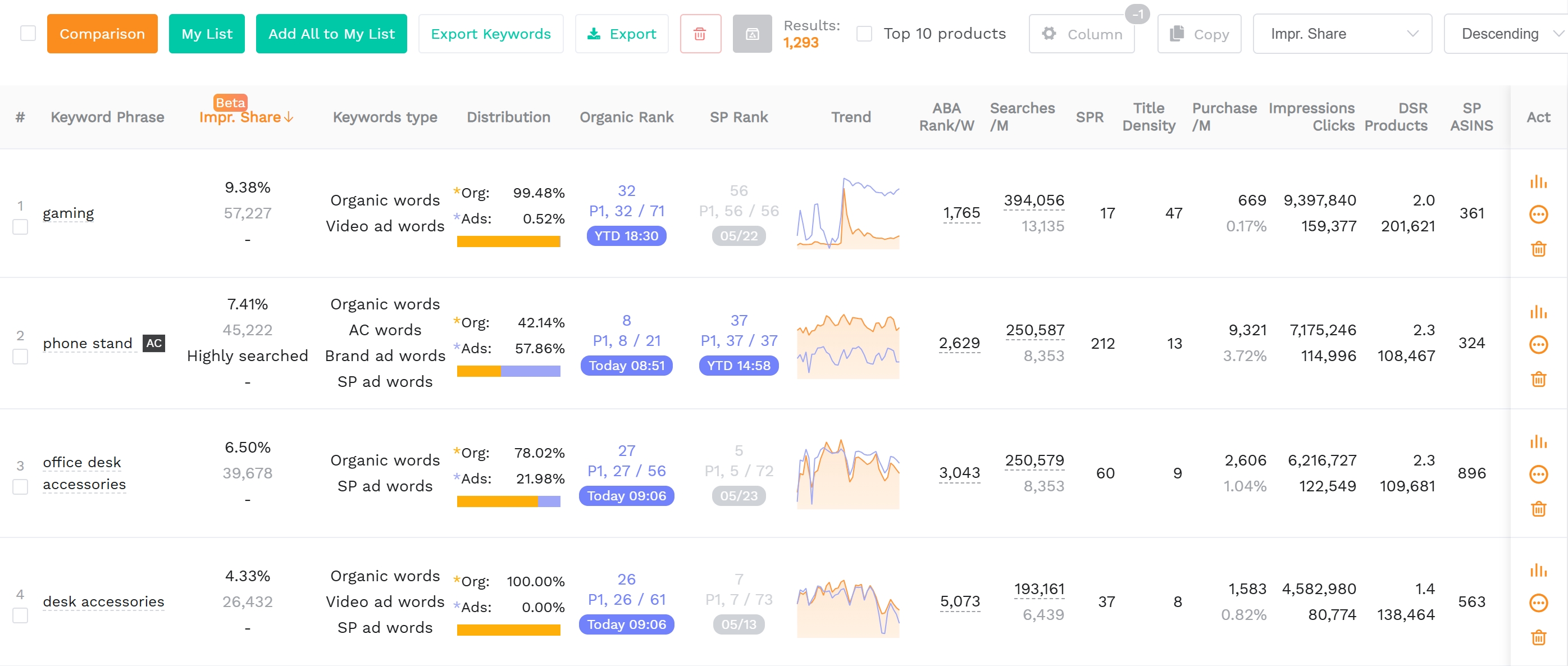
Reverse ASIN looks at a competitor's ASIN, pulls the search terms that drive traffic to that product, and presents them as "visibility keywords." In essence, you're stealing their ranking language, not their brand.
The core insight: you're not copying keywords; you're copying buyer intent patterns
Buyers type the same problems, use‑cases, and compatibility phrases across product categories. Mapping those intent clusters allows you to craft copy that speaks directly to the shopper's mental model.
What reverse ASIN can't do: it won't fix weak offer, bad images, wrong price
Even the perfect keyword set cannot rescue a listing with poor visuals or a price that's out of market. Treat reverse ASIN as a copy‑optimization tool, not a silver bullet for all performance issues.
The Biggest Mistake: Stuffing Reverse ASIN Keywords Into Copy
"Ranking language" vs. "selling language" (why both must exist)
Ranking language satisfies Amazon's algorithm; selling language convinces shoppers. Both need to coexist, but they're not interchangeable. The title can be algorithm‑friendly, while bullets carry persuasive storytelling.
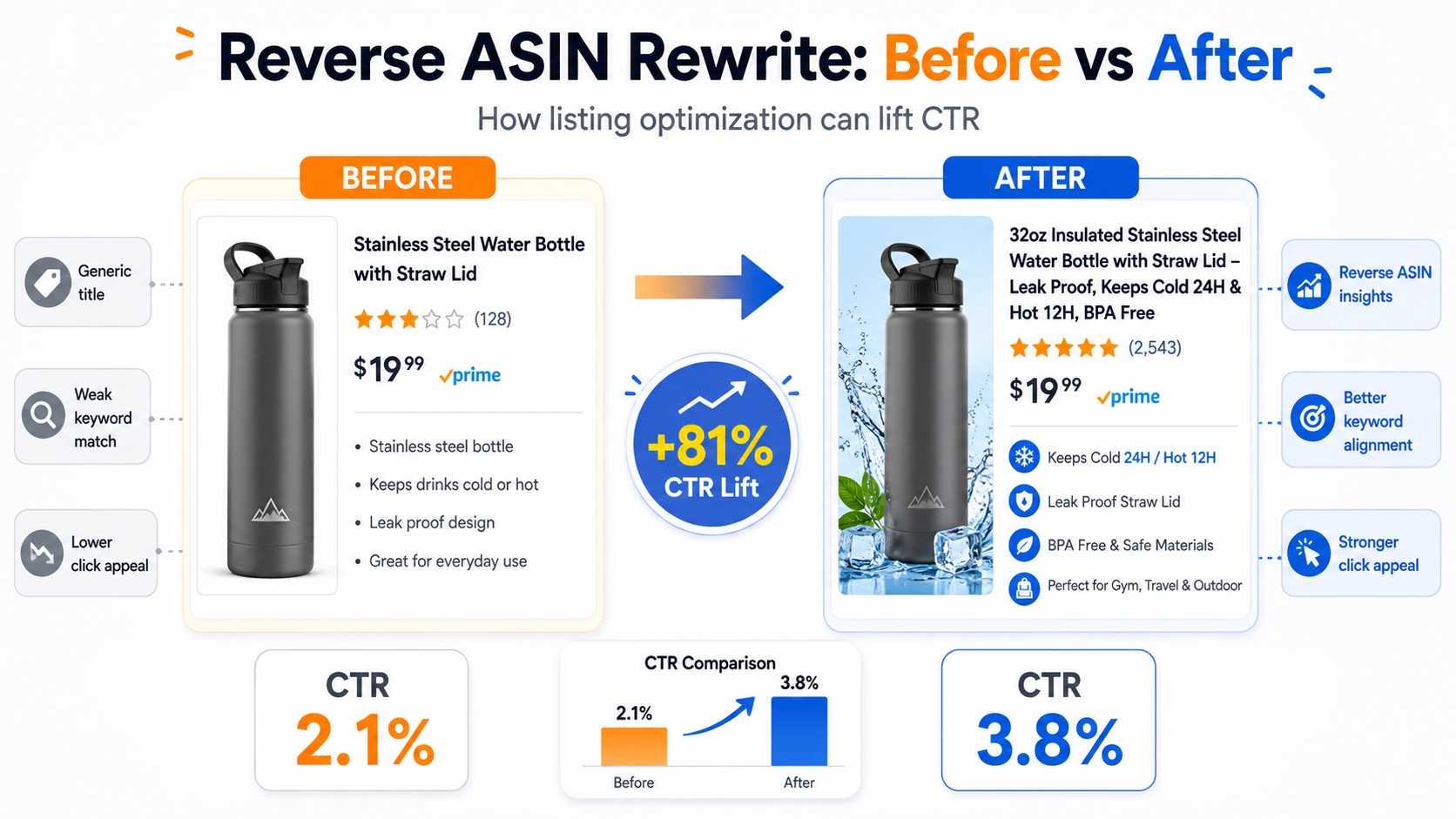
When keywords hurt conversion (robot copy → lower CVR → weaker ranking)
Over‑loading a title with eight synonyms looks spammy on mobile, leading to lower click‑through and conversion rates. Amazon's system interprets that as low relevance, which can actually drop rankings.
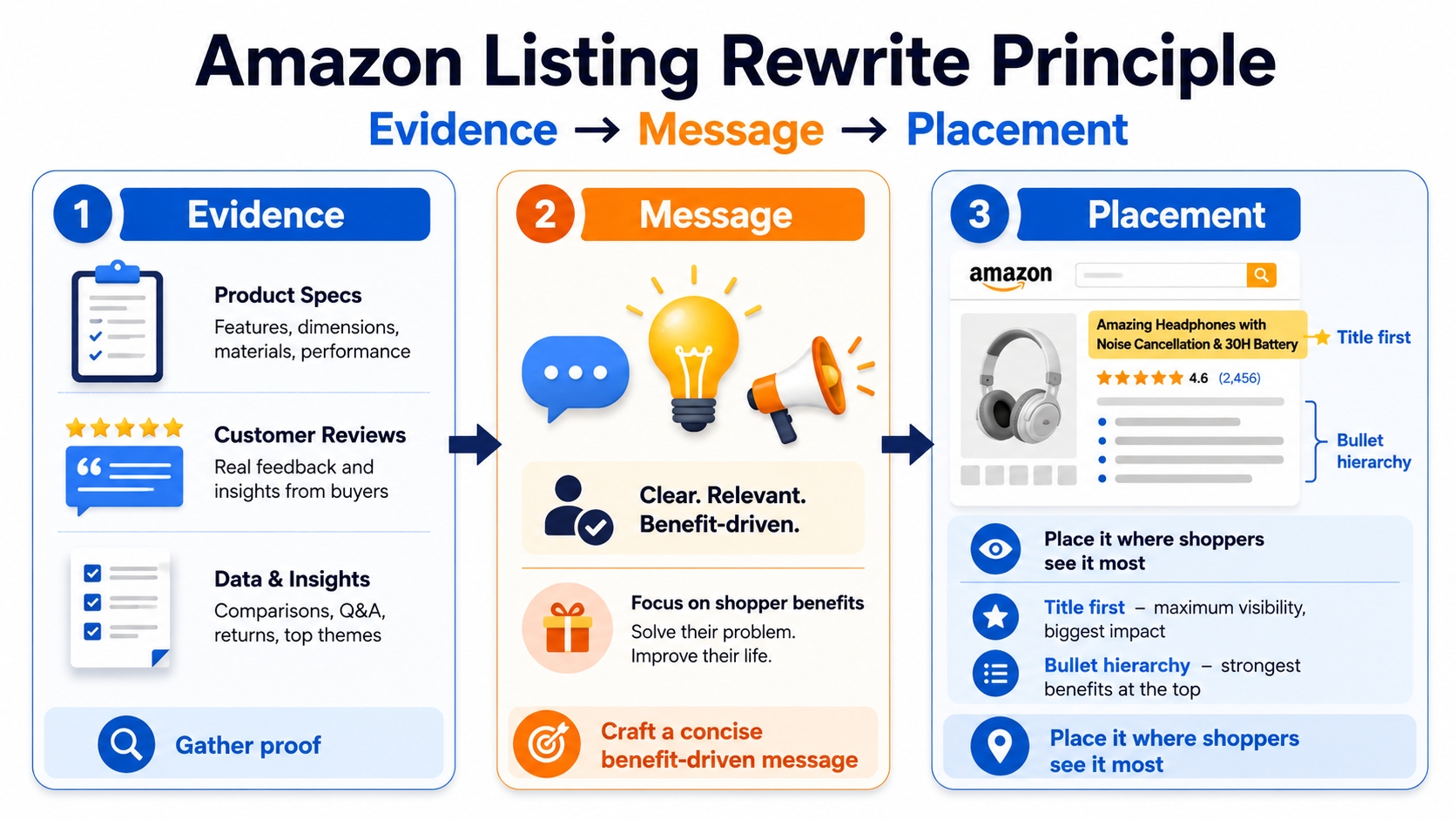
The rewrite principle: evidence → message → placement (in that order)
First gather proof (feature specs, reviews), craft a concise benefit‑driven message, then place it where shoppers see it most (title first, then bullet hierarchy).
Prep: Get Your Inputs Right (So Your Rewrite Isn't Noise)
Choose the right competitor ASINs (same use case + price band + format)
Select ASINs that match your product's core attributes, price range, and packaging. Avoid "data poison" like bundles, multi‑pack variants, or category giants that dominate for unrelated reasons.
Define your "copy goal" before extracting keywords
Are you aiming for better indexing, a rank lift for a specific cluster, higher click‑through, or improved conversion? Your goal determines which keywords you prioritize.
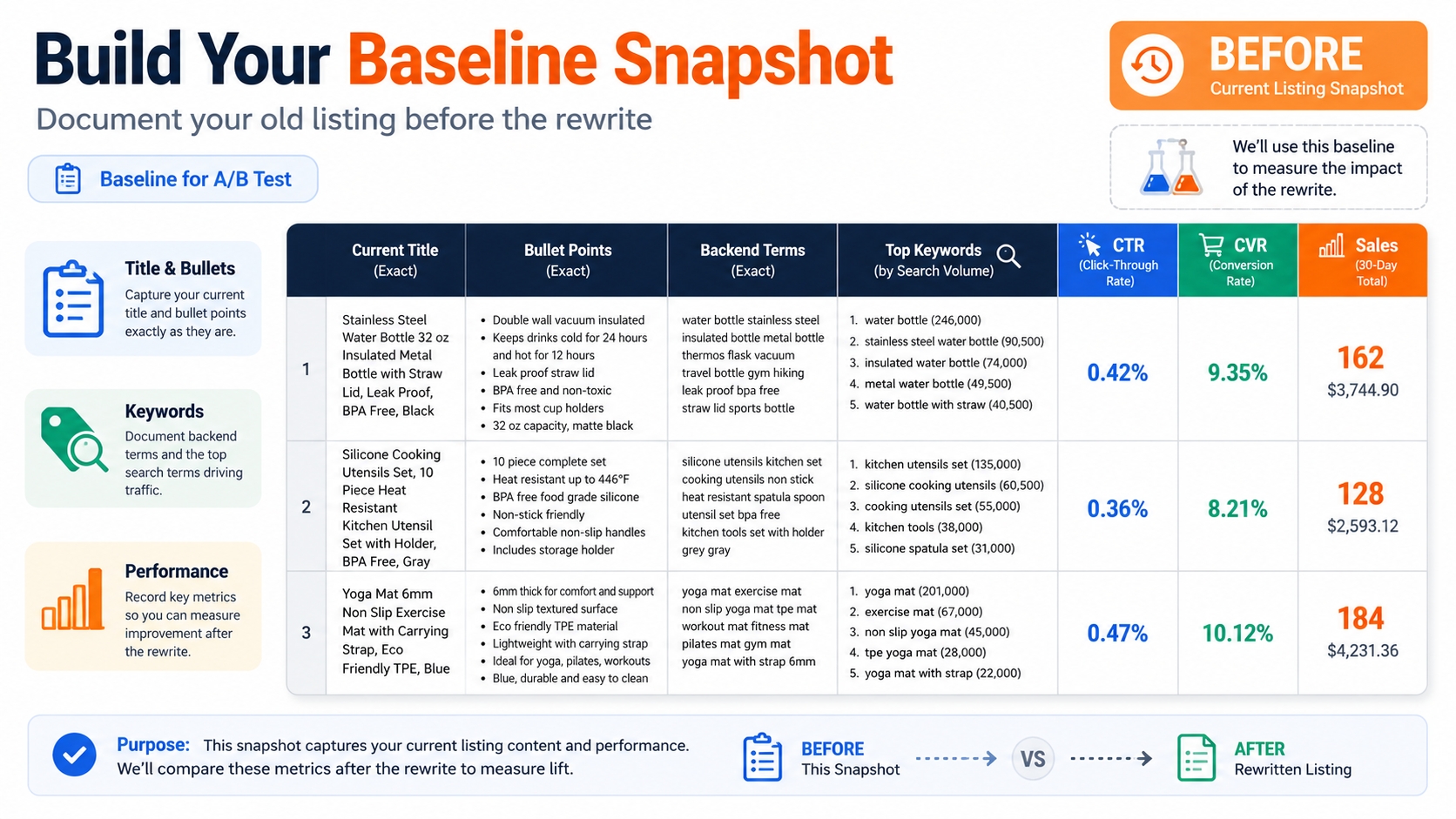
Build a baseline snapshot (so you can prove the rewrite worked)
Document your current title, bullet points, backend terms, top‑ranking keywords, and performance metrics (CTR, CVR, sales). This will be the "before" for your A/B test.
The Reverse ASIN → Rewrite Workflow (Step-by-Step Tutorial)
Step 1: Pull Reverse ASIN Keywords (SellerSprite) and Export Cleanly
Use SellerSprite's Reverse ASIN tool to extract all the traffic keywords for each competitor. Export the data as CSV, keeping only the keyword, relevance signal, and rank type columns. Separate "branded" keywords and exclude them from your core map.
Step 2: Turn the Keyword List Into "Intent Clusters" (This Is the Real Rewrite Engine)
Group keywords by buyer intent: Core term, Attribute, Use case, Compatibility, Problem‑solution. This clustering guides the thematic structure of your bullets. Create a "cluster headline" that sounds like a human promise rather than a keyword pile.
Step 3: Identify the "Intent Gap" (What Competitors Cover That You Don't)
Compare your current copy against each intent cluster. Gaps reveal missing use‑case language, compatibility statements, attribute modifiers, or objection‑killing benefits.
- Gap type A: missing use‑case language (buyers search scenarios)
- Gap type B: missing compatibility language (fits/works with…)
- Gap type C: missing spec/attribute modifiers (size/material/pack)
- Gap type D: missing objection‑killers (durability, ease, safety, etc.)
Step 4: Rewrite the Title (Front‑load what mobile shoppers see)
Use the title formula: Primary term + key attribute + differentiator + compatibility (if critical). Keep it readable with one main term plus 1–2 supporting modifiers.
Step 5: Rewrite Bullets Using "Cluster‑to‑Bullet" Mapping (One Theme Per Bullet)
Bullet 1 delivers the primary benefit with proof. Subsequent bullets rotate the remaining clusters – use‑case, compatibility, spec, problem solved. The final bullet adds risk reversal (warranty, care).
- Bullet 1: primary benefit + proof (own the core intent)
- Bullet 2–4: rotate clusters (use case, compatibility, feature/spec, problem solved)
- Bullet 5: risk reversal (warranty, care, what's included, who it's for)
Step 6: Build Backend Search Terms Without Repeating Front‑End Copy
Backend fields are for variants, synonyms, long‑tail leftovers, and spelling differences. Do not repeat title or bullet language.
Step 7: Add "Copy Guardrails" (So You Don't Accidentally Lower CVR)
Stay compliant by avoiding unverified claims, and don't attract the wrong buyer with unrelated high‑volume terms. Test changes incrementally.
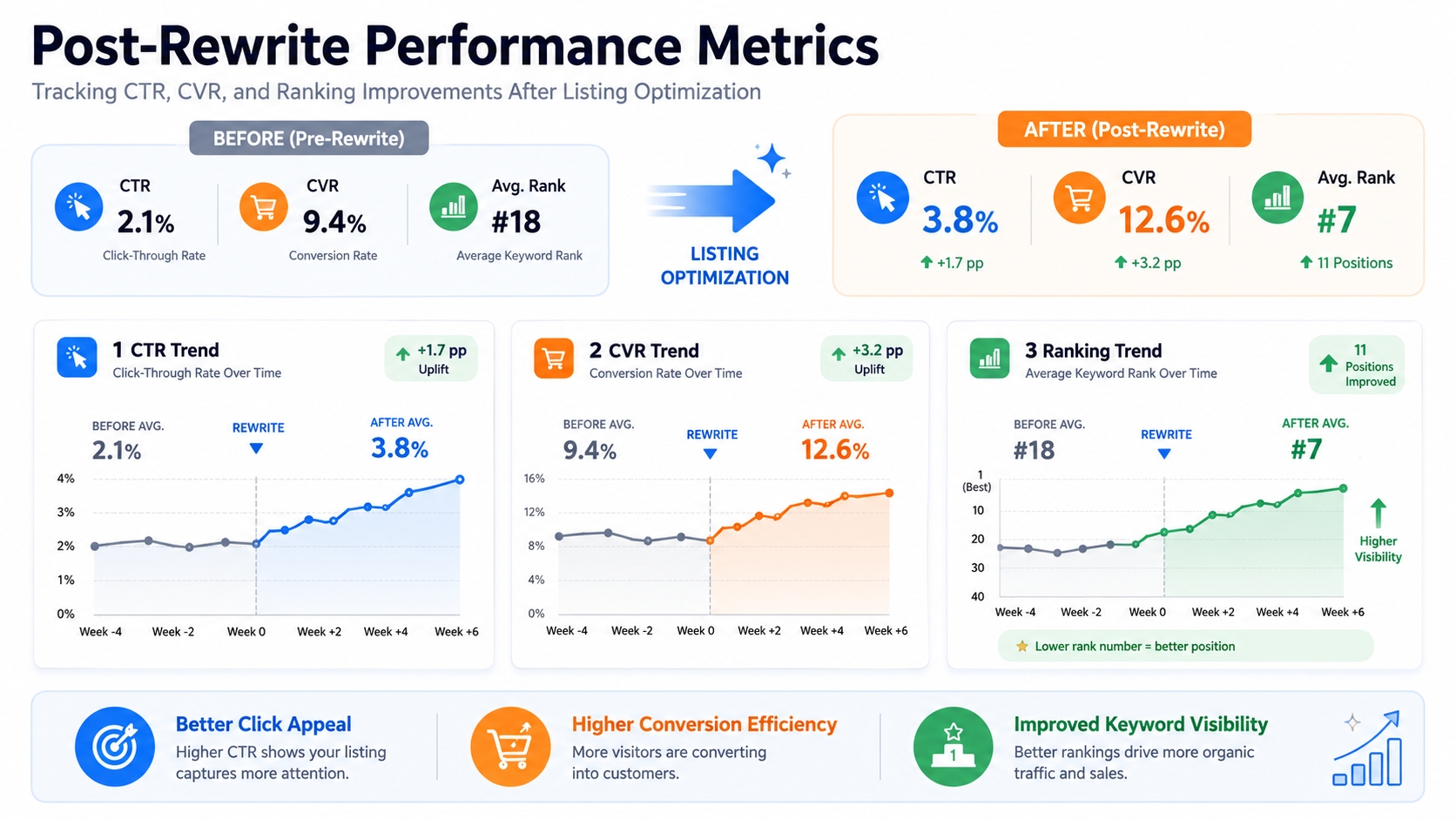
Step 8: Validate Indexing + Performance After the Rewrite (Proof > Feelings)
Check that your intent clusters appear in the search term report. Measure CTR, CVR, and rank changes over a stable 7‑day look‑back window to confirm lift.
A Practical Example: Competitor Keywords → New Copy
Raw reverse ASIN export (what you typically see)
CSV shows keywords like "water‑resistant smartwatch," "battery life 24h," "compatible with iPhone," each with a visibility metric.
Clustered intent map (what you should build)
Core term: Smartwatch; Attribute: Water‑resistant; Use case: Fitness tracking; Compatibility: iPhone & Android; Problem‑solution: Long‑lasting battery.
Rewritten title + 5 bullets (show "before → after" logic)
Before: "Wireless Smartwatch – Black – 1 Piece." After: "Water‑Resistant Smartwatch – 24‑Hour Battery – Works with iPhone & Android." Bullets follow the cluster‑to‑bullet map.
Backend terms list (what you kept out of the title intentionally)
e.g., "black smartwatch," "fitness tracker," "GPS," "quick charge," "silicone strap."
Advanced Moves That Make Reverse ASIN Copy Actually Win
"Intent fingerprinting": which 2–3 clusters correlate with page‑one winners
Analyze top‑ranking listings and note the recurring clusters. Replicate those 2–3 high‑impact intents in your own copy for a fast win.
Differentiation‑first copy: use competitor gaps + review pain points to stand out
If competitors lack "fast charging," highlight it early. Pair the gap with a real review quote to add credibility.
PPC‑to‑copy feedback loop: promote converting search terms into bullets (not keyword stuffing)
Run a short‑term exact‑match campaign, harvest the high‑converting terms, and translate them into bullet benefits.
Avoid cannibalization across your own variations (one cluster, one owner)
Assign each intent cluster to a single ASIN variant. This prevents internal competition for the same keyword space.
Common Mistakes (And the Fix)
Copying competitor titles word‑for‑word (zero differentiation)
Solution: Keep the core intent but rewrite with your brand voice and unique selling proposition.
Chasing volume terms that don't match your offer (traffic that won't convert)
Solution: Prioritize relevance over sheer search volume. Use the intent‑gap analysis to filter out misaligned terms.
Adding too many modifiers early (mobile truncation + lower CTR)
Solution: Stick to the title formula; keep it under 200 pixels for mobile display.
Ignoring backend discipline (repetition wastes space)
Solution: Populate backend with synonyms, misspellings, and hidden attributes, never repeat front‑end copy.
Conclusion
Reverse ASIN is a powerful lens into buyer intent. By following the structured workflow, you turn raw competitor data into high‑converting, algorithm‑friendly copy. Remember to test, measure, and iterate – the data will tell you what works.
FAQ
What is reverse ASIN and how can it boost my Amazon product listing optimization?
Reverse ASIN extracts the search terms that top‑ranking competitors already rank for. By mapping those terms to buyer intent, you can rewrite titles, bullets, and backend search terms that align with proven high‑traffic language, leading to better indexing, higher click‑through, and stronger conversions.
How do I use a reverse ASIN tool to identify high‑ranking competitor keywords?
Enter a competitor's ASIN into SellerSprite's reverse ASIN feature. Export the keyword list, filter by relevance score, and group the keywords into intent clusters. Those clusters become the foundation for your new copy.
Does reverse ASIN reveal Amazon backend keywords?
The tool surfaces front‑end traffic keywords. Backend search terms still need to be built manually, but the same intent clusters guide which synonyms and long‑tail variants you should place in the backend.
Can reverse ASIN data improve my Amazon PPC campaigns and organic search visibility?
Yes. Use high‑converting reverse ASIN keywords in exact‑match PPC ads to surface strong terms quickly. The same terms, when reflected in your listing copy, reinforce relevance for Amazon's organic algorithm.
Next Steps
- Sign up for SellerSprite's Reverse ASIN tool (Start free trial).
- Run a pilot on one of your best‑selling products, follow the workflow, and measure performance over a 7‑day window.
References
By SellerSprite Success Team
The SellerSprite Success Team combines over a decade of Amazon marketplace experience, data‑science expertise, and proven copy‑writing success for sellers ranging from start‑ups to global brands.