Quick answer
Amazon PPC keyword expansion works best when you stop guessing and start building from real signals. This guide shows a practical 3-signal framework that uses converting search terms, SellerSprite organic keyword data, and Amazon Search Query Performance data to find new keyword opportunities, remove duplicates, prioritize by business value, and launch cleaner PPC tests. The goal is not to add more keywords for the sake of volume. The goal is to build a smarter keyword portfolio that improves targeting, protects organic visibility, and creates a repeatable path for profitable PPC growth.
Key takeaways
- The strongest Amazon PPC keyword expansion workflows come from 3 signals, not 1: converting search terms, organic relevance, and underexposed SQP queries.
- A converting search term is often the fastest path to a new keyword because the market has already validated relevance.
- Organic page 1 keywords deserve PPC attention because Amazon already sees your listing as relevant for those searches.
- Search Query Performance can reveal queries where add-to-cart behavior looks stronger than your current visibility, which often signals an underdeveloped opportunity.
- Keyword expansion only works well when you de-duplicate, segment by control level, and launch into a clean campaign structure.
- Treat keyword mining as a repeatable system: deeper mining every 30 days, routine bid optimization every week.
Table of contents
- Who this guide is for
- Keywords vs search terms vs search queries
- The 3-Signal Amazon PPC Keyword Expansion Framework
- Step 1: Mine converting search terms
- Step 2: Mine organic relevance with SellerSprite
- Step 3: Mine underexposed opportunities from SQP
- Step 4: De-duplicate and prioritize
- Step 5: Launch in a cleaner campaign structure
- Anonymized case structure
- Common mistakes
- When not to use this method
- FAQ
- References
- About the author
Who this guide is for
This guide is for Amazon sellers and PPC managers who already have campaign data, want a more reliable way to find new keywords, and need a practical process that connects Amazon reports with SellerSprite keyword intelligence. It is especially useful when your account has already generated sales, your listing has started ranking for some relevant terms, or your brand has access to Search Query Performance data.
This guide is not ideal if:
- You are launching a brand new product with almost no traffic or conversion data yet.
- You do not have Brand Registry access, so SQP is not available.
- Your niche has very low search volume, where signal quality can be too poor for aggressive expansion.
Keywords vs search terms vs search queries
These 3 terms are related but not interchangeable. If you mix them up, your analysis gets messy fast.
| Term | What it means | Why it matters |
|---|---|---|
| Keyword | The term you intentionally target in your PPC campaign. | This is what you control directly in campaign setup. |
| Search term | The exact phrase a shopper typed before your ad received a click. | This shows real customer language and often reveals your next best keyword. |
| Search query | The customer query is used in broader Amazon search analytics, including Search Query Performance. | This helps you spot category-level or brand-level opportunities beyond your current PPC structure. |
The 3-Signal Amazon PPC Keyword Expansion Framework
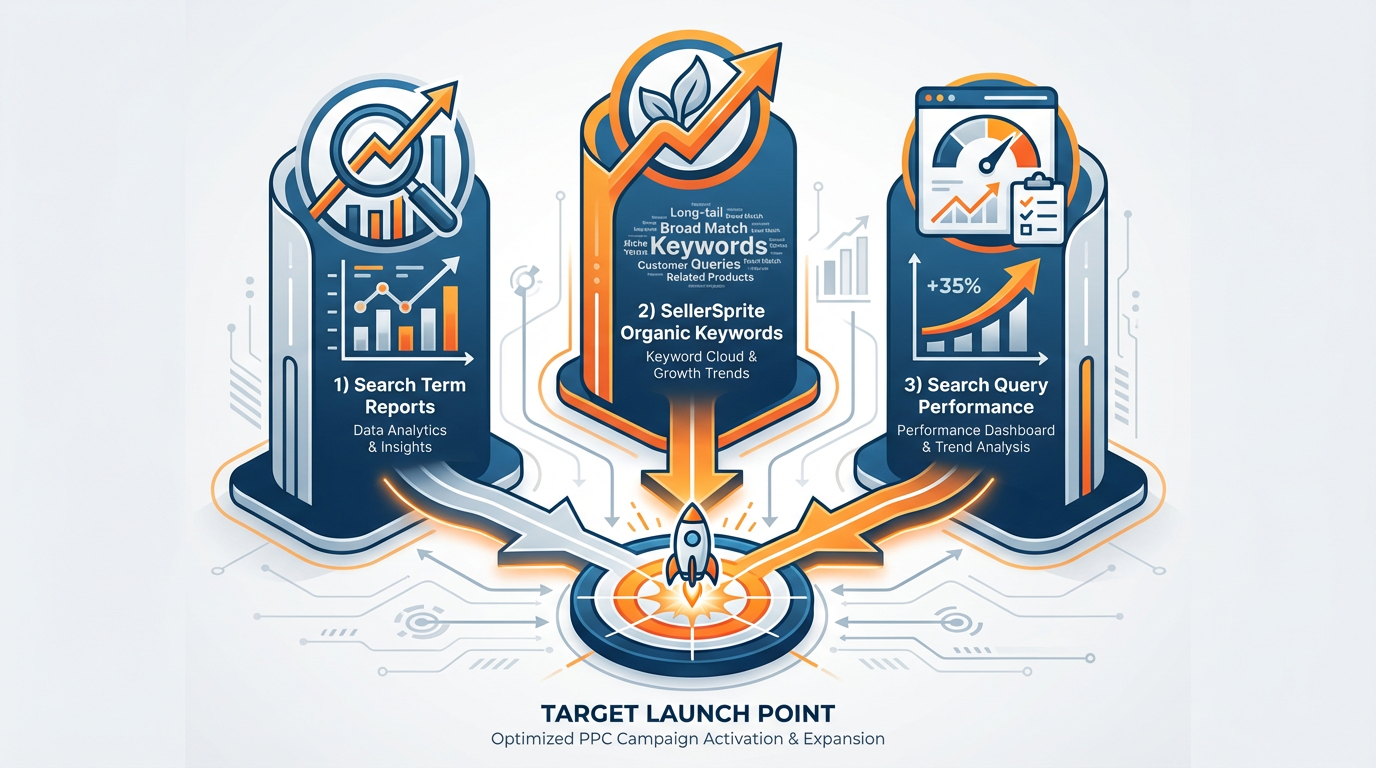
The most reliable keyword expansion workflows answer 3 different questions. What has already been converted? Where does Amazon already see relevance? Where does shopper behavior suggest untapped upside? When you combine those answers, keyword discovery becomes much more strategic.
Signal 1
Converting search terms
Use Amazon ad data to find phrases that already drove sales.
Signal 2
Organic relevance
Use SellerSprite to find keywords where your ASIN already has organic traction.
Signal 3
Underexposed SQP queries
Use Search Query Performance to spot promising queries with stronger downstream behavior than current visibility.
Step 1: Mine converting search terms
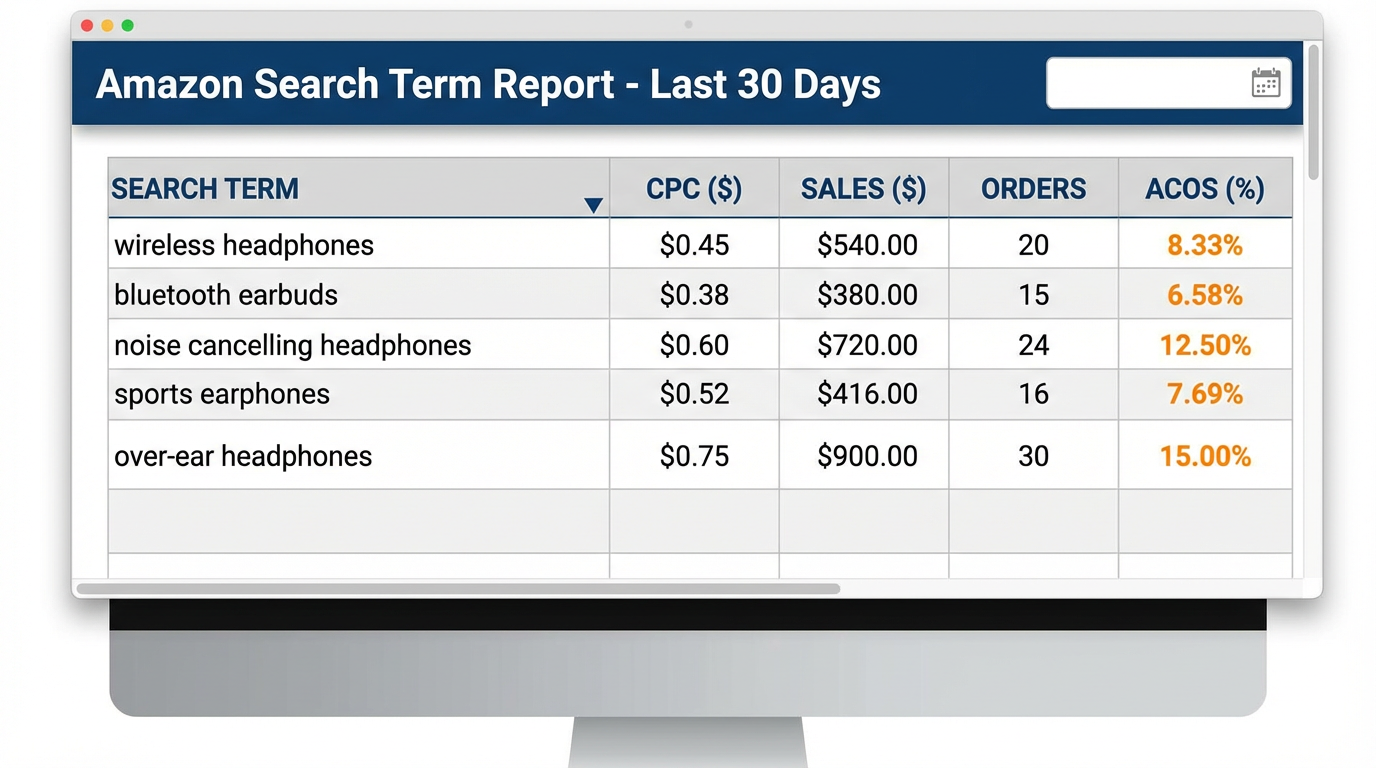
Start with the simplest and most actionable source: search terms that have already generated sales. If a shopper used a query, clicked your ad, and bought your product, that term has already proven relevance. You are not guessing anymore. You are working from real market behavior.
In your Search Term Report, focus first on the fields that directly support action: search term, clicks, CPC, spend, sales, orders, and ACOS. Sort converting terms by ACOS from lowest to highest. This usually creates 2 practical groups.
| Group | What it means | Action |
|---|---|---|
| Converting and within target ACOS | The term is already working at an acceptable cost level. | Promote it into direct targeting and use the current CPC as a logical starting point. |
| Converting but above the target ACOS | The term is relevant, but the traffic cost is too high. | Still test it, but reduce the starting bid. A practical rule is 10% to 40% below the observed CPC, depending on inefficiency. |
What to export from the Search Term Report
- Search term
- Observed CPC
- Orders or sales
- ACOS
- Current campaign and match type
Simple launch logic for converting search terms
- If the term is profitable, launch into exact match first.
- If the term is relevant but expensive, launch into a controlled test campaign with a lower starting bid.
- If the term is already heavily duplicated in your account, pause and resolve overlap before adding more targets.
- If the search term is clearly irrelevant or converts badly after enough clicks, add negatives instead of forcing expansion.
Share Your Sourcing Journey With SellerSprite Community
Join the SellerSprite community on the Facebook Group to share your sourcing journey, ask questions, and get support from fellow Amazon sellers.
Step 2: Mine organic relevance with SellerSprite
Search terms tell you what has already converted through paid traffic. The next question is where Amazon already sees your listing as relevant, even if your PPC structure has not fully supported that demand yet.
This is where SellerSprite becomes especially useful. Use Reverse ASIN, Keyword Mining, and Keyword Research to identify keywords where your ASIN already ranks organically and then validate those terms with search volume and business relevance.
A practical starting point is to review page 1 organic terms, especially those that already place your product in positions 1 to 48. If Amazon is already giving your listing visibility there, PPC support can help defend share, increase repeated exposure, and give you more control over traffic on important searches.
How to prioritize organic keywords
| Keyword type | What to check | Recommended structure |
|---|---|---|
| High-volume, page 1 organic terms | Search volume, current rank, business importance, and existing PPC coverage | Single-keyword campaign or tightly controlled exact match group |
| Mid-volume relevant terms | Organic relevance, semantic fit, manageable overlap | Small grouped campaign by theme or parent term |
| Low-volume long-tail terms | Long-tail intent, low competition, whether it adds unique coverage | Grouped phrase or broad test campaign with careful negatives |
Before launch, compare every organic candidate with your current PPC keyword list. This is one of the easiest places to lose account clarity. Expansion should increase control, not create internal competition.
Step 3: Mine underexposed opportunities from SQP
Once you know what has converted and where you already rank organically, the third layer is Search Query Performance. This is where you look for search queries that may be underdeveloped in your strategy, even though shopper behavior suggests real promise.
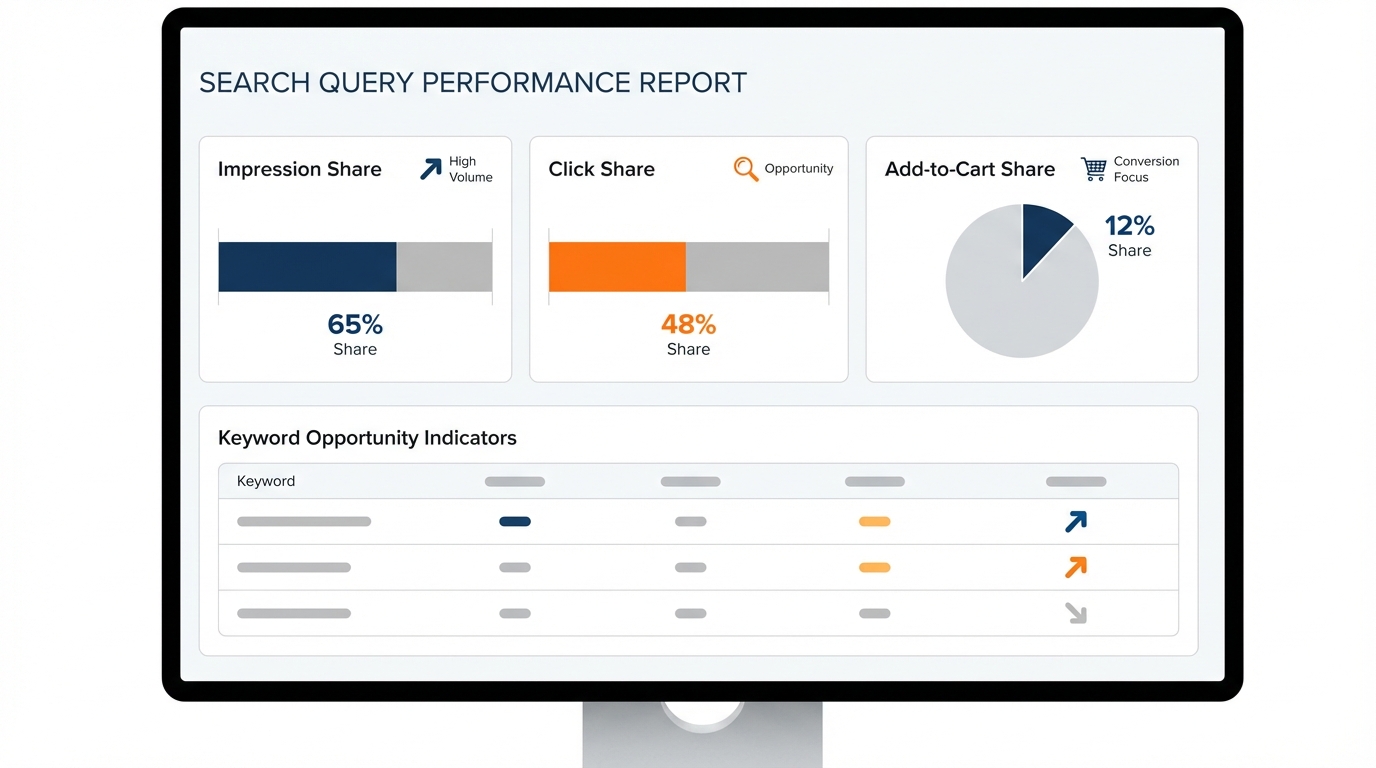
The most useful fields for this workflow are search query, impression share, click share, and add-to-cart share. A particularly useful pattern is when the add-to-cart share is stronger than both click share and impression share. That often suggests the query is underexposed. In simple terms, you may not be visible enough yet, but the response looks encouraging when shoppers do engage.
| SQP signal | What it may mean | Action |
|---|---|---|
| Add-to-cart share > click share and impression share | Downstream behavior looks stronger than current exposure. | Consider a controlled PPC test and review listing support for that query. |
| High impression share but weak click share | Visibility exists, but the offer is not winning enough clicks. | Improve title, main image, price position, or ad relevance before scaling spend. |
| High click share but weak add-to-cart share | Traffic is arriving, but the product page is not closing the gap well. | Review listing quality, price, reviews, offer fit, and conversion blockers. |
Export SQP data, compare it with your current keyword list and listing coverage, and focus on the queries you are not actively targeting yet. That is where this signal becomes powerful.
Step 4: De-duplicate and prioritize
Once you have candidates from all 3 sources, the next job is not to launch everything. The next job is to clean the list and rank opportunities by business logic.
De-duplication rules
- Remove exact duplicates across search term, organic, and SQP exports.
- Merge close variants only when intent is the same and control does not need to be separate.
- Check if the term already exists in exact, phrase, broad, or auto campaigns.
- Tag each keyword by source so you can evaluate which signal produces the best outcomes later.
- Keep important terms isolated if they represent a meaningful revenue or rank-defense opportunity.
A simple prioritization model
| Priority | Keyword profile | Launch style |
|---|---|---|
| Priority 1 | Converting search term with acceptable ACOS, or a strategic organic page 1 term with strong volume | Exact match, higher control, dedicated budget where needed |
| Priority 2 | Converting a but inefficient search term, or a high-potential SQP query with good downstream signal | Controlled test campaign with conservative bid logic |
| Priority 3 | Lower-volume long-tail terms or support keywords with weaker evidence | Grouped phrase or broad test with tight negatives |
Starting bid logic you can actually use
- Converting and profitable search term: start near the observed CPC.
- Converting but inefficient search term: start 10% to 40% below the observed CPC.
- Organic relevance term with no PPC history: start conservatively and scale after you see clean click and conversion signals.
- SQP opportunity with weak visibility: test in a controlled campaign before giving it broad budget support.
Step 5: Launch in a cleaner campaign structure
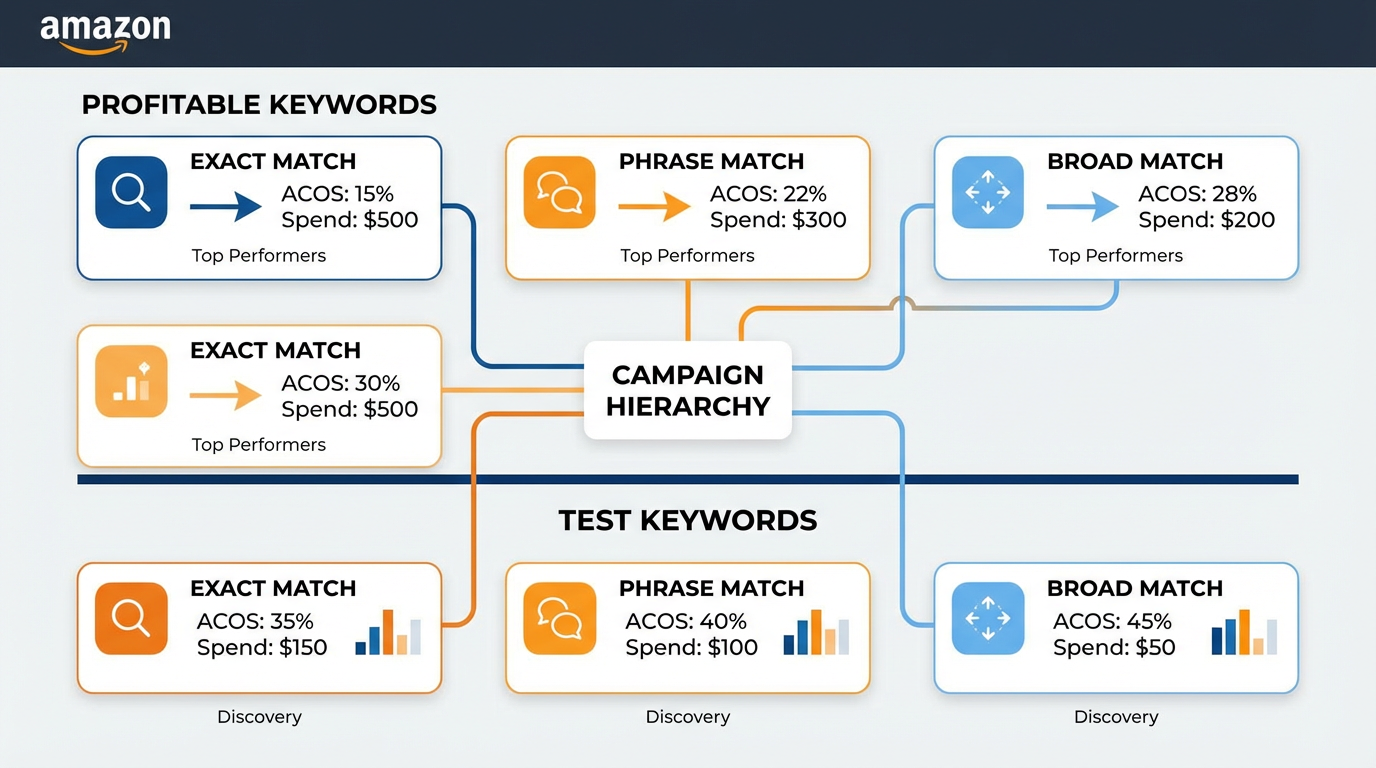
Keyword expansion only becomes scalable when the campaign structure makes future decisions easier. The goal is not to build a complicated account. The goal is to build one that is easy to read, easy to isolate, and easy to optimize.
A practical naming system
Examples:
SP | Exact | SearchTerm | Profitable | Product-A
SP | Exact | Organic | RankDefense | Product-A
SP | Phrase | SQP | Underexposed | Product-A
SP | Broad | Discovery | LongTail | Product-A
Campaign structure rules
- Use exact match first when you need clean measurement and tighter control.
- Use phrases and broad terms when you want discovery, but protect them with negatives.
- Keep profitable search term launches separate from cautious test launches.
- Keep organic defense campaigns separate from general traffic campaigns.
- Review search term harvesting weekly, but run deeper keyword mining every 30 days.
- Use related guides like Amazon PPC Launch Strategy in 3 Phases and Search Query Performance Dashboard: A Deep Dive to connect launch logic with broader account management.
Negative keyword flow
- When an exact keyword is promoted out of broad or phrase, consider adding negatives in the source campaign if overlap becomes noisy.
- Do not block useful discovery too early. Move only when the exact target can clearly take over control.
- Use negatives to improve clarity, not to create artificial complexity.
An anonymized case structure
Editorial note: Replace the placeholders below with a real anonymized account example before publishing. Do not publish made-up performance numbers as real results.
| Product type | [Insert product category and ASIN type] |
| Starting problem | [Example: growth plateau, over-reliance on a few exact terms, weak coverage of relevant organic keywords] |
| 3-signal process used | [Example: harvested converting search terms, added page 1 organic keywords from SellerSprite, tested underexposed SQP queries] |
| Campaign change | [Example: launched exact campaigns for top terms, grouped long-tail terms by theme, added negatives to reduce overlap] |
| Result block | [Insert your real numbers: new keywords launched, CTR change, CVR change, ACOS change, TACoS change, organic rank change] |
Common mistakes
- Adding every converting term without structure and turning the account into a duplicate-heavy mess.
- Ignoring all unprofitable converting terms, even when they are clearly relevant and only need lower CPC control.
- Launching organic keywords into normal campaigns without a naming system or evaluation plan.
- Using SQP as a traffic vanity report instead of a prioritization tool.
- Skipping de-duplication before launch.
- Trying to use every field in every export instead of focusing on the signals that lead to action.
When not to use this method
- When a new product has too little traffic or conversion data to produce meaningful search term signals.
- When you do not have Brand Registry access and therefore cannot use Search Query Performance.
- When the category is so small that volume signals are too thin to support systematic expansion.
- When your listing has major conversion issues, and you are trying to solve a product page problem with keyword volume alone.
FAQ
How often should I run keyword expansion?
A practical rhythm is weekly bid optimization and deeper keyword mining every 30 days. This gives you enough time to gather a signal without letting the account drift.
Should I bid on keywords where I already rank organically?
Often, yes. If the keyword matters to your category and your listing already ranks well, PPC can help defend visibility, increase repeated exposure, and protect share against competitors.
What should I do with converting terms that are above my target ACOS?
Do not dismiss them automatically. If the term converts, it has already proven relevance. The better question is whether it can work under a lower bid and a cleaner campaign environment.
How do I know whether an SQP query is worth testing?
Start with queries where add-to-cart share is stronger than click share and impression share, then compare those queries against your current keyword list and listing coverage.
Should I launch every new keyword in exact match?
No. An exact match is best for high-control tests and important terms. Phrase and broad are still useful for discovery, but they need tighter negative keyword management.
What is the biggest mistake in keyword expansion?
Treating expansion like random addition instead of structured development. The real value comes from prioritization, isolation, and repeatable review.
View The SellerSprite Course Directory
Ready for the next step? Open the SellerSprite Academy course directory to continue building your Amazon FBA skills chapter by chapter.
References
- Amazon Ads: Search term report for Sponsored Products
- Amazon Ads: Targeting report for Sponsored Products
- Amazon Seller Central: Search Query Performance dashboard
- Amazon Seller Central: Brand Analytics
- SellerSprite: Reverse ASIN
- SellerSprite: Keyword Mining
- SellerSprite: Keyword Research
- SellerSprite Blog: Search Query Performance Dashboard: A Deep Dive
About the author
SellerSprite Team. We create practical, step-by-step content for Amazon sellers who want to turn marketplace data into better PPC, SEO, and product decisions. Our editorial focus is simple: make strategy easier to understand, easier to execute, and easier to measure in real workflows.


