TL;DR: Amazon keyword cannibalization occurs when your own listings or campaigns compete for the same keywords, driving up costs and weakening performance. This guide reveals how to detect, resolve, and prevent it with actionable workflows and tools like SellerSprite.
Key Takeaways
- Keyword cannibalization on Amazon happens when your own ads, campaigns, or ASINs compete for the same search terms, reducing efficiency.
- There are three main types: PPC vs. PPC, PPC vs. organic, and ASIN vs. ASIN, each requiring distinct fixes.
- Use a keyword ownership model to assign one primary owner per keyword cluster and apply negative keywords strategically.
- Regular audits help detect keywords overlap early.
- Prevent recurrence with a weekly maintenance system: harvest, promote, negate, and prune.
Table of Contents
- What Amazon Keyword Cannibalization Means
- The 3 Types of Keyword Cannibalization Amazon Sellers Face
- How to Identify Cannibalization Without Guessing
- The Step-by-Step Workflow to Fix Keyword Cannibalization
- Mini Example: Fixing Cannibalization in 30 Minutes (Template)
- Common Mistakes That Recreate Cannibalization
- FAQ
- References
Note on marketplaces: This guide is specifically optimized for the US market.
What Amazon Keyword Cannibalization Means
Amazon keyword cannibalization occurs when multiple listings, ad campaigns, or ad groups from the same seller compete for the same search terms. Instead of working together, they undermine each other, driving up cost-per-click (CPC), confusing Amazon's algorithm, and weakening overall performance.
Definition: Amazon Keyword Cannibalization
When two or more of your Amazon listings, ad campaigns, or ASINs bid on or rank for the same keyword, causing internal competition that increases advertising costs, reduces conversion clarity, and destabilizes organic rankings.
Why It Happens: Overlap Beats Intent
Many sellers create campaigns based on product features rather than search intent. For example, both a "wireless earbuds" and "Bluetooth headphones" campaign might target “best noise cancelling earbuds”, even though only one product truly matches the intent. Without clear keyword ownership, Amazon's system treats them as competitors, not complements.
Why It Matters: Higher CPC, Unstable Ranks, Noisy Data
Cannibalization doesn't just waste budget; it distorts your data. When multiple ads trigger for the same query, attribution becomes unclear. Was the sale from organic traffic, or did your own ad steal the click? This noise makes optimization harder and can lead to poor decisions like pausing winning campaigns.
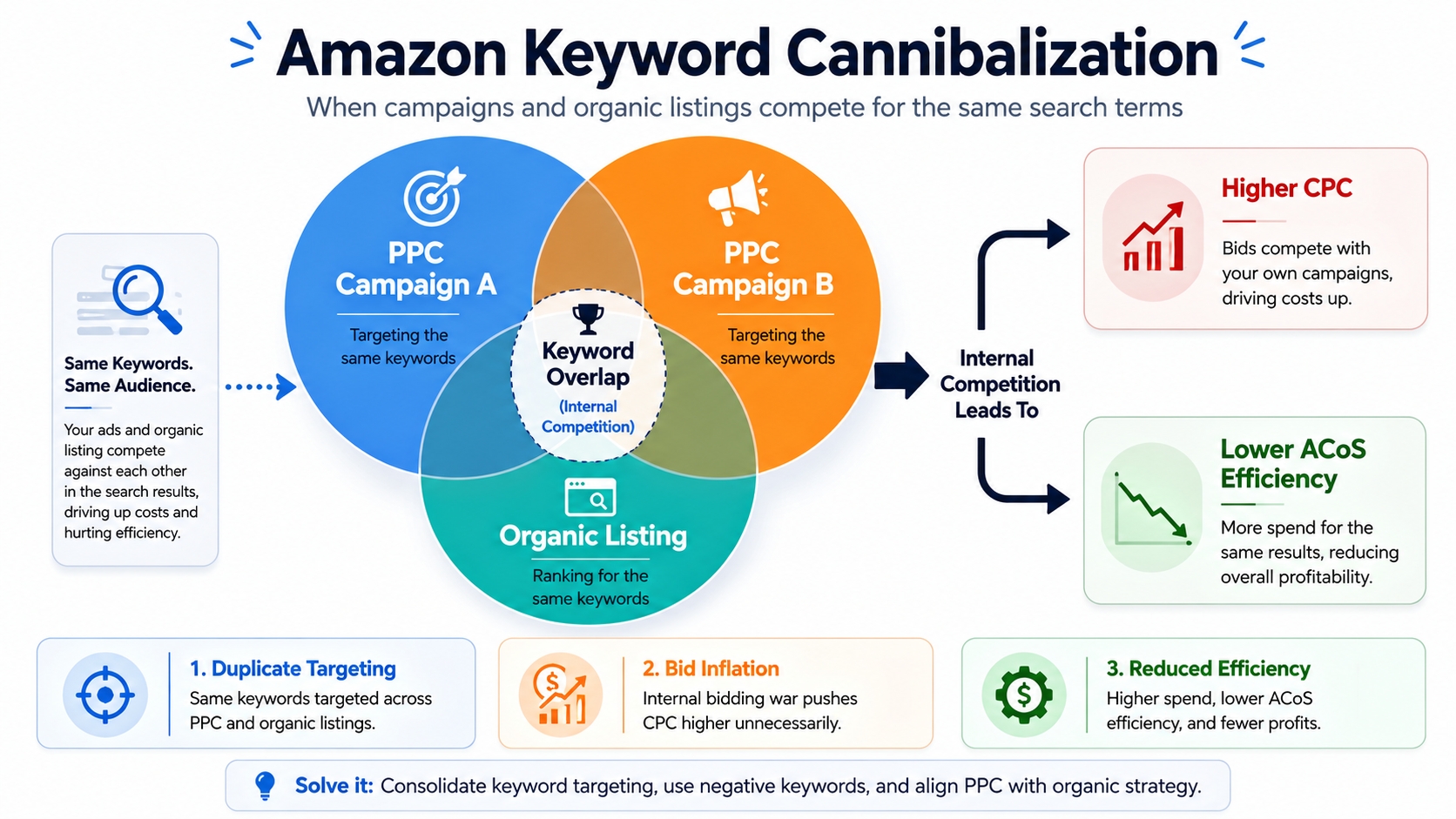
The 3 Types of Keyword Cannibalization Amazon Sellers Face
Amazon PPC Cannibalization (PPC vs. PPC)
This happens when multiple ad campaigns or ad groups within your account bid on the same keywords. For instance, both a broad match auto campaign and a phrase match manual campaign could be targeting "gaming mouse ergonomic", leading to internal bidding wars.
How Amazon Campaign Overlap Shows Up in Performance
You'll see duplicate search terms in your Search Term Reports, rising CPCs without proportional order increases, and inconsistent attribution. Amazon may rotate which ad wins, making performance unpredictable.
Amazon SEO Cannibalization (PPC vs. Organic)
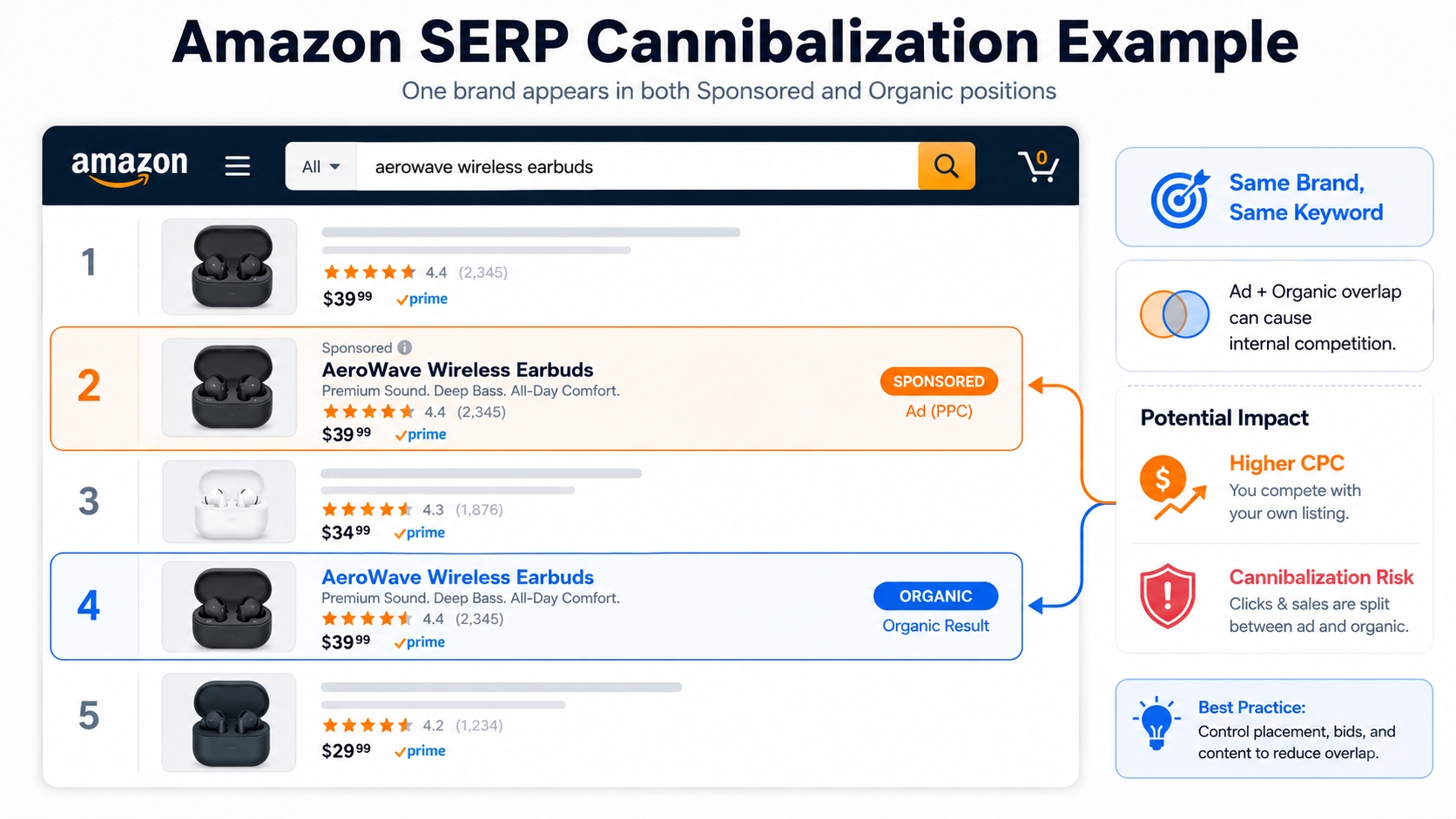
This occurs when your paid ads compete with your own organic rankings. If your ASIN ranks #1 organically for "yoga mat non-slip" but also runs a sponsored ad for the same term, you're paying for traffic you already earn for free.
When Ads "Steal" Clicks From Your Own Organic Rankings
Amazon's algorithm may prioritize your ad over your organic listing, especially if the ad has a high ACoS tolerance. This inflates your ad spend while offering no incremental sales.
ASIN vs. ASIN Cannibalization (Your Own Listings Compete)
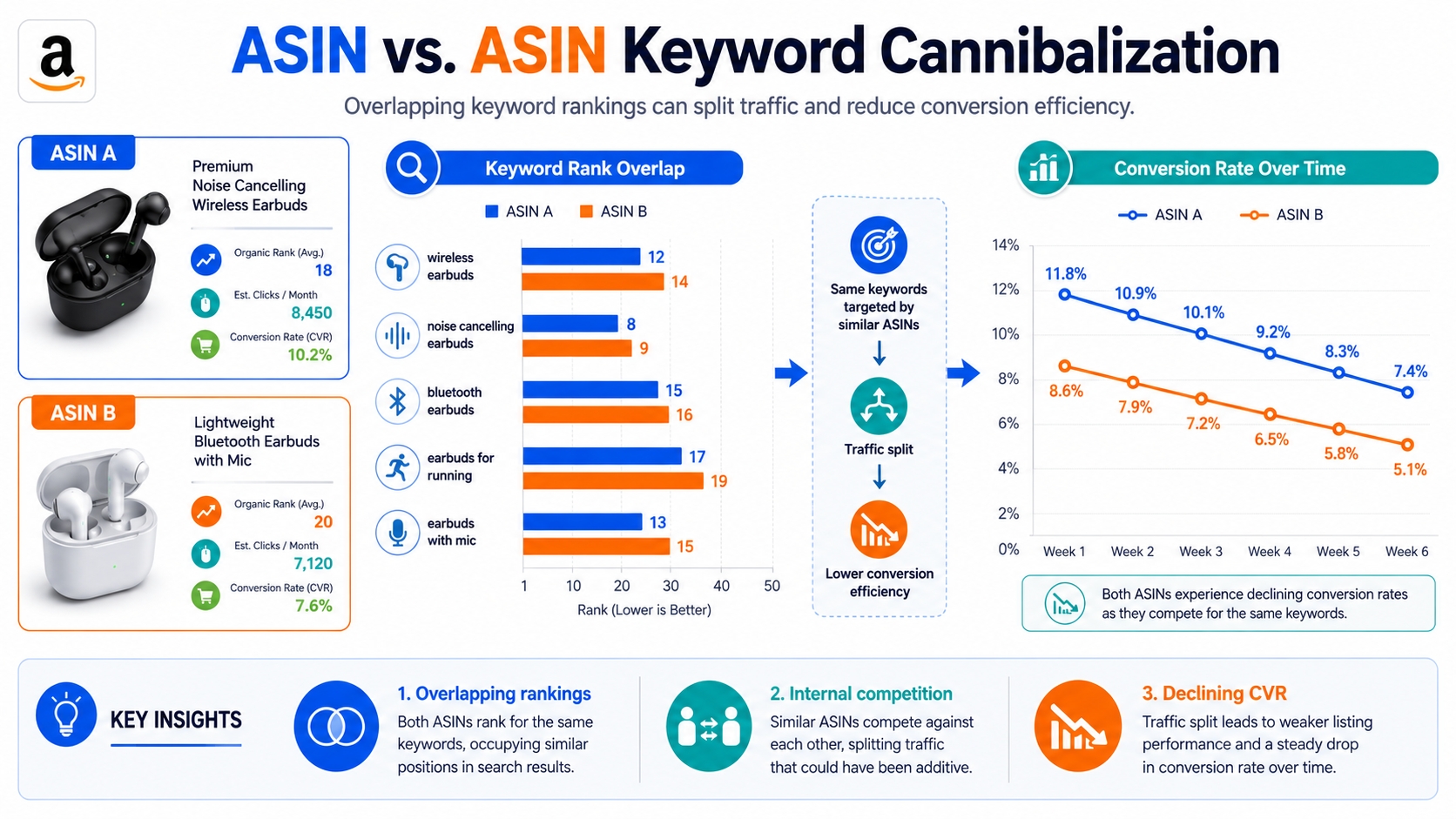
This is common among brands with multiple variations, bundles, or similar products. For example, a 6-pack and 12-pack of protein bars might both rank for "best protein bars for weight loss", splitting traffic and conversions.
Variations, Duplicates, Bundles: The Usual Culprits
Without clear keyword mapping, Amazon doesn't know which ASIN should win. This leads to rank volatility and inefficient ad spend. A study found that 68% of multi-ASIN brands experience internal competition on at least 20% of their core keywords.
How to Identify Cannibalization Without Guessing
PPC Symptoms (Campaign-Level)
Duplicate Search Terms Across Campaigns and Ad Groups
Export your Search Term Reports and sort by query. If the same high-performing term appears in multiple campaigns, you have overlap.
CPC Rising While Orders Stay Flat
If your CPC is increasing but conversion rates aren't improving, your campaigns may be bidding against each other.
The Same Query Triggers Multiple Ads (Messy Attribution)
Use Amazon's "Sponsored Products Search Term" report to see which queries triggered which ads. Multiple ads per query = red flag.
Organic Symptoms (Ranking-Level)
Rank Volatility for the Same Keyword Across Your ASINs
If your ASINs keep swapping positions for the same keyword, Amazon's algorithm is confused about which one deserves the top spot.
Traffic Shifting Between ASINs Without CVR Improvement
One week ASIN A gets traffic, next week ASIN B, but conversions don't increase. This is a classic sign of internal competition.
SERP Symptoms (Page-Level)
You Occupy Multiple Placements But Total Orders Don't Increase
Even if you dominate the first page, if total sales don't rise, you're just cannibalizing your own traffic.
Sponsored Density Increases and Your Efficiency Drops
As more of your ads appear on the same SERP, Amazon's system becomes less efficient at allocating budget to the best performer.
Quick Tools & Reports to Use
Search Term View to Detect Amazon Keyword Overlap
Amazon's native report is essential, but limited. Export and cross-reference across campaigns.
SellerSprite Keyword Tracking to Confirm Rank Volatility
Use SellerSprite’s Keyword Tracker to track keyword rankings across ASINs over time. Spot volatility and overlap instantly.
The Step-by-Step Workflow to Fix Keyword Cannibalization
Step 1: Define "Keyword Ownership" (One Keyword, One Owner)
Build a Keyword Ownership Sheet (Cluster → Owner → Negatives)
Create a spreadsheet with columns: Keyword Cluster, Primary Owner (ASIN/Campaign), Secondary Owner, Negative Keywords to Apply. This becomes your governance document.
Ownership Sheet Template
| Keyword Cluster | Owner (ASIN/Campaign) | Negatives to Apply |
|---|---|---|
| Noise Cancelling Earbuds | ASIN: B0ABC123 / Campaign: Exact_NC_Earbuds | Negative Exact: "noise cancelling earbuds" in Broad/Phrase campaigns |
Ownership Rules by Tier (Core / Mid-Tail / Long-Tail)
Core terms (high volume, high conversion) should be owned by exact match campaigns or top-ranking ASINs. Mid-tail by phrase. Long-tail can be shared or tested in discovery campaigns.
Choose the Owner Type: Campaign, Ad Group, or ASIN
For PPC, the exact match campaign should "own" the term. For SEO, the best-converting ASIN should rank organically. Enforce this with negatives.
Step 2: Audit Overlap (Fast 15-Minute Check)
15-Minute Audit SOP
- Export Search Term Reports from all active campaigns
- Sort by search term and highlight duplicates
- Group by intent (e.g., "buying," "comparing," "branded")
- Flag high-spend/high-impression overlaps
- Verify with SellerSprite keyword tracking
Step 3: Fix Amazon PPC Cannibalization (Structure + Negatives)
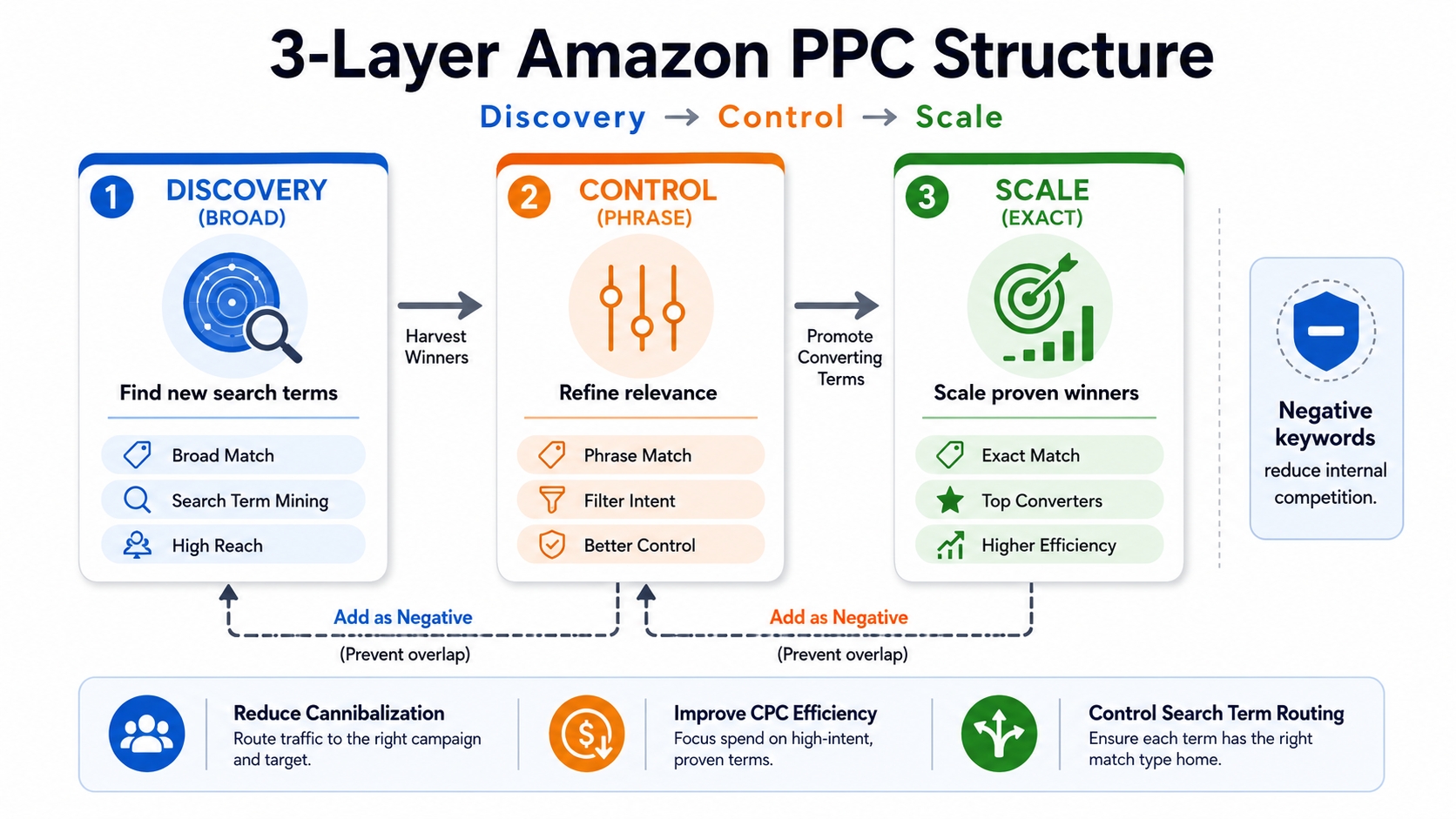
Use a Clean Amazon PPC Campaign Structure (3-Layer Model)
- Discovery: Broad/Auto campaigns to find new terms
- Control: Phrase match to refine performance
- Scale: Exact match to dominate high-intent queries
Apply the "Exact Owns the Term" Rule
Once a keyword converts in Broad/Phrase, move it to Exact and add it as a Negative Exact in the discovery layers.
Negatives Playbook: Negative Exact vs. Negative Phrase
- Negative Exact: Block a single query (e.g., "wireless earbuds")
- Negative Phrase: Block all queries containing a phrase (e.g., "wireless earbuds under $50")
- Use Negative Exact to protect exact campaigns; use Negative Phrase to block broad intent families
Budget Isolation to Protect Winners
Cap spend on discovery campaigns. Allocate majority of budget to exact match campaigns that own core terms.
Step 4: Fix ASIN vs. ASIN Cannibalization (Catalog Strategy)
Consolidate vs. Separate: When Variations Should Share Traffic
Use variation relationships for size/color differences. For different products (e.g., bundle vs. single), keep separate and assign distinct keyword clusters.
Bundle vs. Single: Split Intent Clusters Intentionally
Target "bulk protein bars" to bundles, "single serve protein bars" to singles. Avoid overlap.
Use Keyword Mapping Amazon Listing to Assign Different Clusters to Each ASIN
One ASIN should own one primary cluster. Use backend search terms and listing content to reinforce this.
Step 5: Reduce PPC vs. SEO Cannibalization (Profit-First Rules)
When Defense Is Worth It (Brand Protection, Peak Season, Competitor Aggression)
Run branded ads during holidays or if competitors are bidding on your brand terms.
When It's Wasted Spend (Stable Top Organic Rank + Expensive CPC)
If your ASIN ranks #1 organically and has strong conversion, reduce or pause branded ad bids.
Simple Decision Rule
Strong organic + stable CVR → lower bids or shift budget to expansion campaigns.
Step 6: Prevent Cannibalization From Coming Back (Maintenance System)
Weekly Routine: Harvest → Promote → Negate → Prune
Harvest new search terms, promote converters to exact, negate in discovery, prune underperformers.
Cluster-Based Governance: One Cluster, One Owner
Enforce ownership at the cluster level to prevent future overlap.
Track Changes With a Simple Log (Date → Change → Outcome)
Document every change to build institutional knowledge.
Mini Example: Fixing Cannibalization in 30 Minutes (Template)
Before: Two Campaigns Bidding on the Same Converting Term
Campaign A (Broad) and Campaign B (Phrase) both targeting "ergonomic office chair". CPC rising, ACoS at 45%, inconsistent sales.
Actions: Promote to Exact + Negate in Discovery Layers
Create Campaign C (Exact), add keyword, set bid. Add "ergonomic office chair" as Negative Exact in Campaigns A and B.
What to Monitor Next: CPC, ACoS, Total Orders, Organic Rank Stability
Within a week, CPC drops 22%, ACoS improves to 32%, total orders increase due to better allocation.
Common Mistakes That Recreate Cannibalization
Running Broad/Phrase/Exact Without Negatives
This is the #1 cause. Always negate exact terms in broader campaigns.
Duplicating the Same Keywords Across Multiple Campaigns "Just in Case"
This creates bidding wars. Trust your structure and ownership model.
Mixing Multiple ASINs in One Ad Group With No Intent Separation
Each ad group should focus on one ASIN and one intent cluster.
Over-Optimizing Too Quickly (Destroying Learnings and Causing Churn)
Wait at least 7-14 days before making structural changes. Let data stabilize.
FAQ
Is Amazon keyword cannibalization always bad?
No, not always. Minor overlap during testing or discovery phases is normal. However, sustained cannibalization, especially on high-converting keywords, is harmful. It inflates costs, distorts data, and weakens long-term performance. The goal is strategic control, not total elimination.
What causes keyword cannibalization on Amazon and how can sellers prevent it?
It's caused by poor campaign structure, lack of keyword ownership, and unmanaged ASIN portfolios. Prevent it by using a 3-layer PPC model, assigning one owner per keyword cluster, applying negative keywords, and auditing weekly.
How to identify and fix keyword cannibalization across multiple Amazon listings?
Identify it by exporting search term reports, checking for duplicate queries, and using keyword tracking tools. Fix it by consolidating ownership, applying negatives, separating intent clusters, and optimizing listings for distinct keywords. Use a keyword ownership sheet to maintain clarity.
What negatives should I add first to stop keyword overlap?
Start with Negative Exact keywords for your top-converting terms in Broad and Phrase campaigns. For example, if "wireless earbuds" converts in Exact, add it as a Negative Exact in all discovery campaigns. Use Negative Phrase to block broader intent families.
How do I know if PPC is stealing my organic sales?
Check if your ASIN ranks in the top 3 organically for a keyword and also runs a sponsored ad for it. If your organic rank drops when ads are active, or if ACoS is high with no incremental sales, your PPC may be cannibalizing organic traffic.
Next Steps
- Run a 15-minute audit to detect keyword overlap.
- Join SellerSprite today to automate keyword tracking and prevent cannibalization: Start Free Trial.
References
By SellerSprite Success Team
The SellerSprite Success Team combines deep Amazon algorithm expertise with real-world seller experience. We analyze millions of ASINs and keywords monthly to deliver data-driven strategies that improve visibility, reduce ad waste, and scale profitability for brands worldwide.


