TL;DR: Master Amazon keyword research to uncover high‑volume buyer intent, boost SEO and PPC performance, and drive more sales.
Key Takeaways
- Identify high‑converting keywords by balancing search volume with buyer intent.
- Map keywords strategically across title, bullets, description, backend terms, and PPC campaigns.
- Continuously update and track keyword performance using SellerSprite's tools.
Table of Contents
- Quick Answer: What Is Amazon Keyword Research?
- Key Takeaways for Amazon Sellers
- Why Amazon Keyword Research Matters in 2026
- The Core Amazon Keyword Metrics to Understand
- Amazon Keyword Research Methods Compared
- Step-by-Step Amazon Keyword Research Workflow
- Keyword Mapping for Listings and PPC
- Common Amazon Keyword Research Mistakes
- Featured Amazon Keyword Research Guides
- How SellerSprite Helps with Amazon Keyword Research
- FAQ
- References
Note on marketplaces: This guide is specifically optimized for the US market.
Quick Answer: What Is Amazon Keyword Research?
Amazon keyword research is the process of discovering the exact words and phrases shoppers type into Amazon's search bar, then using those insights to shape product listings, advertising campaigns, and overall brand strategy. By aligning your product copy with buyer language, you improve visibility, relevance, and conversion rates on the world's largest e‑commerce platform.
One-sentence definition for Amazon sellers
It is the systematic discovery of high‑intent search terms that drive traffic and sales for a specific Amazon product.
The three jobs of keyword research
Effective keyword research serves three core purposes: uncover demand, align listing intent, and power both organic SEO and paid PPC strategies.
Find buyer demand
Demand is measured by search volume, the number of times shoppers look for a term. High‑volume keywords indicate a large pool of potential buyers.
Match listing intent
Not every popular term is relevant. Matching intent means selecting keywords that accurately describe your product's features, use‑case, and target audience.
Support SEO and PPC decisions
Data‑driven keywords feed both organic optimization (titles, bullets, description) and paid campaigns, allowing you to allocate ad spend where it yields the highest ROI.
Key Takeaways for Amazon Sellers
Before you start crafting a product detail page, you must lay a solid keyword foundation. This section highlights the preparatory steps, the most meaningful metrics, and the right moments to revisit your keyword data.
What to do before writing a listing
Begin with a clear product definition, identify your ideal buyer persona, and generate a seed list of terms that reflect core features and competitor language.
Which metrics matter most
Search volume, relevance score, competition level, and seasonal trend are the four pillars that determine a keyword's profitability.
When to update keyword research
Refresh your keyword set quarterly, after major product updates, or when you notice shifts in ad performance or organic rankings.
Why Amazon Keyword Research Matters in 2026
In 2026, Amazon's A10 algorithm places even greater emphasis on shopper intent, making keyword relevance a decisive factor for both organic placement and ad relevance. Understanding marketplace search intent helps you capture conversion‑ready traffic before competitors do.
Amazon SEO vs. Google SEO
Unlike Google, Amazon does not crawl the web for backlinks; instead, it evaluates on‑page keyword signals, sales velocity, and conversion metrics to rank products.
Marketplace search intent
Buyers on Amazon are usually in purchase mode. Keywords that reflect purchase intent (e.g., "best waterproof hiking boots") convert at higher rates than exploratory terms.
Conversion and relevance signals
Click‑through rate, conversion rate, and sales velocity feed back into the ranking algorithm, reinforcing the importance of precise keyword mapping.
Organic ranking, PPC, and listing conversion
A well‑researched keyword set fuels both organic visibility and Amazon Sponsored Products, creating a virtuous cycle where paid traffic boosts organic rankings and vice versa.
The Core Amazon Keyword Metrics to Understand
Mastering the four core metrics lets you prioritize keywords that drive traffic without sacrificing relevance or profitability.
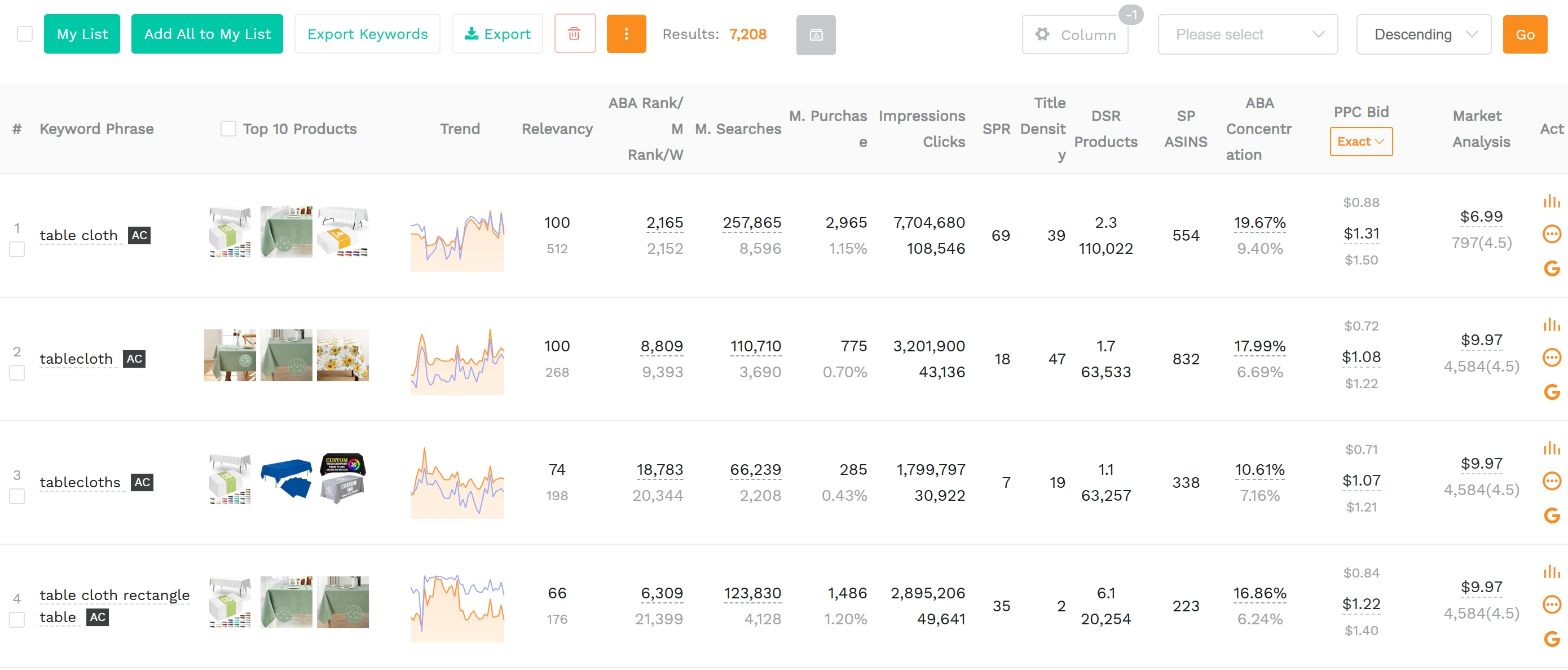
Search volume
Volume shows how many shoppers are searching for a term each month. Balancing high‑volume terms with long‑tail, qualified keywords creates a diversified traffic mix.
High-volume keywords vs. qualified long-tail terms
High‑volume keywords bring broad exposure but often face stiff competition. Long‑tail terms (3‑5 words) capture niche intent and can be cheaper in PPC.
Relevance and buyer intent
A keyword is relevant when it accurately describes the product's core features, use‑case, and target audience, aligning with the shopper's purchase journey.
Competition and ranking difficulty
Amazon's "search frequency" metric and competing seller count help gauge how hard it will be to rank for a given term.
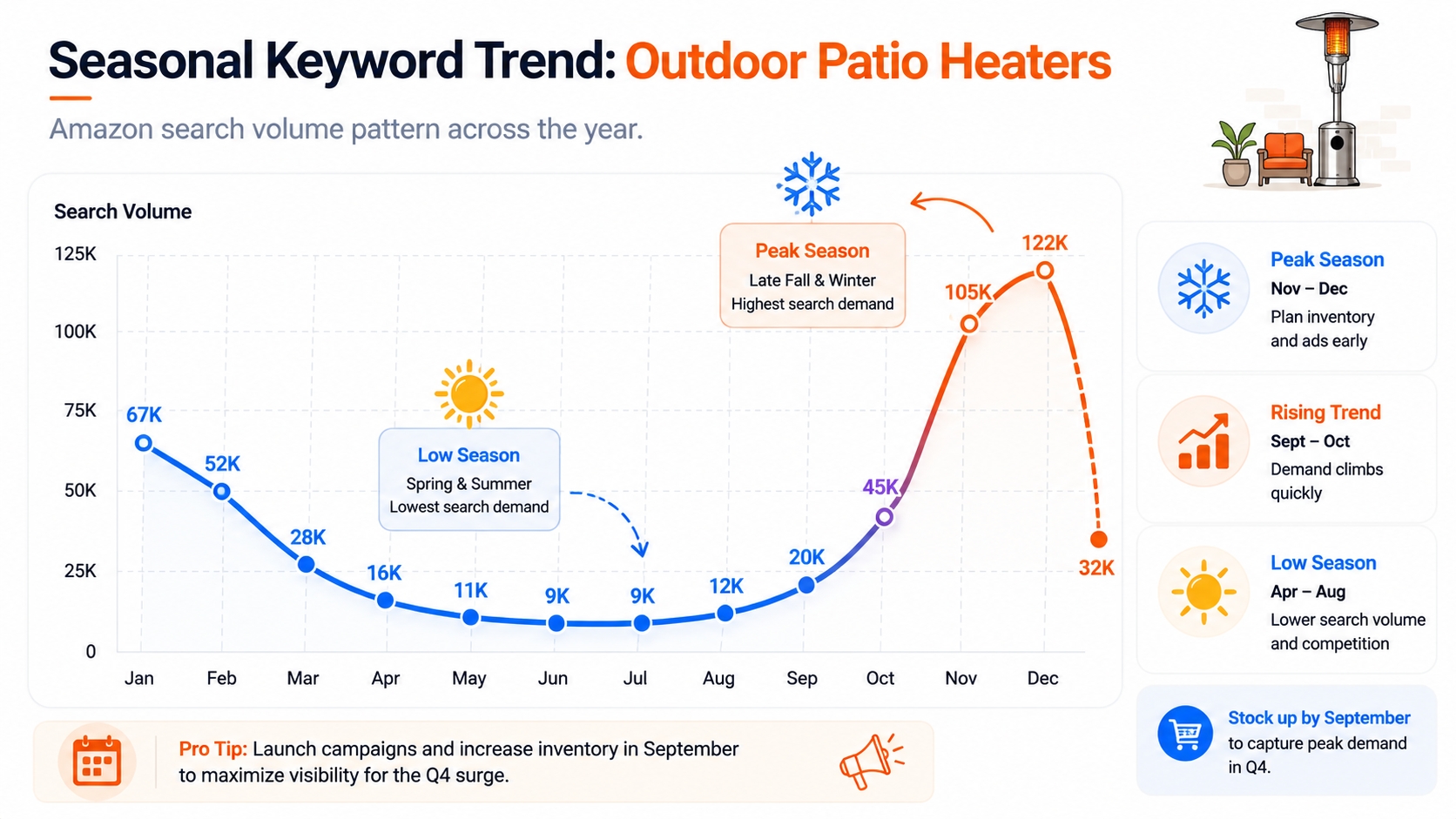
Trend and seasonality
Seasonal spikes (e.g., "christmas lights") and emerging trends can dramatically shift search volume; monitoring these trends protects against missed opportunities.
Amazon Keyword Research Methods Compared
Different methods uncover varying layers of data. Combining them gives you a 360° view of demand, competition, and buyer language.
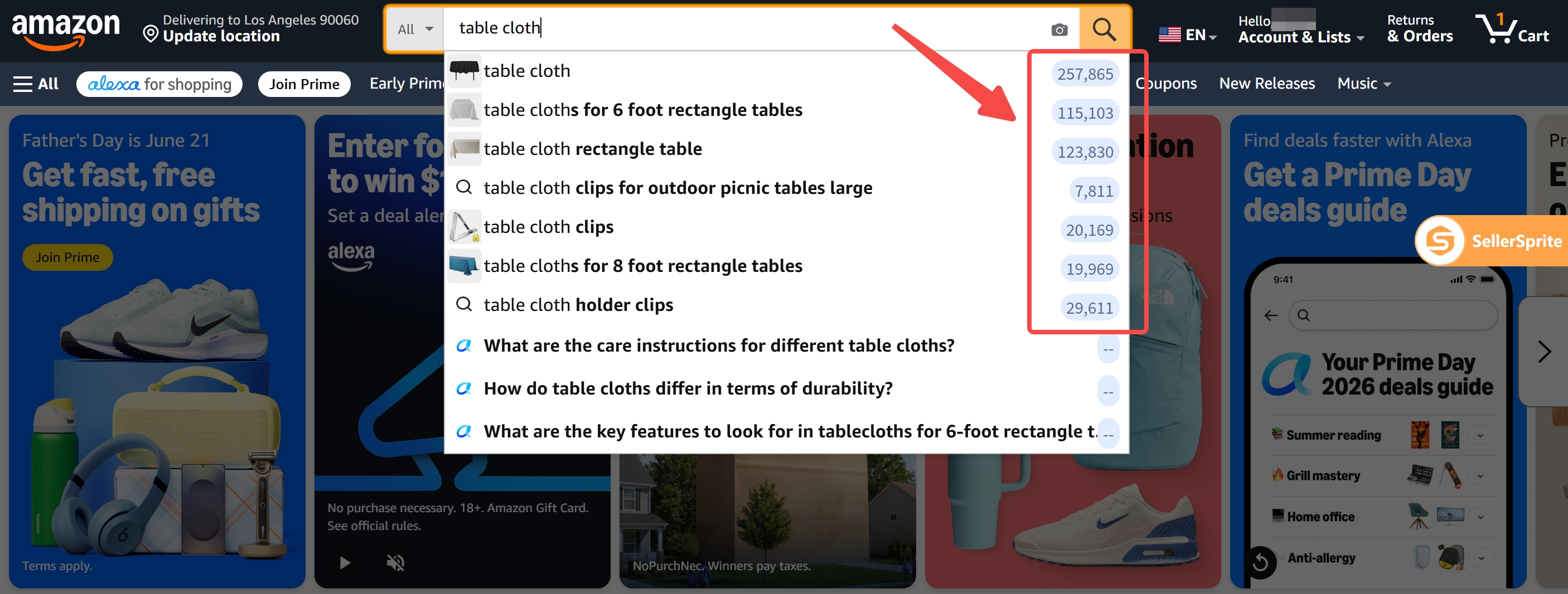
Amazon autocomplete
The autocomplete dropdown surfaces real‑time popular queries as shoppers type, revealing hidden long‑tail opportunities.
Reverse ASIN keyword research
By analyzing the keywords that drive traffic to a competitor's ASIN, you can replicate successful terms and discover gaps.
Brand Analytics and search query data
Amazon Brand Analytics provides aggregated search query reports that show exact buyer language and conversion rates for top keywords.
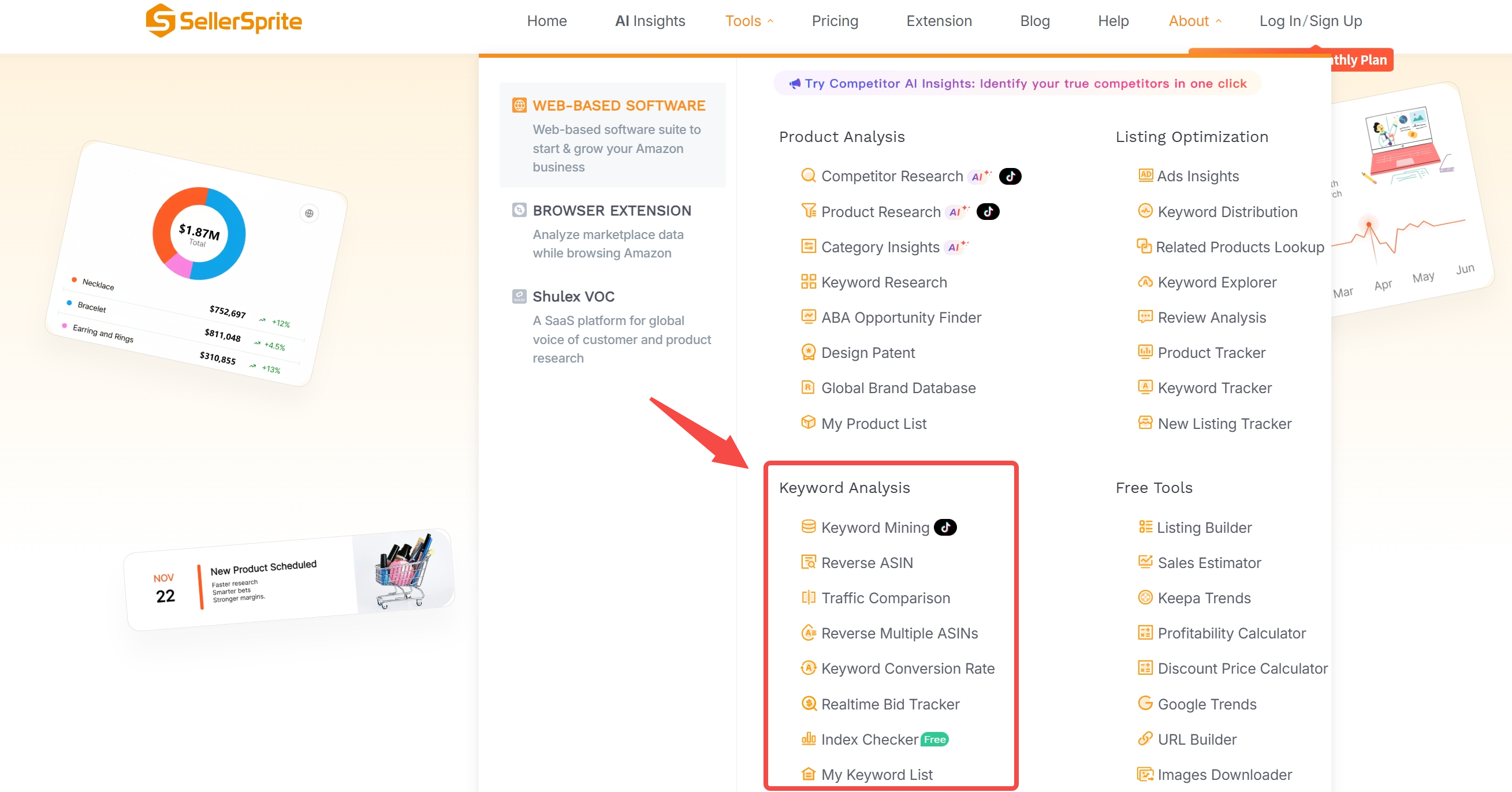
SellerSprite keyword research workflow
SellerSprite automates seed expansion, category validation, and keyword clustering, allowing you to quickly generate a data‑rich keyword list.
Seed keyword expansion
Starting with brand‑specific terms, the tool discovers related phrases, synonyms, and competitor keywords.
Category-level keyword validation
Cross‑checking keywords against Amazon's category browse nodes ensures relevance and filters out out‑of‑scope terms.
Export and keyword clustering
Exported CSV files can be grouped by search intent, allowing you to assign each cluster to specific listing fields or ad groups.
Step-by- Step Amazon Keyword Research Workflow
Follow this five‑step process to move from raw ideas to a fully optimized keyword portfolio ready for listing and advertising.
Step 1: Define the product, audience, and use case
Clarify product specifications, target demographics, and primary pain‑points to guide relevant keyword selection.
Step 2: Build a seed keyword list
Gather brand terms, competitor ASINs, and basic feature descriptors as a foundation for expansion.
Step 3: Expand with long-tail and competitor terms
Use SellerSprite, autocomplete, and reverse ASIN tools to generate hundreds of related long‑tail keywords.
Step 4: Filter by volume, relevance, and competition
Apply thresholds, e.g., minimum 500 monthly searches, relevance > 70%, competition < 0.6, to narrow the list to high‑potential terms.
Step 5: Map keywords to listing fields
Assign top keywords to title, bullet points, product description, backend search terms, and ad groups for maximum impact.
Title
Include 1‑2 primary keywords early in the title for best SEO weight.
Bullet points
Spread secondary keywords across the five bullet points, focusing on benefits and features.
Product description / A+ content
Narrative sections allow natural language variations and long‑tail keyword integration without keyword stuffing.
Backend search terms
Utilize the hidden 250‑character field for niche terms that cannot fit naturally into visible copy.
PPC campaign groups
Create ad groups aligned with keyword clusters to control bids, budgets, and performance reporting.
Keyword Mapping for Listings and PPC
Strategic placement of keywords across organic and paid assets ensures each term serves its strongest purpose.
Organic keyword placement
Primary keywords belong in the title; secondary keywords populate bullet points and description; tertiary terms fill backend search fields.
PPC keyword segmentation
Group high‑intent, high‑volume terms into "Exact Match" ad groups, while long‑tail, lower‑cost terms sit in "Broad" groups for testing.
Negative keywords and irrelevant traffic control
Identify and add negative keywords to prevent wasteful ad spend on unrelated searches, refining overall ROI.
Checklist – Keyword Mapping Success:
- Title contains 1‑2 primary keywords at the front.
- Each bullet point features a distinct secondary keyword.
- Backend terms capture niche long‑tail phrases not used elsewhere.
- PPC groups align with keyword intent and budget.
- Negative keyword list reviewed weekly.
Common Amazon Keyword Research Mistakes
Avoid these pitfalls to keep your keyword strategy efficient and effective.
Chasing search volume without relevance
A high‑volume term that doesn't describe your product will attract clicks but few conversions, harming organic rank.
Repeating the same keyword across fields
Amazon treats duplicate usage as keyword stuffing; diversify synonyms and related terms instead.
Ignoring parent‑child ASIN differences
Sibling variations often have distinct search queries; treat each child ASIN with its own keyword set.
Not updating seasonal terms
Failing to refresh keywords before holidays or trends can cause missed traffic spikes.
Featured Amazon Keyword Research Guides
These internal resources dive deeper into specific aspects of keyword research.
- Beginner keyword research – Start with fundamentals and avoid common rookie errors. Read
- Search volume explained – Learn how to interpret volume numbers and seasonal trends. Read
- Long-tail keywords – Harness low‑competition phrases that convert. Read
- Backend search terms – Optimize the hidden keyword field for niche traffic. Read
- Keyword clustering – Group related terms for organized listing and ad structure. Read
- PPC keyword research – Build profitable campaigns from your keyword list. Read
How SellerSprite Helps with Amazon Keyword Research
SellerSprite consolidates data from Amazon, competitor analysis, and marketplace trends into one intuitive platform, letting you act on insights faster.
Keyword discovery
Generate seed lists automatically from competitor ASINs and Amazon's autocomplete suggestions.
Search volume and trend analysis
View month‑over‑month volume graphs and forecast seasonal peaks to plan inventory and ad spend in advance.
Competitor keyword validation
Cross‑check your keywords against top‑selling ASINs to ensure you're targeting proven traffic sources.
Listing and PPC planning
Export ready‑to‑use CSV files that help you to map keywords to each listing field and to structured PPC ad groups.
🚀 Ready to supercharge your Amazon SEO? Start your free trial today and access the Keyword Mining tool instantly.
FAQ
How can I find high-converting keywords for my Amazon product listings?
Use a combination of Amazon autocomplete, reverse ASIN analysis, and SellerSprite's Keyword Mining tool to discover terms with strong search volume and proven conversion rates. Prioritize keywords that match product features and buyer intent.
What is a good Amazon keyword search volume?
A "good" volume varies by niche, but generally a minimum of 500–1,000 monthly searches indicates sufficient demand while still allowing for manageable competition.
How many keywords should I use in an Amazon listing?
Aim for 2–3 primary keywords in the title, 5–7 secondary keywords across bullet points, and fill the 250‑character backend field with 8–12 long‑tail terms.
What tools are best for Amazon keyword research for Amazon sellers?
Top tools include SellerSprite, Helium 10, and Jungle Scout, as well as Amazon's own Brand Analytics for verified search query data.
How can I track keyword performance and rankings on Amazon over time?
SellerSprite provides Amazon keyword rank‑tracking tool that monitor organic position, sales velocity, and ad spend for each keyword.
Next Steps
- Sign up for SellerSprite's free trial and begin your product keyword research.
- Run the keyword research tools, export the CSV, and map keywords to your listing.
- Launch a Sponsored Products campaign using the keyword groups.
- Monitor performance weekly and refine keywords based on rank and sales data.
References
By SellerSprite Success Team
The SellerSprite Success Team combines years of Amazon marketplace experience with data‑science expertise, helping sellers of all sizes dominate search results through proven keyword strategies and cutting‑edge tooling.


