TL;DR: Ranking alerts are your early-warning system for Amazon keyword position changes. Setting them up correctly—with clear thresholds and a defined intervention playbook—lets you respond before minor dips turn into revenue losses. This guide walks you through tool selection, alert configuration, and the exact moments to take action.
Key Takeaways
- Ranking alerts turn chaotic keyword tracking into a structured, proactive system—catching drops before they hurt sales.
- Effective intervention depends on alert frequency, severity thresholds, and a quick diagnostic checklist—not knee-jerk reactions.
- Automated tools like SellerSprite let you monitor unlimited keywords, receive real-time notifications, and link alert triggers directly to your optimization workflow.
Table of Contents
- Why Amazon Sellers Can’t Afford to Ignore Rank Tracking Alerts
- Step 1: Choosing the Right Rank Tracking Tool for Alerts
- Step 2: Defining Your Alert Keywords and Scope
- Step 3: Setting Intervention Thresholds That Trigger Action
- Interpreting Alerts: When to Act vs. When to Monitor
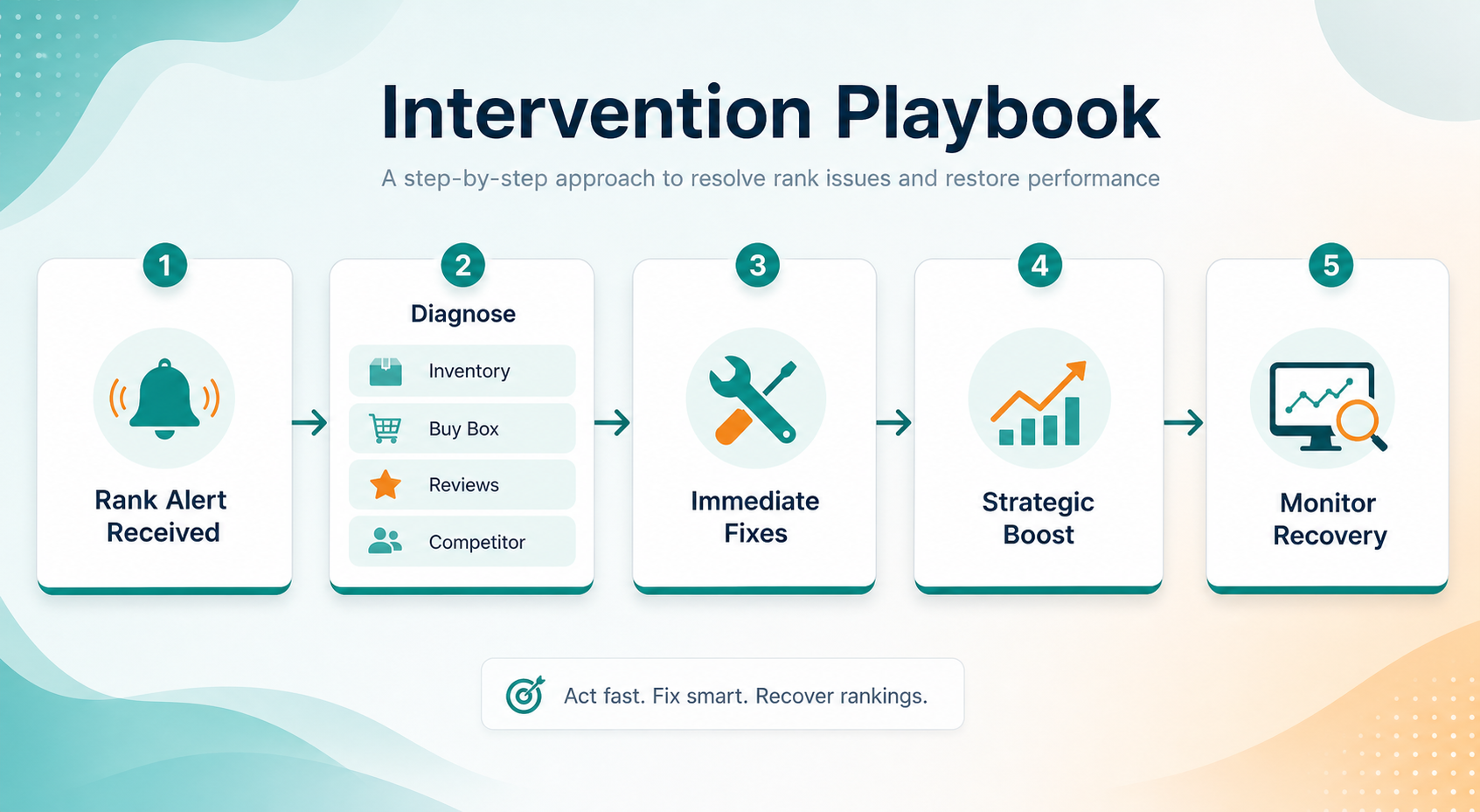
- The Intervention Playbook: Step-by-Step Response to Ranking Drops
- Advanced Strategies: Turning Alerts into Long‑Term Growth Levers
- FAQ
- References
Note on marketplaces: This guide is specifically optimized for the US market.
Why Amazon Sellers Can’t Afford to Ignore Rank Tracking Alerts
Amazon is a 24/7 auction where keyword rankings can shift in hours. A competitor’s aggressive PPC bid, a sudden inventory glitch, or even a minor listing edit can push your best-converting keyword from page one to page two. Without real‑time alerts, you’d only notice the revenue dip days later—after hundreds of missed sales. Ranking alerts act like a smoke detector: they don’t prevent fires, but they give you the time to extinguish them before the whole house burns down.
Consider a seller who ranks #5 for “stainless steel water bottle.” A new competitor runs a lightning deal and climbs to #4, bumping the seller to #6. Organic click‑through rates often drop by 30–50% when moving off the top‑of‑fold positions. If the seller is alerted within hours, they can run a coupon or adjust their PPC strategy to regain the spot. Without an alert, they might check rankings manually at the end of the week, losing thousands in potential sales. This guide will teach you to build a system that turns alerts into actionable insights, not noise.
Step 1: Choosing the Right Rank Tracking Tool for Alerts
The foundation of any ranking alert system is a reliable Amazon keyword tracking tool. While you could manually check positions daily, that’s impractical for more than a handful of keywords. Automated tools monitor thousands of keywords across different search volumes and marketplaces, sending notifications based on rules you define. For US sellers, tools like SellerSprite, Helium 10, or Jungle Scout offer rank tracking, but not all alert systems are equal.
Look for these four capabilities when selecting a tool:
- Real‑time or near‑daily updates: Amazon search results can change by the hour; a tool that only updates weekly misses critical windows.
- Customizable alert triggers: You need to set thresholds for absolute rank change (e.g., alert if rank drops below #20) and relative movement (e.g., alert if rank drops >5 positions in one day).
- Multi‑keyword and multi‑ASIN tracking: Monitor the entire catalog, not just one hero product.
- Integration with your workflow: Alerts should arrive via email, Slack, or push notifications so your team can act fast.
For example, SellerSprite’s rank tracker allows you to add unlimited keywords, set daily monitoring, and define custom alert thresholds. It also integrates with the broader Amazon rank tracking analytics suite, giving you historical context alongside alerts. (We’ll use this tool in our walkthrough, but the principles apply to any solid tracker.)
Step 2: Defining Your Alert Keywords and Scope
Not every keyword deserves an alert. If you monitor everything, you’ll drown in notifications and start ignoring them. Instead, categorize your keywords into tiers based on business impact:
- Tier 1 – Money Keywords (High volume, high conversion): These drive 80% of your sales. Typically 5–15 keywords per product. You need immediate alerts for any movement here.
- Tier 2 – Growth Keywords (Moderate volume, building relevance): 15–50 keywords where you’re climbing ranks. Alerts can be less aggressive—e.g., notify only on drops greater than 10 positions.
- Tier 3 – Long‑tail and Branded Keywords: Hundreds of niche terms. Set alerts only for catastrophic drops (e.g., falling off page one) because these are naturally volatile.
To build your Tier 1 list, use historical sales data and the Pareto principle. If you’re unsure which keywords convert best, check your Amazon Brand Analytics (ABA) reports or a keyword research tool. Our Amazon keyword research guide walks you through identifying high‑value search terms. Once your tiers are mapped, limit Tier 1 alerts to a manageable number (ideally under 20) so each notification demands attention.
Step 3: Setting Intervention Thresholds That Trigger Action
Here’s where most sellers fail: they either set thresholds too tight (alerting on every 1‑position wobble) or too loose (only notifying when a keyword drops off the map). Good thresholds balance sensitivity and actionable value. We recommend a two‑layered system:
Layer 1: Severity‑Based Alerts
- Critical Alert (Red): Rank drops below the top 3 organic results or falls out of the top 10 overnight. Trigger immediate intervention.
- Warning Alert (Yellow): Rank declines by 5+ positions within 48 hours, or slips from page 1 (position 1‑16) to page 2. Review within 24 hours.
- Info Alert (Blue): Minor fluctuations (e.g., drop of 2‑4 positions) on Tier 1 keywords. Flag for review but no immediate action unless pattern repeats.
Layer 2: Velocity‑Based Alerts
Sometimes the speed of decline matters more than absolute rank. Set a rule that triggers if a keyword loses more than 3 positions per day for two consecutive days, even if the final rank is still decent. This catches momentum shifts early.
In SellerSprite, you configure these thresholds per product or per keyword group. The dashboard shows current rank, historical trend, and the alert rules you’ve applied. A glance reveals which keywords are healthy and which need attention—no more sifting through spreadsheets.
![Setting up ranking alert thresholds – custom rules for severity and velocity]](https://o.sellersprite.com/docs/202607/sellersprite-2026071709522057210.png)
Interpreting Alerts: When to Act vs. When to Monitor
Not every alert demands a reaction—overreacting can waste resources and even harm your listing. Learn to distinguish signal from noise with this quick diagnostic framework:
Common False Alarms (Monitor, Don’t Intervene)
- Weekend fluctuations: Consumer search behavior changes on Saturdays/Sundays; some volatility is normal.
- Amazon algorithm testing (A/B rotations): Amazon frequently shuffles search results to test new layouts. If you see your rank oscillating ±3 positions hourly, wait 24–48 hours before acting.
- Seasonal or event‑driven dips: Black Friday, Prime Day, or a holiday weekend can cause short‑term turbulence. Compare year‑over‑year data before panicking.
- New competitor enters, but your conversion rate holds: If your sales and conversion rate remain stable, the rank drop might be temporary and organic.
Genuine Signals to Act
- Rank drop + sales decline >20%: The alert is confirming a real problem—likely a conversion rate issue or competitor traction.
- Multiple Tier 1 keywords fire simultaneously: If 3+ money keywords all drop significantly, something systemic is wrong (listing quality, inventory, or hijacker).
- Sustained decline over 5 days: A gradual but steady slide suggests your organic relevance is eroding. Act before it becomes a freefall.
A good rule of thumb: if the alert makes you nervous, pull up the conversion rate metrics for that product. If conversion rate has dipped, the rank drop is likely causal—fix the listing first. If conversion is stable, the rank drop may be competitor‑driven, and you can respond with PPC or promotions.
The Intervention Playbook: Step-by-Step Response to Ranking Drops
When you’ve confirmed a real ranking threat, follow this playbook to minimize damage and recover quickly. We’ve organized it into a 60‑minute triage sequence that any seller can execute.
Minute 0–15: Diagnose the Root Cause
Open your rank tracker and the impacted ASIN’s Seller Central dashboard. Check in order:
- Inventory status: Is the product in stock? Even a few hours of “Currently Unavailable” can tank rankings.
- Buy Box ownership: Have you lost the Buy Box to a competing offer? Check pricing and fulfillment method.
- Recent negative reviews: A single 1‑star review arriving in the last 48 hours can slash conversion rates. Look at your review velocity and average rating.
- Listing suppression or policy violations: Search for your ASIN in an incognito window. If it doesn’t appear for its main keyword, you might be suppressed.
- Competitor actions: Did a competitor drastically lower their price, run a big coupon, or get a flood of positive reviews? Check the top 5 organic results for your keyword.
Minute 15–30: Immediate Tactical Fixes
- If inventory is low: Create a replenishment shipment immediately and, if possible, switch to FBM temporarily to avoid stockouts.
- If the Buy Box was lost: Match the lowest FBA price or adjust your automated repricing rules. Ensure your seller metrics are healthy.
- If a negative review appeared: Contact the buyer through Amazon’s messaging system (politely) and double down on review generation for happy customers (insert product inserts, follow‑up emails).
- If listing suppressed: Fix the violation in Account Health and contact Seller Support to expedite reinstatement.
Minute 30–60: Strategic Boost to Regain Rank
Once the immediate fire is out, you need to rebuild momentum:
- Launch a targeted PPC campaign: Increase bids on the exact keyword that dropped. Use Sponsored Products with high match types to recapture top‑of‑search placement. Set a budget cap to avoid overspending.
- Run a limited‑time promotion: Apply a coupon or Lightning Deal to drive a surge of sales. Amazon’s algorithm rewards short‑term velocity. Even a 10% coupon can lift conversion rate enough to regain ranks.
- Optimize the listing’s on‑page SEO: Double‑check that the keyword appears naturally in the title, bullets, and backend search terms. Often sellers miss indexing opportunities. Use a tool like SellerSprite’s listing optimizer to find gaps.
- External traffic push: Send a targeted email to your list or run a social media ad campaign directing high‑intent traffic to your listing. External sales signal relevance to A9.
Pro tip: Document every intervention in a simple log. Track the date, alert type, action taken, and rank recovery time. Over months, you’ll build a personal knowledge base of what works for your niche—turning reactive firefighting into a semi‑automated process.
Advanced Strategies: Turning Alerts into Long‑Term Growth Levers
Once you’ve mastered the basics, use ranking alerts proactively to identify opportunities—not just threats.
1. Competitor Erosion Alerts
Set “reverse alerts” on your main competitors’ top keywords. When their rank drops, you get a notification. That’s your signal to increase PPC spend and grab their market share while they’re vulnerable. Many sellers fail to monitor competitors reactively; this turns their weakness into your strength.
2. Indexing Change Alerts
Amazon often re‑indexes products after title or category changes. Track whether your keyword appears in the indexed terms for your ASIN. A sudden de‑indexing for a top keyword can precede a rank drop. Tools like SellerSprite’s keyword index checker can fire an alert when indexing status changes, giving you a head start.
3. Seasonal Ramp‑Up Alerts
For keywords that spike during Q4 or Prime Day, create seasonal monitoring periods. Set alerts 30 days before the event so you catch early rank improvements or declines while you still have time to adjust your promotional strategy.
Finally, integrate your alert data into a weekly SLA (service‑level agreement) report. For Tier 1 keywords, aim for a mean time to detection (MTTD) of under 4 hours and a mean time to recovery (MTTR) of under 48 hours. Treating ranking like a KPI, not an afterthought, is what separates top‑1% sellers from the rest.
Next Steps
- Ready to implement ranking alerts? Sign up for SellerSprite’s free trial and configure your first alert set in under 10 minutes. Start your free trial here.
- Bookmark this guide and use the playbook checklist every time an alert fires. Within a few weeks, your team will develop muscle memory for rapid rank recovery.
FAQ
What are ranking alerts and how do I set them up?
Ranking alerts are automated notifications that tell you when your product’s position for a specific keyword changes on Amazon. To set them up, you first choose a rank tracking tool (like SellerSprite), add your target keywords, and define thresholds such as “notify me if rank drops below #10” or “if it falls 5 spots in one day.” The tool then monitors Amazon search results and sends you an email, Slack message, or push notification the moment a threshold is crossed. Most tools let you customize alerts per keyword group, so you can be instantly notified about your top‑money keywords while getting daily digests for less critical terms.
How often should I check my ranking alerts before intervening?
You don’t need to check alerts constantly if your thresholds are well‑calibrated. Critical (red) alerts demand immediate attention—ideally within an hour. Warning (yellow) alerts can be reviewed within 24 hours, and informational (blue) alerts can be batched into a weekly report. The key is to avoid alert fatigue: set your tool to push only actionable notifications to your phone and reserve daily digests for lower‑priority movements. By tiering your response time, you stay focused on what truly matters without being chained to your dashboard.
Which metrics indicate it’s time to take action after a ranking alert?
Before acting, look at three interconnected metrics: the magnitude of the rank change, the duration of the decline, and your product’s conversion rate over the same period. If the rank drop is sustained (>24 hours) and your conversion rate has fallen by more than 10%, you likely have a listing issue or a competitor advantage. Also, check if sales have declined proportionally. A rank drop with stable sales might simply be a glitch. Finally, external context matters: if you lost the Buy Box or received a negative review, those are clear triggers. Use the diagnostic checklist in the playbook above to make a data‑driven decision rather than reacting on impulse.
References
- SellerSprite Blog – How Conversion Rate Influences Amazon Ranking View
- SellerSprite Blog – The Ultimate Guide to Amazon Keyword Research View
- SellerSprite – Amazon Rank Tracking Guide: Analytics and Insights (Hub) View
By SellerSprite Success Team
Amazon seller tools and marketplace SEO specialist.
Editorial process: AI-assisted draft prepared for human fact-checking, source verification, and brand review before publication.