TL;DR: Targeting Amazon misspellings and Spanish keywords unlocks hidden traffic from overlooked buyer behaviors, especially in competitive niches. Use data-led methods to identify high-value variants and integrate them safely into backend search terms and PPC campaigns.
Key Takeaways
- Amazon misspellings can drive real traffic when they reflect actual customer typing behavior, especially on mobile or voice search.
- Spanish keywords are valuable even in the US marketplace, where bilingual shoppers use native-language queries to find products.
- Always validate misspellings and multilingual terms using Amazon autocomplete and SERP relevance before adding them to listings or ads.
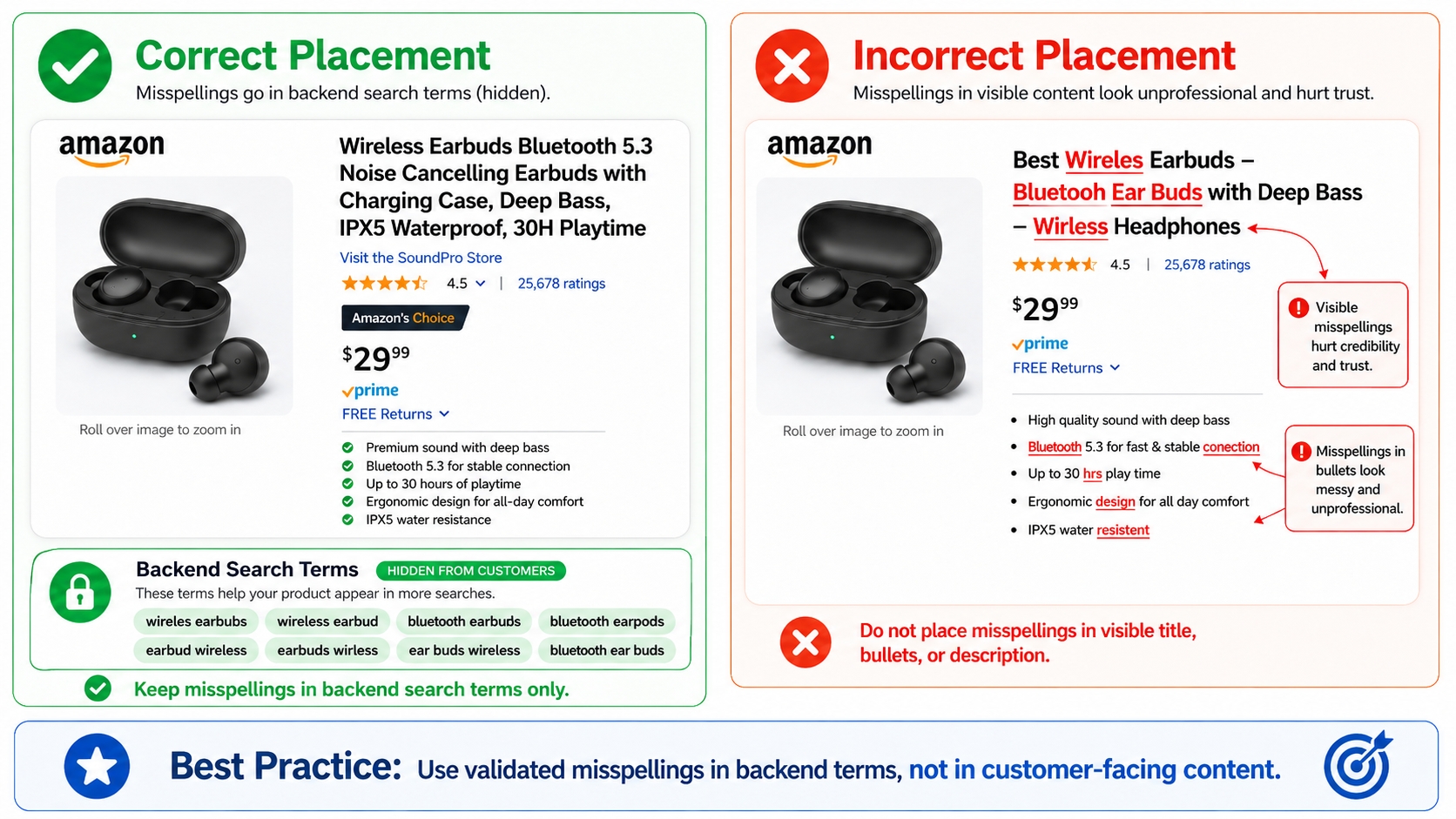
- Place misspelled and Spanish keywords primarily in backend search terms to avoid harming front-end readability and conversion rates.
- Track performance changes one at a time to isolate the impact of new keyword additions on indexing, CTR, and ACoS.
Table of Contents
- Why Misspellings and Spanish Keywords Can Unlock "Hidden" Amazon Traffic
- Amazon Search Reality: Does Amazon Correct Misspellings Automatically?
- Decide Your Goal: SEO Indexing, PPC Discovery, or Both
- Find High-Value Misspellings (The Safe, Data-Led Method)
- Where Misspellings Belong (And Where They Don't)
- Misspellings Best Practices (Avoid Wasted Space and Risk)
- Identify Spanish Keyword Opportunities (US vs. ES Marketplaces)
- Spanish Keywords Placement: Listing vs. Backend vs. PPC
- Build a Multilingual Keyword Map (So It Doesn't Become Chaos)
- Mini Case Example: Hidden Traffic Stack in Action
- Common Mistakes (And How to Avoid Them)
- FAQ
- References
Note on marketplaces: This guide is specifically optimized for the US market.
Why Misspellings and Spanish Keywords Can Unlock "Hidden" Amazon Traffic
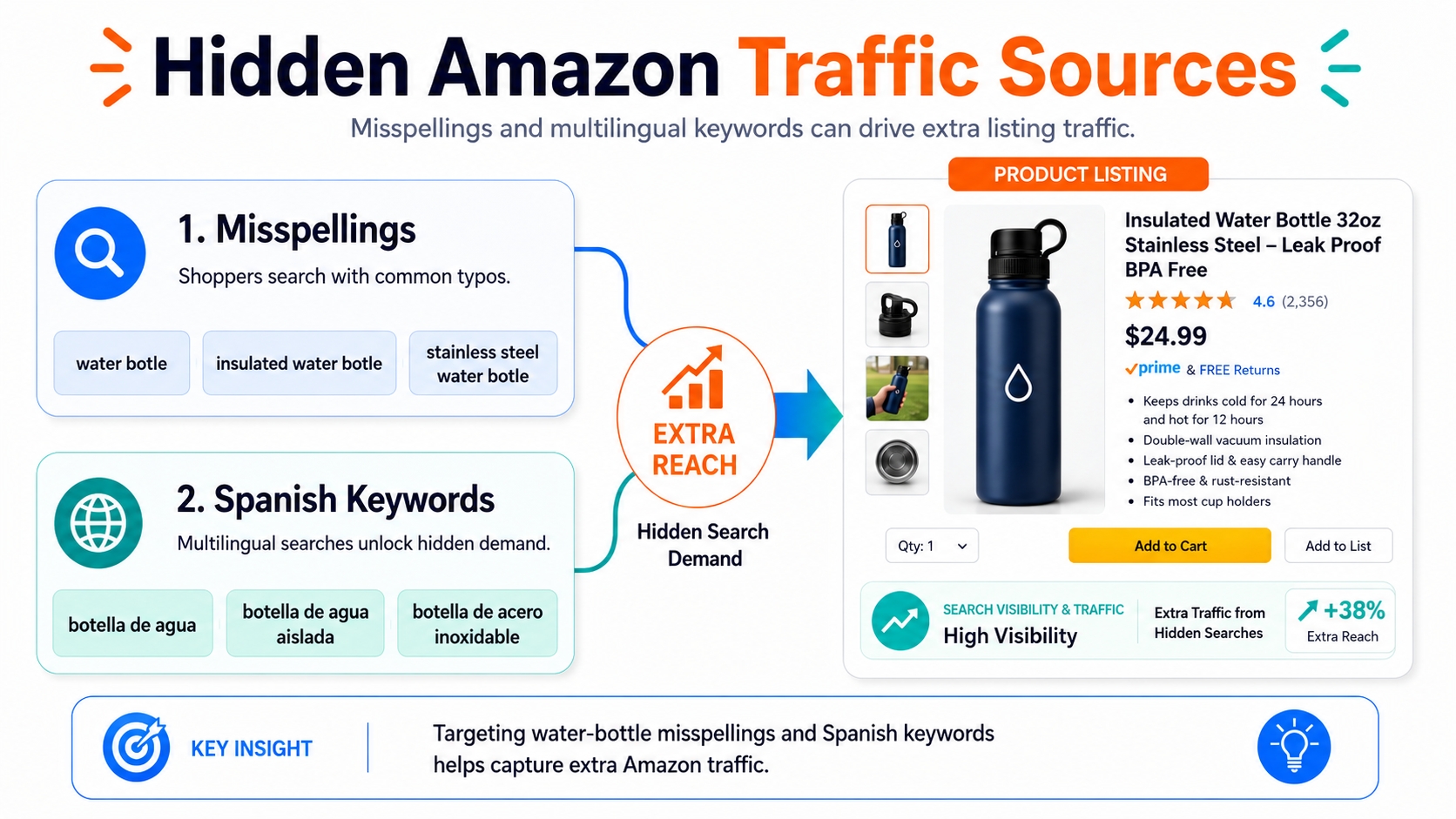
In highly competitive Amazon categories, every bit of incremental traffic matters. While most sellers focus on exact-match, high-volume keywords, a growing number of successful brands are tapping into hidden traffic (searches that competitors ignore but real buyers use daily).
Definition: Hidden Traffic
Relevant Amazon searches that are overlooked by most sellers, including misspellings, phonetic variants, bilingual queries (e.g., Spanish in US), and long-tail voice/mobile inputs. These represent low-competition opportunities when validated with real search data.
Two powerful sources of hidden traffic are misspelled keywords and multilingual queries. For example, a customer might type "blender for smothies" instead of "smoothie blender," or search "licuadora para batidos" while shopping on Amazon.com. These aren't random errors; they reflect real user behavior.
When It Works Best
Targeting misspellings and Spanish keywords is most effective in:
- Crowded niches (e.g., kitchen gadgets, fitness gear) where top keywords are saturated.
- High-CPC categories where cheaper long-tail alternatives reduce ad costs.
- Long-tail discovery phases, such as when buyers use descriptive or voice-based queries.
When It Doesn't Work
Avoid investing in:
- Ultra-low volume terms with no search results or autocomplete suggestions.
- Irrelevant intent, such as homophones (e.g., "flower" vs. "flour") that lead to unrelated products.
- Policy-risk terms, including misspelled branded keywords (e.g., "Dyso" for Dyson), which may trigger compliance issues.
Amazon Search Reality: Does Amazon Correct Misspellings Automatically?
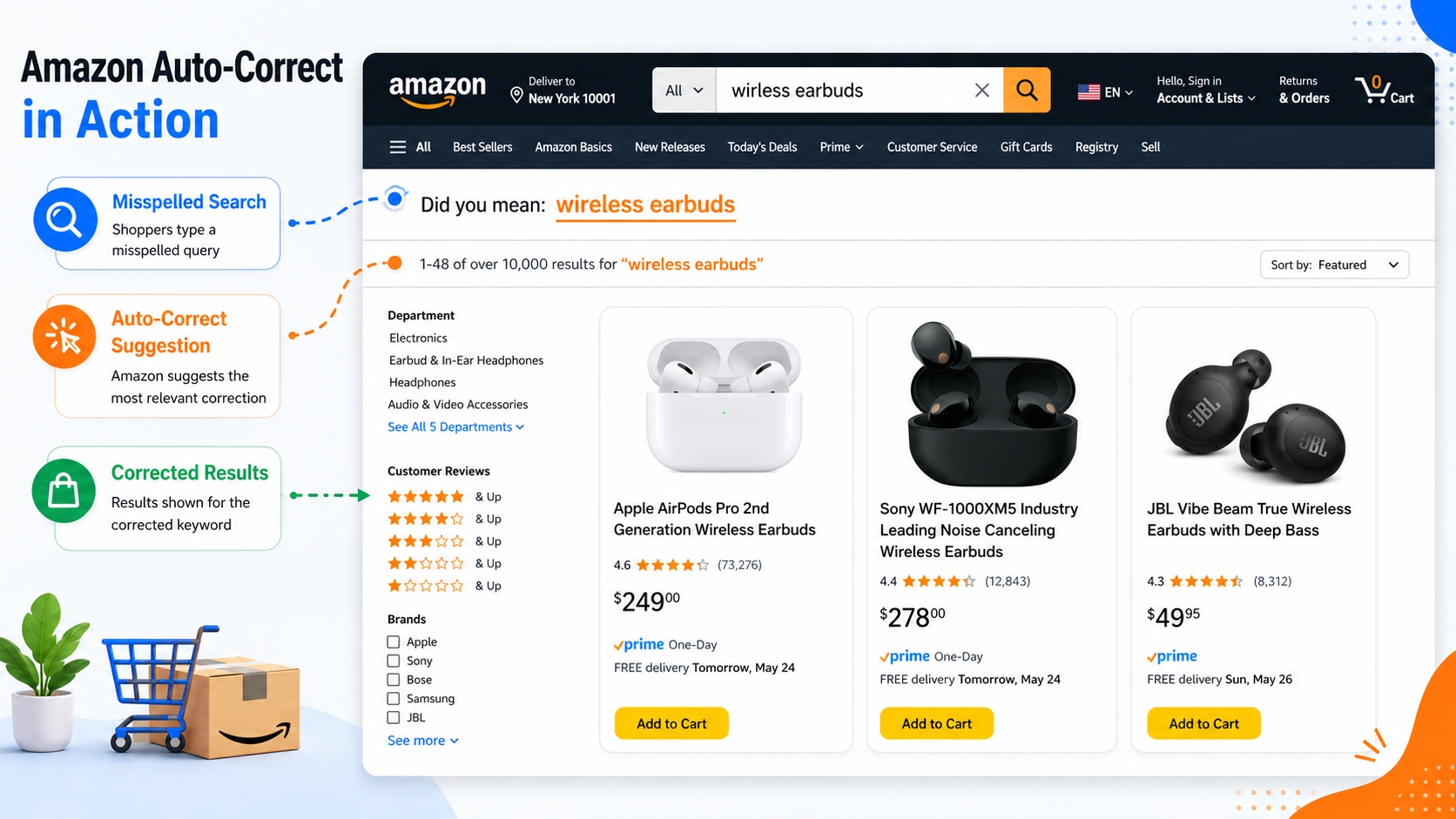
Amazon's search engine does correct many misspellings, but not all. Understanding the nuances helps sellers decide which variants are worth targeting.
Autocorrect and "Did You Mean" Behavior (Why It Varies by Term)
Amazon uses machine learning to predict intent. For common misspellings like "accesories," it often shows a "Did you mean: accessories?" prompt and redirects results. However, less common or phonetically ambiguous errors may not trigger correction.
Why Some Misspellings Still Matter
Even with autocorrect, some misspellings remain valuable because:
- Voice search often produces phonetic errors (e.g., "kayten" for kitten).
- Mobile typing leads to dropped letters or double-taps (e.g., "headphnes").
- Query variants may bypass correction if they're close enough to valid words.
The Seller Takeaway: Treat Misspellings as Tests, Not Assumptions
Don't assume Amazon handles all typos. Instead, test whether a misspelled query returns relevant results. If it does, that variant may still contribute to visibility.
Myth vs. Fact: Amazon Misspellings
Myth: Amazon corrects all misspellings, so targeting them is useless.
Fact: While Amazon autocorrects many errors, uncorrected variants still generate traffic, especially in voice, mobile, and bilingual searches.
Decide Your Goal: SEO Indexing, PPC Discovery, or Both
Your strategy depends on your objective. Here's how to align keyword use with business goals.
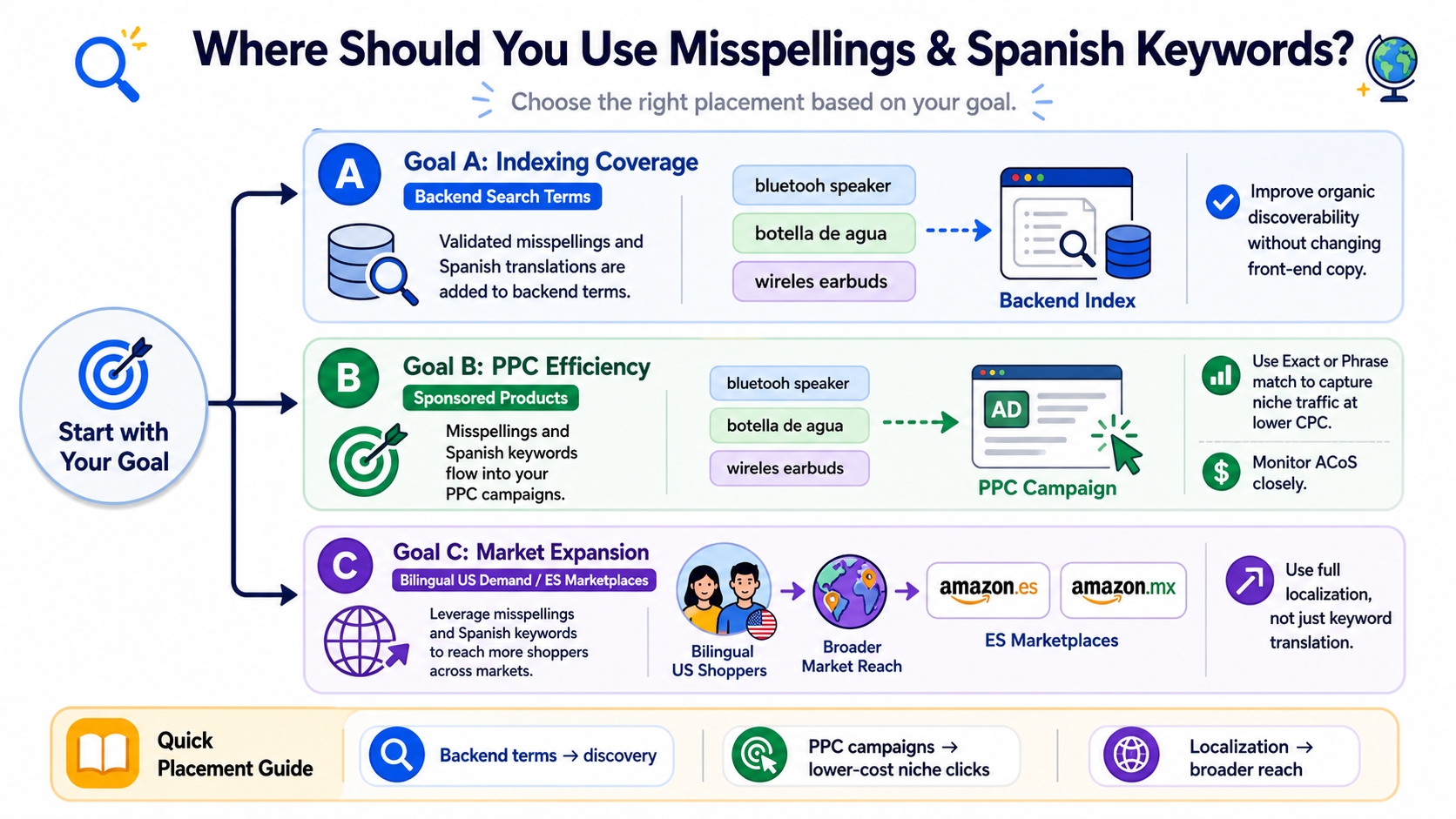
Goal A: Indexing Coverage (Backend Terms)
Add validated misspellings and Spanish translations to your backend search terms to increase the chances your listing appears for variant queries. This improves organic discoverability without affecting front-end readability.
Goal B: PPC Efficiency (Cheap Long-Tail Clicks)
Use low-competition misspellings and Spanish keywords in Amazon Sponsored Products campaigns. Target them in Exact or Phrase match to capture niche traffic at lower CPCs. Monitor ACoS closely.
Goal C: Market Expansion (US Bilingual Demand, or ES Marketplaces)
For broader reach, optimize for Spanish-speaking shoppers in the US or expand to Amazon.es and Amazon.mx. This requires full localization, not just keyword translation.
Find High-Value Misspellings (The Safe, Data-Led Method)
Avoid guesswork. Follow this structured process to identify high-potential variants.
Start with Buyer Typing Patterns
Common error types include:
- Letter swaps: "teh" for "the"
- Missing letters: "headphnes"
- Doubled letters: "blenderrr"
- Phonetic errors: "fone" for "phone"
Use SellerSprite to Expand Keyword Variants
Leverage SellerSprite's Keyword Mining to generate long-tail variations, discovering real customer phrasing, including misspellings and multilingual queries.
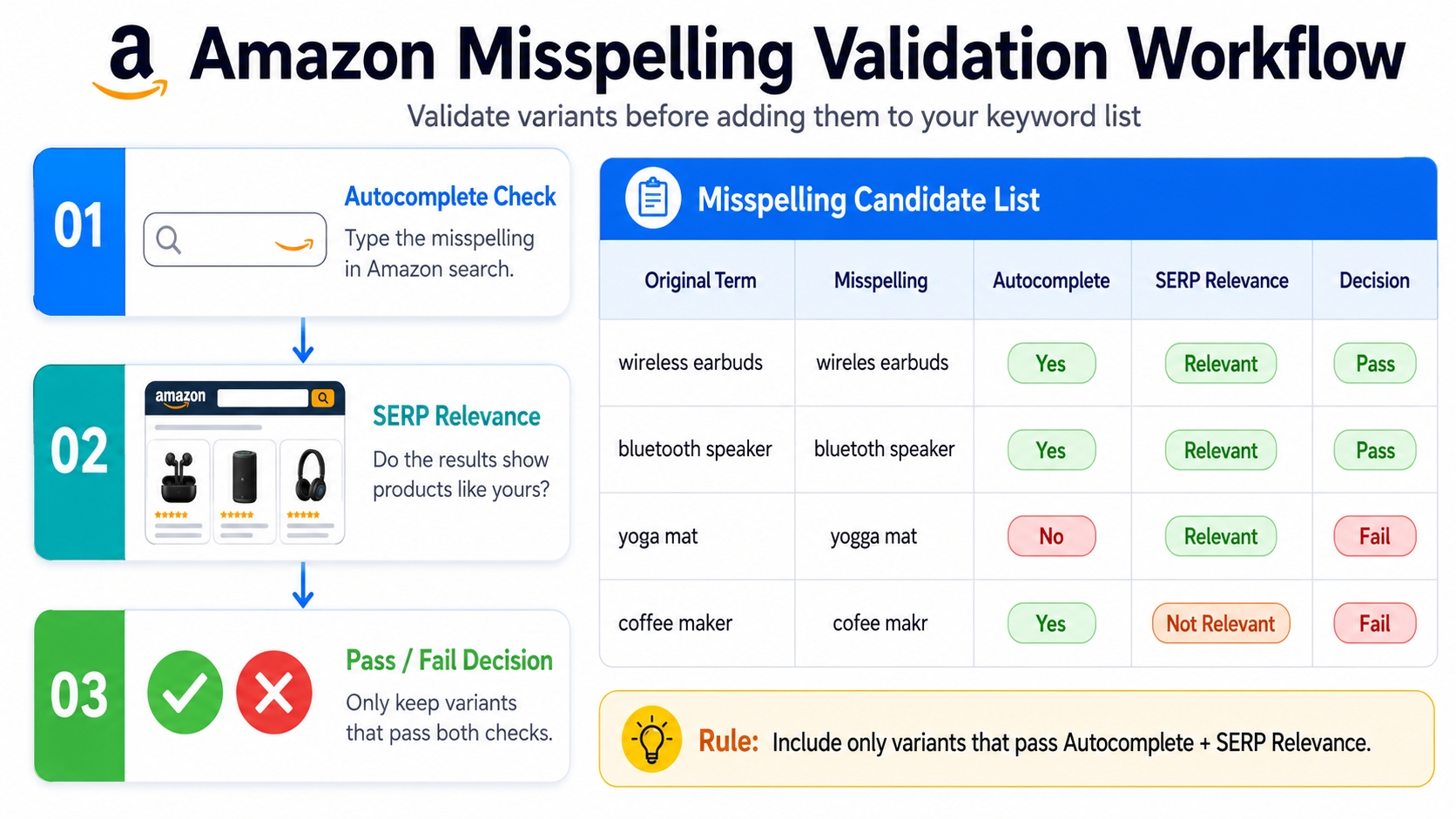
Use Amazon Validation
Before adding any variant, validate it on Amazon:
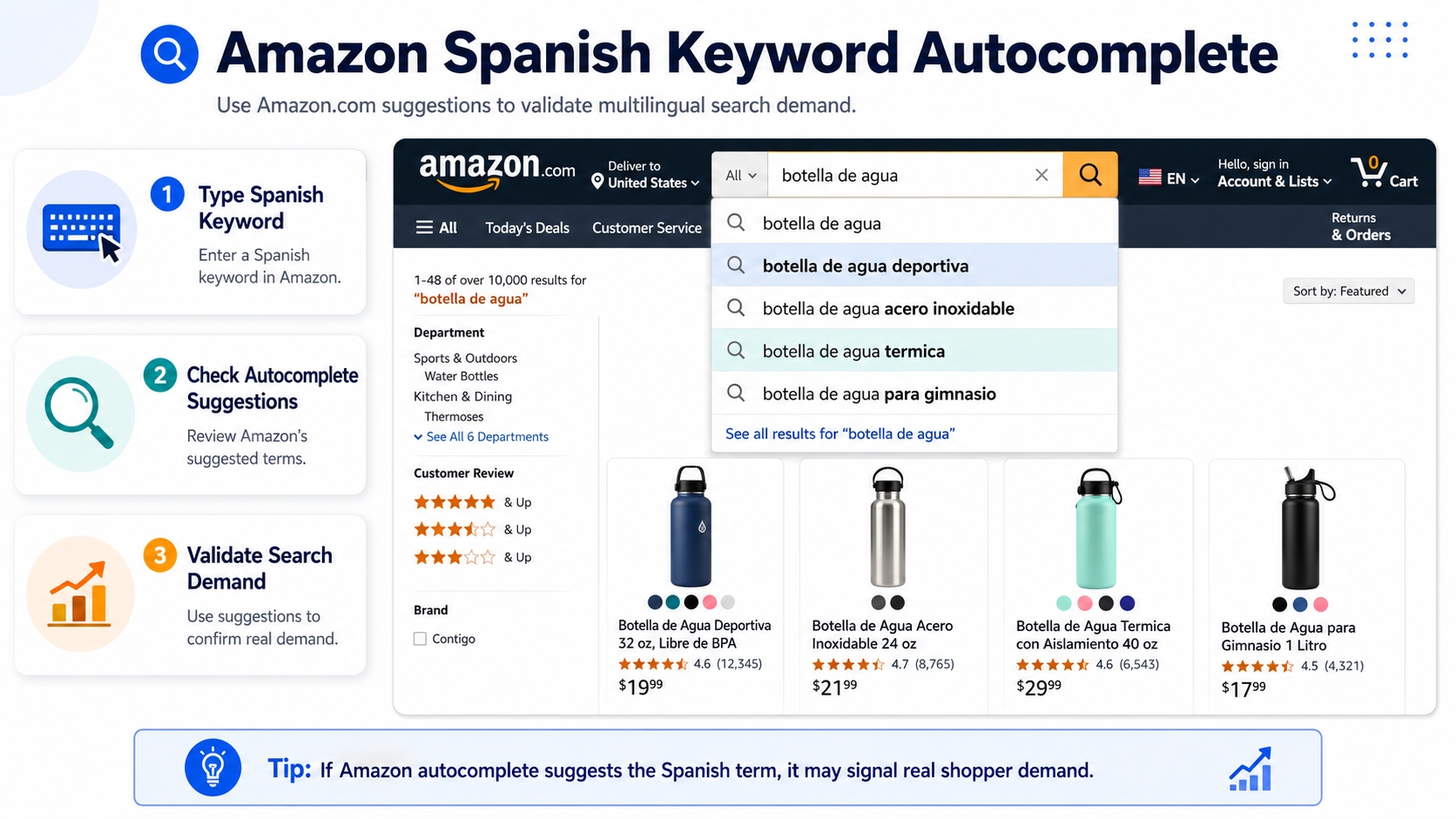
- Autocomplete: Type the misspelling in Amazon's search bar and see whether it appears in the results.
- SERP Relevance: Do the search results show products like yours?
Create a "Misspelling Candidate List" with Rules
Build a spreadsheet with columns for:
- Original term
- Misspelling
- Autocomplete result
- SERP relevance
- Pass/Fail decision
Only include variants that pass both validation checks.
Where Misspellings Belong (And Where They Don't)
Placement matters. Misuse can hurt readability or violate Amazon policies.
Backend Search Terms (Best Default Placement)
This is the safest and most effective place for misspellings. Amazon's algorithm indexes these fields without exposing them to customers.
PPC (Optional): Test Only If Volume Is Real and CPC Is Attractive
Run small Exact match campaigns on high-potential misspellings. Track the conversion to assess ROI.
Front-End Copy (Usually Avoid)
Never include misspellings in titles, bullets, or descriptions. Doing so harms professionalism, CTR, and conversion rates.
Keep Titles/Bullets Human and Correct; Don't Harm CTR/CVR
Your front-end content should build trust. Misspellings here signal low quality, even if intentional.
Misspellings Best Practices (Avoid Wasted Space and Risk)
Follow these rules to maximize impact and minimize risk.
Don't Repeat Misspellings That Amazon Fully Autocorrects (Test First)
If Amazon redirects "smothie" to "smoothie" with no SERP for the typo, it's not worth targeting.
Don't Spam 50 Variants of One Word (Pick the Top 2-5)
Amazon's backend has limited character space. Prioritize the most common, high-intent variants.
Avoid Trademarked Brand Misspellings (Risk + Low Intent Mismatch)
Using "iPhome" or "Samsong" can trigger policy violations and attract unqualified clicks.
Track Results with an Indexing/Change Log (One Change at a Time)
Document each keyword addition. Wait 7-14 days to assess impact on impressions and sales.
Misspelling Rules Checklist
- Validate via Amazon autocomplete
- Check SERP relevance
- Only use in backend or PPC
- Avoid branded typos
- Limit to 2-5 variants per term
- Exclude homophones with wrong intent
- Never use in front-end copy
- Test one change at a time
- Monitor indexing and CTR
- Remove underperformers after 30 days
Identify Spanish Keyword Opportunities (US vs. ES Marketplaces)
Spanish keywords aren't just for Amazon.es. In the US, over 60 million people speak Spanish at home (Pew Research Center), and many use it to search online.
Two Separate Use Cases
- US marketplace: Bilingual shoppers searching in Spanish while browsing Amazon.com.
- ES/MX marketplaces: Primary-language demand on Amazon.es and Amazon.mx.
Choose Keyword Types That Convert
- Product name translations: "licuadora" for blender
- Use cases: "para batidos de proteína"
- Compatibility: "compatible con cápsulas Nespresso"
- Attributes: "talla grande," "color negro"
Validate Spanish Terms Like Any Other Keyword
Use the same validation process:
- Check Amazon autocomplete on .com and .es
- Review SERP relevance
- Look for multiple related long-tails to confirm demand breadth
Spanish Keywords Placement: Listing vs. Backend vs. PPC
Placement strategy varies by marketplace and audience.
US Listings: Keep Front-End English-First, Add Spanish Selectively
Best practice: Use Spanish keywords only in backend search terms. Avoid mixing languages in titles or bullets unless targeting a clearly bilingual niche.
Best Default: Backend Search Terms (Relevant Translations Only)
Include high-intent Spanish terms like "funda para iPhone" in backend fields to capture bilingual searches without cluttering front-end content.
Spanish-Speaking Marketplaces: Localize Properly
On Amazon.es or Amazon.mx, create Spanish-native content. Avoid literal translations; use culturally appropriate phrasing instead.
Create Spanish-Native Titles/Bullets (Not Literal Translations)
For example, "licuadora potente para batidos" sounds more natural than "blender fuerte para batidos."
PPC Testing Strategy for Spanish Queries
Start with Exact or Phrase match on high-intent Spanish long-tails. Use negative keywords to prevent mismatches.
Use Negatives to Prevent Broad Mismatches
For example, exclude "agua" when targeting "agua para plantas" to avoid irrelevant clicks.
Build a Multilingual Keyword Map (So It Doesn't Become Chaos)
Without organization, multilingual keyword efforts become messy. Use a structured approach.
Cluster by Intent First (Same Framework as English)
Group keywords by use case: primary function, compatibility, attributes, etc., regardless of language.
Create a Translation/Variant Table
Use this template to organize your data:
| English Term | Spanish Term(s) | Placement | Notes |
|---|---|---|---|
| smoothie blender | licuadora para batidos | backend, PPC | Validated via autocomplete |
| replacement lid | tapa de repuesto | backend | High relevance on .com |
| BPA-free | libre de BPA | backend | Common attribute search |
Avoid Duplicates Across Fields (Save Space, Reduce Clutter)
Ensure each keyword appears only once per listing. Use your map to prevent redundancy in backend fields.
Mini Case Example: Hidden Traffic Stack in Action
Let's apply this to a real-world scenario: a portable blender seller in a competitive niche.
Start with a Core Keyword + 3 Long-Tails
- Core: "portable blender"
- Long-tails: "blender for smoothies on the go," "USB rechargeable blender," "small blender for travel"
Add 2-3 Misspellings (Backend)
- "portable blendor" (validated via autocomplete)
- "smothie blender" (passes SERP relevance)
Add 3 Spanish Buyer-Intent Terms (Backend + PPC Test)
- "licuadora portátil"
- "batidora para smoothies"
- "blender pequeño para viaje"
What to Measure: Indexing, CTR, CVR, CPC, ACoS
After implementation, track:
- Impressions increase (indexing)
- Click-through rate (CTR)
- Conversion rate (CVR)
- PPC cost-per-click (CPC)
- Advertising cost of sales (ACoS)
Measurement Checklist
- Indexing: Did impressions rise?
- CTR: Are more users clicking?
- CVR: Are sales increasing?
- CPC: Are Spanish/misspelling clicks cheaper?
- ACoS: Is ROI acceptable?
Common Mistakes (And How to Avoid Them)
Stuffing Backend with Low-Quality Variants
Avoid adding every possible typo. Focus on high-intent, validated terms.
Using Spanish Terms Without Validating Relevance on Amazon
Just because a word translates doesn't mean it's searched. Always validate with Amazon data.
Damaging Front-End Readability with Misspellings
Never sacrifice clarity for keyword stuffing. Keep front-end content professional.
Forgetting Marketplace Differences (US vs. ES/MX)
Optimization for Amazon.com differs from Amazon.es. Adapt strategy accordingly.
FAQ
What are the most common Amazon misspellings that sellers should target?
Common misspellings include phonetic errors ("fone" for "phone"), missing letters ("headphnes"), and doubled letters ("blenderrr"). Focus on variants that appear in Amazon autocomplete and return relevant results.
How can Amazon sellers benefit from optimizing for misspelled keywords?
Sellers gain access to low-competition traffic, improve indexing coverage, and reduce PPC costs by capturing long-tail searches that competitors overlook.
Does Amazon's search algorithm account for customer typos in product visibility?
Yes, Amazon autocorrects many typos, but not all. Uncorrected variants, especially from voice or mobile searches, can still influence visibility if your listing is indexed for them.
Should US sellers add Spanish keywords to English listings?
Yes, but only in backend search terms. Over 60 million Spanish speakers live in the US, and many use native-language queries on Amazon.com. Just ensure terms are validated and relevant.
How many misspellings are worth testing per product?
Limit to 2-5 high-intent, validated misspellings per core keyword. Prioritize those with autocomplete presence and relevant SERPs to avoid wasting backend space.
Next Steps
- Use SellerSprite Keyword Mining to discover misspelled and Spanish keyword variants.
- Validate top candidates using Amazon autocomplete and SERP checks.
- Add 2-5 high-potential variants to your backend search terms and monitor performance.
References
By SellerSprite Success Team
The SellerSprite Success Team combines hands-on Amazon selling experience with data science expertise. We've helped thousands of sellers optimize their keyword strategies using real-time search behavior analytics. Our insights are grounded in platform-specific research and validated through A/B testing across millions of product listings.


